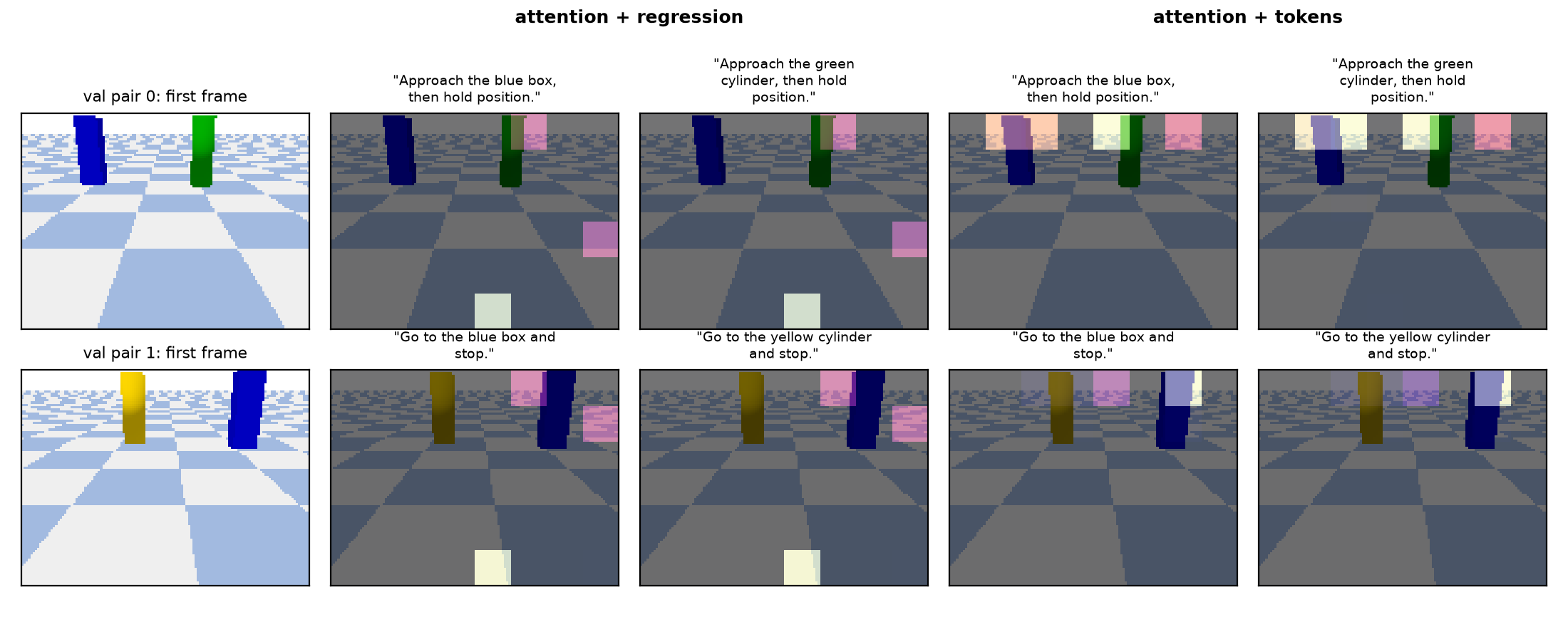
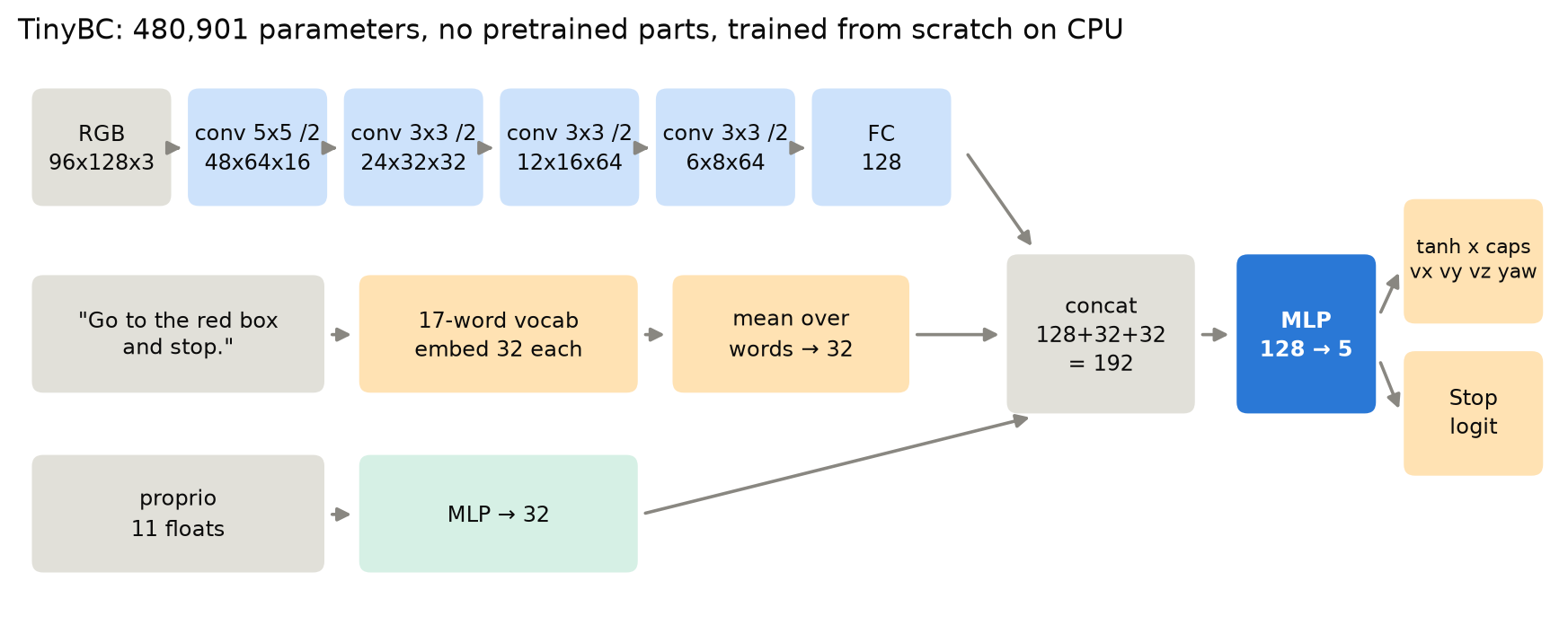
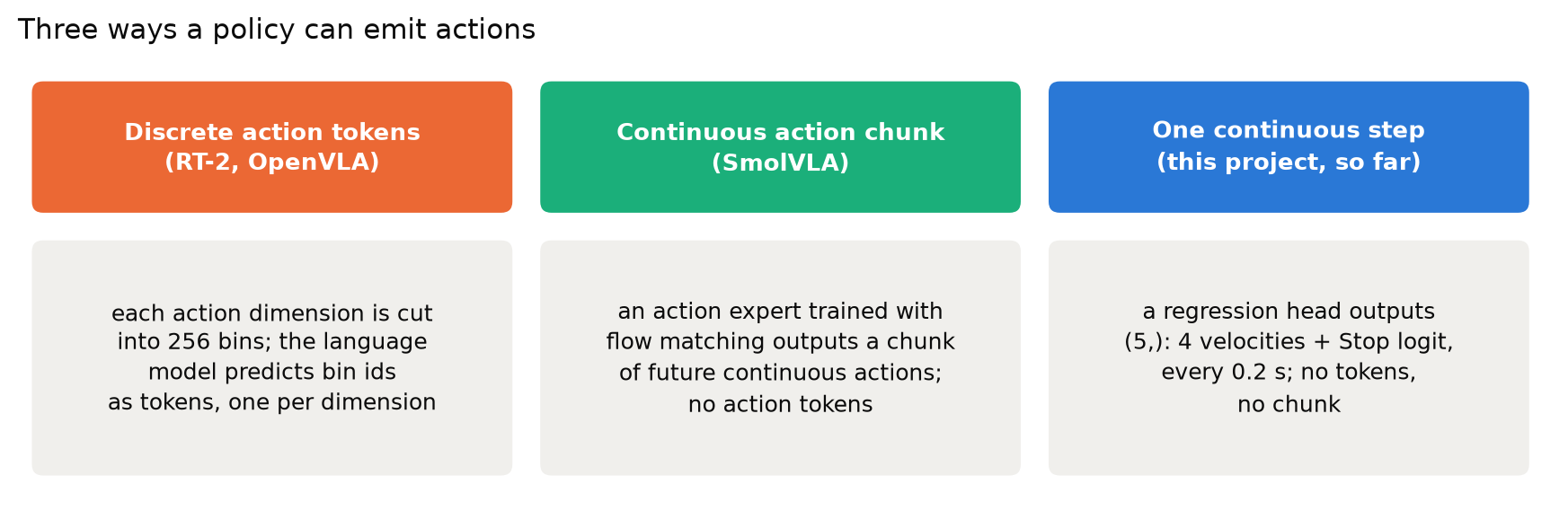
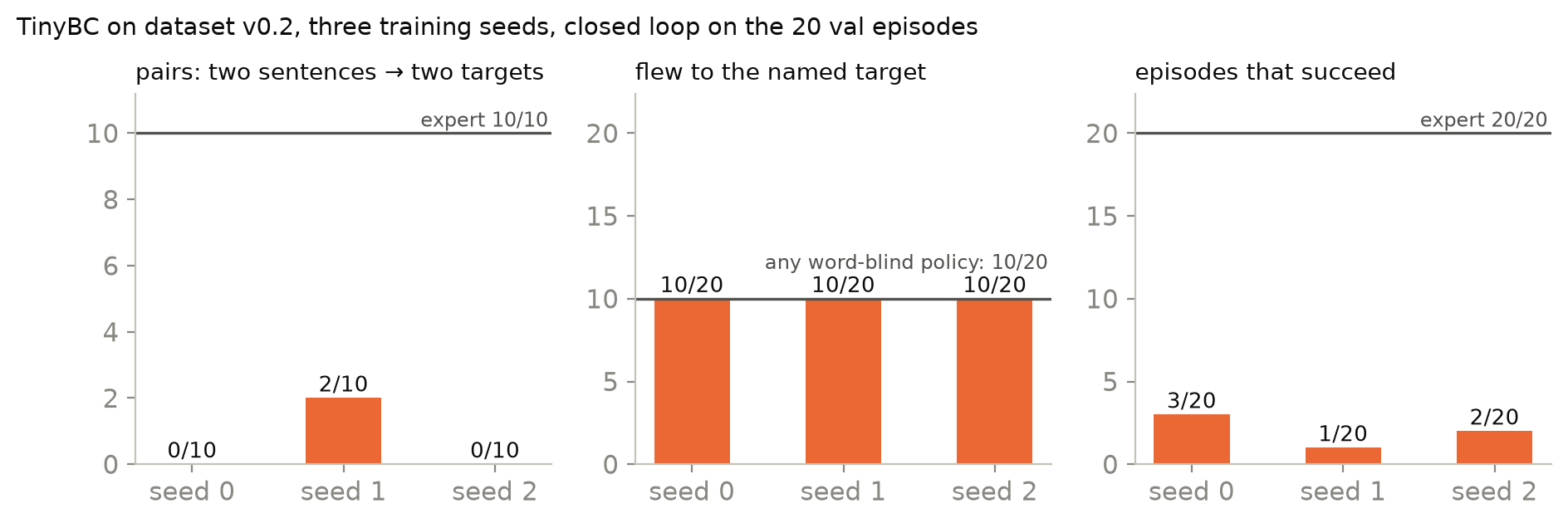
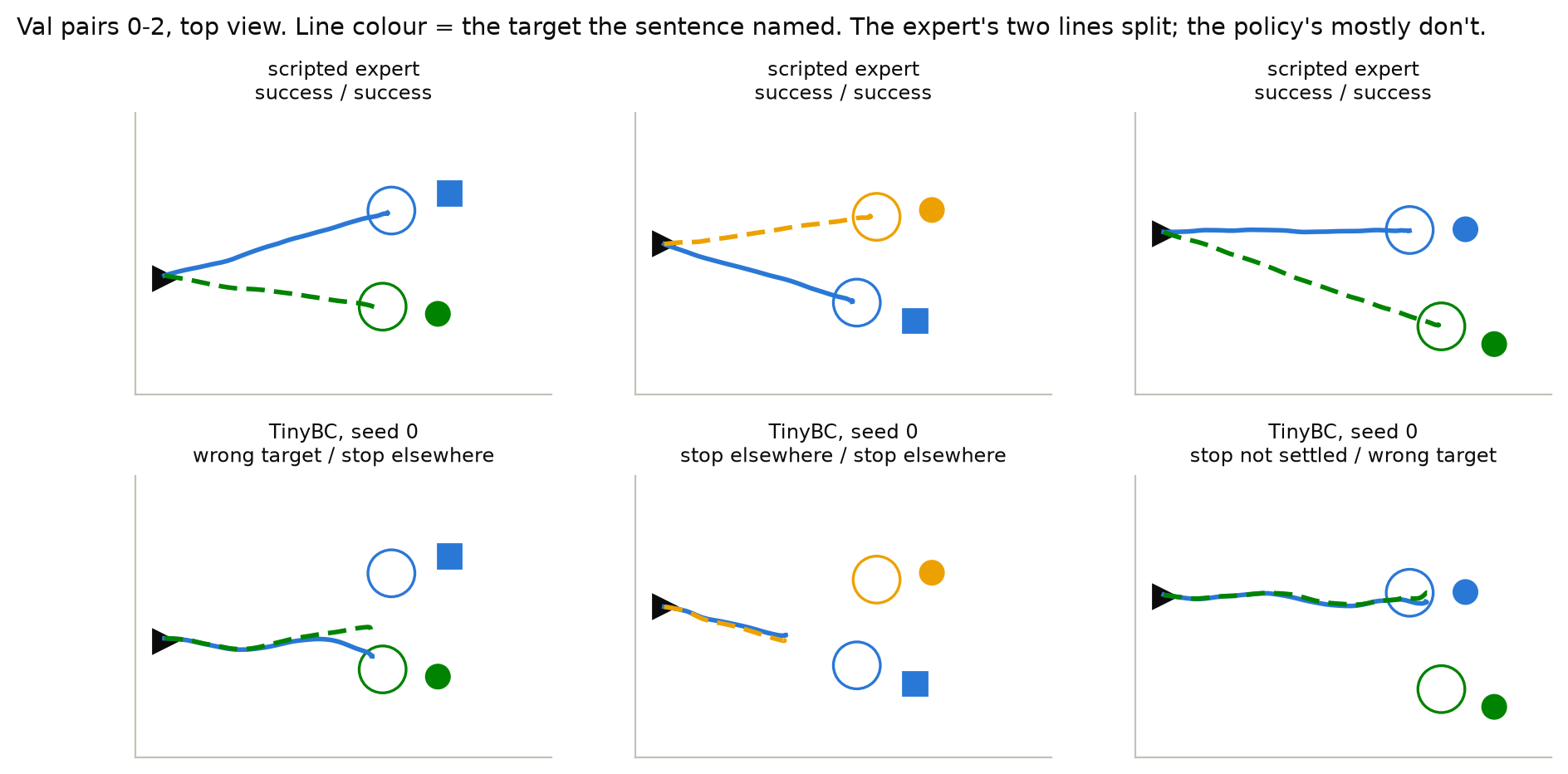
<?xml version="1.0" encoding="utf-8"?><feed xmlns="http://www.w3.org/2005/Atom" ><generator uri="https://jekyllrb.com/" version="3.10.0">Jekyll</generator><link href="https://ckck12.github.io/feed.xml" rel="self" type="application/atom+xml" /><link href="https://ckck12.github.io/" rel="alternate" type="text/html" /><updated>2026-10-16T15:35:28+00:00</updated><id>https://ckck12.github.io/feed.xml</id><title type="html">Chan Park</title><subtitle>Chan Park — AI researcher working on vision-language-action models for driving and robotics.</subtitle><author><name>Chan Park</name><email>pchan1018@g.skku.edu</email></author><entry><title type="html">Part 6 · Separating perception from choice: a world model and a planner</title><link href="https://ckck12.github.io/blog/drone-policy/06-world-model/" rel="alternate" type="text/html" title="Part 6 · Separating perception from choice: a world model and a planner" /><published>2026-10-07T04:00:00+00:00</published><updated>2026-10-07T04:00:00+00:00</updated><id>https://ckck12.github.io/blog/drone-policy/drone-policy-06-world-model</id><content type="html" xml:base="https://ckck12.github.io/blog/drone-policy/06-world-model/"><![CDATA[<div class="tldr">
<span class="tldr__label">TL;DR</span>
<ul class="lang-en">
<li>The words are only allowed to <b>choose</b>: a world model (575k parameters, no words) estimates where every colour's target is, a 340-parameter selector maps the sentence to a colour, and a sampling planner (CEM) plus a Stop rule fly there.</li>
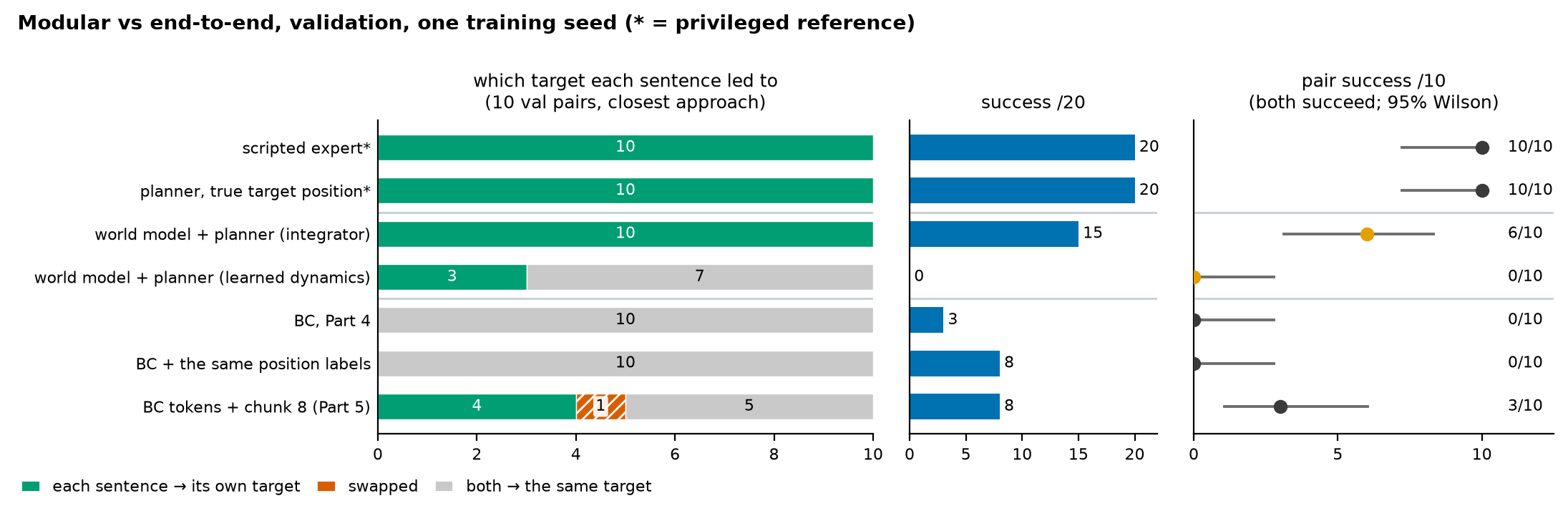
<li>On the same 10 validation pairs, <b>every pair splits to the right targets</b> (end-to-end models: at most 5). Success 15/20, pair success <b>6/10</b> (95% interval 0.31–0.83, one seed). It reaches the goal region in all 20 flights; the misses are perception error near the goal.</li>
<li>Planning through the world model's own <b>learned dynamics</b> scores 0/20. The planner finds commands whose predicted effect is wrong. Assuming the drone does what it is told (an integrator) works far better. And this comparison with BC is not fair: the modular system also got 3x the states and position labels. Giving BC the same labels and states, separately or together, did not bring it close to 10 of 10.</li>
</ul>
<ul class="lang-ko" lang="ko">
<li>말에게는 <b>고르는 일</b>만 맡깁니다: 월드 모델(57.5만 파라미터, 말 입력 없음)이 각 색깔 타깃의 위치를 추정하고 340 파라미터 선택기가 문장을 색깔로 바꾸고 샘플링 플래너(CEM)와 Stop 규칙이 그곳으로 납니다.</li>
<li>같은 검증 10쌍에서 <b>모든 쌍이 맞는 타깃으로 갈라졌습니다</b>(end-to-end 모델은 많아야 5쌍). 성공 15/20, 쌍 성공 <b>6/10</b>(95% 구간 0.31–0.83, 시드 1개). 20번 모두 목표 영역에 도달했고 실패는 목표 근처의 인지 오차 때문입니다.</li>
<li>월드 모델이 학습한 <b>동역학</b>으로 계획하면 0/20입니다. 플래너가 예측 효과가 틀린 명령을 찾아냅니다. '시킨 대로 움직인다'고 가정하는 적분기가 훨씬 낫습니다. 그리고 BC와의 비교는 공정하지 않습니다: 모듈형 시스템은 3배의 상태와 위치 라벨도 받았습니다. 같은 라벨과 상태를 BC에 따로 주든 함께 주든 BC는 10쌍 모두를 맞게 가르는 수준에는 못 미쳤습니다.</li>
</ul>
<ul class="lang-zh" lang="zh-Hans">
<li>只让指令负责<b>选择</b>：世界模型（57.5 万参数，不读指令）估计每种颜色目标的位置，一个 340 参数的选择器把句子映射成颜色，采样规划器（CEM）加 Stop 规则飞过去。</li>
<li>在同样的 10 个验证对上，<b>每一对都飞向了正确的目标</b>（端到端模型最多 5 对）。成功 15/20，pair 成功 <b>6/10</b>（95% 区间 0.31–0.83，单个种子）。20 次全部到达目标区域，失败来自目标附近的感知误差。</li>
<li>用世界模型自己<b>学到的动力学</b>做规划得分 0/20：规划器会找到预测效果错误的指令。假设无人机按指令运动（积分器）要好得多。而且与 BC 的比较并不公平：模块化系统还得到了 3 倍的状态和位置标签。把同样的标签和状态单独或一起交给 BC，也远未达到 10 对全对。</li>
</ul>
</div>

<div class="lang-zh pnote" lang="zh-Hans">

  <p>正文为英文，图表与代码与语言无关。</p>

</div>

<div class="lang-enzh">

  <p>Parts 4 and 5 kept one network responsible for everything: reading the image, reading the
words, and flying. The words kept losing to the image. This part tests a different division of
labour, stated as a design rule:</p>

  <blockquote>
    <p><strong>The sentence should only choose the target. The image and the state should do the flying.</strong></p>
  </blockquote>

  <p>So the words get exactly one job and no path to the motors. A world model learns where every
target is without ever seeing a sentence. A tiny selector turns the sentence into a colour. A
planner, which is not learned, flies to the chosen target.</p>

  <div class="vgrid">
  <figure class="pvid">
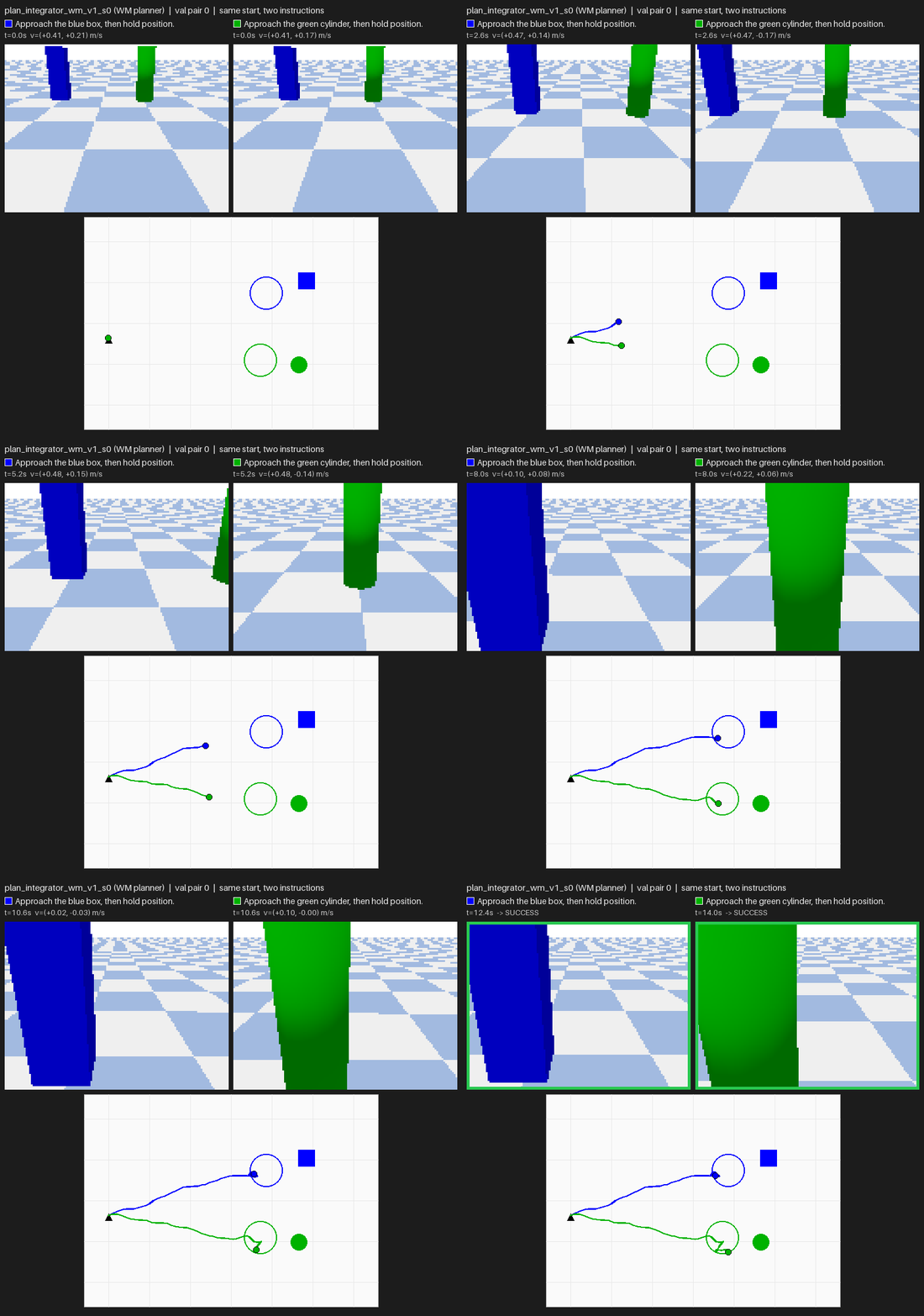
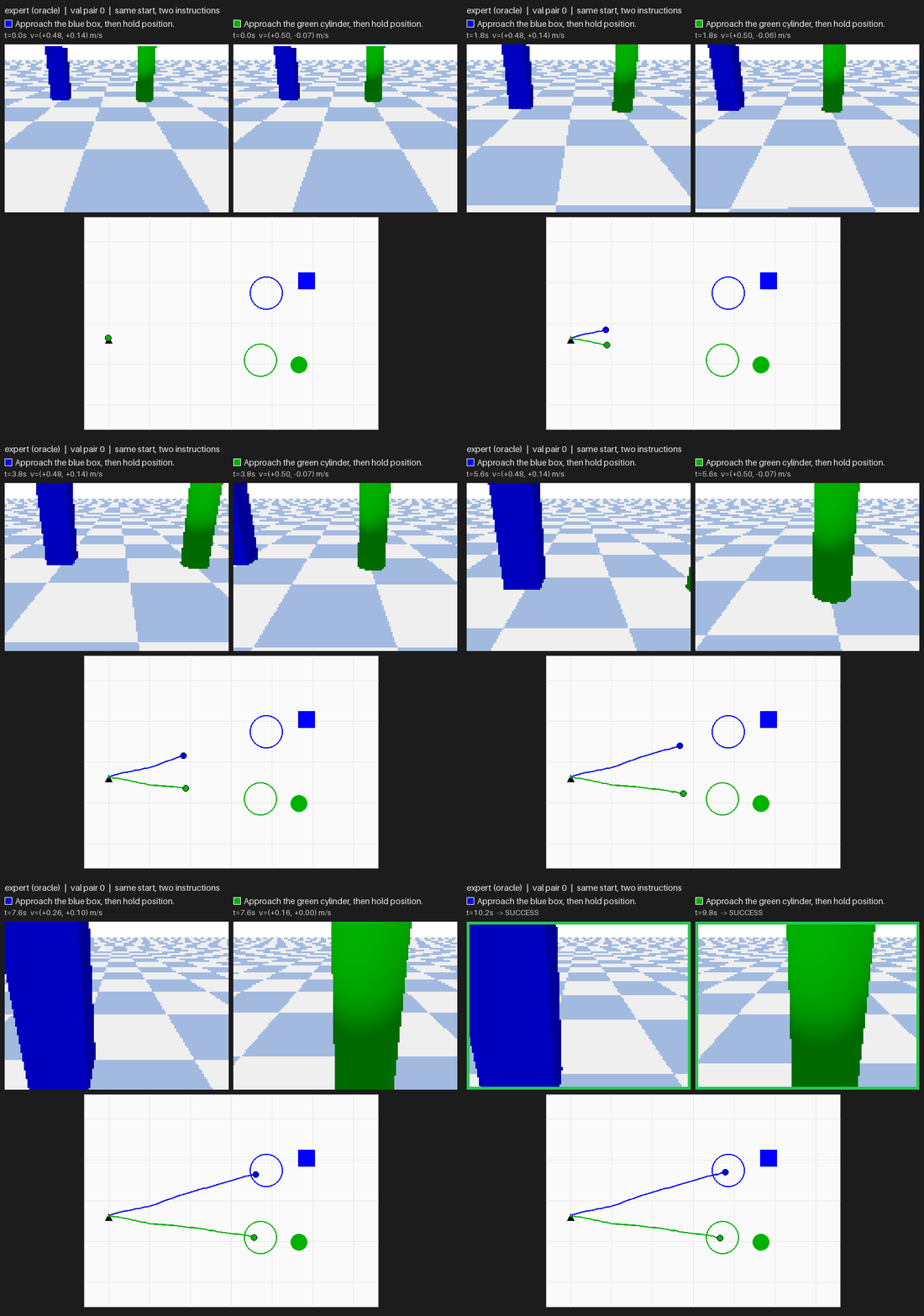
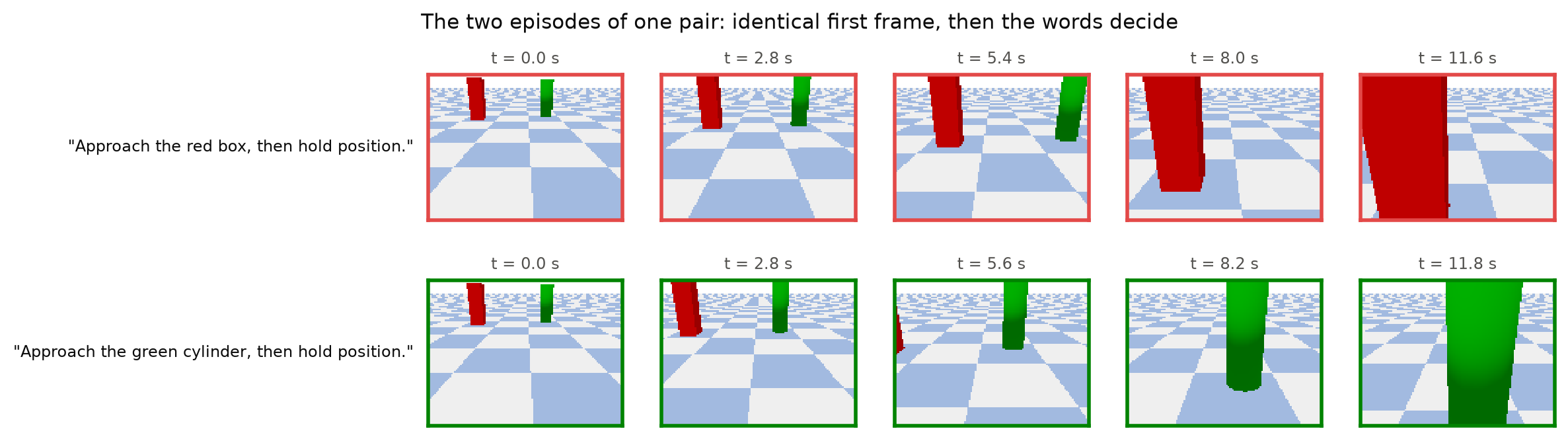
    <img src="/images/blog/drone-policy/06/pair0_plan_integrator.gif" alt="World model plus planner with the integrator on validation pair 0: each sentence leads to its own pillar and both flights succeed" loading="lazy" />
    <figcaption><span class="pvid__label">World model + planner (A)</span>Validation pair 0, the first pair (not selected). Each sentence reaches its own target.</figcaption>
  </figure>
  <figure class="pvid">
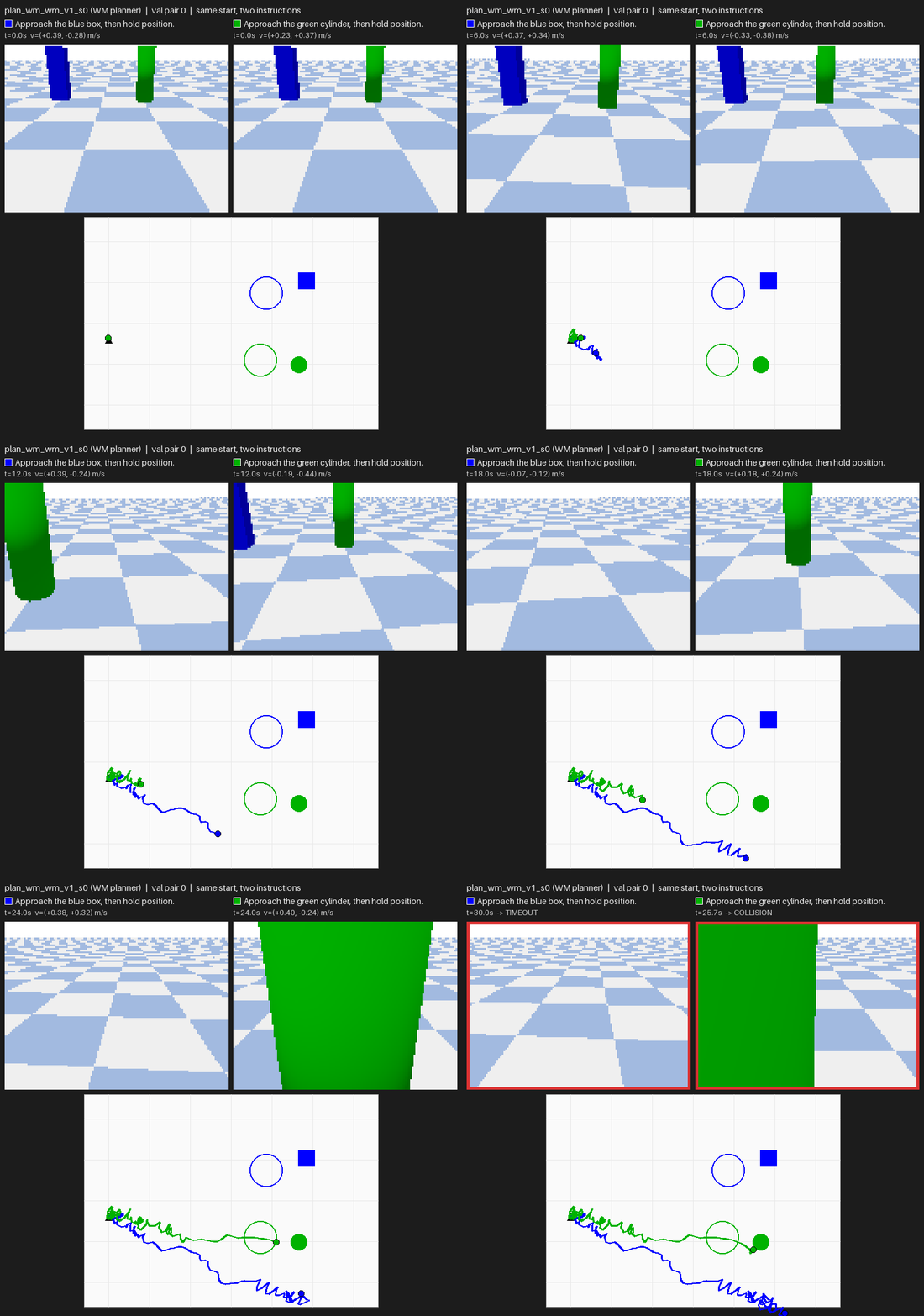
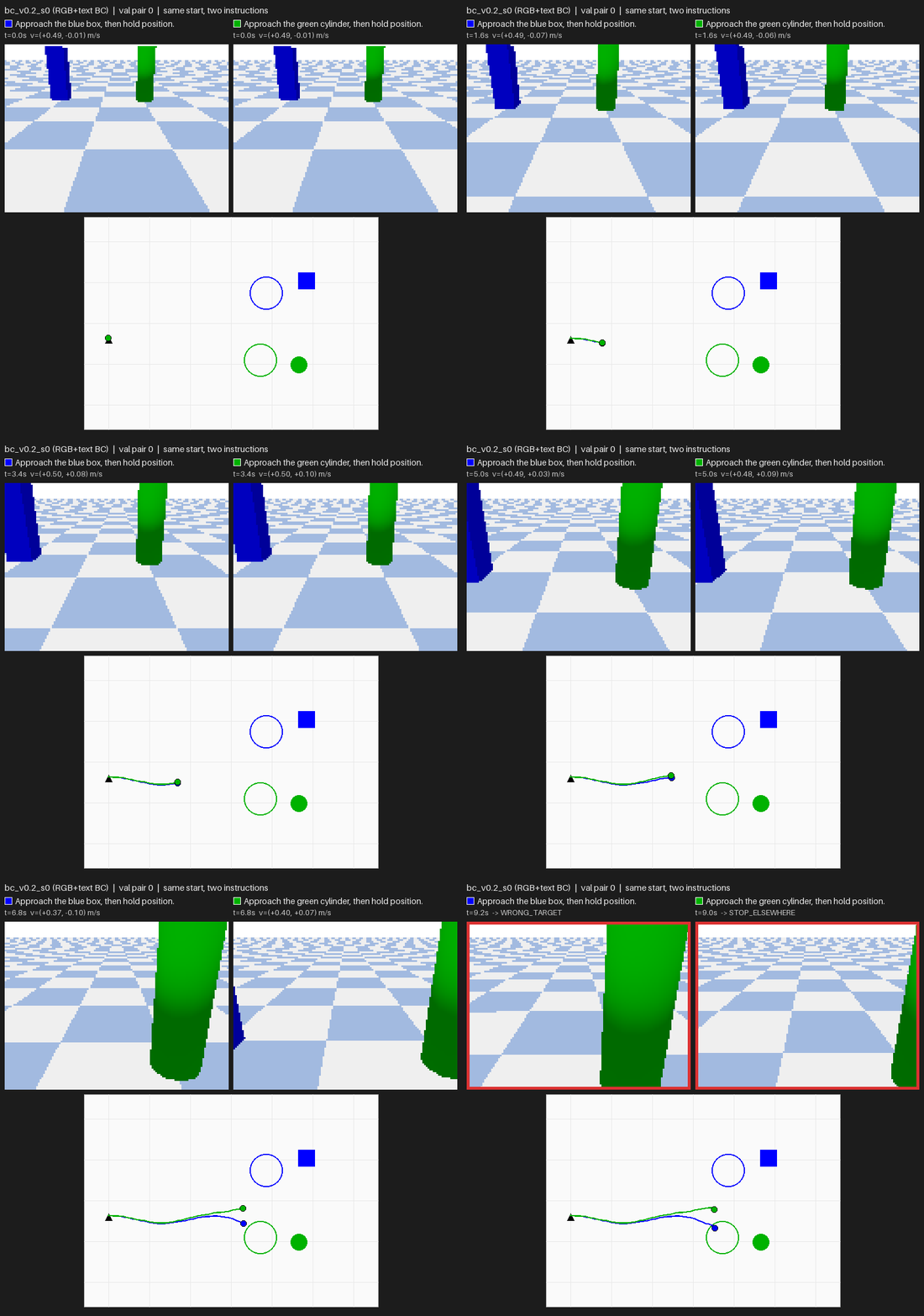
    <img src="/images/blog/drone-policy/06/pair0_plan_wm.gif" alt="The same system planning with learned dynamics on validation pair 0: the drone jitters near the start, one flight times out and the other collides" loading="lazy" />
    <figcaption><span class="pvid__label">Same, learned dynamics (B)</span>Same pair, same perception. Planning through the learned dynamics: one timeout, one collision.</figcaption>
  </figure>
</div>

  <h2 id="the-system-perceive-select-plan">1. The system: perceive, select, plan</h2>

  <figure class="pfig">
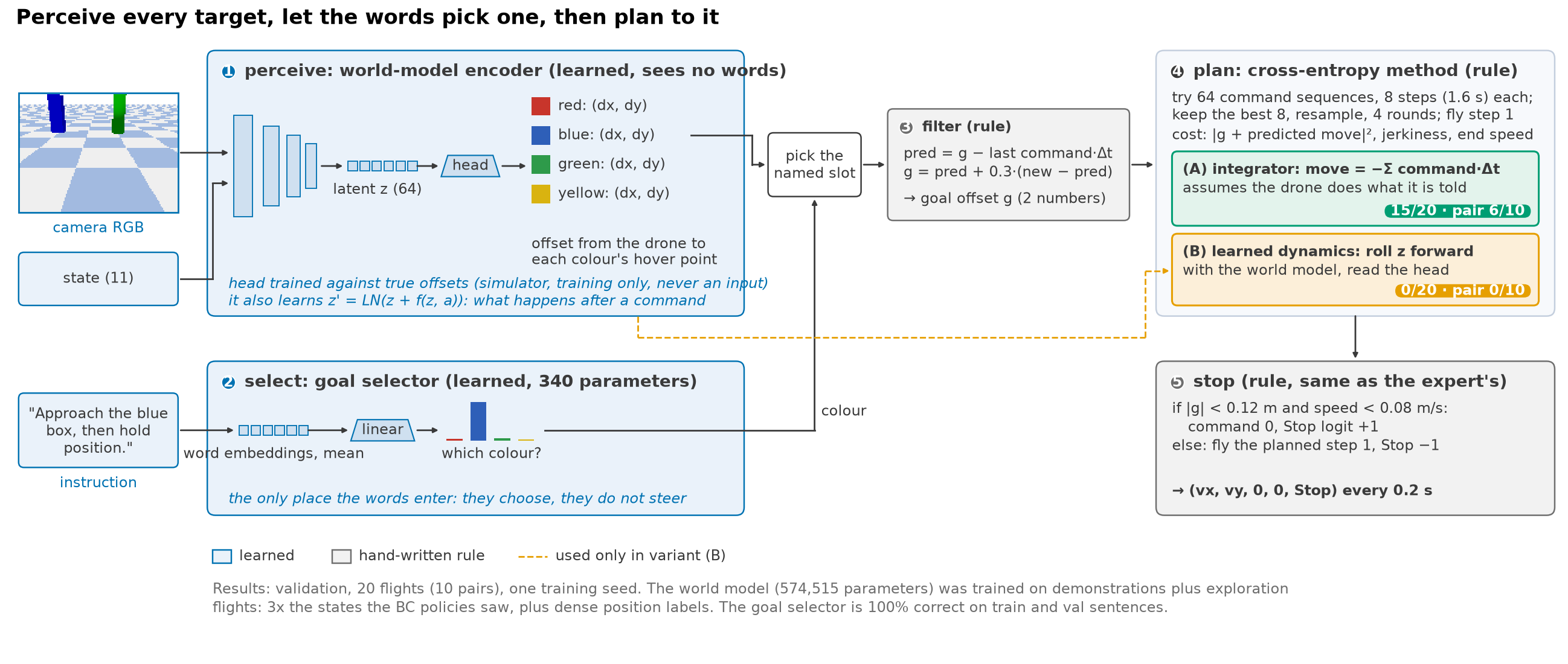
  <img src="/images/blog/drone-policy/06/01_system.png" alt="System diagram. 1: a world-model encoder reads the camera and state, without words, into a 64-number latent and outputs the offset from the drone to each of four colours' hover points. 2: a goal selector maps the sentence to one colour. The named slot is picked. 3: a filter smooths the goal offset. 4: a cross-entropy-method planner scores 64 command sequences of 8 steps with either an integrator (A) or the learned latent dynamics (B). 5: a Stop rule identical to the expert's" loading="lazy" />
  <figcaption><b>Perceive every target, let the words pick one, then plan to it.</b> Blue parts are learned; gray parts are hand-written rules. The words enter only at step 2. Variant (A) predicts the effect of a command by integration; variant (B) rolls the world model's learned dynamics forward. Everything else is shared.</figcaption>
</figure>

  <ol>
    <li>Perceive (learned, no words). An encoder of the same kind as the BC policy’s turns the
image and state into 64 numbers, z. A small head reads out, for each of the four colours,
the offset from the drone to that colour’s hover point. The head was trained against the
simulator’s true positions; those positions are training labels only, never inputs.</li>
    <li>Select (learned, 340 parameters). Word embeddings, averaged, then one linear layer to
four colours. It is 100% correct on the train and validation sentences. In this task one
colour word decides the target, so that is expected, not a result.</li>
    <li>Filter (rule). Single-frame estimates are noisy (about 0.17 m near the goal), and acting
on them raw makes the commands jitter. The filter predicts the offset forward by the last
command and blends in each new measurement at 30%.</li>
    <li>Plan (rule). The cross-entropy method (CEM): sample 64 sequences of 8 commands (1.6 s),
score each by where it would leave the drone relative to the goal, keep the best 8, resample
around them, four rounds. Fly the first command and plan again 0.2 s later.</li>
    <li>Stop (rule). The expert’s own rule: Stop when the estimated goal is within 0.12 m and the
drone is slower than 0.08 m/s.</li>
  </ol>

  <p>The planner is short
(<a href="https://github.com/Ckck12/Drone_VLA_Simulation/blob/7b9acb9551c3fb2d7392d9beaf32c249b6396630/dronevla/planner.py#L146-L163">full code</a>):</p>

  <div class="language-python highlighter-rouge"><div class="highlight"><pre class="highlight"><code><span class="k">def</span> <span class="nf">plan</span><span class="p">(</span><span class="bp">self</span><span class="p">,</span> <span class="n">g0</span><span class="p">,</span> <span class="n">displacement</span><span class="p">):</span>        <span class="c1"># g0: filtered goal offset (2,), body frame
</span>    <span class="n">mean</span><span class="p">,</span> <span class="n">std</span> <span class="o">=</span> <span class="bp">self</span><span class="p">.</span><span class="n">mean</span><span class="p">,</span> <span class="n">np</span><span class="p">.</span><span class="n">full</span><span class="p">((</span><span class="mi">8</span><span class="p">,</span> <span class="mi">2</span><span class="p">),</span> <span class="mf">0.3</span><span class="p">)</span>
    <span class="k">for</span> <span class="n">_</span> <span class="ow">in</span> <span class="nb">range</span><span class="p">(</span><span class="mi">4</span><span class="p">):</span>
        <span class="n">A</span> <span class="o">=</span> <span class="n">cap</span><span class="p">(</span><span class="n">mean</span> <span class="o">+</span> <span class="n">std</span> <span class="o">*</span> <span class="n">rng</span><span class="p">.</span><span class="n">standard_normal</span><span class="p">((</span><span class="mi">64</span><span class="p">,</span> <span class="mi">8</span><span class="p">,</span> <span class="mi">2</span><span class="p">)))</span>   <span class="c1"># 64 sequences of 8 commands
</span>        <span class="n">off</span> <span class="o">=</span> <span class="n">g0</span> <span class="o">+</span> <span class="n">displacement</span><span class="p">(</span><span class="n">A</span><span class="p">)</span>                              <span class="c1"># where the goal would be
</span>        <span class="n">cost</span> <span class="o">=</span> <span class="p">(</span><span class="n">off</span> <span class="o">**</span> <span class="mi">2</span><span class="p">).</span><span class="nb">sum</span><span class="p">(</span><span class="o">-</span><span class="mi">1</span><span class="p">).</span><span class="n">mean</span><span class="p">(</span><span class="mi">1</span><span class="p">)</span>                       <span class="c1"># stay close to it
</span>        <span class="n">cost</span> <span class="o">+=</span> <span class="mf">0.5</span> <span class="o">*</span> <span class="n">jerk</span><span class="p">(</span><span class="n">A</span><span class="p">)</span> <span class="o">+</span> <span class="mf">1.0</span> <span class="o">*</span> <span class="p">(</span><span class="n">A</span><span class="p">[:,</span> <span class="o">-</span><span class="mi">1</span><span class="p">]</span> <span class="o">**</span> <span class="mi">2</span><span class="p">).</span><span class="nb">sum</span><span class="p">(</span><span class="o">-</span><span class="mi">1</span><span class="p">)</span>   <span class="c1"># smooth, arrive slowly
</span>        <span class="n">elite</span> <span class="o">=</span> <span class="n">A</span><span class="p">[</span><span class="n">np</span><span class="p">.</span><span class="n">argsort</span><span class="p">(</span><span class="n">cost</span><span class="p">)[:</span><span class="mi">8</span><span class="p">]]</span>
        <span class="n">mean</span><span class="p">,</span> <span class="n">std</span> <span class="o">=</span> <span class="n">elite</span><span class="p">.</span><span class="n">mean</span><span class="p">(</span><span class="mi">0</span><span class="p">),</span> <span class="n">elite</span><span class="p">.</span><span class="n">std</span><span class="p">(</span><span class="mi">0</span><span class="p">)</span> <span class="o">+</span> <span class="mf">1e-3</span>
    <span class="k">return</span> <span class="n">elite</span><span class="p">[</span><span class="mi">0</span><span class="p">][</span><span class="mi">0</span><span class="p">]</span>                                          <span class="c1"># fly step 1, re-plan next tick
</span>
<span class="n">integrator</span> <span class="o">=</span> <span class="k">lambda</span> <span class="n">A</span><span class="p">:</span> <span class="o">-</span><span class="n">np</span><span class="p">.</span><span class="n">cumsum</span><span class="p">(</span><span class="n">A</span><span class="p">,</span> <span class="n">axis</span><span class="o">=</span><span class="mi">1</span><span class="p">)</span> <span class="o">*</span> <span class="mf">0.2</span>               <span class="c1"># variant (A)
</span></code></pre></div>  </div>

  <p>The only difference between the two variants is <code class="language-plaintext highlighter-rouge">displacement</code>. <strong>(A)</strong> assumes the drone moves
exactly as commanded. <strong>(B)</strong> starts from z, applies the world model’s learned dynamics
z’ = LN(z + f(z, a)) step by step, and reads the head after each step.</p>

  <p>All planner settings were tuned with the true target positions on <em>training</em> scenes, before any
learned variant was run on validation.</p>

  <h2 id="what-the-world-model-learned">2. What the world model learned</h2>

  <p>The world model has 574,515 parameters and was trained on CPU for 12 epochs (36 minutes). Its
training data was the 100 demonstration layouts plus exploration flights over the same
layouts: noisy expert, random walks, and overshoots past the goal. That is 30,448 rows, three
times the states the BC policies saw. The loss unrolls the dynamics 4 steps from each start
state with the recorded commands
(<a href="https://github.com/Ckck12/Drone_VLA_Simulation/blob/7b9acb9551c3fb2d7392d9beaf32c249b6396630/dronevla/world_model.py#L175-L202">full code</a>):</p>

  <div class="language-python highlighter-rouge"><div class="highlight"><pre class="highlight"><code><span class="n">z</span> <span class="o">=</span> <span class="n">model</span><span class="p">.</span><span class="n">encode</span><span class="p">(</span><span class="n">rgb</span><span class="p">[:,</span> <span class="mi">0</span><span class="p">],</span> <span class="n">state</span><span class="p">[:,</span> <span class="mi">0</span><span class="p">])</span>
<span class="n">loss</span> <span class="o">=</span> <span class="n">heads_loss</span><span class="p">(</span><span class="n">z</span><span class="p">,</span> <span class="n">k</span><span class="o">=</span><span class="mi">0</span><span class="p">)</span>                                  <span class="c1"># state + every colour's offset
</span><span class="k">for</span> <span class="n">k</span> <span class="ow">in</span> <span class="nb">range</span><span class="p">(</span><span class="mi">1</span><span class="p">,</span> <span class="mi">5</span><span class="p">):</span>
    <span class="n">z</span> <span class="o">=</span> <span class="n">model</span><span class="p">.</span><span class="n">step</span><span class="p">(</span><span class="n">z</span><span class="p">,</span> <span class="n">command</span><span class="p">[:,</span> <span class="n">k</span> <span class="o">-</span> <span class="mi">1</span><span class="p">])</span>                   <span class="c1"># z' = LN(z + f(z, a))
</span>    <span class="n">target</span> <span class="o">=</span> <span class="n">model</span><span class="p">.</span><span class="n">encode</span><span class="p">(</span><span class="n">rgb</span><span class="p">[:,</span> <span class="n">k</span><span class="p">],</span> <span class="n">state</span><span class="p">[:,</span> <span class="n">k</span><span class="p">]).</span><span class="n">detach</span><span class="p">()</span> <span class="c1"># what the encoder sees at t+k
</span>    <span class="n">loss</span> <span class="o">+=</span> <span class="mf">0.9</span> <span class="o">**</span> <span class="n">k</span> <span class="o">*</span> <span class="p">(((</span><span class="n">z</span> <span class="o">-</span> <span class="n">target</span><span class="p">)</span> <span class="o">**</span> <span class="mi">2</span><span class="p">).</span><span class="n">mean</span><span class="p">()</span> <span class="o">+</span> <span class="n">heads_loss</span><span class="p">(</span><span class="n">z</span><span class="p">,</span> <span class="n">k</span><span class="p">))</span>
</code></pre></div>  </div>

  <figure class="pfig">
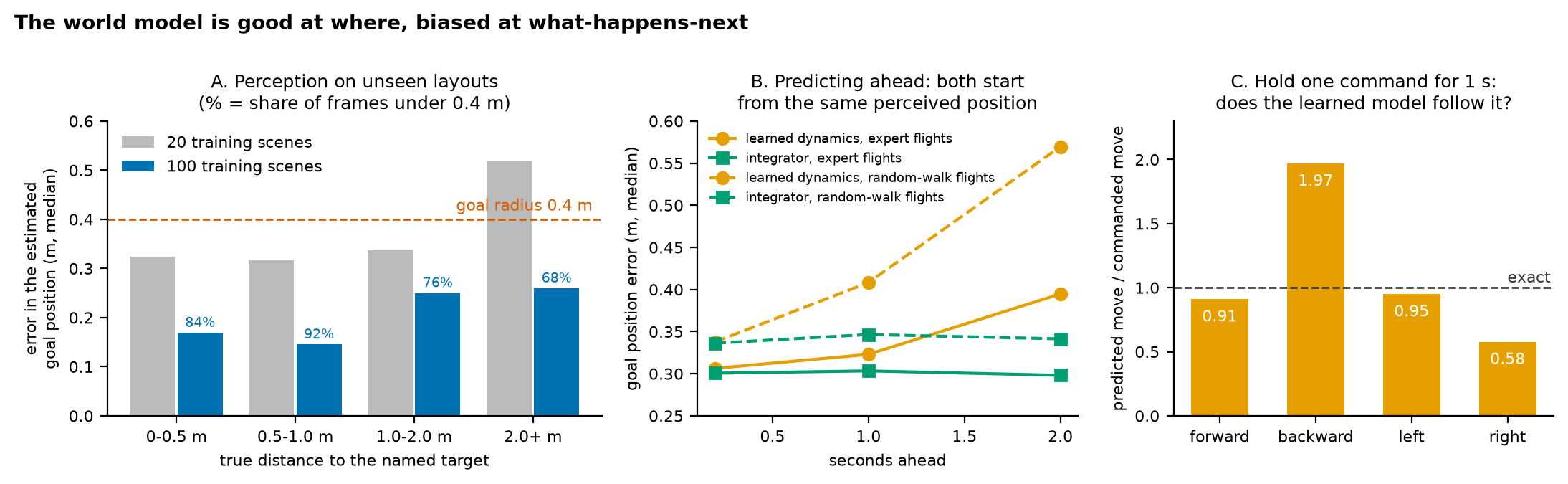
  <img src="/images/blog/drone-policy/06/02_perception_dynamics.png" alt="A: error of the estimated goal position on unseen layouts, by distance to the target; with 100 training scenes it is 0.15 to 0.26 m, roughly half of the 20-scene model, and below the 0.4 m goal radius in 68 to 92 percent of frames. B: error when predicting ahead from the same perceived position: the integrator stays near 0.30 m up to 2 s while the learned dynamics grows to 0.39 m on expert flights and 0.57 m on random walks. C: holding one command for 1 s, the learned model predicts forward and left moves well but backward 1.97 times too far and right only 0.58 times" loading="lazy" />
  <figcaption>Validation layouts, medians. A: perception, for the 20-scene and 100-scene world models. B: prediction error over time, both starting from the same perceived goal position. C: the constant-command probe, 519 validation states; 1.0 means the predicted move equals the commanded one.</figcaption>
</figure>

  <ul>
    <li><strong>A, perception is good enough to plan with.</strong> On unseen layouts the estimated goal position
is off by a median 0.15–0.26 m, under the 0.4 m goal radius in 68–92% of frames. Training on
100 scenes instead of 20 roughly halved the error. The bottleneck was the number of distinct
scenes, not the model.</li>
    <li><strong>B, the learned dynamics are worse than doing nothing clever.</strong> Starting from the same
perceived position, rolling the learned dynamics forward 2 s gives 0.39 m error on expert
flights and 0.57 m on random walks. Simply integrating the commands stays near 0.30 m.
<span class="key-line">In this simulator the low-level controller tracks commands closely, so
an integrator is almost perfect dynamics.</span></li>
    <li><strong>C, and the learned dynamics are biased by direction.</strong> Hold one command for 1 s: the model
predicts forward and left moves about right, but backward moves twice as far as commanded and
right moves at 0.58 of the commanded distance. Most training commands point forward, toward
the targets.</li>
  </ul>

  <h2 id="results">3. Results</h2>

  <figure class="pfig">
  <img src="/images/blog/drone-policy/06/03_scoreboard.png" alt="Scoreboard. Each sentence led to its own target: expert 10, planner with true positions 10, world model plus integrator planner 10, world model with learned dynamics 3, BC Part 4 0, BC with the same position labels 0, BC tokens with chunk 4. Success out of 20: 20, 20, 15, 0, 3, 8, 8. Pair success out of 10: 10, 10, 6, 0, 0, 0, 3" loading="lazy" />
  <figcaption>Validation, one training seed. * = privileged reference (true positions). "BC + the same position labels" is the Part 4 policy with an extra head trained on exactly the target-position labels the world model gets.</figcaption>
</figure>

  <p><strong>(A) World model + integrator planner.</strong></p>
  <ul>
    <li><span class="key-line">All 10 pairs split the right way</span> (no end-to-end model splits more than 5 correctly;
Fisher’s exact test for 10/10 vs 5/10: p ≈ 0.03).</li>
    <li>Success is 15/20 and pair success <strong>6/10</strong>, 95% interval 0.31–0.83. Against the best
end-to-end model’s 3/10 (0.11–0.60) that difference is not yet beyond chance.</li>
    <li>It reaches the 0.4 m goal region in all 20 flights.</li>
    <li>The five misses all come after it has reached the region: two stops just outside it and
three collisions. The same planner fed the <em>true</em> target position succeeds 20/20, so what
is left is perception error close to the target.</li>
  </ul>

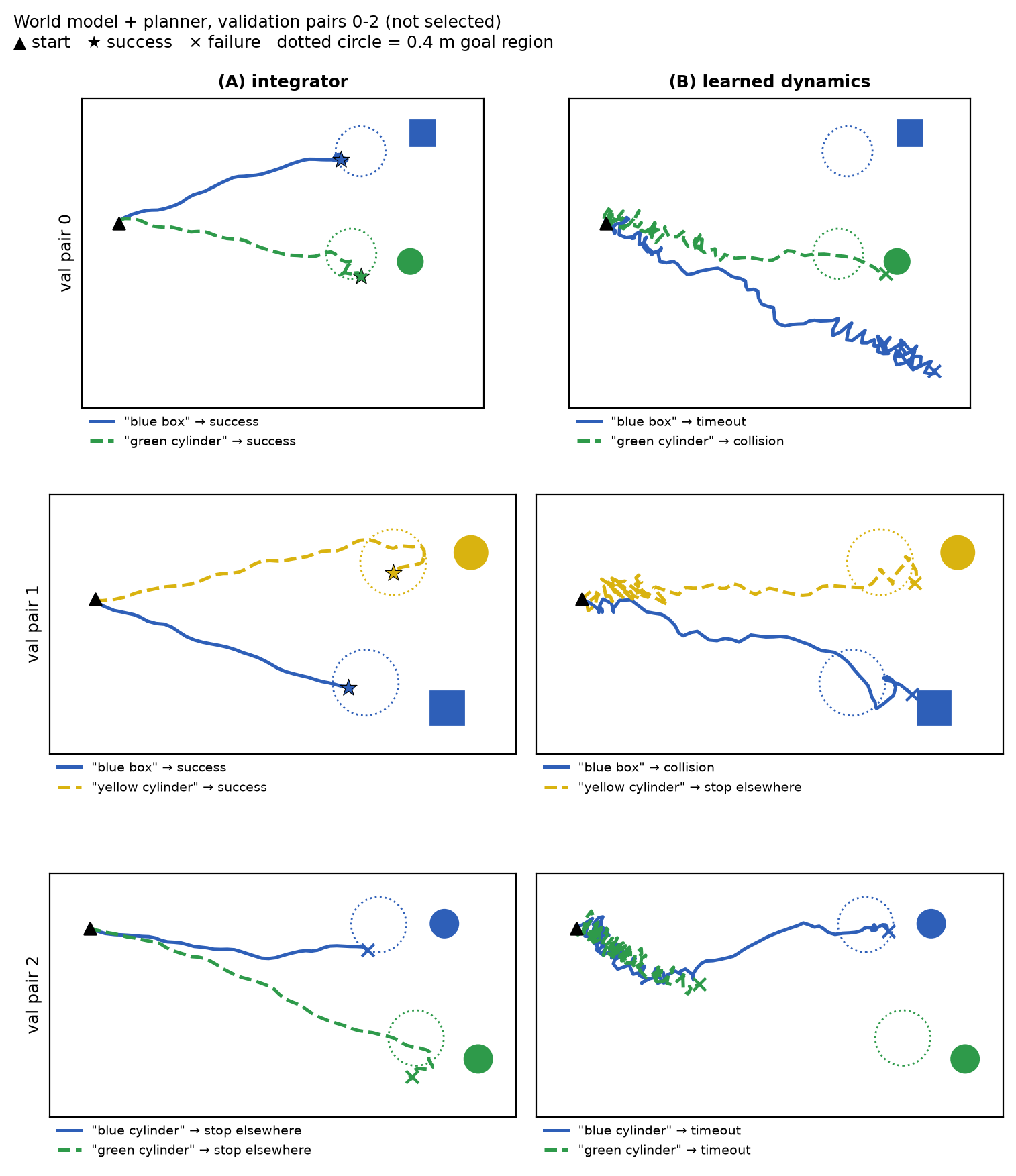
  <p><strong>(B) The same system planning through the learned dynamics</strong> scores 0/20: 13 timeouts and
5 collisions. The GIF above shows why. CEM searches for commands that look good <em>according to
the model</em>, and panel C showed the model exaggerates some directions. The planner keeps
choosing the commands whose effect the model gets most wrong, and the drone jitters. Two things
make this worse: the model was trained to unroll 4 steps and is asked for 8, and most of its
training commands point forward, while a planner tries every direction.</p>

  <figure class="pfig">
  <img src="/images/blog/drone-policy/06/04_paths.png" alt="Top views of validation pairs 0 to 2. With the integrator, the two sentences' paths split to their own targets in all three pairs; pairs 0 and 1 succeed, pair 2 stops just outside both goal circles. With learned dynamics, paths zigzag near the start and wander, with timeouts and collisions" loading="lazy" />
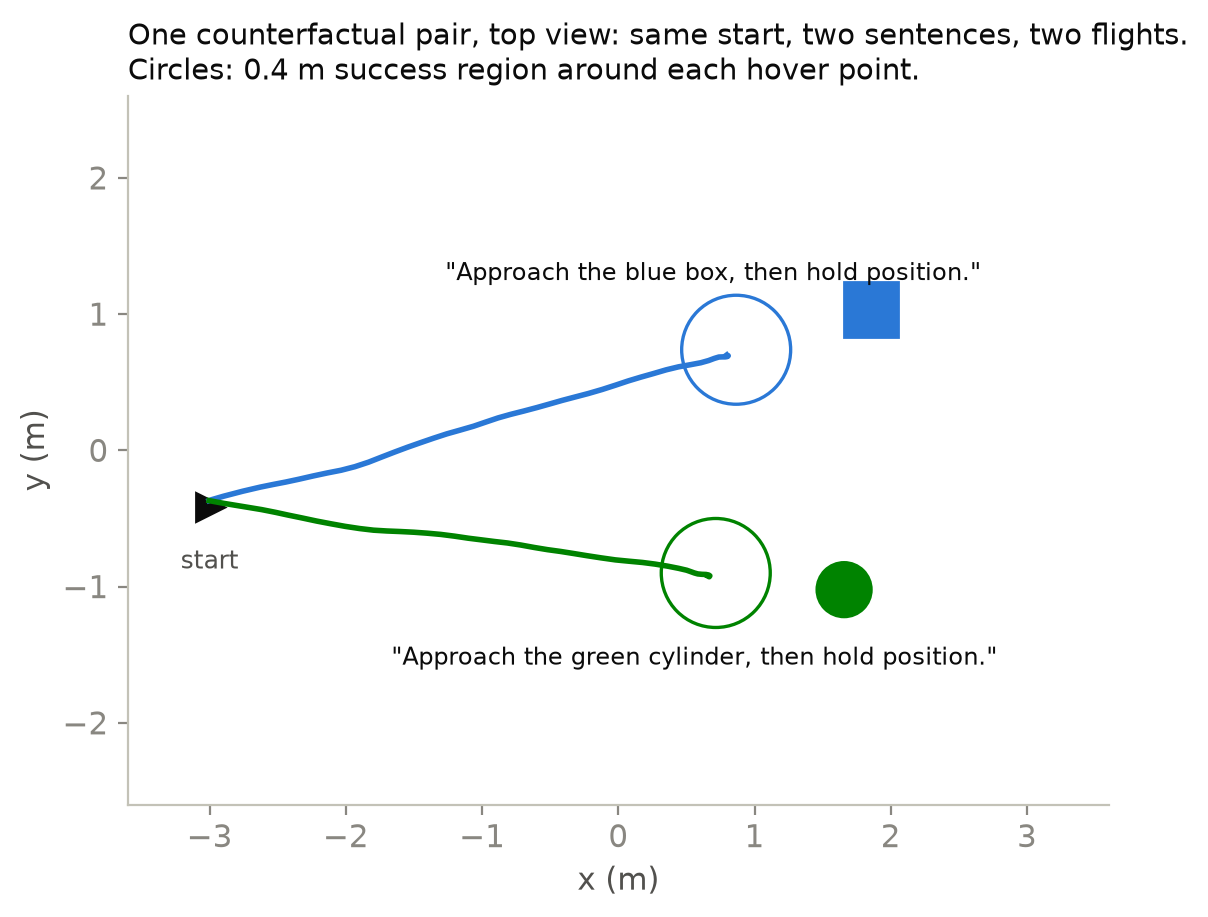
  <figcaption>Validation pairs 0–2 (the first three, not selected). With the integrator, both sentences go to their own targets every time; in pair 2 both flights stop just outside the 0.4 m circle, which is where perception error shows. With the learned dynamics, the planner exploits the model's bias and the flights zigzag.</figcaption>
</figure>

  <h2 id="is-this-a-fair-comparison-no-so-here-is-what-it-does-and-doesnt-explain">4. Is this a fair comparison? No, so here is what it does and doesn’t explain</h2>

  <p>The modular system differs from the BC policies in more than its structure:</p>

  <table>
    <thead>
      <tr>
        <th>advantage</th>
        <th>does it alone explain the result?</th>
      </tr>
    </thead>
    <tbody>
      <tr>
        <td>dense position labels (where every target is, from the simulator)</td>
        <td>No. Part 4’s policy with a head trained on exactly these labels still sends both sentences to the same target in 10 of 10 pairs.</td>
      </tr>
      <tr>
        <td>3x the states (exploration flights)</td>
        <td>No. The chunk policy trained on the same exploration flights (Part 5) splits 5 of 10 pairs correctly and completes none.</td>
      </tr>
      <tr>
        <td>both together</td>
        <td>No. The chunk policy with the exploration flights <em>and</em> the position-label head also splits 5 of 10 pairs correctly and completes none (success 2/20).</td>
      </tr>
      <tr>
        <td>an explicit colour selector and hand-written filter, planner and Stop</td>
        <td>Not tested separately. This is the structure itself.</td>
      </tr>
    </tbody>
  </table>

  <p><span class="key-line">Neither the labels nor the states, alone or together, gave an
end-to-end policy the modular system’s 10 of 10 correctly split pairs.</span> What’s left is the structure: the words can
only choose, and nothing downstream can ignore that choice. I can’t yet separate how much comes
from the selector and how much from the rule-based Stop.</p>

  <p>Two smaller differences:</p>

  <ul>
    <li><strong>Randomness.</strong> The planner’s random seed differs between the two flights of a pair; BC
evaluation is deterministic.</li>
    <li><strong>Training budget.</strong> The world model trained for 36 minutes, about 4–5 times a Part 4 BC
run.</li>
  </ul>

  <h2 id="what-this-part-does-not-show">What this part does not show</h2>

  <ul>
    <li>One training seed and ten pairs. 6/10 has a 95% interval of 0.31–0.83.</li>
    <li>The selector’s job is trivial here. Two pillars always differ in colour, so one word
decides. Relational instructions (“the pillar left of the red one”) would need a real
grounding model.</li>
    <li>The integrator works because the simulator is kind. Its controller tracks commands
almost perfectly. With wind, drag or a real airframe, the dynamics would have to be learned or
identified, and section 3 shows that naively learned dynamics are a liability for a sampling
planner.</li>
    <li>Validation only. It was used for screening; final numbers need a fresh test split.</li>
  </ul>

  <h2 id="next">Next</h2>

  <p>Season 2 ends with a working answer to Part 4’s question, for this two-pillar, one-colour-word
task: yes, the words can be made to decide, if they are only allowed to decide. Season 3 turns
to engineering. One evaluation contract will run the same policies in Python and C++, so every
later change (ONNX, INT8, a C++ runner) is measured against the same numbers.</p>

  <h2 id="appendix">Appendix</h2>

  <details>
<summary>A. Settings</summary>

<table>
<thead><tr><th>component</th><th>setting</th></tr></thead>
<tbody>
<tr><td>world model</td><td>4 strided convolutions + state MLP → z (64); dynamics MLP 256-256 with a residual and LayerNorm; heads for state (11) and colour offsets (4 × 2). 574,515 parameters.</td></tr>
<tr><td>world-model training</td><td>v0.2 demonstrations + 4 exploration flights per layout (30,448 rows); 4-step unroll, discount 0.9; Adam 10⁻³, batch 32, 12 epochs fixed in advance, last epoch kept; seed 0; 36 min on CPU.</td></tr>
<tr><td>goal selector</td><td>17-token vocabulary × 16-d embedding, mean, linear to 4 colours; 300 full-batch steps on the 200 training sentences; 100% train and val.</td></tr>
<tr><td>filter</td><td>predict by the last command, blend 0.3 of the new measurement.</td></tr>
<tr><td>planner (CEM)</td><td>horizon 8 (1.6 s), 64 samples, 8 elites, 4 iterations, initial std 0.3 m/s, speed cap 0.5 m/s; cost weights: smoothness 0.5, end speed 1.0.</td></tr>
<tr><td>Stop</td><td>|goal offset| &lt; 0.12 m and speed &lt; 0.08 m/s (the expert's values); then the environment's three-in-a-row and 1 s hold rules.</td></tr>
</tbody>
</table>
</details>

  <details>
<summary>B. Outcomes (validation, 20 flights)</summary>

<table>
<thead><tr><th>system</th><th>success</th><th>stop elsewhere</th><th>collision</th><th>timeout</th><th>out of bounds</th><th>reached goal region</th></tr></thead>
<tbody>
<tr><td>planner, true target position</td><td>20</td><td>0</td><td>0</td><td>0</td><td>0</td><td>20</td></tr>
<tr><td>world model + integrator</td><td>15</td><td>2</td><td>3</td><td>0</td><td>0</td><td>20</td></tr>
<tr><td>world model + learned dynamics</td><td>0</td><td>1</td><td>5</td><td>13</td><td>1</td><td>8</td></tr>
</tbody>
</table>
</details>

  <details>
<summary>C. Reproduce</summary>

<p>Commit <a href="https://github.com/Ckck12/Drone_VLA_Simulation/tree/7b9acb9551c3fb2d7392d9beaf32c249b6396630"><code>7b9acb9</code></a>, dataset v0.2 and exploration flights <code>explore_v0.2</code>.</p>

<pre><code>python -m dronevla.world_model train --data data/v0.2 --explore data/explore_v0.2 --out runs/wm_v1
python -m dronevla.world_model eval --run runs/wm_v1 --out reports/wm_v1_prediction.json
python scripts/wm_diagnostics.py --run runs/wm_v1 --out reports/wm_v1_diagnostics.json
python -m dronevla.planner train-selector --data data/v0.2 --out runs/goal_selector
python -m dronevla.evaluate --data data/v0.2 --split val --policy plan-oracle \
    --policy plan:runs/wm_v1:integrator --policy plan:runs/wm_v1:wm \
    --out reports/eval_planner_val.json
python scripts/figures/blog06.py
bash scripts/figures/render_blog06_videos.sh
</code></pre>
<p>Stage-by-stage notes: <code>docs/phase1_world_model.md</code>, <code>docs/season2_experiments.md</code>.</p>
</details>

  <h3 id="references-what-i-took-from-each">References: what I took from each</h3>

  <ul>
    <li><a href="https://arxiv.org/abs/1803.10122">World Models (Ha and Schmidhuber, 2018)</a> and
<a href="https://arxiv.org/abs/1811.04551">PlaNet (Hafner et al., 2019)</a> learn a compact latent
state and its dynamics from images. → The encoder, latent z and residual dynamics.</li>
    <li><a href="https://arxiv.org/abs/1805.12114">PETS (Chua et al., 2018)</a> plans with CEM through learned
dynamics. → The planner. Its use of model ensembles to avoid exploiting model error is
exactly what variant (B) lacks.</li>
    <li><a href="https://arxiv.org/abs/1906.08253">When to Trust Your Model (Janner et al., 2019)</a> shows how
model error compounds over long rollouts. → Why the planner was given an integrator first,
and why (B) fails at an 8-step horizon after 4-step training.</li>
    <li><a href="https://arxiv.org/abs/2203.04955">TD-MPC (Hansen et al., 2022)</a> plans in a latent space
learned for control. → A direction for making (B) work, not tried here.</li>
    <li><a href="https://arxiv.org/abs/2109.12098">CLIPort (Shridhar et al., 2021)</a> separates <em>what</em>
(language-conditioned semantics) from <em>where</em> (spatial precision). → The same split, in its
simplest possible form.</li>
  </ul>

  <h2 id="summary-star">Summary (STAR)</h2>

  <div class="star-summary">

    <h3 class="star-h"><span class="star-tag">S</span>Situation</h3>

    <p>In Parts 4 and 5 one network read the image, read the words and flew, and the words kept
losing to the image. No end-to-end model split more than 5 of 10 validation pairs correctly, and the best completed 3.</p>

    <h3 class="star-h"><span class="star-tag">T</span>Task</h3>

    <p>Test a design rule in which the sentence only chooses the target and the image and state do
the flying. Check whether the modular system’s extra advantages (position labels, 3x the
states) explain the result on their own.</p>

    <h3 class="star-h"><span class="star-tag">A</span>Action</h3>

    <p>I trained a 574,515-parameter world model without words on 30,448 rows (36 minutes on CPU) and
a 340-parameter colour selector, then added a filter, a CEM planner and the expert’s Stop rule.
The planner predicted command effects either with an integrator (A) or with the learned
dynamics (B), and BC controls got the same position labels and exploration flights.</p>

    <h3 class="star-h"><span class="star-tag">R</span>Result</h3>

    <p>With the integrator all 10 pairs split the right way (p ≈ 0.03 against 5/10); success was
15/20 and pair success 6/10 (95% interval 0.31–0.83, one seed); every flight reached the goal
region. Planning through the learned dynamics scored 0/20. Neither the labels nor the states,
alone or together, gave an end-to-end policy the modular system’s 10 of 10 correctly split pairs.</p>

  </div>

</div>

<div class="lang-ko" lang="ko">

  <p>4편과 5편에서는 네트워크 하나가 모든 일을 맡았습니다. 이미지를 읽고 말을 읽고 비행까지 했습니다.
그리고 말은 번번이 이미지에 밀렸습니다. 이번 편에서는 일을 다르게 나눠 봅니다. 설계 규칙으로
적으면 다음과 같습니다.</p>

  <blockquote>
    <p><strong>문장은 타깃을 고르기만 해야 합니다. 비행은 이미지와 상태가 맡아야 합니다.</strong></p>
  </blockquote>

  <p>그래서 말에는 딱 한 가지 일만 주고 모터로 가는 경로는 주지 않습니다. 월드 모델은 문장을 한 번도
보지 않은 채 모든 타깃의 위치를 배웁니다. 아주 작은 선택기가 문장을 색깔로 바꿉니다. 고른 타깃까지
비행하는 일은 학습하지 않은 플래너가 맡습니다.</p>

  <div class="vgrid">
  <figure class="pvid">
    <img src="/images/blog/drone-policy/06/pair0_plan_integrator.gif" alt="검증 쌍 0에서 적분기를 쓴 월드 모델과 플래너: 두 문장이 각자의 기둥으로 가고 두 비행 모두 성공" loading="lazy" />
    <figcaption><span class="pvid__label">월드 모델 + 플래너 (A)</span>검증 쌍(pair) 0, 첫 번째 쌍입니다(골라낸 것이 아님). 문장마다 자기 타깃에 도달합니다.</figcaption>
  </figure>
  <figure class="pvid">
    <img src="/images/blog/drone-policy/06/pair0_plan_wm.gif" alt="같은 시스템이 검증 쌍 0에서 학습된 동역학으로 계획하는 모습: 드론이 출발점 근처에서 떨리며 한 비행은 시간 초과, 다른 비행은 충돌" loading="lazy" />
    <figcaption><span class="pvid__label">같은 시스템, 학습된 동역학 (B)</span>같은 쌍, 같은 인지입니다. 학습된 동역학으로 계획하면 한 번은 시간 초과, 한 번은 충돌로 끝납니다.</figcaption>
  </figure>
</div>

  <h2 id="section">1. 시스템: 인지, 선택, 계획</h2>

  <figure class="pfig">
  <img src="/images/blog/drone-policy/06/01_system.png" alt="시스템 다이어그램. 1: 월드 모델 인코더가 말 없이 카메라와 상태를 읽어 64개 숫자의 잠재 벡터로 만든 뒤 드론에서 네 색깔 각각의 호버 지점까지의 오프셋을 출력. 2: 목표 선택기가 문장을 색깔 하나로 바꾸며 이름이 불린 슬롯이 선택됨. 3: 필터가 목표 오프셋을 부드럽게 다듬음. 4: 교차 엔트로피 방법 플래너가 8스텝짜리 명령 시퀀스 64개를 적분기(A) 또는 학습된 잠재 동역학(B)으로 평가. 5: 전문가와 똑같은 Stop 규칙" loading="lazy" />
  <figcaption><b>타깃을 모두 인지하고 말로 하나를 고른 다음 그곳까지 계획합니다.</b> 파란 부분은 학습한 것이고 회색 부분은 손으로 짠 규칙입니다. 말은 2단계에서만 들어옵니다. 변형 (A)는 명령의 효과를 적분으로 예측하고 변형 (B)는 월드 모델의 학습된 동역학을 순차적으로 적용해 미래 상태를 예측합니다. 나머지는 모두 같습니다.</figcaption>
</figure>

  <ol>
    <li>인지 (학습, 말 없음). 행동 복제(BC) 정책과 같은 종류의 인코더가 이미지와 상태를 숫자
64개, 곧 z로 바꿉니다. 작은 헤드가 네 색깔마다 드론에서 그 색깔의 호버 지점까지의 오프셋을
읽어 냅니다. 헤드는 시뮬레이터가 아는 실제 위치를 정답으로 삼아 학습했습니다. 이 위치는 학습
라벨로만 쓰고 입력으로는 한 번도 넣지 않습니다.</li>
    <li>선택 (학습, 340 파라미터). 단어 임베딩을 평균한 뒤 선형 층 하나로 네 색깔에 대응시킵니다.
학습 문장과 검증 문장에서 100% 맞힙니다. 이 과제에서는 색깔 단어 하나가 타깃을 정하므로 당연한
일이고 결과로 볼 수는 없습니다.</li>
    <li>필터 (규칙). 프레임 하나로 낸 추정은 잡음이 큽니다(목표 근처에서 약 0.17 m). 이 값을
그대로 쓰면 명령이 떨립니다. 필터는 마지막 명령만큼 오프셋을 앞으로 예측한 다음 새 측정값을 30%
비율로 섞습니다.</li>
    <li>계획 (규칙). 교차 엔트로피 방법(cross-entropy method, CEM)을 씁니다. 명령 8개(1.6 s)로
된 시퀀스를 64개 샘플링하고 각 시퀀스가 끝났을 때 드론이 목표 기준으로 어디에 있을지로 점수를
매깁니다. 가장 좋은 8개를 남기고 그 주변에서 다시 샘플링하는 과정을 네 번 반복합니다. 첫 번째
명령으로 비행하고 0.2 s 뒤에 다시 계획합니다.</li>
    <li>Stop (규칙). 전문가가 쓰는 규칙 그대로입니다. 추정한 목표가 0.12 m 안에 있고 드론이
0.08 m/s보다 느리면 Stop합니다.</li>
  </ol>

  <p>플래너 코드는 짧습니다
(<a href="https://github.com/Ckck12/Drone_VLA_Simulation/blob/7b9acb9551c3fb2d7392d9beaf32c249b6396630/dronevla/planner.py#L146-L163">전체 코드</a>):</p>

  <div class="language-python highlighter-rouge"><div class="highlight"><pre class="highlight"><code><span class="k">def</span> <span class="nf">plan</span><span class="p">(</span><span class="bp">self</span><span class="p">,</span> <span class="n">g0</span><span class="p">,</span> <span class="n">displacement</span><span class="p">):</span>        <span class="c1"># g0: filtered goal offset (2,), body frame
</span>    <span class="n">mean</span><span class="p">,</span> <span class="n">std</span> <span class="o">=</span> <span class="bp">self</span><span class="p">.</span><span class="n">mean</span><span class="p">,</span> <span class="n">np</span><span class="p">.</span><span class="n">full</span><span class="p">((</span><span class="mi">8</span><span class="p">,</span> <span class="mi">2</span><span class="p">),</span> <span class="mf">0.3</span><span class="p">)</span>
    <span class="k">for</span> <span class="n">_</span> <span class="ow">in</span> <span class="nb">range</span><span class="p">(</span><span class="mi">4</span><span class="p">):</span>
        <span class="n">A</span> <span class="o">=</span> <span class="n">cap</span><span class="p">(</span><span class="n">mean</span> <span class="o">+</span> <span class="n">std</span> <span class="o">*</span> <span class="n">rng</span><span class="p">.</span><span class="n">standard_normal</span><span class="p">((</span><span class="mi">64</span><span class="p">,</span> <span class="mi">8</span><span class="p">,</span> <span class="mi">2</span><span class="p">)))</span>   <span class="c1"># 64 sequences of 8 commands
</span>        <span class="n">off</span> <span class="o">=</span> <span class="n">g0</span> <span class="o">+</span> <span class="n">displacement</span><span class="p">(</span><span class="n">A</span><span class="p">)</span>                              <span class="c1"># where the goal would be
</span>        <span class="n">cost</span> <span class="o">=</span> <span class="p">(</span><span class="n">off</span> <span class="o">**</span> <span class="mi">2</span><span class="p">).</span><span class="nb">sum</span><span class="p">(</span><span class="o">-</span><span class="mi">1</span><span class="p">).</span><span class="n">mean</span><span class="p">(</span><span class="mi">1</span><span class="p">)</span>                       <span class="c1"># stay close to it
</span>        <span class="n">cost</span> <span class="o">+=</span> <span class="mf">0.5</span> <span class="o">*</span> <span class="n">jerk</span><span class="p">(</span><span class="n">A</span><span class="p">)</span> <span class="o">+</span> <span class="mf">1.0</span> <span class="o">*</span> <span class="p">(</span><span class="n">A</span><span class="p">[:,</span> <span class="o">-</span><span class="mi">1</span><span class="p">]</span> <span class="o">**</span> <span class="mi">2</span><span class="p">).</span><span class="nb">sum</span><span class="p">(</span><span class="o">-</span><span class="mi">1</span><span class="p">)</span>   <span class="c1"># smooth, arrive slowly
</span>        <span class="n">elite</span> <span class="o">=</span> <span class="n">A</span><span class="p">[</span><span class="n">np</span><span class="p">.</span><span class="n">argsort</span><span class="p">(</span><span class="n">cost</span><span class="p">)[:</span><span class="mi">8</span><span class="p">]]</span>
        <span class="n">mean</span><span class="p">,</span> <span class="n">std</span> <span class="o">=</span> <span class="n">elite</span><span class="p">.</span><span class="n">mean</span><span class="p">(</span><span class="mi">0</span><span class="p">),</span> <span class="n">elite</span><span class="p">.</span><span class="n">std</span><span class="p">(</span><span class="mi">0</span><span class="p">)</span> <span class="o">+</span> <span class="mf">1e-3</span>
    <span class="k">return</span> <span class="n">elite</span><span class="p">[</span><span class="mi">0</span><span class="p">][</span><span class="mi">0</span><span class="p">]</span>                                          <span class="c1"># fly step 1, re-plan next tick
</span>
<span class="n">integrator</span> <span class="o">=</span> <span class="k">lambda</span> <span class="n">A</span><span class="p">:</span> <span class="o">-</span><span class="n">np</span><span class="p">.</span><span class="n">cumsum</span><span class="p">(</span><span class="n">A</span><span class="p">,</span> <span class="n">axis</span><span class="o">=</span><span class="mi">1</span><span class="p">)</span> <span class="o">*</span> <span class="mf">0.2</span>               <span class="c1"># variant (A)
</span></code></pre></div>  </div>

  <p>두 변형은 <code class="language-plaintext highlighter-rouge">displacement</code> 하나만 다릅니다. <strong>(A)</strong>는 드론이 명령받은 그대로 움직인다고 가정합니다.
<strong>(B)</strong>는 z에서 출발해 월드 모델의 학습된 동역학 z’ = LN(z + f(z, a))를 한 스텝씩 적용하고 스텝마다
헤드를 읽습니다.</p>

  <p>플래너 설정은 모두 <em>학습</em> 장면에서 실제 타깃 위치를 써서 맞췄습니다. 학습된 변형을 검증에서 돌리기
전에 끝낸 작업입니다.</p>

  <h2 id="section-1">2. 월드 모델이 배운 것</h2>

  <p>월드 모델은 파라미터가 574,515개이고 CPU에서 12 에폭(36분) 동안 학습했습니다. 학습 데이터는 시연
레이아웃 100개에 같은 레이아웃 위를 나는 탐색 비행을 더한 것입니다. 탐색 비행은 잡음을 섞은 전문가,
무작위 보행(random walk), 목표를 지나쳐 가는 비행으로 구성됩니다. 모두 30,448행이고 BC 정책들이 본
상태의 세 배입니다. 손실은 각 시작 상태에서 기록된 명령으로 동역학을 4스텝 펼쳐서 계산합니다
(<a href="https://github.com/Ckck12/Drone_VLA_Simulation/blob/7b9acb9551c3fb2d7392d9beaf32c249b6396630/dronevla/world_model.py#L175-L202">전체 코드</a>):</p>

  <div class="language-python highlighter-rouge"><div class="highlight"><pre class="highlight"><code><span class="n">z</span> <span class="o">=</span> <span class="n">model</span><span class="p">.</span><span class="n">encode</span><span class="p">(</span><span class="n">rgb</span><span class="p">[:,</span> <span class="mi">0</span><span class="p">],</span> <span class="n">state</span><span class="p">[:,</span> <span class="mi">0</span><span class="p">])</span>
<span class="n">loss</span> <span class="o">=</span> <span class="n">heads_loss</span><span class="p">(</span><span class="n">z</span><span class="p">,</span> <span class="n">k</span><span class="o">=</span><span class="mi">0</span><span class="p">)</span>                                  <span class="c1"># state + every colour's offset
</span><span class="k">for</span> <span class="n">k</span> <span class="ow">in</span> <span class="nb">range</span><span class="p">(</span><span class="mi">1</span><span class="p">,</span> <span class="mi">5</span><span class="p">):</span>
    <span class="n">z</span> <span class="o">=</span> <span class="n">model</span><span class="p">.</span><span class="n">step</span><span class="p">(</span><span class="n">z</span><span class="p">,</span> <span class="n">command</span><span class="p">[:,</span> <span class="n">k</span> <span class="o">-</span> <span class="mi">1</span><span class="p">])</span>                   <span class="c1"># z' = LN(z + f(z, a))
</span>    <span class="n">target</span> <span class="o">=</span> <span class="n">model</span><span class="p">.</span><span class="n">encode</span><span class="p">(</span><span class="n">rgb</span><span class="p">[:,</span> <span class="n">k</span><span class="p">],</span> <span class="n">state</span><span class="p">[:,</span> <span class="n">k</span><span class="p">]).</span><span class="n">detach</span><span class="p">()</span> <span class="c1"># what the encoder sees at t+k
</span>    <span class="n">loss</span> <span class="o">+=</span> <span class="mf">0.9</span> <span class="o">**</span> <span class="n">k</span> <span class="o">*</span> <span class="p">(((</span><span class="n">z</span> <span class="o">-</span> <span class="n">target</span><span class="p">)</span> <span class="o">**</span> <span class="mi">2</span><span class="p">).</span><span class="n">mean</span><span class="p">()</span> <span class="o">+</span> <span class="n">heads_loss</span><span class="p">(</span><span class="n">z</span><span class="p">,</span> <span class="n">k</span><span class="p">))</span>
</code></pre></div>  </div>

  <figure class="pfig">
  <img src="/images/blog/drone-policy/06/02_perception_dynamics.png" alt="A: 처음 보는 레이아웃에서 추정한 목표 위치의 오차를 타깃까지의 거리별로 나타냄. 학습 장면 100개로는 0.15~0.26 m로 장면 20개 모델의 약 절반이며 프레임의 68~92%에서 목표 반경 0.4 m보다 작음. B: 같은 인지 위치에서 앞을 예측할 때의 오차. 적분기는 2 s까지 0.30 m 근처에 머물지만 학습된 동역학은 전문가 비행에서 0.39 m, 무작위 보행에서 0.57 m까지 커짐. C: 명령 하나를 1 s 동안 유지하면 학습된 모델은 앞쪽과 왼쪽 이동은 잘 예측하지만 뒤쪽은 1.97배 너무 멀리, 오른쪽은 0.58배만 예측함" loading="lazy" />
  <figcaption>검증 레이아웃, 중앙값. A: 장면 20개와 100개로 학습한 월드 모델의 인지 오차. B: 같은 인지 목표 위치에서 출발했을 때 시간에 따른 예측 오차. C: 일정 명령 탐침(probe), 검증 상태 519개. 1.0이면 예측 이동이 명령한 이동과 같습니다.</figcaption>
</figure>

  <ul>
    <li><strong>A, 인지는 계획에 쓸 만큼 정확합니다.</strong> 처음 보는 레이아웃에서 추정한 목표 위치는 중앙값으로
0.15–0.26 m 어긋납니다. 프레임의 68–92%에서는 목표 반경 0.4 m 안에 듭니다. 학습 장면을 20개에서
100개로 늘리자 오차가 대략 절반으로 줄었습니다. 병목은 모델이 아니라 서로 다른 장면의 수였습니다.</li>
    <li><strong>B, 학습된 동역학은 아무 요령 없는 방법보다도 못합니다.</strong> 같은 인지 위치에서 학습된 동역학을
순차적으로 적용해 2 s 뒤의 상태를 예측하면 오차가 전문가 비행에서 0.39 m, 무작위 보행에서 0.57 m입니다. 명령을 그냥
적분하면 0.30 m 근처에 머뭅니다. <span class="key-line">이 시뮬레이터에서는 저수준 제어기가 명령을
바짝 따라가므로 적분기가 거의 완벽한 동역학입니다.</span></li>
    <li><strong>C, 게다가 학습된 동역학은 방향에 따라 치우쳐 있습니다.</strong> 명령 하나를 1 s 유지해 보면 모델은
앞쪽과 왼쪽 이동은 대체로 맞게 예측합니다. 반면 뒤쪽 이동은 명령한 거리의 두 배로, 오른쪽 이동은
명령한 거리의 0.58로 예측합니다. 학습에 쓴 명령은 대부분 타깃이 있는 앞쪽을 향합니다.</li>
  </ul>

  <h2 id="section-2">3. 결과</h2>

  <figure class="pfig">
  <img src="/images/blog/drone-policy/06/03_scoreboard.png" alt="점수표. 문장마다 자기 타깃으로 간 쌍의 수: 전문가 10, 실제 위치를 쓴 플래너 10, 월드 모델과 적분기 플래너 10, 학습된 동역학을 쓴 월드 모델 3, 4편 BC 0, 같은 위치 라벨을 더한 BC 0, 청크를 쓴 BC 토큰 4. 20회 중 성공: 20, 20, 15, 0, 3, 8, 8. 10쌍 중 쌍 성공: 10, 10, 6, 0, 0, 0, 3" loading="lazy" />
  <figcaption>검증, 학습 시드 1개. * = 실제 위치를 입력받는 비교 기준. "BC + 같은 위치 라벨"은 4편 정책에 헤드를 하나 더 붙여 월드 모델이 받는 것과 똑같은 타깃 위치 라벨로 학습한 것입니다.</figcaption>
</figure>

  <p><strong>(A) 월드 모델 + 적분기 플래너.</strong></p>
  <ul>
    <li><span class="key-line">10쌍 모두 맞는 방향으로 갈라졌습니다</span>(end-to-end 모델은 많아야
5쌍. 10/10 대 5/10의 피셔 정확 검정(Fisher’s exact test): p ≈ 0.03).</li>
    <li>성공은 15/20, 쌍 성공(pair success)은 <strong>6/10</strong>이고 95% 구간은 0.31–0.83입니다. 가장 나은
end-to-end 모델의 3/10(0.11–0.60)과 견주면 이 차이는 아직 우연의 범위를 벗어나지 못합니다.</li>
    <li>20번의 비행 모두 0.4 m 목표 영역에 도달합니다.</li>
    <li>실패 다섯 번은 모두 목표 영역에 도달한 뒤에 나왔습니다. 두 번은 영역 바로 바깥에서 멈췄고 세 번은
충돌했습니다. 같은 플래너에 <em>실제</em> 타깃 위치를 주면 20/20 성공하므로 남은 원인은 타깃 근처의 인지
오차입니다.</li>
  </ul>

  <p><strong>(B) 같은 시스템을 학습된 동역학으로 계획하게 하면</strong> 0/20입니다. 시간 초과가 13번, 충돌이 5번입니다.
이유는 위의 GIF에 보입니다. CEM은 <em>모델 기준으로</em> 좋아 보이는 명령을 찾습니다. 그런데 패널 C에서
봤듯이 모델은 몇몇 방향을 과장합니다. 플래너는 모델이 효과를 가장 크게 틀리는 명령을 계속 고르고
드론은 떨립니다. 사정을 더 나쁘게 만드는 요인도 두 가지 있습니다. 모델은 4스텝을 펼치도록 학습했는데
8스텝을 요구받습니다. 또 학습 명령은 대부분 앞쪽을 향하는 반면 플래너는 모든 방향을 시험합니다.</p>

  <figure class="pfig">
  <img src="/images/blog/drone-policy/06/04_paths.png" alt="검증 쌍 0~2를 위에서 본 경로. 적분기를 쓰면 세 쌍 모두 두 문장의 경로가 각자의 타깃으로 갈라짐. 쌍 0과 1은 성공하고 쌍 2는 두 목표 원 바로 바깥에서 멈춤. 학습된 동역학을 쓰면 경로가 출발점 근처에서 지그재그로 움직이다 헤매며 시간 초과와 충돌이 생김" loading="lazy" />
  <figcaption>검증 쌍 0–2(처음 세 쌍, 골라낸 것이 아님). 적분기를 쓰면 두 문장이 매번 각자의 타깃으로 갑니다. 쌍 2에서는 두 비행 모두 0.4 m 원 바로 바깥에서 멈추는데 인지 오차가 드러나는 곳이 바로 여기입니다. 학습된 동역학을 쓰면 플래너가 모델의 편향을 파고들어 비행이 지그재그가 됩니다.</figcaption>
</figure>

  <h2 id="section-3">4. 공정한 비교입니까? 아닙니다. 그래서 무엇이 설명되고 무엇이 설명되지 않는지 적습니다</h2>

  <p>모듈형 시스템은 구조 말고도 BC 정책과 다른 점이 더 있습니다.</p>

  <table>
    <thead>
      <tr>
        <th>이점</th>
        <th>이것만으로 결과가 설명됩니까?</th>
      </tr>
    </thead>
    <tbody>
      <tr>
        <td>촘촘한 위치 라벨(시뮬레이터가 알려 주는 모든 타깃의 위치)</td>
        <td>아닙니다. 4편 정책에 바로 이 라벨로 학습한 헤드를 붙여도 10쌍 중 10쌍에서 두 문장을 같은 타깃으로 보냅니다.</td>
      </tr>
      <tr>
        <td>3배의 상태(탐색 비행)</td>
        <td>아닙니다. 같은 탐색 비행으로 학습한 청크 정책(5편)은 10쌍 중 5쌍을 맞게 가르지만 완료한 쌍은 하나도 없습니다.</td>
      </tr>
      <tr>
        <td>둘 다</td>
        <td>아닙니다. 탐색 비행<em>과</em> 위치 라벨 헤드를 모두 쓴 청크 정책도 10쌍 중 5쌍을 맞게 가르고 완료한 쌍은 없습니다(성공 2/20).</td>
      </tr>
      <tr>
        <td>명시적인 색깔 선택기, 손으로 짠 필터·플래너·Stop</td>
        <td>따로 시험하지 않았습니다. 이것이 구조 자체입니다.</td>
      </tr>
    </tbody>
  </table>

  <p><span class="key-line">위치 라벨과 상태를 따로 주든 함께 주든 end-to-end 정책은 모듈형 시스템처럼
10쌍을 모두 맞게 가르지 못했습니다.</span> 그러면 구조가 남습니다. 말은 고르기만 할 수 있고 그 뒤에 있는 어떤 부분도
그 선택을 무시할 수 없습니다. 이 효과 가운데 얼마가 선택기 덕분이고 얼마가 규칙 기반 Stop 덕분인지는
아직 나누지 못했습니다.</p>

  <p>작은 차이가 두 가지 더 있습니다.</p>

  <ul>
    <li><strong>무작위성.</strong> 한 쌍의 두 비행에서 플래너의 랜덤 시드가 다릅니다. BC 평가는 결정론적입니다.</li>
    <li><strong>학습 예산.</strong> 월드 모델은 36분 동안 학습했습니다. 4편 BC 학습 한 번의 4–5배쯤 됩니다.</li>
  </ul>

  <h2 id="section-4">이번 편이 보여 주지 못한 것</h2>

  <ul>
    <li>학습 시드 1개, 쌍 10개. 6/10의 95% 구간은 0.31–0.83입니다.</li>
    <li>여기서 선택기가 하는 일은 아주 쉽습니다. 두 기둥은 항상 색깔이 다르므로 단어 하나로 정해집니다.
“빨간 기둥 왼쪽에 있는 기둥” 같은 관계형 지시문이라면 제대로 된 그라운딩 모델이 필요합니다.</li>
    <li>적분기가 통하는 것은 시뮬레이터가 친절하기 때문입니다. 이 시뮬레이터의 제어기는 명령을 거의
완벽하게 따라갑니다. 바람이나 항력이 있거나 실제 기체를 쓴다면 동역학을 학습하거나 식별해야 합니다.
3절에서 봤듯이 단순한 방식으로 학습한 동역학은 샘플링 플래너에게 오히려 짐이 됩니다.</li>
    <li>검증 분할만 썼습니다. 검증 분할은 선별에 썼으므로 최종 수치를 내려면 새 테스트 분할이
필요합니다.</li>
  </ul>

  <h2 id="section-5">다음 편</h2>

  <p>기둥 두 개와 색깔 단어 하나로 된 이 과제에 한해서는 시즌 2가 4편이 던진 질문에 작동하는 답을 얻고
끝납니다. 답은 “그렇다”입니다. 말에게 결정하는 일만 허락하면 말이 결정하게 만들 수 있습니다.
시즌 3은 엔지니어링으로 넘어갑니다. 같은 정책을 Python과 C++에서 돌리는 평가 계약(evaluation
contract)을 하나 두고 이후의 모든 변경(ONNX, INT8, C++ 러너)을 같은 수치에 대어 측정합니다.</p>

  <h2 id="section-6">부록</h2>

  <details>
<summary>A. 설정</summary>

<table>
<thead><tr><th>구성 요소</th><th>설정</th></tr></thead>
<tbody>
<tr><td>월드 모델</td><td>스트라이드 합성곱 4개 + 상태 MLP → z (64); 잔차와 LayerNorm을 쓴 동역학 MLP 256-256; 상태(11)와 색깔 오프셋(4 × 2) 헤드. 파라미터 574,515개.</td></tr>
<tr><td>월드 모델 학습</td><td>v0.2 시연 + 레이아웃마다 탐색 비행 4개(30,448행); 4스텝 펼침, 할인율 0.9; Adam 10⁻³, 배치 32, 미리 정한 12 에폭, 마지막 에폭 사용; 시드 0; CPU에서 36분.</td></tr>
<tr><td>목표 선택기</td><td>어휘 17토큰 × 16차원 임베딩, 평균, 4색으로 가는 선형 층; 학습 문장 200개로 전체 배치 300스텝; 학습·검증 100%.</td></tr>
<tr><td>필터</td><td>마지막 명령으로 예측하고 새 측정값을 0.3 비율로 섞음.</td></tr>
<tr><td>플래너 (CEM)</td><td>호라이즌 8 (1.6 s), 샘플 64개, 엘리트 8개, 반복 4회, 초기 표준편차 0.3 m/s, 속도 상한 0.5 m/s; 비용 가중치: 부드러움 0.5, 종료 속도 1.0.</td></tr>
<tr><td>Stop</td><td>|목표 오프셋| &lt; 0.12 m 이고 속도 &lt; 0.08 m/s (전문가와 같은 값); 그다음에는 환경의 3회 연속 규칙과 1 s 유지 규칙.</td></tr>
</tbody>
</table>
</details>

  <details>
<summary>B. 결과 (검증, 비행 20회)</summary>

<table>
<thead><tr><th>시스템</th><th>성공</th><th>다른 곳에서 정지</th><th>충돌</th><th>시간 초과</th><th>범위 이탈</th><th>목표 영역 도달</th></tr></thead>
<tbody>
<tr><td>플래너, 실제 타깃 위치</td><td>20</td><td>0</td><td>0</td><td>0</td><td>0</td><td>20</td></tr>
<tr><td>월드 모델 + 적분기</td><td>15</td><td>2</td><td>3</td><td>0</td><td>0</td><td>20</td></tr>
<tr><td>월드 모델 + 학습된 동역학</td><td>0</td><td>1</td><td>5</td><td>13</td><td>1</td><td>8</td></tr>
</tbody>
</table>
</details>

  <details>
<summary>C. 재현</summary>

<p>커밋 <a href="https://github.com/Ckck12/Drone_VLA_Simulation/tree/7b9acb9551c3fb2d7392d9beaf32c249b6396630"><code>7b9acb9</code></a>, 데이터셋 v0.2, 탐색 비행 <code>explore_v0.2</code>.</p>

<pre><code>python -m dronevla.world_model train --data data/v0.2 --explore data/explore_v0.2 --out runs/wm_v1
python -m dronevla.world_model eval --run runs/wm_v1 --out reports/wm_v1_prediction.json
python scripts/wm_diagnostics.py --run runs/wm_v1 --out reports/wm_v1_diagnostics.json
python -m dronevla.planner train-selector --data data/v0.2 --out runs/goal_selector
python -m dronevla.evaluate --data data/v0.2 --split val --policy plan-oracle \
    --policy plan:runs/wm_v1:integrator --policy plan:runs/wm_v1:wm \
    --out reports/eval_planner_val.json
python scripts/figures/blog06.py
bash scripts/figures/render_blog06_videos.sh
</code></pre>
<p>단계별 기록: <code>docs/phase1_world_model.md</code>, <code>docs/season2_experiments.md</code>.</p>
</details>

  <h3 id="section-7">참고 문헌: 각각에서 가져온 것</h3>

  <ul>
    <li><a href="https://arxiv.org/abs/1803.10122">World Models (Ha and Schmidhuber, 2018)</a>와
<a href="https://arxiv.org/abs/1811.04551">PlaNet (Hafner et al., 2019)</a>은 이미지에서 압축된 잠재 상태와
그 동역학을 학습합니다. → 인코더, 잠재 z, 잔차 동역학.</li>
    <li><a href="https://arxiv.org/abs/1805.12114">PETS (Chua et al., 2018)</a>는 학습된 동역학을 거쳐 CEM으로
계획합니다. → 플래너. PETS는 모델 앙상블을 써서 플래너가 모델 오차를 파고들지 못하게 하는데 변형
(B)에 없는 것이 바로 이것입니다.</li>
    <li><a href="https://arxiv.org/abs/1906.08253">When to Trust Your Model (Janner et al., 2019)</a>은 긴 롤아웃에서
모델 오차가 어떻게 쌓이는지 보입니다. → 플래너에 적분기를 먼저 준 이유이자 4스텝으로 학습한 (B)가
8스텝 호라이즌에서 실패하는 이유.</li>
    <li><a href="https://arxiv.org/abs/2203.04955">TD-MPC (Hansen et al., 2022)</a>는 제어용으로 학습한 잠재 공간에서
계획합니다. → (B)를 살릴 수 있는 방향이지만 여기서는 시도하지 않았습니다.</li>
    <li><a href="https://arxiv.org/abs/2109.12098">CLIPort (Shridhar et al., 2021)</a>는 <em>무엇</em>(언어 조건 의미)과
<em>어디</em>(공간 정밀도)를 분리합니다. → 같은 분리를 가장 단순한 형태로 적용했습니다.</li>
  </ul>

  <h2 id="star">요약 (STAR)</h2>

  <div class="star-summary">

    <h3 class="star-h"><span class="star-tag">S</span>상황</h3>

    <p>4편과 5편에서는 네트워크 하나가 이미지와 말을 읽고 비행까지 맡았는데 말이 번번이 이미지에 밀렸습니다.
end-to-end 모델은 검증 10쌍 중 많아야 5쌍을 맞게 갈랐고 가장 나은 모델도 3쌍만 완료했습니다.</p>

    <h3 class="star-h"><span class="star-tag">T</span>과제</h3>

    <p>문장은 타깃만 고르고 비행은 이미지와 상태가 맡는다는 설계 규칙을 시험합니다. 모듈형 시스템이 덤으로
받은 위치 라벨과 3배의 상태가 그것만으로 결과를 설명하는지도 확인합니다.</p>

    <h3 class="star-h"><span class="star-tag">A</span>행동</h3>

    <p>말을 읽지 않는 574,515 파라미터 월드 모델을 30,448행으로 학습하고(CPU에서 36분) 340 파라미터 색깔
선택기를 만든 뒤 필터, CEM 플래너, 전문가의 Stop 규칙을 붙였습니다. 플래너는 명령의 효과를
적분기(A)나 학습된 동역학(B)으로 예측했습니다. 대조군 BC에는 같은 위치 라벨과 탐색 비행을
주었습니다.</p>

    <h3 class="star-h"><span class="star-tag">R</span>결과</h3>

    <p>적분기를 쓰면 10쌍 모두 맞는 방향으로 갈라졌고(5/10 대비 p ≈ 0.03) 성공 15/20, 쌍 성공 6/10(95%
구간 0.31–0.83, 시드 1개)이었으며 20번 모두 목표 영역에 도달했습니다. 학습된 동역학으로 계획하면
0/20이었습니다. 위치 라벨과 상태를 따로 주든 함께 주든 end-to-end 정책은 모듈형 시스템처럼 10쌍을
모두 맞게 가르지 못했습니다.</p>

  </div>

</div>]]></content><author><name>Chan Park</name><email>pchan1018@g.skku.edu</email></author><category term="drone" /><category term="world-model" /><category term="planning" /><category term="cem" /><category term="evaluation" /><category term="pytorch" /><summary type="html"><![CDATA[Part 6 of *Building and Evaluating a Drone VLA from Scratch*. Instead of hoping one network learns to listen, split the job: a world model finds every target without reading the words, a 340-parameter selector lets the words pick one, and a planner flies there. Every pair goes the right way, pair success 6/10, and planning through the learned dynamics fails completely.]]></summary></entry><entry><title type="html">Part 5 · Borrowing from VLAs: action tokens and action chunks</title><link href="https://ckck12.github.io/blog/drone-policy/05-vla-recipes/" rel="alternate" type="text/html" title="Part 5 · Borrowing from VLAs: action tokens and action chunks" /><published>2026-10-07T03:00:00+00:00</published><updated>2026-10-07T03:00:00+00:00</updated><id>https://ckck12.github.io/blog/drone-policy/drone-policy-05-vla-recipes</id><content type="html" xml:base="https://ckck12.github.io/blog/drone-policy/05-vla-recipes/"><![CDATA[<div class="tldr">
<span class="tldr__label">TL;DR</span>
<ul class="lang-en">
<li>Only the action head and its loss changed; no pretrained model. <b>256-bin action tokens</b> (as in OpenVLA) raised success from 3/20 to 8/20 and cut the median final distance from 1.38 m to 0.22 m.</li>
<li>Why: on the frame where only the words decide, regression answers <b>between</b> the two sentences' answers. A token head puts its probability mostly on <b>one</b> of them, although not always the right one (right in 135 of 200 training frames).</li>
<li>An <b>8-step action chunk</b>, executed one step at a time, is the best end-to-end model so far: 4 of 10 validation pairs split to the right targets, pair success <b>3/10</b> (95% interval 0.11–0.60, one training seed). Adding exploration states makes it react to the words like the expert on training frames, but in flight 8 of 20 runs overshoot and leave the room.</li>
</ul>
<ul class="lang-ko" lang="ko">
<li>바뀐 것은 행동 출력 헤드와 그 손실뿐이고 사전학습 모델은 없습니다. <b>256개 구간 액션 토큰</b>(OpenVLA 방식)으로 성공이 3/20에서 8/20으로 오르고 최종 거리 중앙값이 1.38 m에서 0.22 m로 줄었습니다.</li>
<li>이유: 말만이 방향을 정하는 프레임에서 회귀는 두 문장의 정답 <b>사이</b>를 답합니다. 토큰 헤드는 확률을 대부분 둘 중 <b>하나</b>에 겁니다. 다만 늘 맞는 쪽은 아닙니다(학습 프레임 200개 중 135개에서 맞는 쪽).</li>
<li>한 스텝씩 실행하는 <b>8스텝 액션 청크</b>가 지금까지 가장 나은 end-to-end 모델입니다: 검증 10쌍 중 4쌍이 맞는 타깃으로 갈라졌고 쌍 성공 <b>3/10</b>(95% 구간 0.11–0.60, 학습 시드 1개). 탐색 상태를 더하면 학습 프레임에서는 전문가만큼 말에 반응하지만 실제 비행에서는 20번 중 8번이 목표를 지나쳐 방 밖으로 나갑니다.</li>
</ul>
<ul class="lang-zh" lang="zh-Hans">
<li>只改变了动作输出头和它的损失，没有预训练模型。<b>256 档动作 token</b>（OpenVLA 的做法）使成功率从 3/20 升至 8/20，最终距离中位数从 1.38 m 降到 0.22 m。</li>
<li>原因：在只有指令能决定方向的那一帧，回归给出两句指令答案<b>之间</b>的值；token 头则把概率主要放在其中<b>一个</b>上，但不总是对的那个（200 个训练帧中 135 个是对的）。</li>
<li>逐步执行的 <b>8 步动作块</b>是目前最好的端到端模型：10 个验证对中 4 个分别飞向正确目标，pair 成功 <b>3/10</b>（95% 区间 0.11–0.60，单个训练种子）。加入探索状态后，它在训练帧上对指令的反应达到专家水平，但实际飞行中 20 次有 8 次冲过目标飞出房间。</li>
</ul>
</div>

<div class="lang-zh pnote" lang="zh-Hans">

  <p>正文为英文，图表与代码与语言无关。</p>

</div>

<div class="lang-enzh">

  <p>Part 4 ended with a diagnosis. The words matter on one frame per episode, the first, which is
2% of the training rows. On that frame the policy answered with the <em>average</em> of the two
sentences’ answers. On every other frame the image already showed where to go.</p>

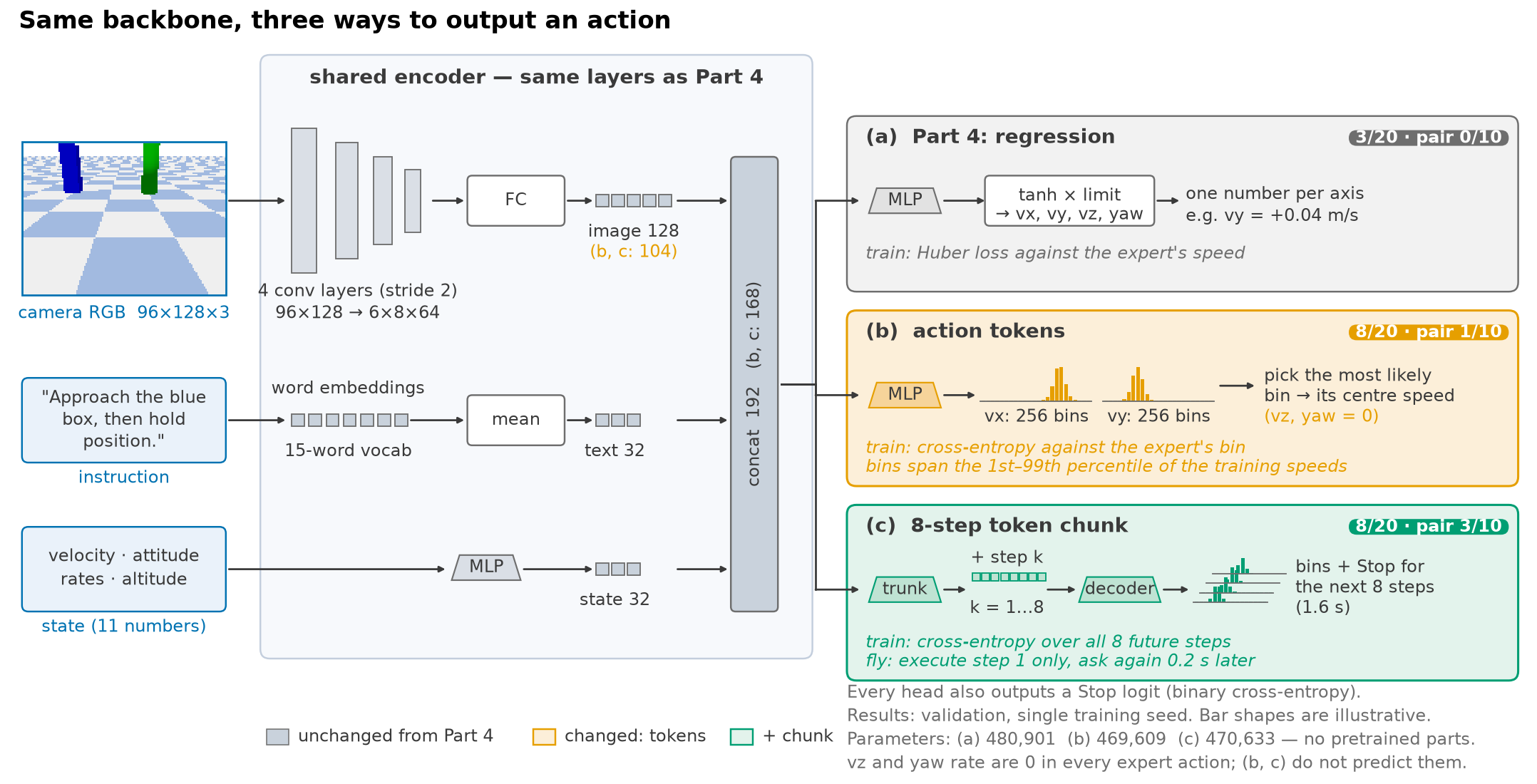
  <p>Large vision-language-action models (VLAs) don’t output actions the way that policy did. RT-2
and OpenVLA turn each action dimension into one of 256 <strong>tokens</strong> and train with cross-entropy.
OpenVLA-OFT and ACT predict a <strong>chunk</strong> of several future actions at once. This post borrows
those two output formats and nothing else. The encoders keep their design, the data and the
parameter budget stay as they were, and the image layer shrinks from 128 to 104 numbers to keep
the parameter counts comparable. There is still no pretrained model; that arrives in
Season 4.</p>

  <div class="vgrid">
  <figure class="pvid">
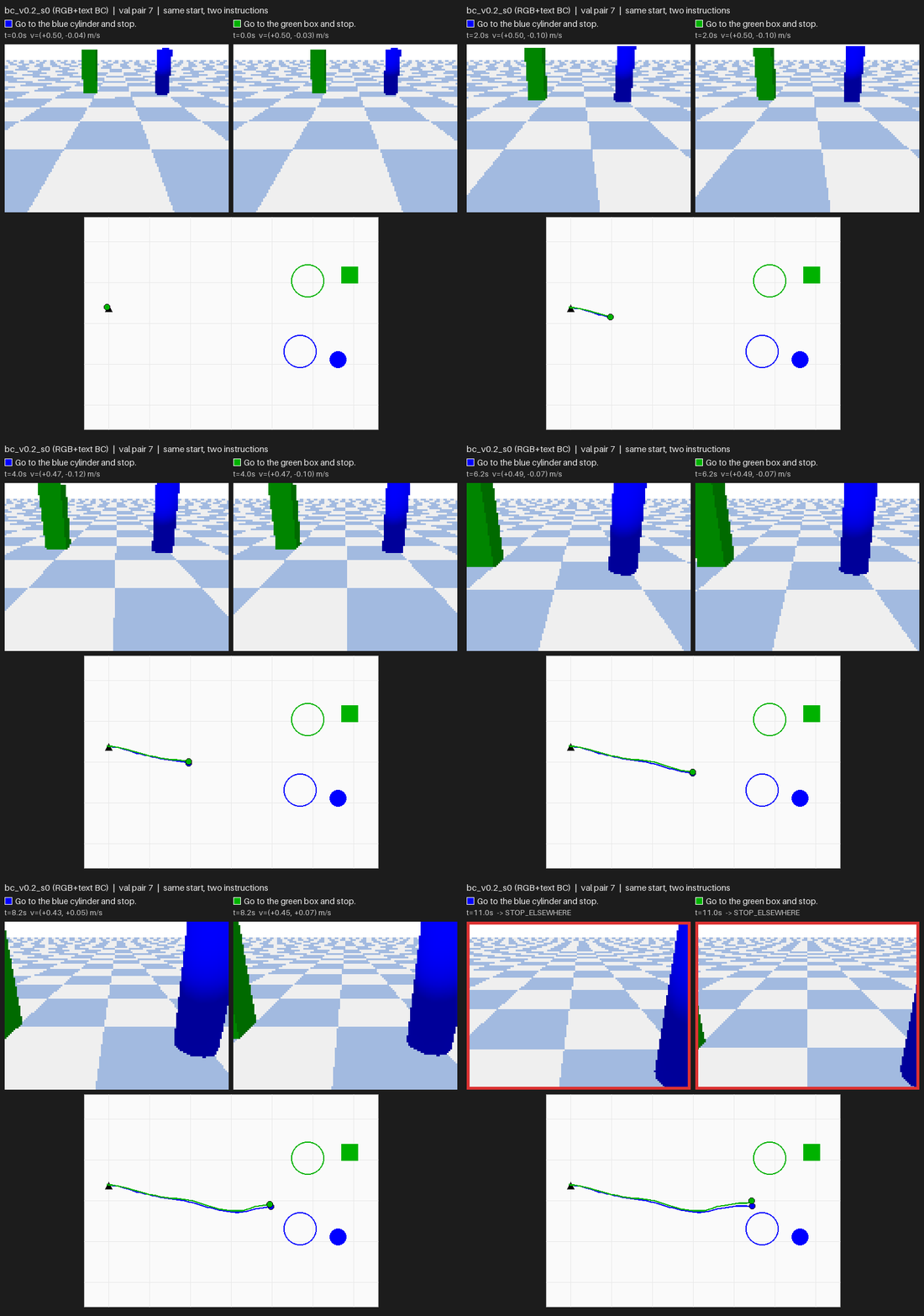
    <img src="/images/blog/drone-policy/05/pair7_bc_v0.2_s0.gif" alt="Part 4 policy on validation pair 7: both sentences end hovering between the two pillars" loading="lazy" />
    <figcaption><span class="pvid__label">Part 4 regression</span>Validation pair 7. Both flights stop away from both targets.</figcaption>
  </figure>
  <figure class="pvid">
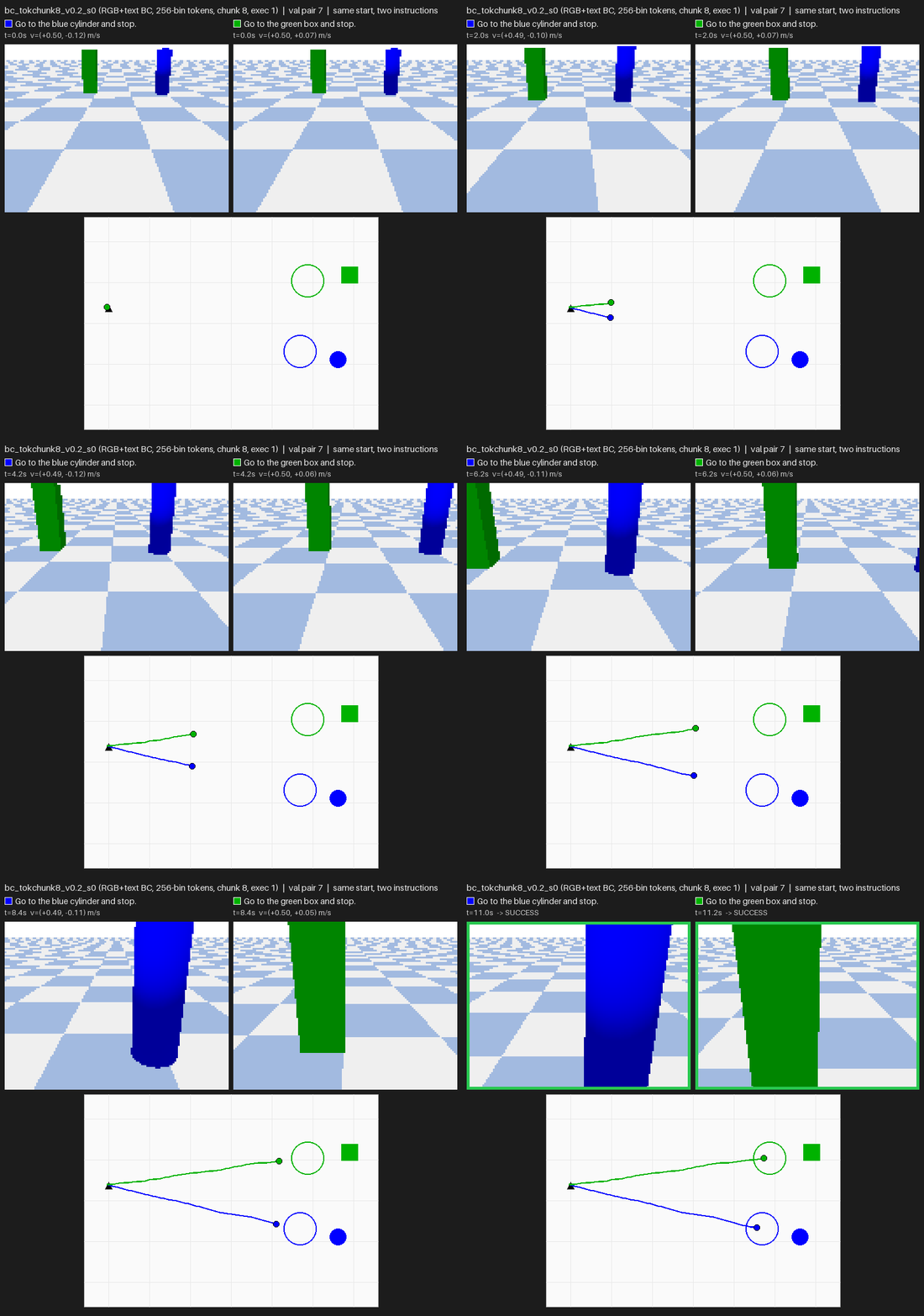
    <img src="/images/blog/drone-policy/05/pair7_bc_tokchunk8_v0.2_s0.gif" alt="Token chunk policy on validation pair 7: each sentence leads to its own pillar and both succeed" loading="lazy" />
    <figcaption><span class="pvid__label">Tokens + 8-step chunk</span>Same pair. Each sentence reaches its own target. (Pair 7 was chosen because this model succeeds on both sentences there; it does so on 3 of 10 pairs.)</figcaption>
  </figure>
</div>

  <h3 id="how-these-experiments-were-run">How these experiments were run</h3>

  <p>This post is a screen, not a final result, so the rules are lighter than Part 4’s and are
stated up front:</p>

  <ul>
    <li><strong>One training seed per model</strong> (seed 0). Part 4 used three.</li>
    <li>Validation only: 10 pairs, 20 flights. The test split is untouched.</li>
    <li>Same training recipe as Part 4: 20 epochs, keep the last, dataset v0.2 (100 training
pairs).</li>
    <li>Same size: every model has 80–100% of Part 4’s 480,901 parameters.</li>
  </ul>

  <p>Single-pair differences are noise at this sample size, so the post gives intervals where it
matters.</p>

  <h2 id="what-changed-only-the-output">1. What changed: only the output</h2>

  <figure class="pfig">
  <img src="/images/blog/drone-policy/05/01_method.png" alt="Diagram: camera, sentence and state go through the same encoder as Part 4 into a 168-number feature; three heads follow: (a) regression with tanh and Huber loss, (b) 256-bin tokens for vx and vy with cross-entropy and argmax decoding, (c) an 8-step chunk of tokens and Stop, decoded by a shared decoder with a learned step embedding" loading="lazy" />
  <figcaption><b>Same backbone, three ways to output an action.</b> (a) Part 4 regresses the speeds. (b) Action tokens: vx and vy each become 256 bins between the 1st and 99th percentile of the training speeds; the head is trained with cross-entropy and flies the centre of the most likely bin. (c) Chunk: one trunk plus a learned embedding per future step predicts bins and Stop for the next 8 steps (1.6 s). Only step 1 is flown, and the model is asked again 0.2 s later. The image layer shrinks from 128 to 104 numbers in (b) and (c) to keep the parameter counts comparable.</figcaption>
</figure>

  <p><strong>Tokens.</strong> For each axis, the training speeds are split into 256 equal bins between their
1st and 99th percentiles, as OpenVLA does. The head outputs 256 scores per axis instead of one
number. Training asks it to score the expert’s bin highest (cross-entropy); flying uses the
centre of its top bin
(<a href="https://github.com/Ckck12/Drone_VLA_Simulation/blob/7b9acb9551c3fb2d7392d9beaf32c249b6396630/dronevla/model.py#L145-L178">model code</a>):</p>

  <div class="language-python highlighter-rouge"><div class="highlight"><pre class="highlight"><code><span class="k">def</span> <span class="nf">set_action_bins</span><span class="p">(</span><span class="bp">self</span><span class="p">,</span> <span class="n">actions</span><span class="p">):</span>            <span class="c1"># actions: (N, 4) training speeds / limits
</span>    <span class="k">for</span> <span class="n">i</span><span class="p">,</span> <span class="n">d</span> <span class="ow">in</span> <span class="nb">enumerate</span><span class="p">((</span><span class="mi">0</span><span class="p">,</span> <span class="mi">1</span><span class="p">)):</span>             <span class="c1"># vx, vy; vz and yaw rate are always 0 here
</span>        <span class="n">lo</span><span class="p">,</span> <span class="n">hi</span> <span class="o">=</span> <span class="n">torch</span><span class="p">.</span><span class="n">quantile</span><span class="p">(</span><span class="n">actions</span><span class="p">[:,</span> <span class="n">d</span><span class="p">],</span> <span class="n">torch</span><span class="p">.</span><span class="n">tensor</span><span class="p">([</span><span class="mf">0.01</span><span class="p">,</span> <span class="mf">0.99</span><span class="p">]))</span>
        <span class="bp">self</span><span class="p">.</span><span class="n">bin_edges</span><span class="p">[</span><span class="n">i</span><span class="p">]</span> <span class="o">=</span> <span class="n">torch</span><span class="p">.</span><span class="n">linspace</span><span class="p">(</span><span class="n">lo</span><span class="p">,</span> <span class="n">hi</span><span class="p">,</span> <span class="mi">257</span><span class="p">)</span>

<span class="k">def</span> <span class="nf">tokenize</span><span class="p">(</span><span class="bp">self</span><span class="p">,</span> <span class="n">actions</span><span class="p">):</span>                   <span class="c1"># training target: which bin
</span>    <span class="k">return</span> <span class="n">torch</span><span class="p">.</span><span class="n">stack</span><span class="p">([</span><span class="n">torch</span><span class="p">.</span><span class="n">bucketize</span><span class="p">(</span><span class="n">actions</span><span class="p">[:,</span> <span class="n">d</span><span class="p">],</span> <span class="bp">self</span><span class="p">.</span><span class="n">bin_edges</span><span class="p">[</span><span class="n">i</span><span class="p">,</span> <span class="mi">1</span><span class="p">:</span><span class="o">-</span><span class="mi">1</span><span class="p">])</span>
                        <span class="k">for</span> <span class="n">i</span><span class="p">,</span> <span class="n">d</span> <span class="ow">in</span> <span class="nb">enumerate</span><span class="p">((</span><span class="mi">0</span><span class="p">,</span> <span class="mi">1</span><span class="p">))],</span> <span class="n">dim</span><span class="o">=</span><span class="mi">1</span><span class="p">)</span>

<span class="k">def</span> <span class="nf">detokenize</span><span class="p">(</span><span class="bp">self</span><span class="p">,</span> <span class="n">logits</span><span class="p">):</span>                  <span class="c1"># flying: the centre of the most likely bin
</span>    <span class="n">centres</span> <span class="o">=</span> <span class="p">(</span><span class="bp">self</span><span class="p">.</span><span class="n">bin_edges</span><span class="p">[:,</span> <span class="p">:</span><span class="o">-</span><span class="mi">1</span><span class="p">]</span> <span class="o">+</span> <span class="bp">self</span><span class="p">.</span><span class="n">bin_edges</span><span class="p">[:,</span> <span class="mi">1</span><span class="p">:])</span> <span class="o">/</span> <span class="mi">2</span>
    <span class="k">return</span> <span class="n">centres</span><span class="p">.</span><span class="n">gather</span><span class="p">(</span><span class="mi">1</span><span class="p">,</span> <span class="n">logits</span><span class="p">.</span><span class="n">argmax</span><span class="p">(</span><span class="o">-</span><span class="mi">1</span><span class="p">).</span><span class="n">T</span><span class="p">).</span><span class="n">T</span>
</code></pre></div>  </div>

  <p><strong>Chunks.</strong> The head predicts the next 8 steps at once. A shared trunk produces one feature, a
learned embedding for each step k is added, and one decoder turns each into bins plus a Stop
logit. The loss covers every future step that exists in the episode
(<a href="https://github.com/Ckck12/Drone_VLA_Simulation/blob/7b9acb9551c3fb2d7392d9beaf32c249b6396630/dronevla/train.py#L445-L456">training code</a>):</p>

  <div class="language-python highlighter-rouge"><div class="highlight"><pre class="highlight"><code><span class="n">logits_h</span><span class="p">,</span> <span class="n">stops_h</span> <span class="o">=</span> <span class="n">model</span><span class="p">.</span><span class="n">heads</span><span class="p">(</span><span class="n">feats</span><span class="p">)[</span><span class="mi">2</span><span class="p">]</span>          <span class="c1"># (B, 8, 2, 256), (B, 8)
</span><span class="n">target</span> <span class="o">=</span> <span class="n">model</span><span class="p">.</span><span class="n">tokenize</span><span class="p">(</span><span class="n">chunk_action</span><span class="p">[</span><span class="n">idx</span><span class="p">])</span>         <span class="c1"># expert's next 8 actions, as bins
</span><span class="n">ce</span> <span class="o">=</span> <span class="n">cross_entropy</span><span class="p">(</span><span class="n">logits_h</span><span class="p">.</span><span class="n">flatten</span><span class="p">(</span><span class="mi">0</span><span class="p">,</span> <span class="mi">2</span><span class="p">),</span> <span class="n">target</span><span class="p">.</span><span class="n">flatten</span><span class="p">(),</span> <span class="n">reduction</span><span class="o">=</span><span class="s">"none"</span><span class="p">)</span>
<span class="n">motion</span> <span class="o">=</span> <span class="p">(</span><span class="n">ce</span><span class="p">.</span><span class="n">view</span><span class="p">(</span><span class="n">B</span><span class="p">,</span> <span class="mi">8</span><span class="p">,</span> <span class="mi">2</span><span class="p">).</span><span class="n">mean</span><span class="p">(</span><span class="o">-</span><span class="mi">1</span><span class="p">)</span> <span class="o">*</span> <span class="n">mask</span><span class="p">).</span><span class="nb">sum</span><span class="p">()</span> <span class="o">/</span> <span class="n">mask</span><span class="p">.</span><span class="nb">sum</span><span class="p">()</span>   <span class="c1"># mask: steps past the end
</span><span class="n">stop</span> <span class="o">=</span> <span class="p">(</span><span class="n">bce</span><span class="p">(</span><span class="n">stops_h</span><span class="p">,</span> <span class="n">chunk_stop</span><span class="p">[</span><span class="n">idx</span><span class="p">])</span> <span class="o">*</span> <span class="n">mask</span><span class="p">).</span><span class="nb">sum</span><span class="p">()</span> <span class="o">/</span> <span class="n">mask</span><span class="p">.</span><span class="nb">sum</span><span class="p">()</span>
<span class="n">loss</span> <span class="o">=</span> <span class="n">motion</span> <span class="o">+</span> <span class="n">stop</span>
</code></pre></div>  </div>

  <p>The model is still asked every 0.2 s, and only the first step is flown. So the chunk changes
what the model is trained to predict, not how it flies. Section 3 also tests flying all 8
steps.</p>

  <h2 id="why-tokens-fly-better-averaging-versus-choosing">2. Why tokens fly better: averaging versus choosing</h2>

  <figure class="pfig">
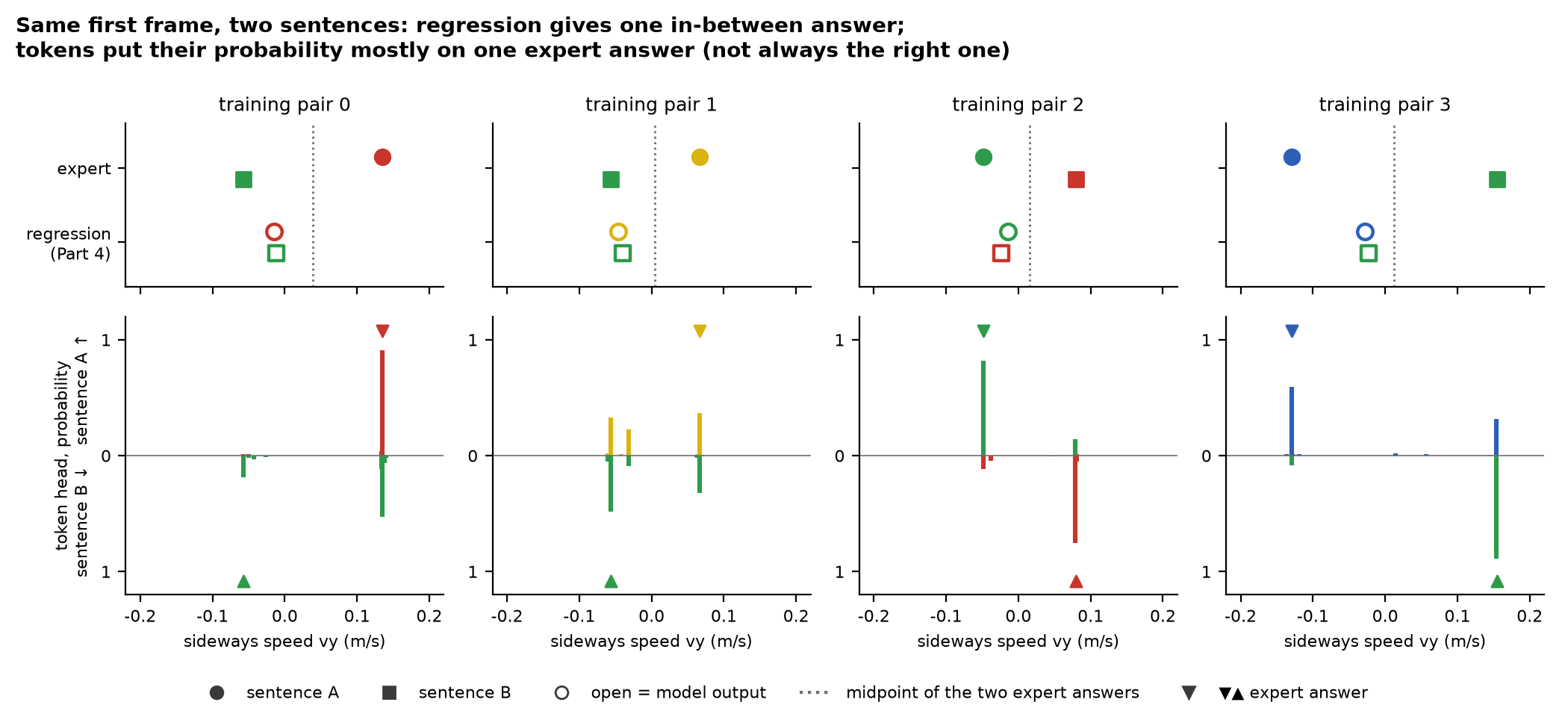
  <img src="/images/blog/drone-policy/05/02_midpoint_vs_pick.png" alt="Four training pairs. Top: the expert's two sideways speeds differ, while the regression model outputs nearly the same in-between value for both sentences. Bottom: the token model's probability over vy bins, sentence A upward and sentence B downward, concentrates on one expert answer; in pair 0 sentence B's mass sits mostly on the other sentence's answer" loading="lazy" />
  <figcaption>The first frame of training pairs 0–3, in order (not selected). Top: the expert's two answers (filled) and the regression output for each sentence (open). Bottom: the token head's probability over the vy bins; sentence A points up, sentence B down; triangles mark the expert's answers.</figcaption>
</figure>

  <p>On the first frame, the image and the state are identical for both sentences of a pair, and
their labels differ. Regression with a Huber loss is pulled toward the middle. Over all 200
training first frames, the Part 4 model is closer to its own sentence’s answer in exactly 100
and to the other sentence’s answer in the other 100. It sits on average 0.03 m/s from the
midpoint.</p>

  <p>A token head can’t place its answer between two bins it was never shown. <span class="key-line">It has to put its
probability <em>somewhere</em>, and it mostly puts it on one expert answer.</span> It picks the right one in
135 of 200 training first frames. Its median error is 0.0005 m/s, but its mean is 0.066 m/s,
because the wrong picks are a whole answer away. Training pair 0, sentence B in the figure is
such a wrong pick.</p>

  <p>In flight, a regression policy that starts in the middle tends to hover between the pillars.
A token policy commits to a side. That alone moves the numbers:</p>

  <table>
    <thead>
      <tr>
        <th>validation, 20 flights</th>
        <th style="text-align: right">Part 4 regression</th>
        <th style="text-align: right">256-bin tokens</th>
      </tr>
    </thead>
    <tbody>
      <tr>
        <td>success</td>
        <td style="text-align: right">3</td>
        <td style="text-align: right"><strong>8</strong></td>
      </tr>
      <tr>
        <td>median distance to the named target at the end</td>
        <td style="text-align: right">1.38 m</td>
        <td style="text-align: right"><strong>0.22 m</strong></td>
      </tr>
      <tr>
        <td>stopped away from both targets</td>
        <td style="text-align: right">8</td>
        <td style="text-align: right">3</td>
      </tr>
      <tr>
        <td>first frames where swapping the sentence changes vy by &gt; 0.02 m/s (of 200 training frames)</td>
        <td style="text-align: right">0</td>
        <td style="text-align: right">74</td>
      </tr>
    </tbody>
  </table>

  <p>This is the multimodality problem that Diffusion Policy and Behavior Transformers were built
for: when two answers are both right, a model that averages them is wrong for both. Here the
two answers come from two sentences rather than from two demonstrators, but the loss can’t tell
the difference on that frame.</p>

  <h2 id="results-the-chunk-is-the-best-end-to-end-model-so-far">3. Results: the chunk is the best end-to-end model so far</h2>

  <figure class="pfig">
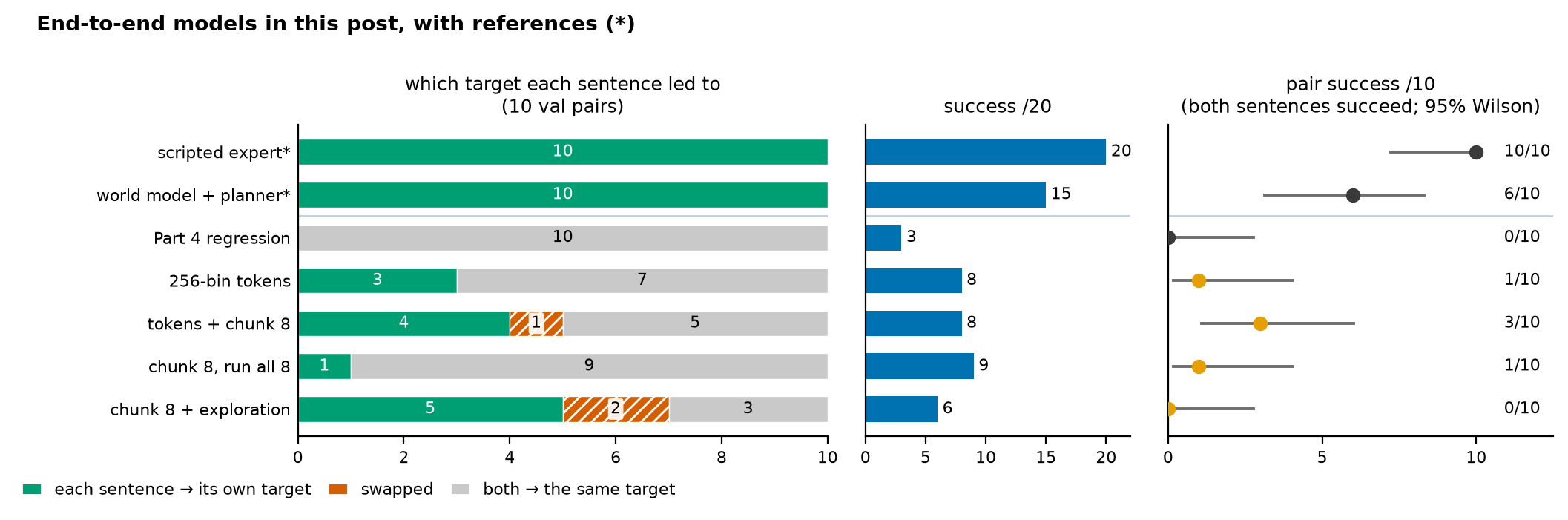
  <img src="/images/blog/drone-policy/05/04_scoreboard.png" alt="Scoreboard of seven models. Left: in how many of 10 validation pairs each sentence led to its own target: expert 10, world model planner 10, Part 4 regression 0, tokens 3, tokens with chunk 4 plus 1 swapped, chunk run open-loop 1, chunk with exploration 5 plus 2 swapped. Middle: success out of 20. Right: pair success out of 10 with 95% Wilson intervals: chunk 3 out of 10, others 0 or 1" loading="lazy" />
  <figcaption>Validation, one training seed. Left: which target each sentence's flight came closest to. Right: pair success, both sentences of a layout succeeding, with 95% Wilson intervals. * = reference. The world model + planner is Part 6.</figcaption>
</figure>

  <ul>
    <li>Tokens alone don’t make the drone choose. With 256 bins, 7 of 10 pairs still go to the
same pillar for both sentences. The token head commits, but on most first frames it commits
to whatever the image suggests.</li>
    <li><span class="key-line">Tokens + an 8-step chunk is the best end-to-end model: 4 pairs split the right way, and
pair success is <strong>3/10</strong>.</span> One plausible reason: predicting 1.6 s ahead forces the
representation to encode where the flight is going, not just the next step. Its 95% interval
is 0.11–0.60, which overlaps Part 4’s 0/10 (0–0.28). With one seed and ten pairs this is a
lead, not a proven gain.</li>
    <li>Flying all 8 predicted steps before asking again flies about as well (9/20) but listens
less (1 correct pair). My guess: re-asking every step lets each new image correct the
course, and flying 8 steps blind gives that up.</li>
  </ul>

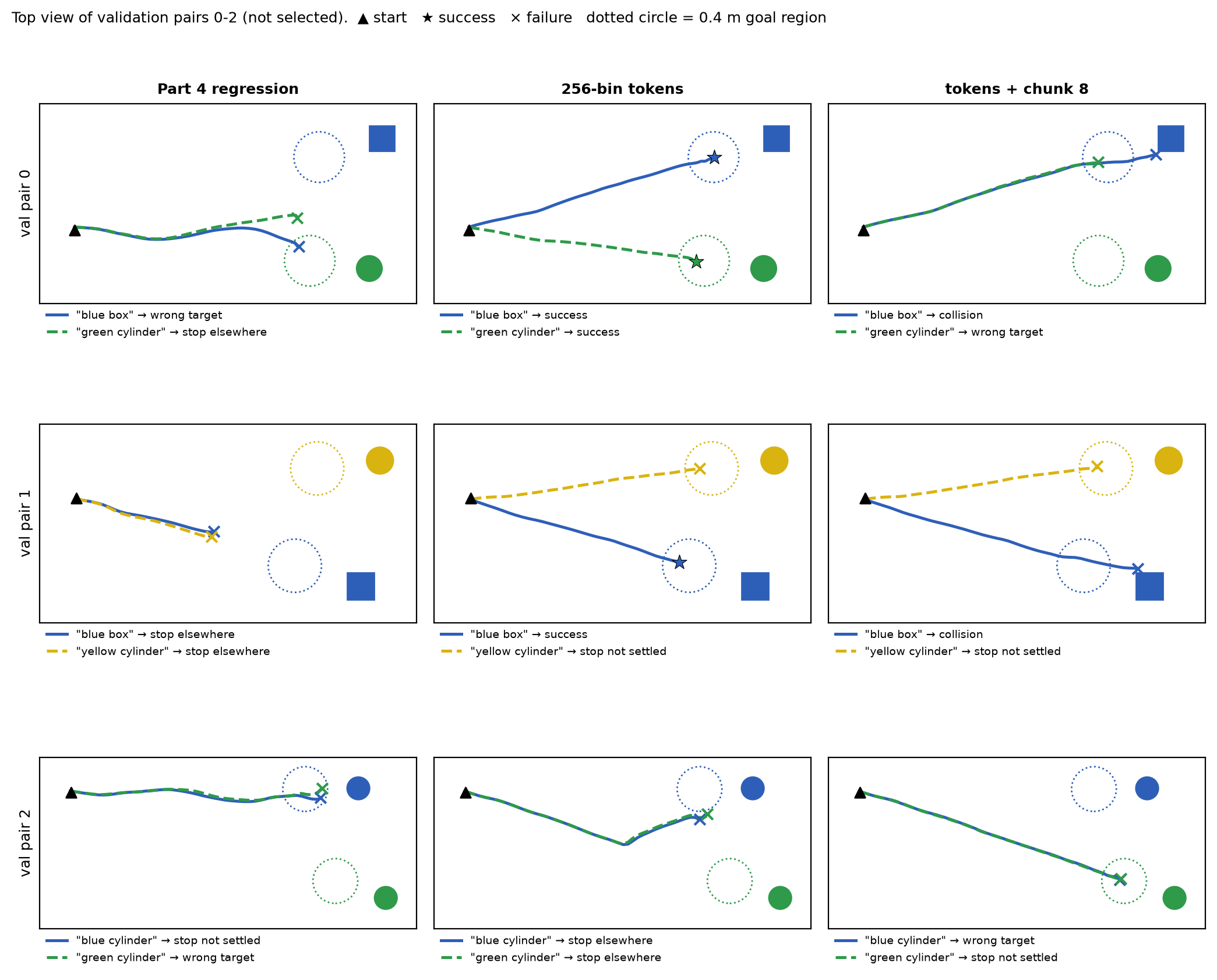
  <p>The first three validation pairs, unselected, show how far from solved this is:</p>

  <figure class="pfig">
  <img src="/images/blog/drone-policy/05/05_paths.png" alt="Top views of validation pairs 0 to 2 for three models. The Part 4 policy's two paths overlap and stop short; the token policy splits pair 0 and 1 correctly; the chunk policy sends both sentences toward one pillar in pairs 0 and 2" loading="lazy" />
  <figcaption>Validation pairs 0–2 (the first three, not selected). Colour = the target the sentence named; solid and dashed = the two sentences. On these three pairs the chunk model looks <i>worse</i> than tokens alone; across all ten it splits more pairs correctly (4 vs 3) and completes more (3 vs 1). Ten pairs is a small sample, and individual pairs disagree with the total.</figcaption>
</figure>

  <h2 id="more-states-it-reacts-then-it-cant-stop">4. More states: it reacts, then it can’t stop</h2>

  <p>Part 4’s diagnosis was that the words decide only on frames the policy rarely sees. Part 6’s
world model was trained on three times as many states: expert flights plus <em>exploration</em>
flights (noisy expert, random walks, overshoots past the goal). So I gave the chunk policy the
same 400 exploration flights (19,896 states), each state labelled with what the expert would do from there toward
a target picked at random for that episode, with the matching sentence. For exploration rows
only the current step is a label; their future chunk steps are masked, because a random walk
isn’t the expert’s plan.</p>

  <figure class="pfig">
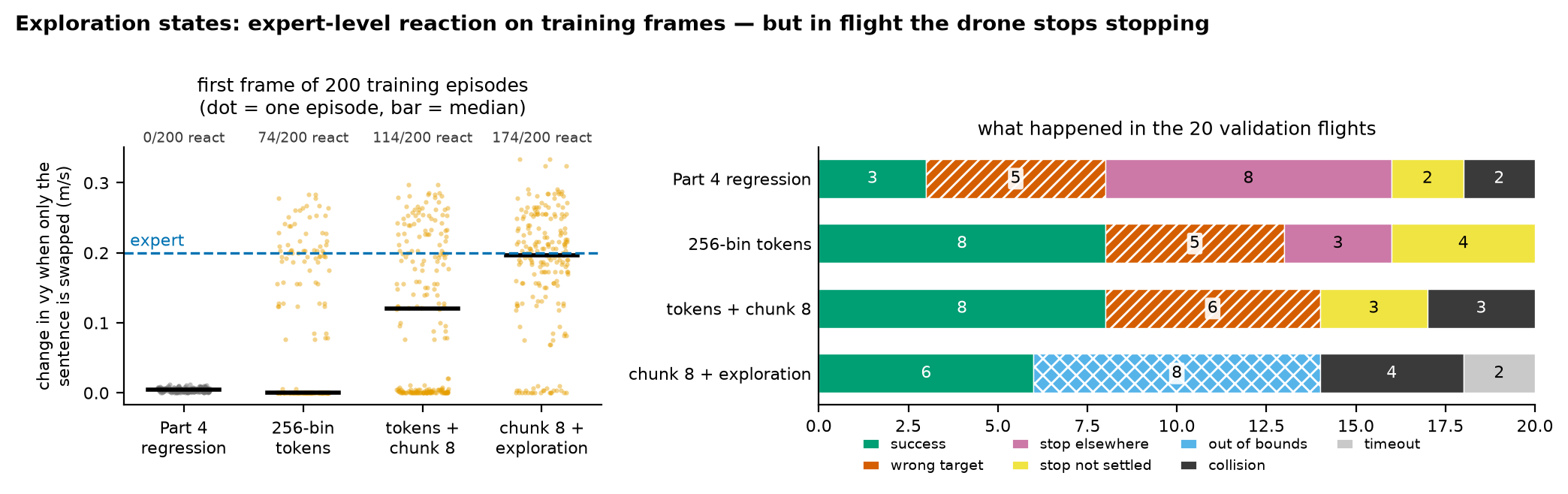
  <img src="/images/blog/drone-policy/05/06_reaction_vs_stop.png" alt="Left: on the first frames of 200 training episodes, swapping the sentence changes vy by about 0 for Part 4, by a median near 0 for tokens, 0.12 m/s for the chunk, and 0.196 m/s with exploration states, close to the expert's 0.200. Right: closed-loop outcomes: with exploration states, 6 successes, 8 out of bounds, 4 collisions, 2 timeouts" loading="lazy" />
  <figcaption>Left: the open-loop swap test from Part 4 on the 200 training first frames. Each dot is one frame; the bar is the median; the dashed line is the expert. Right: what happened in the 20 validation flights.</figcaption>
</figure>

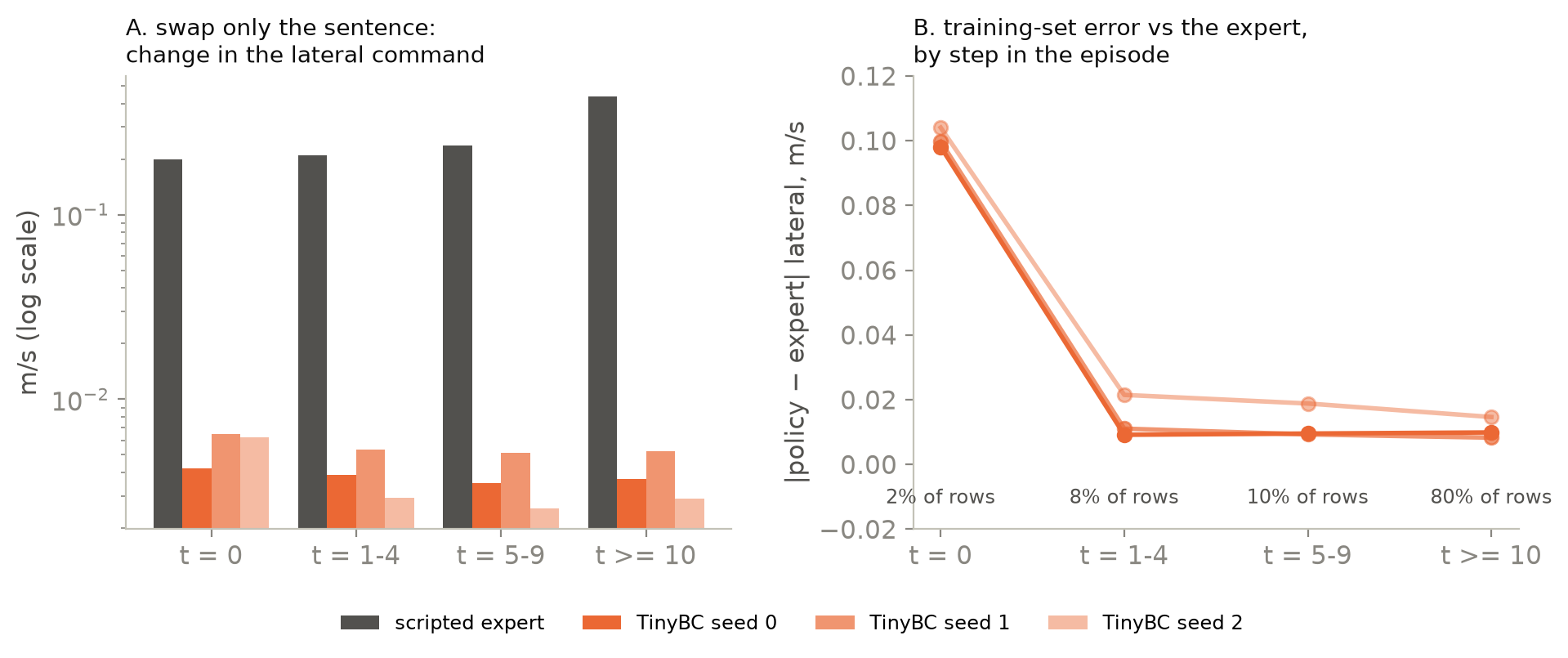
  <p>On training frames, the swap test now looks like the expert. Changing only the sentence moves
the first command by a median 0.196 m/s (the expert: 0.200), and it moves in the right
direction in 180 of 200 frames. In closed loop it splits 5 of 10 pairs the right way, the most
of any end-to-end model (cross-attention + counterfactual relabelling also reaches 5). But <strong>8 of 20 flights overshoot the target and leave the room</strong>, success falls to 6, and
pair success is 0.</p>

  <p>I didn’t separate the causes. Three candidates:</p>

  <ul>
    <li>Stop is diluted. The exploration rows contain only 6 Stop examples, so Stop becomes a
rarer event in the training mix.</li>
    <li>The bins got coarser. The bin range comes from the training speeds, and exploration
widens the vy range from about ±0.17 to ±0.42 m/s. Each bin is 2.4 times wider, which is
coarse near the goal.</li>
    <li>Recovery labels near the goal. Overshoot flights teach large corrections exactly where
the expert usually slows down.</li>
  </ul>

  <p><span class="key-line">With exploration states the first-frame reaction matched the expert’s on training
frames (median 0.196 vs 0.200 m/s), but pair success fell from 3/10 to 0/10.</span> The experiment
changes what the policy reacts to without changing how it stops. That split,
choosing versus flying, is what Part 6 builds in on purpose.</p>

  <h2 id="what-this-part-does-not-show">What this part does not show</h2>

  <ul>
    <li><strong>One training seed and ten pairs.</strong> Wilson 95% for 3/10 is 0.11–0.60. Single-pair
differences, and the bin-count comparison in the appendix, are within noise.</li>
    <li>Validation was used both to screen models and to set the Stop threshold, so these are not
generalisation estimates. The original test seeds were seen in an earlier round; final
numbers need a fresh test split.</li>
    <li>The swap test runs on training frames. Near-zero token errors there may partly be
memorisation.</li>
    <li>The language is easy. The two pillars always differ in colour, so one word decides.</li>
    <li>It is not a VLA. Only the output format is borrowed; there is no pretrained vision or
language model.</li>
  </ul>

  <h2 id="next">Next</h2>

  <p>No end-to-end model splits more than 5 of 10 pairs the right way, and the best one completes 3. Part 6 tries the opposite design: a model that
perceives where <em>every</em> target is without reading the words, a tiny selector that lets the words
pick one, and a planner that flies there.</p>

  <h2 id="appendix">Appendix</h2>

  <details>
<summary>A. Everything else I tried (validation, one seed)</summary>

<table>
<thead><tr><th>model</th><th>params</th><th>correct / swapped / same-target pairs</th><th>success /20</th><th>pair success /10</th></tr></thead>
<tbody>
<tr><td>Part 4 regression</td><td>480,901</td><td>0 / 0 / 10</td><td>3</td><td>0</td></tr>
<tr><td>+ counterfactual relabelling</td><td>480,901</td><td>2 / 3 / 5</td><td>0</td><td>0</td></tr>
<tr><td>+ counterfactual + FiLM</td><td>492,517</td><td>4 / 3 / 3</td><td>0</td><td>0</td></tr>
<tr><td>+ target-position aux head</td><td>493,773</td><td>0 / 0 / 10</td><td>8</td><td>0</td></tr>
<tr><td>+ cross-attention</td><td>420,997</td><td>0 / 0 / 10</td><td>0</td><td>0</td></tr>
<tr><td>+ cross-attention + counterfactual</td><td>420,997</td><td>5 / 3 / 2</td><td>0</td><td>0</td></tr>
<tr><td>256-bin tokens</td><td>469,609</td><td>3 / 0 / 7</td><td>8</td><td>1</td></tr>
<tr><td>64-bin tokens</td><td>471,289</td><td>1 / 1 / 8</td><td>7</td><td>1</td></tr>
<tr><td>1024-bin tokens</td><td>475,609</td><td>2 / 0 / 8</td><td>4</td><td>0</td></tr>
<tr><td>256-bin + paired goal loss</td><td>480,555</td><td>2 / 0 / 8</td><td>7</td><td>0</td></tr>
<tr><td>256-bin + cross-attention</td><td>477,289</td><td>1 / 0 / 9</td><td>9</td><td>0</td></tr>
<tr><td><b>256-bin + chunk 8, fly step 1</b></td><td>470,633</td><td>4 / 1 / 5</td><td>8</td><td><b>3</b></td></tr>
<tr><td>256-bin + chunk 8, fly all 8</td><td>470,633</td><td>1 / 0 / 9</td><td>9</td><td>1</td></tr>
<tr><td>chunk 8 + exploration states</td><td>470,633</td><td>5 / 2 / 3</td><td>6</td><td>0</td></tr>
<tr><td>chunk 8 + exploration + aux head</td><td>468,909</td><td>5 / 2 / 3</td><td>2</td><td>0</td></tr>
</tbody>
</table>

<p>Notes:</p>
<ul>
<li>Counterfactual relabelling adds, for every training state, the expert's action toward the <i>other</i> target with the other sentence. The words start to matter, but correct and swapped pairs are about equal, and flying collapses. Part of that is a confound: the added rows contain no Stop positives, while the Stop loss weight stayed at its original value.</li>
<li>Aux head: an extra output trained to predict where every colour's target is, from the simulator's true positions (the same labels Part 6's world model gets). It flies better (8/20) and listens no more.</li>
<li>FiLM and cross-attention let the sentence modulate the image features (FiLM scales and shifts the convolution channels; cross-attention uses the sentence as a query over 6 × 8 image patches). The FiLM row and the aux-head row predate the 80–100% parameter rule (FiLM 102%, aux 103%).</li>
<li>Bin count: 64, 256 and 1024 bins are within one seed's noise of each other.</li>
</ul>

<figure class="pfig">
  <img src="/images/blog/drone-policy/05/03_attention.png" alt="Attention maps on the first frames of validation pairs 0 and 1: the regression model attends to floor patches, nearly the same for both sentences; the token model attends along the top of the image near the pillars, also nearly the same for both sentences" loading="lazy" />
  <figcaption>Where the cross-attention models look, on the shared first frame of validation pairs 0 and 1, for each sentence (head-averaged weights, normalised per map). Both maps hardly change with the sentence. Attention weights are not a causal explanation (Jain &amp; Wallace, 2019); the swap test in section 4 is the measurement that counts.</figcaption>
</figure>
</details>

  <details>
<summary>B. Reproduce</summary>

<p>Commit <a href="https://github.com/Ckck12/Drone_VLA_Simulation/tree/7b9acb9551c3fb2d7392d9beaf32c249b6396630"><code>7b9acb9</code></a>, dataset v0.2 from Part 3, exploration flights from <code>python -m dronevla.explore</code>.</p>

<pre><code>python -m dronevla.train --data data/v0.2 --epochs 20 --select last --seed 0 \
    --action-bins 256 --img-dim 104 --out runs/bc_tok256_v0.2_s0
python -m dronevla.train --data data/v0.2 --epochs 20 --select last --seed 0 \
    --action-bins 256 --img-dim 104 --chunk 8 --out runs/bc_tokchunk8_v0.2_s0
python -m dronevla.train --data data/v0.2 --epochs 20 --select last --seed 0 \
    --action-bins 256 --img-dim 104 --chunk 8 --explore data/explore_v0.2/train \
    --out runs/bc_tokchunk8_explore_v0.2_s0
bash scripts/run_tokens_s0.sh &amp;&amp; bash scripts/run_tokens2_s0.sh   # evaluate (and train if missing)
bash scripts/run_explore_s0.sh
python scripts/season2_summary.py                 # every number in this post (needs all run_*_s0.sh)
python scripts/figures/blog05.py                  # figures
bash scripts/figures/render_blog05_videos.sh      # GIFs
</code></pre>
<p>All screening runs: <code>scripts/run_*_s0.sh</code>. Full write-up: <code>docs/season2_experiments.md</code>.</p>
</details>

  <h3 id="references-what-i-took-from-each">References: what I took from each</h3>

  <ul>
    <li><a href="https://arxiv.org/abs/2406.09246">OpenVLA (Kim et al., 2024)</a> and
<a href="https://arxiv.org/abs/2307.15818">RT-2 (Brohan et al., 2023)</a> discretise each action
dimension into 256 bins and predict them as tokens. → The token head and its 1st–99th
percentile bins.</li>
    <li><a href="https://arxiv.org/abs/2502.19645">OpenVLA-OFT (Kim, Finn and Liang, 2025)</a> and
<a href="https://arxiv.org/abs/2304.13705">ACT (Zhao et al., 2023)</a> predict chunks of future actions.
→ The 8-step chunk. Here only the first step is flown.</li>
    <li><a href="https://arxiv.org/abs/2303.04137">Diffusion Policy (Chi et al., 2023)</a> and
<a href="https://arxiv.org/abs/2206.11251">Behavior Transformers (Shafiullah et al., 2022)</a> show that
averaging a multimodal action distribution fails. → The explanation for section 2.</li>
    <li><a href="https://arxiv.org/abs/2403.03950">Stop Regressing (Farebrother et al., 2024)</a> finds
classification losses train value networks better than regression. → Why switching the loss
alone was worth testing.</li>
    <li><a href="https://arxiv.org/abs/1905.11979">Causal Confusion in Imitation Learning (de Haan et al., 2019)</a>
describes policies that latch onto the wrong cue. → The image shortcut from Part 4, which
tokens don’t remove.</li>
  </ul>

  <h2 id="summary-star">Summary (STAR)</h2>

  <div class="star-summary">

    <h3 class="star-h"><span class="star-tag">S</span>Situation</h3>

    <p>In Part 4 the regression policy answered with the average of the two sentences’ answers on the
first frame, the only frame where the words decide (2% of the training rows). On validation it
split 0 of 10 pairs and succeeded in 3 of 20 flights.</p>

    <h3 class="star-h"><span class="star-tag">T</span>Task</h3>

    <p>Find out whether borrowing only the output formats of VLAs, action tokens and action chunks,
fixes this with the same encoder design, the same dataset v0.2, 80–100% of Part 4’s 480,901
parameters and no pretrained model. The image projection shrank from 128 to 104 outputs to keep
the parameter counts comparable. This was a screen: one training seed, validation only.</p>

    <h3 class="star-h"><span class="star-tag">A</span>Action</h3>

    <p>I replaced the regression head with 256 bins per axis trained with cross-entropy, then added an
8-step (1.6 s) chunk head that is flown one step at a time. I also tried flying all 8 steps and
adding 400 exploration flights (19,896 states), and measured each model with the sentence swap
test and 20 closed-loop flights, with Wilson intervals.</p>

    <h3 class="star-h"><span class="star-tag">R</span>Result</h3>

    <p>Tokens raised success from 3/20 to 8/20 and cut the median final distance from 1.38 m to
0.22 m. Tokens plus the chunk split 4 of 10 pairs the right way, with pair success 3/10 (95%
interval 0.11–0.60, overlapping Part 4’s 0–0.28): a lead, not a proven gain. Exploration
states made the swap reaction match the expert (0.196 vs 0.200 m/s), but 8 of 20 flights
overshot and left the room, and pair success fell to 0.</p>

  </div>

</div>

<div class="lang-ko" lang="ko">

  <p>4편은 진단으로 끝났습니다. 말이 의미를 갖는 프레임은 에피소드마다 하나, 첫 프레임뿐이고
학습 행으로 치면 2%입니다. 그 프레임에서 정책은 두 문장 정답의 <em>평균</em>을 답했습니다. 나머지
프레임에서는 어디로 갈지 이미지가 이미 알려 주고 있었습니다.</p>

  <p>대형 비전-언어-행동 모델(vision-language-action model, VLA)은 그 정책처럼 행동을 출력하지
않습니다. RT-2와 OpenVLA는 행동의 각 차원을 256개 <strong>토큰</strong> 중 하나로 바꾸고 cross-entropy로
학습합니다. OpenVLA-OFT와 ACT는 앞으로 할 행동 여러 개를 한 덩어리, 곧 <strong>청크</strong>로 한 번에
예측합니다. 이번 글은 이 두 출력 형식만 빌려 옵니다. 인코더의 기본 구조와 데이터, 파라미터
예산은 그대로 두고 파라미터 수를 비슷하게 맞추려고 이미지 층의 출력만 숫자 128개에서 104개로
줄입니다. 사전학습 모델은 이번에도 쓰지 않습니다. 그건 시즌 4의 몫입니다.</p>

  <div class="vgrid">
  <figure class="pvid">
    <img src="/images/blog/drone-policy/05/pair7_bc_v0.2_s0.gif" alt="4편 정책의 검증 쌍 7 비행: 두 문장 모두 두 기둥 사이에 떠 있는 채로 끝납니다" loading="lazy" />
    <figcaption><span class="pvid__label">4편 회귀</span>검증 쌍(pair) 7. 두 비행 모두 어느 목표와도 떨어진 곳에서 멈춥니다.</figcaption>
  </figure>
  <figure class="pvid">
    <img src="/images/blog/drone-policy/05/pair7_bc_tokchunk8_v0.2_s0.gif" alt="토큰 청크 정책의 검증 쌍 7 비행: 문장마다 자기 기둥으로 가서 둘 다 성공합니다" loading="lazy" />
    <figcaption><span class="pvid__label">토큰 + 8스텝 청크</span>같은 쌍입니다. 문장마다 자기 목표에 도착합니다. (쌍 7은 이 모델이 두 문장 모두 성공하는 쌍이라서 골랐습니다. 그런 쌍은 10개 중 3개입니다.)</figcaption>
  </figure>
</div>

  <h3 id="section">실험 방식</h3>

  <p>이번 글은 최종 결과가 아니라 후보를 걸러 보는 스크리닝입니다. 그래서 규칙을 4편보다 가볍게
잡았고 그 내용을 먼저 밝혀 둡니다.</p>

  <ul>
    <li><strong>모델마다 학습 시드 하나</strong>(시드 0). 4편은 세 개를 썼습니다.</li>
    <li>검증 데이터만 씁니다. 10쌍, 비행 20회입니다. 테스트 분할은 건드리지 않았습니다.</li>
    <li>학습 방식은 4편과 같습니다. 20 epoch, 마지막 모델 사용, 데이터셋 v0.2(학습 쌍 100개).</li>
    <li>크기도 맞췄습니다. 모든 모델의 파라미터 수는 4편 480,901개의 80–100%입니다.</li>
  </ul>

  <p>이 정도 표본에서는 쌍 하나 차이가 잡음에 묻힙니다. 그래서 중요한 곳에는 구간을 같이 적었습니다.</p>

  <h2 id="section-1">1. 바뀐 것은 출력뿐</h2>

  <figure class="pfig">
  <img src="/images/blog/drone-policy/05/01_method.png" alt="도식: 카메라, 문장, 상태가 4편과 같은 인코더를 거쳐 숫자 168개짜리 특징이 되고 그 뒤에 헤드 세 가지가 붙습니다. (a) tanh와 Huber 손실을 쓰는 회귀, (b) vx와 vy를 256개 구간 토큰으로 바꿔 cross-entropy로 학습하고 argmax로 디코딩, (c) 토큰과 Stop을 8스텝 청크로 예측하고 학습된 스텝 임베딩과 공유 디코더로 디코딩" loading="lazy" />
  <figcaption><b>같은 백본, 행동을 내는 세 가지 방식.</b> (a) 4편은 속도를 회귀합니다. (b) 액션 토큰: vx와 vy를 각각 학습 속도의 1번째와 99번째 백분위수 사이에서 256개 구간(bin)으로 나눕니다. 헤드는 cross-entropy로 학습합니다. 비행할 때는 확률이 가장 높은 구간의 중심값으로 납니다. (c) 청크: 공유 네트워크(trunk)에 미래 스텝마다 학습된 임베딩을 더해 다음 8스텝(1.6 s)의 구간과 Stop을 예측합니다. 실제로 나는 것은 1번째 스텝뿐이고 0.2 s 뒤에 모델에 다시 묻습니다. 파라미터 수를 비슷하게 맞추려고 (b)와 (c)에서는 이미지 층의 출력을 숫자 128개에서 104개로 줄였습니다.</figcaption>
</figure>

  <p><strong>토큰.</strong> 축마다 학습 속도의 1번째와 99번째 백분위수 사이를 같은 폭의 구간 256개로 나눕니다.
OpenVLA와 같은 방식입니다. 헤드는 숫자 하나 대신 축마다 점수 256개를 냅니다. 학습에서는
전문가 행동이 들어 있는 구간에 가장 높은 점수를 주도록 가르칩니다(cross-entropy). 비행할 때는
점수가 가장 높은 구간의 중심값을 씁니다
(<a href="https://github.com/Ckck12/Drone_VLA_Simulation/blob/7b9acb9551c3fb2d7392d9beaf32c249b6396630/dronevla/model.py#L145-L178">모델 코드</a>).</p>

  <div class="language-python highlighter-rouge"><div class="highlight"><pre class="highlight"><code><span class="k">def</span> <span class="nf">set_action_bins</span><span class="p">(</span><span class="bp">self</span><span class="p">,</span> <span class="n">actions</span><span class="p">):</span>            <span class="c1"># actions: (N, 4) training speeds / limits
</span>    <span class="k">for</span> <span class="n">i</span><span class="p">,</span> <span class="n">d</span> <span class="ow">in</span> <span class="nb">enumerate</span><span class="p">((</span><span class="mi">0</span><span class="p">,</span> <span class="mi">1</span><span class="p">)):</span>             <span class="c1"># vx, vy; vz and yaw rate are always 0 here
</span>        <span class="n">lo</span><span class="p">,</span> <span class="n">hi</span> <span class="o">=</span> <span class="n">torch</span><span class="p">.</span><span class="n">quantile</span><span class="p">(</span><span class="n">actions</span><span class="p">[:,</span> <span class="n">d</span><span class="p">],</span> <span class="n">torch</span><span class="p">.</span><span class="n">tensor</span><span class="p">([</span><span class="mf">0.01</span><span class="p">,</span> <span class="mf">0.99</span><span class="p">]))</span>
        <span class="bp">self</span><span class="p">.</span><span class="n">bin_edges</span><span class="p">[</span><span class="n">i</span><span class="p">]</span> <span class="o">=</span> <span class="n">torch</span><span class="p">.</span><span class="n">linspace</span><span class="p">(</span><span class="n">lo</span><span class="p">,</span> <span class="n">hi</span><span class="p">,</span> <span class="mi">257</span><span class="p">)</span>

<span class="k">def</span> <span class="nf">tokenize</span><span class="p">(</span><span class="bp">self</span><span class="p">,</span> <span class="n">actions</span><span class="p">):</span>                   <span class="c1"># training target: which bin
</span>    <span class="k">return</span> <span class="n">torch</span><span class="p">.</span><span class="n">stack</span><span class="p">([</span><span class="n">torch</span><span class="p">.</span><span class="n">bucketize</span><span class="p">(</span><span class="n">actions</span><span class="p">[:,</span> <span class="n">d</span><span class="p">],</span> <span class="bp">self</span><span class="p">.</span><span class="n">bin_edges</span><span class="p">[</span><span class="n">i</span><span class="p">,</span> <span class="mi">1</span><span class="p">:</span><span class="o">-</span><span class="mi">1</span><span class="p">])</span>
                        <span class="k">for</span> <span class="n">i</span><span class="p">,</span> <span class="n">d</span> <span class="ow">in</span> <span class="nb">enumerate</span><span class="p">((</span><span class="mi">0</span><span class="p">,</span> <span class="mi">1</span><span class="p">))],</span> <span class="n">dim</span><span class="o">=</span><span class="mi">1</span><span class="p">)</span>

<span class="k">def</span> <span class="nf">detokenize</span><span class="p">(</span><span class="bp">self</span><span class="p">,</span> <span class="n">logits</span><span class="p">):</span>                  <span class="c1"># flying: the centre of the most likely bin
</span>    <span class="n">centres</span> <span class="o">=</span> <span class="p">(</span><span class="bp">self</span><span class="p">.</span><span class="n">bin_edges</span><span class="p">[:,</span> <span class="p">:</span><span class="o">-</span><span class="mi">1</span><span class="p">]</span> <span class="o">+</span> <span class="bp">self</span><span class="p">.</span><span class="n">bin_edges</span><span class="p">[:,</span> <span class="mi">1</span><span class="p">:])</span> <span class="o">/</span> <span class="mi">2</span>
    <span class="k">return</span> <span class="n">centres</span><span class="p">.</span><span class="n">gather</span><span class="p">(</span><span class="mi">1</span><span class="p">,</span> <span class="n">logits</span><span class="p">.</span><span class="n">argmax</span><span class="p">(</span><span class="o">-</span><span class="mi">1</span><span class="p">).</span><span class="n">T</span><span class="p">).</span><span class="n">T</span>
</code></pre></div>  </div>

  <p><strong>청크.</strong> 헤드가 다음 8스텝을 한 번에 예측합니다. 공유 네트워크가 특징을 추출하고 스텝 k마다
학습된 임베딩을 더합니다. 그러면 디코더 하나가 각각을 구간과 Stop 로짓으로 바꿉니다. 손실에는 에피소드
안에 실제로 남아 있는 미래 스텝이 모두 들어갑니다
(<a href="https://github.com/Ckck12/Drone_VLA_Simulation/blob/7b9acb9551c3fb2d7392d9beaf32c249b6396630/dronevla/train.py#L445-L456">학습 코드</a>).</p>

  <div class="language-python highlighter-rouge"><div class="highlight"><pre class="highlight"><code><span class="n">logits_h</span><span class="p">,</span> <span class="n">stops_h</span> <span class="o">=</span> <span class="n">model</span><span class="p">.</span><span class="n">heads</span><span class="p">(</span><span class="n">feats</span><span class="p">)[</span><span class="mi">2</span><span class="p">]</span>          <span class="c1"># (B, 8, 2, 256), (B, 8)
</span><span class="n">target</span> <span class="o">=</span> <span class="n">model</span><span class="p">.</span><span class="n">tokenize</span><span class="p">(</span><span class="n">chunk_action</span><span class="p">[</span><span class="n">idx</span><span class="p">])</span>         <span class="c1"># expert's next 8 actions, as bins
</span><span class="n">ce</span> <span class="o">=</span> <span class="n">cross_entropy</span><span class="p">(</span><span class="n">logits_h</span><span class="p">.</span><span class="n">flatten</span><span class="p">(</span><span class="mi">0</span><span class="p">,</span> <span class="mi">2</span><span class="p">),</span> <span class="n">target</span><span class="p">.</span><span class="n">flatten</span><span class="p">(),</span> <span class="n">reduction</span><span class="o">=</span><span class="s">"none"</span><span class="p">)</span>
<span class="n">motion</span> <span class="o">=</span> <span class="p">(</span><span class="n">ce</span><span class="p">.</span><span class="n">view</span><span class="p">(</span><span class="n">B</span><span class="p">,</span> <span class="mi">8</span><span class="p">,</span> <span class="mi">2</span><span class="p">).</span><span class="n">mean</span><span class="p">(</span><span class="o">-</span><span class="mi">1</span><span class="p">)</span> <span class="o">*</span> <span class="n">mask</span><span class="p">).</span><span class="nb">sum</span><span class="p">()</span> <span class="o">/</span> <span class="n">mask</span><span class="p">.</span><span class="nb">sum</span><span class="p">()</span>   <span class="c1"># mask: steps past the end
</span><span class="n">stop</span> <span class="o">=</span> <span class="p">(</span><span class="n">bce</span><span class="p">(</span><span class="n">stops_h</span><span class="p">,</span> <span class="n">chunk_stop</span><span class="p">[</span><span class="n">idx</span><span class="p">])</span> <span class="o">*</span> <span class="n">mask</span><span class="p">).</span><span class="nb">sum</span><span class="p">()</span> <span class="o">/</span> <span class="n">mask</span><span class="p">.</span><span class="nb">sum</span><span class="p">()</span>
<span class="n">loss</span> <span class="o">=</span> <span class="n">motion</span> <span class="o">+</span> <span class="n">stop</span>
</code></pre></div>  </div>

  <p>모델에는 여전히 0.2 s마다 묻고 실제로 나는 것은 첫 스텝뿐입니다. 그러니 청크는 모델이
무엇을 예측하도록 학습하는지만 바꾸고 나는 방식은 그대로 둡니다. 8스텝을 모두 나는 경우는
3절에서 따로 시험합니다.</p>

  <h2 id="section-2">2. 토큰이 더 잘 나는 이유, 평균과 선택의 차이</h2>

  <figure class="pfig">
  <img src="/images/blog/drone-policy/05/02_midpoint_vs_pick.png" alt="학습 쌍 네 개. 위: 전문가의 두 옆방향 속도는 서로 다른데 회귀 모델은 두 문장 모두에 거의 같은 중간값을 냅니다. 아래: 토큰 모델이 vy 구간에 거는 확률(문장 A는 위쪽, 문장 B는 아래쪽)은 전문가 답 하나에 몰립니다. 쌍 0의 문장 B는 확률 대부분이 다른 문장의 답에 가 있습니다" loading="lazy" />
  <figcaption>학습 쌍 0–3의 첫 프레임을 순서대로 실었습니다(골라낸 것이 아닙니다). 위: 전문가의 두 답(채운 기호)과 문장별 회귀 출력(빈 기호). 아래: 토큰 헤드가 vy 구간에 거는 확률입니다. 문장 A는 위쪽, 문장 B는 아래쪽으로 그렸고 삼각형이 전문가의 답입니다.</figcaption>
</figure>

  <p>첫 프레임에서 한 쌍의 두 문장은 이미지도 상태도 똑같고 라벨만 다릅니다. Huber 손실을 쓰는
회귀는 그 가운데로 끌려갑니다. 학습 첫 프레임 200개를 모두 보면 4편 모델이 자기 문장의 답에
더 가까운 경우가 정확히 100개, 다른 문장의 답에 더 가까운 경우가 나머지 100개입니다. 중간점에서
떨어진 거리는 평균 0.03 m/s에 불과합니다.</p>

  <p>토큰 헤드는 두 구간 사이, 학습에서 본 적 없는 자리에 답을 놓을 수 없습니다.
<span class="key-line">확률을 <em>어딘가에는</em> 걸어야 하는데 대부분 전문가 답 하나에 겁니다.</span>
맞는 쪽을 고른 경우는 학습 첫 프레임 200개 중 135개입니다. 오차 중앙값은 0.0005 m/s인데 평균은
0.066 m/s나 됩니다. 잘못 고르면 답 하나만큼 통째로 빗나가기 때문입니다. 그림에서 학습 쌍 0의
문장 B가 그렇게 잘못 고른 경우입니다.</p>

  <p>비행해 보면 가운데서 출발한 회귀 정책은 두 기둥 사이에서 맴돌기 쉽습니다. 토큰 정책은 한쪽을
정하고 갑니다. 이것만으로 숫자가 달라집니다.</p>

  <table>
    <thead>
      <tr>
        <th>검증, 비행 20회</th>
        <th style="text-align: right">4편 회귀</th>
        <th style="text-align: right">256개 구간을 쓰는 토큰 모델</th>
      </tr>
    </thead>
    <tbody>
      <tr>
        <td>성공</td>
        <td style="text-align: right">3</td>
        <td style="text-align: right"><strong>8</strong></td>
      </tr>
      <tr>
        <td>끝났을 때 지시한 목표까지 거리 중앙값</td>
        <td style="text-align: right">1.38 m</td>
        <td style="text-align: right"><strong>0.22 m</strong></td>
      </tr>
      <tr>
        <td>두 목표 모두와 떨어진 곳에서 멈춤</td>
        <td style="text-align: right">8</td>
        <td style="text-align: right">3</td>
      </tr>
      <tr>
        <td>문장을 바꾸면 vy가 0.02 m/s보다 크게 바뀌는 첫 프레임 (학습 프레임 200개 중)</td>
        <td style="text-align: right">0</td>
        <td style="text-align: right">74</td>
      </tr>
    </tbody>
  </table>

  <p>Diffusion Policy와 Behavior Transformers가 풀려고 한 다중 모드(multimodality) 문제가 바로
이것입니다. 정답이 둘 다 맞을 때 둘을 평균 내는 모델은 양쪽 모두에서 틀립니다. 여기서는 두
답이 두 문장에서 나옵니다. 시연자가 둘인 경우와 출처는 다르지만 그 프레임의 손실로는 둘을
구별할 수 없습니다.</p>

  <h2 id="end-to-end--">3. 결과: 지금까지 가장 나은 end-to-end 모델은 청크</h2>

  <figure class="pfig">
  <img src="/images/blog/drone-policy/05/04_scoreboard.png" alt="모델 일곱 개의 점수판. 왼쪽: 검증 10쌍 중 문장마다 자기 목표로 간 쌍의 수. 전문가 10, 월드 모델 플래너 10, 4편 회귀 0, 토큰 3, 토큰+청크 4(뒤바뀐 쌍 1), 청크 개루프 실행 1, 청크+탐색 5(뒤바뀐 쌍 2). 가운데: 20회 중 성공. 오른쪽: 10쌍 중 쌍 성공과 95% Wilson 구간. 청크 3/10, 나머지는 0 또는 1" loading="lazy" />
  <figcaption>검증, 학습 시드 하나. 왼쪽: 문장마다 비행이 어느 목표에 가장 가까이 갔는지. 오른쪽: 쌍 성공(pair success), 곧 한 레이아웃의 두 문장이 모두 성공한 비율과 95% Wilson 구간. * = 참고 기준. 월드 모델 + 플래너는 6편에서 다룹니다.</figcaption>
</figure>

  <ul>
    <li>토큰만으로는 드론이 고르게 되지 않습니다. 256개 구간을 써도 10쌍 중 7쌍은 두 문장 모두 같은
기둥으로 갑니다. 토큰 헤드가 한쪽을 정하기는 하지만 대부분의 첫 프레임에서 정하는 쪽은
이미지가 가리키는 쪽입니다.</li>
    <li><span class="key-line">토큰 + 8스텝 청크가 가장 나은 end-to-end 모델입니다. 4쌍이 맞는 방향으로
갈라지고 쌍 성공은 <strong>3/10</strong>입니다.</span> 이유로 짐작되는 것이 하나 있습니다. 1.6 s 앞을
예측하게 하면 표현(representation)이 다음 스텝뿐 아니라 비행이 어디로 향하는지까지 담아야
합니다. 95% 구간은 0.11–0.60으로 4편의 0/10(0–0.28)과 겹칩니다. 시드 하나, 쌍 10개로는 단서
정도이고 개선이 입증되지는 않았습니다.</li>
    <li>예측한 8스텝을 다 날고 나서 다시 묻는 방식은 비슷하게 날지만(9/20) 말을 덜 듣습니다(맞게
갈라진 쌍 1개). 제 짐작은 이렇습니다. 매 스텝 다시 물으면 새 이미지가 들어올 때마다 경로를
바로잡을 수 있습니다. 8스텝을 눈 감고 날면 그 기회가 사라집니다.</li>
  </ul>

  <p>골라내지 않은 첫 검증 쌍 세 개를 보면 아직 갈 길이 얼마나 먼지 보입니다.</p>

  <figure class="pfig">
  <img src="/images/blog/drone-policy/05/05_paths.png" alt="세 모델의 검증 쌍 0–2 비행을 위에서 본 그림. 4편 정책은 두 경로가 겹치고 목표 전에 멈춥니다. 토큰 정책은 쌍 0과 1을 맞게 가릅니다. 청크 정책은 쌍 0과 2에서 두 문장을 모두 한 기둥 쪽으로 보냅니다" loading="lazy" />
  <figcaption>검증 쌍 0–2(골라내지 않은 첫 세 쌍). 색 = 문장이 지시한 목표, 실선과 점선 = 두 문장. 이 세 쌍만 보면 청크 모델이 토큰만 쓴 모델보다 <i>나빠</i> 보입니다. 열 쌍 전체로는 맞게 가른 쌍도 더 많고(4 대 3) 두 문장 모두 성공한 쌍도 더 많습니다(3 대 1). 열 쌍은 작은 표본이라 쌍 하나하나의 결과가 전체와 어긋나기도 합니다.</figcaption>
</figure>

  <h2 id="section-3">4. 상태를 늘리면 말에는 반응하지만 멈추지 못합니다</h2>

  <p>4편은 말이 방향을 정하는 프레임을 정책이 거의 보지 못한다고 진단했습니다. 6편의 월드 모델은
세 배 많은 상태로 학습했습니다. 전문가 비행에 <em>탐색</em> 비행(잡음을 넣은 전문가, 랜덤 워크,
목표를 지나치는 비행)을 더한 데이터입니다. 그래서 청크 정책에도 같은 탐색 비행 400개(상태
19,896개)를 줬습니다. 에피소드마다 목표를 무작위로 하나 고릅니다. 각 상태에는 전문가가 그
자리에서 그 목표로 가려고 할 행동을 라벨로 달고 그 목표에 맞는 문장을 짝지었습니다. 탐색
행에서는 현재 스텝만 라벨로 씁니다. 랜덤 워크는 전문가의 계획이 아니므로 미래 청크 스텝은
마스킹했습니다.</p>

  <figure class="pfig">
  <img src="/images/blog/drone-policy/05/06_reaction_vs_stop.png" alt="왼쪽: 학습 에피소드 200개의 첫 프레임에서 문장을 바꿨을 때 vy가 바뀌는 양. 4편은 거의 0, 토큰은 중앙값이 0 근처, 청크는 0.12 m/s, 탐색 상태를 더하면 0.196 m/s로 전문가의 0.200에 가깝습니다. 오른쪽: 폐루프 결과. 탐색 상태를 더한 모델은 성공 6, 범위 이탈 8, 충돌 4, 시간 초과 2" loading="lazy" />
  <figcaption>왼쪽: 4편의 개루프 문장 교체 테스트(swap test)를 학습 첫 프레임 200개에 돌린 결과입니다. 점 하나가 프레임 하나, 막대가 중앙값, 점선이 전문가입니다. 오른쪽: 검증 비행 20회에서 일어난 일.</figcaption>
</figure>

  <p>학습 프레임에서는 이제 문장 교체 테스트 결과가 전문가와 비슷합니다. 문장만 바꿔도
첫 명령이 중앙값 0.196 m/s만큼 움직입니다(전문가는 0.200). 방향도 200개 프레임 중 180개에서
맞습니다. 폐루프에서는 10쌍 중 5쌍을 맞게 가릅니다. end-to-end 모델 중 가장 많은 수입니다(cross-attention + counterfactual 재라벨링도 5쌍). 그런데
<strong>비행 20회 중 8회가 목표를 지나쳐 방 밖으로 나가고</strong> 성공은 6회로 떨어지며 쌍 성공은 0입니다.</p>

  <p>원인은 따로 떼어 보지 않았습니다. 후보는 셋입니다.</p>

  <ul>
    <li>Stop이 희석됩니다. 탐색 행에는 Stop 예시가 6개뿐이라서 학습 데이터 전체에서 Stop이 더 드문
사건이 됩니다.</li>
    <li>구간이 거칠어졌습니다. 구간 범위는 학습 속도에서 정하는데 탐색 데이터가 vy 범위를 약 ±0.17에서
±0.42 m/s로 넓힙니다. 구간 하나가 2.4배 넓어지니 목표 근처에서는 거칩니다.</li>
    <li>목표 근처의 복구 라벨. 목표를 지나친 비행은 전문가가 보통 속도를 줄이는 바로 그 자리에서 크게
방향을 고치라고 가르칩니다.</li>
  </ul>

  <p><span class="key-line">탐색 상태를 더하자 학습 프레임에서 첫 반응은 전문가 수준이 됐지만(중앙값 0.196 대
0.200 m/s) 쌍 성공은 3/10에서 0/10으로 떨어졌습니다.</span> 이 실험으로 정책이 무엇에 반응하는지는
바뀌었지만 어떻게 멈추는지는 그대로였습니다. 고르는 일과 나는 일을 이렇게 나누는 구조를 6편은 일부러 설계에 넣습니다.</p>

  <h2 id="section-4">이번 편이 보여 주지 못하는 것</h2>

  <ul>
    <li><strong>학습 시드 하나, 쌍 10개.</strong> 3/10의 Wilson 95% 구간은 0.11–0.60입니다. 쌍 하나 차이도, 부록의
구간 수 비교도 잡음 범위 안에 있습니다.</li>
    <li>검증 데이터를 모델 선별과 Stop 임계값 설정에 모두 썼습니다. 그래서 이 숫자를 일반화 추정치로
볼 수는 없습니다. 원래 테스트 시드는 이전 라운드에서 이미 본 적이 있어 최종 숫자를 내려면 새
테스트 분할이 필요합니다.</li>
    <li>문장 교체 테스트는 학습 프레임에서 돌립니다. 거기서 토큰 오차가 0에 가까운 데는 암기도 일부
섞였을 수 있습니다.</li>
    <li>언어가 쉽습니다. 두 기둥은 늘 색이 달라서 단어 하나로 결정됩니다.</li>
    <li>VLA는 아닙니다. 출력 형식만 빌려 왔고 사전학습된 비전 모델이나 언어 모델은 없습니다.</li>
  </ul>

  <h2 id="section-5">다음 편</h2>

  <p>end-to-end 모델은 10쌍 중 많아야 5쌍을 맞게 가르고 가장 나은 모델도 3쌍만 완료합니다. 6편은 반대쪽 설계를 시험합니다. 말을
읽지 않고 <em>모든</em> 목표의 위치를 인지하는 모델, 말로 그중 하나를 고르는 작은 목표 선택기, 그리고
그곳까지 날아가는 플래너입니다.</p>

  <h2 id="section-6">부록</h2>

  <details>
<summary>A. 그 밖에 시도한 것 전부 (검증, 시드 하나)</summary>

<table>
<thead><tr><th>모델</th><th>파라미터</th><th>맞음 / 뒤바뀜 / 같은 목표 쌍</th><th>성공 /20</th><th>쌍 성공 /10</th></tr></thead>
<tbody>
<tr><td>4편 회귀</td><td>480,901</td><td>0 / 0 / 10</td><td>3</td><td>0</td></tr>
<tr><td>+ counterfactual 재라벨링</td><td>480,901</td><td>2 / 3 / 5</td><td>0</td><td>0</td></tr>
<tr><td>+ counterfactual + FiLM</td><td>492,517</td><td>4 / 3 / 3</td><td>0</td><td>0</td></tr>
<tr><td>+ 목표 위치 보조 헤드</td><td>493,773</td><td>0 / 0 / 10</td><td>8</td><td>0</td></tr>
<tr><td>+ cross-attention</td><td>420,997</td><td>0 / 0 / 10</td><td>0</td><td>0</td></tr>
<tr><td>+ cross-attention + counterfactual</td><td>420,997</td><td>5 / 3 / 2</td><td>0</td><td>0</td></tr>
<tr><td>256개 구간을 쓰는 토큰 모델</td><td>469,609</td><td>3 / 0 / 7</td><td>8</td><td>1</td></tr>
<tr><td>64개 구간을 쓰는 토큰 모델</td><td>471,289</td><td>1 / 1 / 8</td><td>7</td><td>1</td></tr>
<tr><td>1024개 구간을 쓰는 토큰 모델</td><td>475,609</td><td>2 / 0 / 8</td><td>4</td><td>0</td></tr>
<tr><td>256개 구간 + 쌍 목표 손실</td><td>480,555</td><td>2 / 0 / 8</td><td>7</td><td>0</td></tr>
<tr><td>256개 구간 + cross-attention</td><td>477,289</td><td>1 / 0 / 9</td><td>9</td><td>0</td></tr>
<tr><td><b>256개 구간 + 청크 8, 1스텝만 비행</b></td><td>470,633</td><td>4 / 1 / 5</td><td>8</td><td><b>3</b></td></tr>
<tr><td>256개 구간 + 청크 8, 8스텝 모두 비행</td><td>470,633</td><td>1 / 0 / 9</td><td>9</td><td>1</td></tr>
<tr><td>청크 8 + 탐색 상태</td><td>470,633</td><td>5 / 2 / 3</td><td>6</td><td>0</td></tr>
<tr><td>청크 8 + 탐색 + 보조 헤드</td><td>468,909</td><td>5 / 2 / 3</td><td>2</td><td>0</td></tr>
</tbody>
</table>

<p>메모:</p>
<ul>
<li>Counterfactual 재라벨링은 모든 학습 상태에 <i>다른</i> 목표를 향한 전문가 행동을 다른 문장과 함께 추가합니다. 말이 영향을 주기 시작하지만 맞게 가른 쌍과 뒤바뀐 쌍이 거의 같은 수이고 비행은 무너집니다. 여기에는 교란 요인도 일부 섞여 있습니다. 추가한 행에는 Stop 양성 예시가 없는데 Stop 손실 가중치는 원래 값 그대로였습니다.</li>
<li>보조 헤드: 색마다 목표가 어디 있는지 예측하는 추가 출력입니다. 라벨은 시뮬레이터의 실제 위치이고 6편의 월드 모델이 받는 라벨과 같습니다. 비행은 나아지지만(8/20) 말을 더 듣지는 않습니다.</li>
<li>FiLM과 cross-attention은 문장으로 이미지 특징을 조절합니다. FiLM은 합성곱 채널에 스케일과 이동을 겁니다. cross-attention은 문장을 query로 삼아 6 × 8 이미지 패치를 봅니다. FiLM 행과 보조 헤드 행은 80–100% 파라미터 규칙을 정하기 전에 만든 모델입니다(FiLM 102%, 보조 헤드 103%).</li>
<li>구간 수: 64, 256, 1024 구간은 서로 시드 하나의 잡음 범위 안에 있습니다.</li>
</ul>

<figure class="pfig">
  <img src="/images/blog/drone-policy/05/03_attention.png" alt="검증 쌍 0과 1의 첫 프레임 attention 맵. 회귀 모델은 바닥 패치를 보고 두 문장에서 거의 같습니다. 토큰 모델은 이미지 위쪽 기둥 근처를 따라 보는데 이것도 두 문장에서 거의 같습니다" loading="lazy" />
  <figcaption>cross-attention 모델들이 검증 쌍 0과 1의 공통 첫 프레임에서 문장별로 어디를 보는지 나타냈습니다(헤드 평균 가중치, 맵마다 정규화). 두 맵 모두 문장에 따라 거의 바뀌지 않습니다. attention 가중치는 인과적 설명이 되지 못합니다(Jain &amp; Wallace, 2019). 믿을 만한 측정은 4절의 문장 교체 테스트입니다.</figcaption>
</figure>
</details>

  <details>
<summary>B. 재현하기</summary>

<p>커밋 <a href="https://github.com/Ckck12/Drone_VLA_Simulation/tree/7b9acb9551c3fb2d7392d9beaf32c249b6396630"><code>7b9acb9</code></a>, 3편의 데이터셋 v0.2, <code>python -m dronevla.explore</code>로 만든 탐색 비행을 씁니다.</p>

<pre><code>python -m dronevla.train --data data/v0.2 --epochs 20 --select last --seed 0 \
    --action-bins 256 --img-dim 104 --out runs/bc_tok256_v0.2_s0
python -m dronevla.train --data data/v0.2 --epochs 20 --select last --seed 0 \
    --action-bins 256 --img-dim 104 --chunk 8 --out runs/bc_tokchunk8_v0.2_s0
python -m dronevla.train --data data/v0.2 --epochs 20 --select last --seed 0 \
    --action-bins 256 --img-dim 104 --chunk 8 --explore data/explore_v0.2/train \
    --out runs/bc_tokchunk8_explore_v0.2_s0
bash scripts/run_tokens_s0.sh &amp;&amp; bash scripts/run_tokens2_s0.sh   # evaluate (and train if missing)
bash scripts/run_explore_s0.sh
python scripts/season2_summary.py                 # every number in this post (needs all run_*_s0.sh)
python scripts/figures/blog05.py                  # figures
bash scripts/figures/render_blog05_videos.sh      # GIFs
</code></pre>
<p>스크리닝 실행 전체: <code>scripts/run_*_s0.sh</code>. 전체 기록: <code>docs/season2_experiments.md</code>.</p>
</details>

  <h3 id="section-7">참고 문헌과 각각에서 가져온 것</h3>

  <ul>
    <li><a href="https://arxiv.org/abs/2406.09246">OpenVLA (Kim et al., 2024)</a>와
<a href="https://arxiv.org/abs/2307.15818">RT-2 (Brohan et al., 2023)</a>는 행동의 각 차원을 256개 구간으로
이산화해 토큰으로 예측합니다. → 토큰 헤드와 1번째–99번째 백분위수 구간.</li>
    <li><a href="https://arxiv.org/abs/2502.19645">OpenVLA-OFT (Kim, Finn and Liang, 2025)</a>와
<a href="https://arxiv.org/abs/2304.13705">ACT (Zhao et al., 2023)</a>는 미래 행동을 청크로 예측합니다.
→ 8스텝 청크. 여기서는 첫 스텝만 납니다.</li>
    <li><a href="https://arxiv.org/abs/2303.04137">Diffusion Policy (Chi et al., 2023)</a>와
<a href="https://arxiv.org/abs/2206.11251">Behavior Transformers (Shafiullah et al., 2022)</a>는 다중 모드
행동 분포를 평균 내면 실패한다는 것을 보였습니다. → 2절의 설명.</li>
    <li><a href="https://arxiv.org/abs/2403.03950">Stop Regressing (Farebrother et al., 2024)</a>는 가치 네트워크를
학습할 때 분류 손실이 회귀보다 낫다는 결과를 냈습니다. → 손실만 바꿔 보는 실험이 해 볼 만했던
근거.</li>
    <li><a href="https://arxiv.org/abs/1905.11979">Causal Confusion in Imitation Learning (de Haan et al., 2019)</a>은
엉뚱한 단서에 매달리는 정책을 다룹니다. → 4편의 이미지 지름길(shortcut). 토큰을 써도 이 지름길은
사라지지 않습니다.</li>
  </ul>

  <h2 id="star">요약 (STAR)</h2>

  <div class="star-summary">

    <h3 class="star-h"><span class="star-tag">S</span>상황</h3>

    <p>4편의 회귀 정책은 말이 방향을 정하는 유일한 프레임(첫 프레임, 학습 행의 2%)에서 두 문장 정답의
평균을 답했습니다. 검증에서 맞게 가른 쌍은 10개 중 0개였고 성공은 비행 20회 중 3회였습니다.</p>

    <h3 class="star-h"><span class="star-tag">T</span>과제</h3>

    <p>VLA의 출력 형식, 곧 액션 토큰과 액션 청크만 빌려 와서 이 문제가 풀리는지 확인하는 일이었습니다.
인코더의 기본 구조와 데이터셋 v0.2는 유지하되 파라미터 수를 맞추려고 이미지 출력 차원을 128에서
104로 줄였고 파라미터는 4편 480,901개의 80–100%로 맞췄으며 사전학습 모델은 쓰지 않았습니다. 학습 시드 하나로 검증 데이터만 쓴 스크리닝입니다.</p>

    <h3 class="star-h"><span class="star-tag">A</span>행동</h3>

    <p>회귀 헤드를 축마다 256개 구간을 cross-entropy로 학습하는 토큰 헤드로 바꿨습니다. 여기에
8스텝(1.6 s) 청크 헤드를 더하고 한 스텝씩 실행했습니다. 8스텝을 모두 나는 방식과 탐색 비행
400개(상태 19,896개)를 더하는 방식도 시험했습니다. 모델마다 문장 교체 테스트와 폐루프 비행
20회로 측정했고 Wilson 구간을 붙였습니다.</p>

    <h3 class="star-h"><span class="star-tag">R</span>결과</h3>

    <p>토큰만으로 성공이 3/20에서 8/20으로 오르고 최종 거리 중앙값이 1.38 m에서 0.22 m로 줄었습니다.
토큰 + 청크는 10쌍 중 4쌍을 맞게 갈라 쌍 성공 3/10(95% 구간 0.11–0.60)을 기록했지만 4편의
0–0.28과 구간이 겹쳐 아직 단서 수준입니다. 탐색 상태를 더하면 교체 반응은 전문가 수준(0.196 대
0.200 m/s)이 되지만 비행 20회 중 8회가 목표를 지나쳐 방 밖으로 나갔고 쌍 성공은 0이 됐습니다.</p>

  </div>

</div>]]></content><author><name>Chan Park</name><email>pchan1018@g.skku.edu</email></author><category term="drone" /><category term="behaviour-cloning" /><category term="action-tokens" /><category term="action-chunking" /><category term="evaluation" /><category term="pytorch" /><summary type="html"><![CDATA[Part 5 of *Building and Evaluating a Drone VLA from Scratch*. Same small policy, same data; only the way it outputs an action changes. OpenVLA-style action tokens fix the flying, an 8-step action chunk makes it the best end-to-end model so far (pair success 3/10), and giving it more states makes it react to the words but stop stopping.]]></summary></entry><entry><title type="html">Part 4 · The policy that did not listen</title><link href="https://ckck12.github.io/blog/drone-policy/04-policy/" rel="alternate" type="text/html" title="Part 4 · The policy that did not listen" /><published>2026-10-06T03:00:00+00:00</published><updated>2026-10-06T03:00:00+00:00</updated><id>https://ckck12.github.io/blog/drone-policy/drone-policy-04-policy</id><content type="html" xml:base="https://ckck12.github.io/blog/drone-policy/04-policy/"><![CDATA[<div class="tldr">
<span class="tldr__label">TL;DR</span>
<ul class="lang-en">
<li>A small RGB + text policy (481k parameters, CPU, ~8 min per seed) trained on 100 pairs flies toward the pillars, but <b>two sentences led to two different targets in only 0, 2 and 0 of 10 validation pairs</b> across 3 training seeds. Pair success: 0/10 for every seed.</li>
<li>Swapping only the sentence on the identical first frame changes its sideways command by <b>0.004–0.007 m/s</b>; the expert's changes by <b>0.200 m/s</b>.</li>
<li>Why: only the first frame of an episode truly needs the words (2% of training rows). Every later frame shows where the drone is already heading, so the loss is minimised by reading the image and ignoring the text.</li>
</ul>
<ul class="lang-ko" lang="ko">
<li>100쌍으로 학습한 작은 RGB+텍스트 정책(48만 파라미터, CPU, 시드당 약 8분)은 기둥 쪽으로 날지만 3개 시드에서 <b>두 문장이 서로 다른 타깃으로 이어진 쌍이 검증 10개 중 0, 2, 0개</b>뿐이었습니다. 쌍 성공은 모든 시드에서 0/10.</li>
<li>같은 첫 프레임에서 문장만 바꾸면 정책의 좌우 명령은 <b>0.004–0.007 m/s</b> 변하고 전문가는 <b>0.200 m/s</b> 변합니다.</li>
<li>이유: 에피소드에서 말이 정말 필요한 건 첫 프레임뿐입니다(학습 행의 2%). 그다음 프레임은 드론이 이미 향하는 방향을 보여 주므로 이미지만 읽고 텍스트를 무시해도 손실이 최소가 됩니다.</li>
</ul>
<ul class="lang-zh" lang="zh-Hans">
<li>用 100 对数据训练的小型 RGB+文本策略（48 万参数，CPU，每个种子约 8 分钟）会飞向柱子，但在 3 个训练种子中，<b>两句指令飞向不同目标的验证对只有 10 对中的 0、2、0 对</b>。pair 成功率每个种子都是 0/10。</li>
<li>在完全相同的首帧上只替换指令，它的横向指令只变化 <b>0.004–0.007 m/s</b>，而专家变化 <b>0.200 m/s</b>。</li>
<li>原因：一个回合中真正需要指令的只有第一帧（占训练行的 2%）。之后每一帧都显示无人机已经朝向哪里，所以只读图像、忽略文本就能使损失最小。</li>
</ul>
</div>

<div class="lang-zh pnote" lang="zh-Hans">

  <p>正文为英文，图表与代码与语言无关。</p>

</div>

<div class="lang-enzh">

  <p>Three parts of setup lead to this one: a simulator, a scored task, and 100 pairs of flights in
which the same image comes with two different sentences. Now the first policy. I expected it to
be bad at flying. I didn’t expect it to fly toward <em>a</em> pillar and stop there while having no
idea <em>which</em> one.</p>

  <div class="vgrid">
  <figure class="pvid">
    <img src="/images/blog/drone-policy/common/expert_val_pair0.gif" alt="The scripted expert flying a validation pair to two different targets" loading="lazy" />
    <figcaption><span class="pvid__label">Scripted expert</span>Validation pair 0: two sentences, two targets.</figcaption>
  </figure>
  <figure class="pvid">
    <img src="/images/blog/drone-policy/04/bc_v0.2_s0_val_pair0.gif" alt="The learned policy flying the same validation pair: both sentences lead to nearly the same path" loading="lazy" />
    <figcaption><span class="pvid__label">TinyBC, seed 0</span>Same pair. Both sentences produce almost the same flight.</figcaption>
  </figure>
</div>

  <h2 id="the-model-small-on-purpose">1. The model: small on purpose</h2>

  <figure class="pfig">
  <img src="/images/blog/drone-policy/04/01_architecture.png" alt="Architecture: four strided convolutions turn the 96x128 image into a 6x8x64 map and a 128-number vector; words are embedded and averaged into 32 numbers; the state goes through an MLP to 32; all are concatenated and an MLP outputs four velocities and a Stop logit" loading="lazy" />
</figure>

  <p>Three inputs, one output, no pretrained parts:</p>

  <ul>
    <li>Image: four strided convolutions shrink 96 x 128 x 3 to a 6 x 8 x 64 map, then to 128
numbers.</li>
    <li>Sentence: each word gets a learned 32-number vector, and the vectors are averaged. With
only 15 distinct words in the dataset, this is the simplest text encoder that can still tell
“red” from “blue”.</li>
    <li>State: the 11 numbers from Part 2’s contract, normalised with training-set statistics.</li>
  </ul>

  <p>They are joined into 192 numbers, and a small MLP outputs four velocities (squashed by <code class="language-plaintext highlighter-rouge">tanh</code>
and scaled to the limits) plus one Stop logit. Total: <strong>480,901 parameters</strong>. It runs in
2.7 ms per decision on the CPU (median), far inside the 200 ms budget (simplified below;
<a href="https://github.com/Ckck12/Drone_VLA_Simulation/blob/49a7f1ad0e1f5c205f1689792d17086c566c2e10/dronevla/model.py#L109-L120">model code</a>):</p>

  <div class="language-python highlighter-rouge"><div class="highlight"><pre class="highlight"><code><span class="k">def</span> <span class="nf">forward</span><span class="p">(</span><span class="bp">self</span><span class="p">,</span> <span class="n">rgb_u8</span><span class="p">,</span> <span class="n">proprio</span><span class="p">,</span> <span class="n">text_vec</span><span class="p">):</span>
    <span class="s">"""rgb_u8 (B, 96, 128, 3) uint8; proprio (B, 11) normalised; text_vec (B, 32)."""</span>
    <span class="n">x</span> <span class="o">=</span> <span class="n">rgb_u8</span><span class="p">.</span><span class="n">permute</span><span class="p">(</span><span class="mi">0</span><span class="p">,</span> <span class="mi">3</span><span class="p">,</span> <span class="mi">1</span><span class="p">,</span> <span class="mi">2</span><span class="p">).</span><span class="nb">float</span><span class="p">().</span><span class="n">div</span><span class="p">(</span><span class="mf">255.0</span><span class="p">).</span><span class="n">sub</span><span class="p">(</span><span class="mf">0.5</span><span class="p">)</span>       <span class="c1"># to (B, 3, 96, 128)
</span>    <span class="n">feats</span> <span class="o">=</span> <span class="n">torch</span><span class="p">.</span><span class="n">cat</span><span class="p">([</span><span class="bp">self</span><span class="p">.</span><span class="n">img_fc</span><span class="p">(</span><span class="bp">self</span><span class="p">.</span><span class="n">cnn</span><span class="p">(</span><span class="n">x</span><span class="p">)),</span>                      <span class="c1"># (B, 128)
</span>                       <span class="n">text_vec</span><span class="p">,</span>                                      <span class="c1"># (B, 32)
</span>                       <span class="bp">self</span><span class="p">.</span><span class="n">prop</span><span class="p">(</span><span class="n">proprio</span><span class="p">)],</span> <span class="n">dim</span><span class="o">=</span><span class="mi">1</span><span class="p">)</span>                    <span class="c1"># (B, 32)
</span>    <span class="n">out</span> <span class="o">=</span> <span class="bp">self</span><span class="p">.</span><span class="n">head</span><span class="p">(</span><span class="n">feats</span><span class="p">)</span>                                            <span class="c1"># (B, 5)
</span>    <span class="k">return</span> <span class="n">torch</span><span class="p">.</span><span class="n">tanh</span><span class="p">(</span><span class="n">out</span><span class="p">[:,</span> <span class="p">:</span><span class="mi">4</span><span class="p">]),</span> <span class="n">out</span><span class="p">[:,</span> <span class="mi">4</span><span class="p">]</span>                          <span class="c1"># velocities, Stop logit
</span></code></pre></div>  </div>

  <figure class="pfig">
  <img src="/images/blog/drone-policy/04/05_action_heads.png" alt="Three columns comparing discrete action tokens (RT-2, OpenVLA), continuous action chunks (SmolVLA) and this project's single continuous step" loading="lazy" />
  <figcaption><b>Why no action tokens (yet)?</b> Large VLAs output actions in different ways. RT-2 and OpenVLA cut each action dimension into 256 bins and predict them as tokens; SmolVLA's action expert outputs a chunk of future continuous actions. This tiny policy regresses one continuous step. Season 4 maps this (5,) action onto SmolVLA's format.</figcaption>
</figure>

  <h2 id="training-behaviour-cloning-on-cpu">2. Training: behaviour cloning on CPU</h2>

  <p>Behaviour cloning means copying the expert: for every recorded frame, predict the action the
expert took. Two losses are added together: a Huber loss on the four velocities, and a binary
cross-entropy on Stop, weighted up because only 6.7% of rows are Stop
(<a href="https://github.com/Ckck12/Drone_VLA_Simulation/blob/49a7f1ad0e1f5c205f1689792d17086c566c2e10/dronevla/train.py#L289-L304">full code</a>):</p>

  <div class="language-python highlighter-rouge"><div class="highlight"><pre class="highlight"><code><span class="n">huber</span> <span class="o">=</span> <span class="n">nn</span><span class="p">.</span><span class="n">SmoothL1Loss</span><span class="p">(</span><span class="n">beta</span><span class="o">=</span><span class="mf">0.1</span><span class="p">)</span>
<span class="n">bce</span> <span class="o">=</span> <span class="n">nn</span><span class="p">.</span><span class="n">BCEWithLogitsLoss</span><span class="p">(</span><span class="n">pos_weight</span><span class="o">=</span><span class="n">torch</span><span class="p">.</span><span class="n">tensor</span><span class="p">(</span><span class="mf">13.9</span><span class="p">))</span>   <span class="c1"># from training rows only
</span>
<span class="k">def</span> <span class="nf">train_step</span><span class="p">(</span><span class="n">idx</span><span class="p">):</span>
    <span class="n">rgb</span><span class="p">,</span> <span class="n">prop</span><span class="p">,</span> <span class="n">ids</span><span class="p">,</span> <span class="n">act</span><span class="p">,</span> <span class="n">stp</span> <span class="o">=</span> <span class="n">prep</span><span class="p">.</span><span class="n">batch</span><span class="p">(</span><span class="n">train</span><span class="p">,</span> <span class="n">idx</span><span class="p">)</span>       <span class="c1"># act is scaled by the limits
</span>    <span class="n">m</span><span class="p">,</span> <span class="n">logit</span> <span class="o">=</span> <span class="n">model</span><span class="p">(</span><span class="n">rgb</span><span class="p">,</span> <span class="n">prop</span><span class="p">,</span> <span class="n">model</span><span class="p">.</span><span class="n">encode_text</span><span class="p">(</span><span class="n">ids</span><span class="p">))</span>
    <span class="n">loss</span> <span class="o">=</span> <span class="n">huber</span><span class="p">(</span><span class="n">m</span><span class="p">,</span> <span class="n">act</span><span class="p">)</span> <span class="o">+</span> <span class="n">bce</span><span class="p">(</span><span class="n">logit</span><span class="p">,</span> <span class="n">stp</span><span class="p">)</span>
    <span class="n">opt</span><span class="p">.</span><span class="n">zero_grad</span><span class="p">()</span>
    <span class="n">loss</span><span class="p">.</span><span class="n">backward</span><span class="p">()</span>
    <span class="n">opt</span><span class="p">.</span><span class="n">step</span><span class="p">()</span>
</code></pre></div>  </div>

  <p>Settings: Adam, learning rate 10⁻³, batch 16, 9,952 training rows. Each seed takes 7–8.5
minutes on the laptop CPU.</p>

  <h3 id="the-evaluation-rules-fixed-before-running">The evaluation rules, fixed before running</h3>

  <p>An earlier round of experiments taught me these rules by breaking them, so this time they were
written down first:</p>

  <ol>
    <li>Decisions use validation only. The 10 test pairs aren’t touched, and no number in this
post comes from them. (Those test seeds were looked at during the earlier, discarded round,
so final numbers will come from a fresh test split.)</li>
    <li>Three training seeds. With 10 validation pairs, one seed’s luck can look like an effect.</li>
    <li>One stopping rule for every run: train 20 epochs and keep the last. Picking the “best”
epoch by validation loss favoured whichever epoch the Stop term happened to like.</li>
    <li>“Which target did it go for” = the one it came closest to. Scoring by the final position
misreads flights that end outside the room.</li>
  </ol>

  <p>The Stop threshold is the only thing tuned, on validation rows.</p>

  <h2 id="results-it-flies-it-doesnt-listen">3. Results: it flies, it doesn’t listen</h2>

  <figure class="pfig">
  <img src="/images/blog/drone-policy/04/03_language_use.png" alt="Three bar charts for three seeds: pairs where the two sentences led to two different targets 0, 2 and 0 out of 10; flew to the named target 10 out of 20 for every seed; success 3, 1 and 2 out of 20" loading="lazy" />
  <figcaption>Closed loop on the 20 validation episodes, three training seeds. Left is the headline: in how many of the 10 pairs did the two sentences send the drone to two different targets? Middle: 10/20 is exactly what any policy that ignores the words must score (see below).</figcaption>
</figure>

  <p>The expert splits all 10 pairs. <span class="key-line">The policy split <strong>0, 2 and 0</strong>
of them: for almost every layout it flew to the same pillar whichever sentence it was given.</span></p>

  <p>The middle panel follows from that. Within a pair, each sentence names a different pillar. A
policy that flies to the same pillar for both is right for exactly one of the two sentences,
so any word-blind policy scores <strong>exactly 10 of 20</strong>, as Part 2 predicted. Seeds 0 and 2 are
that case. Seed 1’s two split pairs land on 10 too: it split one pair the right way round and
one the wrong way round. And no seed completed both sentences of any pair: pair success was
0/10 for all three seeds.</p>

  <p>The top view shows it directly:</p>

  <figure class="pfig">
  <img src="/images/blog/drone-policy/04/02_closed_loop_topdown.png" alt="Six top-view panels: for three validation pairs the expert's two paths split toward the two targets, while the learned policy's two paths lie on top of each other" loading="lazy" />
  <figcaption>Each line's colour is the target its sentence named; solid and dashed are the two sentences. The expert's two lines split. The policy's lie on top of each other.</figcaption>
</figure>

  <p>Its most common failures are stopping away from both hover points and stopping at the wrong
pillar (appendix A). It does fly toward the pillars and it does stop. What it lacks is the one
decision the sentence exists for.</p>

  <h2 id="why-the-words-matter-for-one-frame">4. Why: the words matter for one frame</h2>

  <p>My hypothesis was that the image makes the words unnecessary, and I tested it directly. From
every recorded training state, I asked each trained policy for its action twice: once with the
episode’s own sentence, and once with its pair partner’s. Then I compared how much the sideways
command changed with how much the expert’s changes
(<a href="https://github.com/Ckck12/Drone_VLA_Simulation/blob/49a7f1ad0e1f5c205f1689792d17086c566c2e10/scripts/instruction_sensitivity.py">measurement script</a>).</p>

  <figure class="pfig">
  <img src="/images/blog/drone-policy/04/04_swap_gap.png" alt="Left: on a log scale, swapping the sentence changes the expert's lateral command by about 0.2 m/s at every step but the policy's by about 0.003 to 0.007 m/s. Right: the policy's training error is about 0.10 m/s at the first step and about 0.01 m/s afterwards" loading="lazy" />
  <figcaption>A: swap only the sentence and measure the change in the sideways command (log scale). B: the policy's error against the expert on the training set, by step within the episode, with each bucket's share of the training rows.</figcaption>
</figure>

  <p><strong>A.</strong> On the identical first frame, swapping the sentence moves the expert’s sideways command
by 0.200 m/s. It moves the policy’s by <strong>0.004–0.007 m/s</strong>, 30 to 50 times less, for all three
seeds. At later steps the gap is just as small. The policy has nearly disconnected the words.
(The expert’s later-step bars are computed actions: from each logged state, what the expert would
do for the <em>other</em> sentence. Those states never occur with the other sentence in the data,
which is why its gap grows later in the episode.)</p>

  <p><strong>B.</strong> On the training set, the policy matches the expert to about 0.01 m/s on every step except
the first, where its error is <strong>0.10 m/s</strong>. That’s half of the 0.2 m/s gap between the two
sentences’ labels, consistent with predicting the <em>average</em> of the two.</p>

  <p>The mechanism is simple:</p>

  <ul>
    <li>On the first frame, both sentences share one image, and only the words say left or right.
That frame is <strong>2% of the training rows</strong>.</li>
    <li>On every later frame, the drone has already started moving to one side (its heading never
changes; only its position does). The image itself shows which way it is going, so the image
predicts the label. That’s 98% of the rows.</li>
    <li>Behaviour cloning minimises the average loss over all rows. <span class="key-line">The cheapest solution is to read
the image and average over the 2% it can’t explain.</span> In closed loop, the first move is then
made without the words, and every frame after it confirms whichever way the drone happened to
lean.</li>
  </ul>

  <p>That is why the counterfactual pairs exist. Without them, this policy’s success rate could have
looked like a language effect; with them, the word-blindness is visible.</p>

  <h2 id="what-this-part-does-not-show">What this part does not show</h2>

  <ul>
    <li>10 validation pairs is a small sample; a policy that listened only a little could hide in it.</li>
    <li>One small architecture and one way of encoding words. A bigger text pathway could behave
differently; that is a question for the next season, not a result here.</li>
    <li>Simulation only, two pillars, two sentence templates.</li>
  </ul>

  <h2 id="next">Next</h2>

  <p>Season 2 asks whether the shortcut can be removed. One idea is to give the words a reason to
matter on every frame. Another is to split the problem in two: first perceive where every target
is, then choose the one the sentence names.</p>

  <h2 id="appendix">Appendix</h2>

  <details>
<summary>A. Outcomes per seed (validation, 20 episodes each)</summary>

<table>
<thead><tr><th>seed</th><th>success</th><th>stop not settled</th><th>wrong target</th><th>stop elsewhere</th><th>collision</th><th>out of bounds</th></tr></thead>
<tbody>
<tr><td>0</td><td>3</td><td>2</td><td>5</td><td>8</td><td>2</td><td>0</td></tr>
<tr><td>1</td><td>1</td><td>1</td><td>3</td><td>3</td><td>4</td><td>8</td></tr>
<tr><td>2</td><td>2</td><td>4</td><td>5</td><td>5</td><td>4</td><td>0</td></tr>
</tbody>
</table>

<p>With 20 training layouts instead of 100 (the first version of the dataset, same rules, same
seeds), the policies left the room in 31 of 60 episodes instead of 8, and the two sentences
still led to different targets in only 1, 2 and 1 of 10 pairs. More scenes improved the flying,
not the listening.</p>
</details>

  <details>
<summary>B. Reproduce</summary>

<p>Commit <a href="https://github.com/Ckck12/Drone_VLA_Simulation/tree/49a7f1ad0e1f5c205f1689792d17086c566c2e10"><code>49a7f1a</code></a>, dataset v0.2 from Part 3.</p>

<pre><code>for s in 0 1 2; do
  python -m dronevla.train --data data/v0.2 --epochs 20 --select last --seed $s --out runs/bc_v0.2_s$s
done
python -m dronevla.evaluate --data data/v0.2 --split val \
    --policy runs/bc_v0.2_s0 --policy runs/bc_v0.2_s1 --policy runs/bc_v0.2_s2 \
    --out reports/eval_v0.2_val.json
python scripts/language_use.py reports/eval_v0.2_val.json
python scripts/instruction_sensitivity.py --data data/v0.2 --split train \
    --runs runs/bc_v0.2_s0 runs/bc_v0.2_s1 runs/bc_v0.2_s2 \
    --out reports/instruction_sensitivity_v0.2_train.json
bash scripts/figures/render_blog04_videos.sh
python scripts/figures/blog02_04.py
</code></pre>
</details>

  <h3 id="references-what-i-took-from-each">References: what I took from each</h3>

  <ul>
    <li><a href="https://deepmind.google/blog/rt-2-new-model-translates-vision-and-language-into-action/">RT-2 (Google DeepMind)</a>
represents actions as text tokens inside a vision-language model. → That’s one end of the
action-output spectrum; this policy is the opposite end.</li>
    <li><a href="https://huggingface.co/blog/smolvla">SmolVLA (Hugging Face)</a> pairs a small VLM with a
flow-matching action expert that outputs action chunks. → The target for Season 4, and why
the (5,) contract will need a mapping step.</li>
    <li><a href="https://karpathy.github.io/2019/04/25/recipe/">A Recipe for Training Neural Networks (Karpathy)</a>
says to become one with the data and verify the evaluation before trusting a model. → Pair
success and the swap test are how this project checks the policy instead of trusting the
loss.</li>
  </ul>

  <h2 id="summary-star">Summary (STAR)</h2>

  <div class="star-summary">

    <h3 class="star-h"><span class="star-tag">S</span>Situation</h3>

    <p>Three earlier parts built a simulator, a scored task and 100 counterfactual pairs of flights, in
which the same image comes with two sentences that name different pillars.</p>

    <h3 class="star-h"><span class="star-tag">T</span>Task</h3>

    <p>Train a first RGB + text policy by behaviour cloning, and check on 10 validation pairs and three
training seeds whether the sentence decides which pillar it flies to.</p>

    <h3 class="star-h"><span class="star-tag">A</span>Action</h3>

    <p>I trained a 480,901-parameter policy with no pretrained parts on the laptop CPU (20 epochs, last
epoch kept, 7–8.5 minutes per seed), under evaluation rules written down before the runs. I scored
it in closed loop, then swapped in the pair partner’s sentence on every training state and compared
the change in its sideways command with the expert’s.</p>

    <h3 class="star-h"><span class="star-tag">R</span>Result</h3>

    <p>The policy flies toward the pillars, but the two sentences sent it to different targets in only
0, 2 and 0 of 10 pairs, it flew to the named target in exactly 10 of 20 episodes for every seed,
and pair success was 0/10 for all three seeds. On the first frame, swapping the sentence moved its
sideways command by 0.004–0.007 m/s against the expert’s 0.200 m/s: only that frame (2% of the
training rows) needs the words, so behaviour cloning learned to read the image instead.</p>

  </div>

</div>

<div class="lang-ko" lang="ko">

  <p>앞의 세 편에서 준비한 것은 시뮬레이터, 점수를 매길 수 있는 과제, 그리고 같은 이미지에 서로 다른
두 문장이 붙은 비행 쌍(pair) 100개입니다. 이번 편에서는 드디어 첫 정책을 학습합니다. 비행이 서툴
거라고는 예상했습니다. 그런데 기둥 <em>하나</em>를 향해 날아가 거기서 멈추면서도 그게 <em>어느</em> 기둥인지는
전혀 모를 줄은 몰랐습니다.</p>

  <div class="vgrid">
  <figure class="pvid">
    <img src="/images/blog/drone-policy/common/expert_val_pair0.gif" alt="스크립트 전문가가 검증 쌍 하나를 서로 다른 두 타깃으로 비행하는 모습" loading="lazy" />
    <figcaption><span class="pvid__label">스크립트 전문가</span>검증 쌍 0: 두 문장, 두 타깃.</figcaption>
  </figure>
  <figure class="pvid">
    <img src="/images/blog/drone-policy/04/bc_v0.2_s0_val_pair0.gif" alt="학습된 정책이 같은 검증 쌍을 비행하는 모습. 두 문장 모두 거의 같은 경로로 이어집니다" loading="lazy" />
    <figcaption><span class="pvid__label">TinyBC, 시드 0</span>같은 쌍입니다. 두 문장이 거의 같은 비행을 만듭니다.</figcaption>
  </figure>
</div>

  <h2 id="section">1. 모델: 일부러 작게</h2>

  <figure class="pfig">
  <img src="/images/blog/drone-policy/04/01_architecture.png" alt="구조도. 스트라이드 합성곱 네 개가 96x128 이미지를 6x8x64 맵으로 바꾼 뒤 숫자 128개짜리 벡터로 만듭니다. 단어는 임베딩한 다음 평균을 내 숫자 32개로 만듭니다. 상태는 MLP를 거쳐 32개가 됩니다. 셋을 이어 붙이면 MLP가 속도 네 개와 Stop 로짓을 출력합니다" loading="lazy" />
</figure>

  <p>입력은 세 가지, 출력은 하나이고 사전 학습된 부분은 없습니다.</p>

  <ul>
    <li>이미지: 스트라이드 합성곱 네 개가 96 x 128 x 3을 6 x 8 x 64 맵으로 줄이고 이를 다시 숫자
128개로 만듭니다.</li>
    <li>문장: 단어마다 학습되는 숫자 32개짜리 벡터를 두고 그 벡터들의 평균을 냅니다. 데이터셋에 있는
서로 다른 단어가 15개뿐이니 “red”와 “blue”를 구별할 수 있는 텍스트 인코더로는 이게 가장
단순합니다.</li>
    <li>상태: 2편에서 정한 계약의 숫자 11개입니다. 학습 세트 통계로 정규화합니다.</li>
  </ul>

  <p>셋을 이어 붙이면 숫자 192개가 됩니다. 작은 MLP가 여기서 속도 네 개(<code class="language-plaintext highlighter-rouge">tanh</code>로 누른 뒤 한계값에
맞춰 스케일)와 Stop 로짓 하나를 출력합니다. 전체 파라미터는 <strong>480,901개</strong>입니다. CPU에서 결정
한 번에 2.7 ms(중앙값)가 걸리니 200 ms 예산보다 한참 여유가 있습니다. 아래는 단순화한 코드입니다
(<a href="https://github.com/Ckck12/Drone_VLA_Simulation/blob/49a7f1ad0e1f5c205f1689792d17086c566c2e10/dronevla/model.py#L109-L120">모델 코드</a>).</p>

  <div class="language-python highlighter-rouge"><div class="highlight"><pre class="highlight"><code><span class="k">def</span> <span class="nf">forward</span><span class="p">(</span><span class="bp">self</span><span class="p">,</span> <span class="n">rgb_u8</span><span class="p">,</span> <span class="n">proprio</span><span class="p">,</span> <span class="n">text_vec</span><span class="p">):</span>
    <span class="s">"""rgb_u8 (B, 96, 128, 3) uint8; proprio (B, 11) normalised; text_vec (B, 32)."""</span>
    <span class="n">x</span> <span class="o">=</span> <span class="n">rgb_u8</span><span class="p">.</span><span class="n">permute</span><span class="p">(</span><span class="mi">0</span><span class="p">,</span> <span class="mi">3</span><span class="p">,</span> <span class="mi">1</span><span class="p">,</span> <span class="mi">2</span><span class="p">).</span><span class="nb">float</span><span class="p">().</span><span class="n">div</span><span class="p">(</span><span class="mf">255.0</span><span class="p">).</span><span class="n">sub</span><span class="p">(</span><span class="mf">0.5</span><span class="p">)</span>       <span class="c1"># to (B, 3, 96, 128)
</span>    <span class="n">feats</span> <span class="o">=</span> <span class="n">torch</span><span class="p">.</span><span class="n">cat</span><span class="p">([</span><span class="bp">self</span><span class="p">.</span><span class="n">img_fc</span><span class="p">(</span><span class="bp">self</span><span class="p">.</span><span class="n">cnn</span><span class="p">(</span><span class="n">x</span><span class="p">)),</span>                      <span class="c1"># (B, 128)
</span>                       <span class="n">text_vec</span><span class="p">,</span>                                      <span class="c1"># (B, 32)
</span>                       <span class="bp">self</span><span class="p">.</span><span class="n">prop</span><span class="p">(</span><span class="n">proprio</span><span class="p">)],</span> <span class="n">dim</span><span class="o">=</span><span class="mi">1</span><span class="p">)</span>                    <span class="c1"># (B, 32)
</span>    <span class="n">out</span> <span class="o">=</span> <span class="bp">self</span><span class="p">.</span><span class="n">head</span><span class="p">(</span><span class="n">feats</span><span class="p">)</span>                                            <span class="c1"># (B, 5)
</span>    <span class="k">return</span> <span class="n">torch</span><span class="p">.</span><span class="n">tanh</span><span class="p">(</span><span class="n">out</span><span class="p">[:,</span> <span class="p">:</span><span class="mi">4</span><span class="p">]),</span> <span class="n">out</span><span class="p">[:,</span> <span class="mi">4</span><span class="p">]</span>                          <span class="c1"># velocities, Stop logit
</span></code></pre></div>  </div>

  <figure class="pfig">
  <img src="/images/blog/drone-policy/04/05_action_heads.png" alt="이산 액션 토큰(RT-2, OpenVLA), 연속 액션 청크(SmolVLA), 이 프로젝트의 단일 연속 스텝을 나란히 비교한 세 열" loading="lazy" />
  <figcaption><b>왜 (아직) 액션 토큰을 쓰지 않을까요?</b> 큰 VLA는 액션을 내놓는 방식이 저마다 다릅니다. RT-2와 OpenVLA는 액션의 각 차원을 256개 구간(bin)으로 잘라 토큰으로 예측합니다. SmolVLA의 action expert는 미래의 연속 액션 여러 개를 묶은 액션 청크를 출력합니다. 이 작은 정책은 연속 스텝 하나를 회귀합니다. 시즌 4에서 이 (5,) 액션을 SmolVLA의 형식에 맞춰 옮깁니다.</figcaption>
</figure>

  <h2 id="cpu---">2. 학습: CPU에서 하는 행동 복제</h2>

  <p>행동 복제(behaviour cloning, BC)는 전문가를 그대로 따라 하는 방법입니다. 기록된 프레임마다
전문가가 그때 낸 액션을 예측합니다. 손실은 두 가지를 더합니다. 속도 네 개에는 Huber 손실을
쓰고 Stop에는 이진 교차 엔트로피를 쓰는데 Stop인 행이 6.7%밖에 안 되어서 가중치를 높였습니다
(<a href="https://github.com/Ckck12/Drone_VLA_Simulation/blob/49a7f1ad0e1f5c205f1689792d17086c566c2e10/dronevla/train.py#L289-L304">전체 코드</a>).</p>

  <div class="language-python highlighter-rouge"><div class="highlight"><pre class="highlight"><code><span class="n">huber</span> <span class="o">=</span> <span class="n">nn</span><span class="p">.</span><span class="n">SmoothL1Loss</span><span class="p">(</span><span class="n">beta</span><span class="o">=</span><span class="mf">0.1</span><span class="p">)</span>
<span class="n">bce</span> <span class="o">=</span> <span class="n">nn</span><span class="p">.</span><span class="n">BCEWithLogitsLoss</span><span class="p">(</span><span class="n">pos_weight</span><span class="o">=</span><span class="n">torch</span><span class="p">.</span><span class="n">tensor</span><span class="p">(</span><span class="mf">13.9</span><span class="p">))</span>   <span class="c1"># from training rows only
</span>
<span class="k">def</span> <span class="nf">train_step</span><span class="p">(</span><span class="n">idx</span><span class="p">):</span>
    <span class="n">rgb</span><span class="p">,</span> <span class="n">prop</span><span class="p">,</span> <span class="n">ids</span><span class="p">,</span> <span class="n">act</span><span class="p">,</span> <span class="n">stp</span> <span class="o">=</span> <span class="n">prep</span><span class="p">.</span><span class="n">batch</span><span class="p">(</span><span class="n">train</span><span class="p">,</span> <span class="n">idx</span><span class="p">)</span>       <span class="c1"># act is scaled by the limits
</span>    <span class="n">m</span><span class="p">,</span> <span class="n">logit</span> <span class="o">=</span> <span class="n">model</span><span class="p">(</span><span class="n">rgb</span><span class="p">,</span> <span class="n">prop</span><span class="p">,</span> <span class="n">model</span><span class="p">.</span><span class="n">encode_text</span><span class="p">(</span><span class="n">ids</span><span class="p">))</span>
    <span class="n">loss</span> <span class="o">=</span> <span class="n">huber</span><span class="p">(</span><span class="n">m</span><span class="p">,</span> <span class="n">act</span><span class="p">)</span> <span class="o">+</span> <span class="n">bce</span><span class="p">(</span><span class="n">logit</span><span class="p">,</span> <span class="n">stp</span><span class="p">)</span>
    <span class="n">opt</span><span class="p">.</span><span class="n">zero_grad</span><span class="p">()</span>
    <span class="n">loss</span><span class="p">.</span><span class="n">backward</span><span class="p">()</span>
    <span class="n">opt</span><span class="p">.</span><span class="n">step</span><span class="p">()</span>
</code></pre></div>  </div>

  <p>설정은 Adam, 학습률 10⁻³, 배치 16, 학습 행 9,952개입니다. 노트북 CPU로 시드 하나에 7–8.5분이
걸립니다.</p>

  <h3 id="section-1">실행 전에 고정한 평가 규칙</h3>

  <p>이전 실험 라운드에서 이 규칙들을 어겨 가며 배웠기 때문에 이번에는 먼저 적어 두고 시작했습니다.</p>

  <ol>
    <li>결정은 검증 분할로만 내립니다. 테스트 쌍 10개는 건드리지 않았고 이 글의 숫자 중 테스트에서
나온 것은 없습니다. (그 테스트 시드들은 폐기한 이전 라운드에서 이미 들여다봤기 때문에 최종
숫자는 새 테스트 분할에서 낼 계획입니다.)</li>
    <li>학습 시드는 세 개입니다. 검증 쌍이 10개뿐이면 시드 하나의 운이 효과처럼 보일 수 있습니다.</li>
    <li>모든 실행에 같은 중단 규칙을 씁니다. 20 에폭을 학습하고 마지막 에폭을 남깁니다. 검증 손실로
“최고” 에폭을 고르면 Stop 항이 우연히 좋게 나온 에폭이 뽑혔습니다.</li>
    <li>“어느 타깃으로 갔는가”는 가장 가까이 다가간 타깃으로 판정합니다. 마지막 위치로 채점하면 방
밖에서 끝난 비행을 잘못 읽게 됩니다.</li>
  </ol>

  <p>검증 행에서 튜닝한 값은 Stop 임계값 하나입니다.</p>

  <h2 id="section-2">3. 결과: 날기는 하지만 말은 듣지 않는 정책</h2>

  <figure class="pfig">
  <img src="/images/blog/drone-policy/04/03_language_use.png" alt="시드 세 개의 막대그래프 세 개. 두 문장이 서로 다른 타깃으로 이어진 쌍은 10개 중 0, 2, 0개입니다. 지시된 타깃으로 비행한 경우는 모든 시드에서 20개 중 10개입니다. 성공은 20개 중 3, 1, 2개입니다" loading="lazy" />
  <figcaption>검증 에피소드 20개를 학습 시드 세 개로 돌린 폐루프 결과입니다. 왼쪽이 핵심입니다. 쌍 10개 중 몇 개에서 두 문장이 드론을 서로 다른 타깃으로 보냈는지 셉니다. 가운데의 10/20은 말을 무시하는 정책이라면 어떤 정책이든 정확히 받게 되는 점수입니다(아래 참고).</figcaption>
</figure>

  <p>전문가는 쌍 10개를 모두 서로 다른 타깃으로 갈라 냅니다.
<span class="key-line">정책은 그중 <strong>0, 2, 0</strong>개만 갈랐고 거의 모든 레이아웃에서 어떤 문장을 받든 같은 기둥으로 날아갔습니다.</span></p>

  <p>가운데 패널은 여기서 곧바로 따라 나옵니다. 한 쌍 안에서 두 문장은 서로 다른 기둥을 가리킵니다.
두 문장 모두에 같은 기둥으로 가는 정책은 둘 중 정확히 한 문장에서만 맞습니다. 그래서 말을
무시하는 정책은 2편에서 예측한 대로 어떤 것이든 <strong>정확히 20개 중 10개</strong>를 받습니다. 시드 0과 2가
여기에 해당합니다. 시드 1에서는 두 쌍의 경로가 갈라졌지만 점수는 역시 20개 중 10개였습니다. 한 쌍은 맞는 방향으로,
다른 한 쌍은 반대 방향으로 갈랐기 때문입니다. 한 쌍의 두 문장을 모두 완수한 시드는 하나도
없었습니다. 쌍 성공(pair success)은 세 시드 모두 0/10이었습니다.</p>

  <p>위에서 내려다본 궤적을 보면 바로 드러납니다.</p>

  <figure class="pfig">
  <img src="/images/blog/drone-policy/04/02_closed_loop_topdown.png" alt="위에서 본 패널 여섯 개. 검증 쌍 세 개에서 전문가의 두 경로는 두 타깃 쪽으로 갈라지지만 학습된 정책의 두 경로는 서로 겹칩니다" loading="lazy" />
  <figcaption>선 색은 그 문장이 가리킨 타깃이고 실선과 점선이 두 문장입니다. 전문가의 두 선은 갈라집니다. 정책의 두 선은 서로 포개집니다.</figcaption>
</figure>

  <p>가장 흔한 실패는 두 호버 지점 어디와도 떨어진 곳에서 멈추는 것과 엉뚱한 기둥에서 멈추는
것입니다(부록 A). 정책은 기둥 쪽으로 날아가기도 하고 멈추기도 합니다. 그런데 문장이 맡은 단
하나의 결정은 해내지 못합니다.</p>

  <h2 id="section-3">4. 이유: 말이 필요한 건 한 프레임뿐</h2>

  <p>저는 이미지 때문에 말이 필요 없어진다고 가정하고 이를 직접 확인했습니다. 기록된 학습 상태마다
학습된 정책 각각에 액션을 두 번 물었습니다. 한 번은 그 에피소드의 원래 문장으로, 한 번은 쌍을
이루는 상대 에피소드의 문장으로 물었습니다. 그다음 좌우 명령이 얼마나 바뀌는지 전문가의
변화량과 비교했습니다(<a href="https://github.com/Ckck12/Drone_VLA_Simulation/blob/49a7f1ad0e1f5c205f1689792d17086c566c2e10/scripts/instruction_sensitivity.py">측정 스크립트</a>).</p>

  <figure class="pfig">
  <img src="/images/blog/drone-policy/04/04_swap_gap.png" alt="왼쪽: 로그 스케일에서 문장을 바꾸면 전문가의 좌우 명령은 모든 스텝에서 약 0.2 m/s 바뀌지만 정책의 명령은 약 0.003에서 0.007 m/s만 바뀝니다. 오른쪽: 정책의 학습 오차는 첫 스텝에서 약 0.10 m/s이고 이후에는 약 0.01 m/s입니다" loading="lazy" />
  <figcaption>A: 문장만 바꾸고 좌우 명령이 얼마나 변하는지 잽니다(로그 스케일). B: 학습 세트에서 정책과 전문가 사이의 오차를 에피소드 안의 스텝별로 나눴고 각 묶음이 학습 행에서 차지하는 비율도 함께 적었습니다.</figcaption>
</figure>

  <p><strong>A.</strong> 똑같은 첫 프레임에서 문장을 바꾸면 전문가의 좌우 명령은 0.200 m/s 움직입니다. 정책의
명령은 세 시드 모두 <strong>0.004–0.007 m/s</strong>만 움직여 30~50배 작습니다. 이후 스텝에서도 차이는
그만큼 작습니다. 정책은 말과의 연결을 거의 끊어 버렸습니다. (이후 스텝의 전문가 막대는 계산으로
구한 액션입니다. 기록된 각 상태에서 전문가가 <em>다른</em> 문장을 받았다면 냈을 액션을 구했습니다.
데이터에는 그 상태들이 다른 문장과 함께 나온 적이 없습니다. 그래서 에피소드 후반으로 갈수록 전문가
쪽 차이가 커집니다.)</p>

  <p><strong>B.</strong> 학습 세트에서 첫 스텝을 제외한 모든 스텝의 정책과 전문가 간 오차는 약 0.01 m/s입니다.
첫 스텝에서만 오차가 <strong>0.10 m/s</strong>입니다. 두 문장의 라벨이 0.2 m/s 차이 나니 그 절반이고 정책이
두 라벨의 <em>평균</em>을 예측한다고 보면 딱 맞는 값입니다.</p>

  <p>메커니즘은 단순합니다.</p>

  <ul>
    <li>첫 프레임에서는 두 문장이 같은 이미지를 공유하므로 왼쪽인지 오른쪽인지는 말만 알려 줍니다. 이
프레임은 <strong>학습 행의 2%</strong>입니다.</li>
    <li>그 뒤의 모든 프레임에서 드론은 이미 한쪽으로 움직이기 시작한 상태입니다(기수 방향은 그대로이고
위치만 바뀝니다). 어느 쪽으로 가고 있는지 이미지에 그대로 보이니 이미지만으로 라벨을 예측할 수
있습니다. 이런 행이 98%입니다.</li>
    <li>BC는 모든 행의 평균 손실을 최소화합니다. <span class="key-line">평균 손실을 가장 쉽게 줄이는 방법은 이미지로 행동을 예측하고 이미지로 구별할 수 없는 2%에서는 두 라벨의 평균을 내는 것입니다.</span>
그러면 폐루프에서 첫 움직임은 말 없이 정해지고 그 뒤의 모든 프레임은 드론이 우연히 기운
방향을 그대로 굳힙니다.</li>
  </ul>

  <p>counterfactual 쌍을 만든 것도 이 때문입니다. 쌍이 없었다면 이 정책의 성공률은 언어 효과처럼
보였을 수도 있습니다. 쌍이 있으니 정책이 말을 무시한다는 사실이 그대로 드러납니다.</p>

  <h2 id="section-4">이번 편이 보여 주지 않는 것</h2>

  <ul>
    <li>검증 쌍 10개는 작은 표본입니다. 말을 아주 조금만 듣는 정책이라면 이 안에 묻힐 수 있습니다.</li>
    <li>작은 구조 하나와 단어 인코딩 방식 하나만 봤습니다. 텍스트 경로가 더 크면 다르게 동작할 수도
있습니다. 그건 다음 시즌에 다룰 질문이고 이번 편의 결과로 말할 수 있는 부분은 아닙니다.</li>
    <li>시뮬레이션에서만, 기둥 두 개와 문장 템플릿 두 개로 실험했습니다.</li>
  </ul>

  <h2 id="section-5">다음 편</h2>

  <p>시즌 2에서는 이 지름길(shortcut)을 없앨 수 있는지 살펴봅니다. 한 가지 방법은 모든 프레임에서
말이 쓸모 있도록 만드는 것입니다. 다른 하나는 문제를 둘로 나누는 방법입니다. 먼저 모든 타깃이
어디 있는지 인지하고 그다음 문장이 가리키는 타깃을 고릅니다.</p>

  <h2 id="section-6">부록</h2>

  <details>
<summary>A. 시드별 결과 (검증, 시드마다 에피소드 20개)</summary>

<table>
<thead><tr><th>시드</th><th>성공</th><th>안정 전 Stop</th><th>엉뚱한 타깃</th><th>다른 곳에서 Stop</th><th>충돌</th><th>범위 이탈</th></tr></thead>
<tbody>
<tr><td>0</td><td>3</td><td>2</td><td>5</td><td>8</td><td>2</td><td>0</td></tr>
<tr><td>1</td><td>1</td><td>1</td><td>3</td><td>3</td><td>4</td><td>8</td></tr>
<tr><td>2</td><td>2</td><td>4</td><td>5</td><td>5</td><td>4</td><td>0</td></tr>
</tbody>
</table>

<p>학습 레이아웃을 100개 대신 20개로 쓰면(데이터셋의 첫 버전, 같은 규칙, 같은 시드) 정책은 에피소드
60개 중 31개에서 방을 벗어났습니다. 100개일 때는 8개였습니다. 두 문장이 서로 다른 타깃으로 이어진
쌍도 여전히 10개 중 1, 2, 1개뿐이었습니다. 장면을 늘리자 비행은 나아졌지만 말을 듣는 능력은
그대로였습니다.</p>
</details>

  <details>
<summary>B. 재현 방법</summary>

<p>커밋 <a href="https://github.com/Ckck12/Drone_VLA_Simulation/tree/49a7f1ad0e1f5c205f1689792d17086c566c2e10"><code>49a7f1a</code></a>, 3편의 데이터셋 v0.2.</p>

<pre><code>for s in 0 1 2; do
  python -m dronevla.train --data data/v0.2 --epochs 20 --select last --seed $s --out runs/bc_v0.2_s$s
done
python -m dronevla.evaluate --data data/v0.2 --split val \
    --policy runs/bc_v0.2_s0 --policy runs/bc_v0.2_s1 --policy runs/bc_v0.2_s2 \
    --out reports/eval_v0.2_val.json
python scripts/language_use.py reports/eval_v0.2_val.json
python scripts/instruction_sensitivity.py --data data/v0.2 --split train \
    --runs runs/bc_v0.2_s0 runs/bc_v0.2_s1 runs/bc_v0.2_s2 \
    --out reports/instruction_sensitivity_v0.2_train.json
bash scripts/figures/render_blog04_videos.sh
python scripts/figures/blog02_04.py
</code></pre>
</details>

  <h3 id="section-7">참고 자료: 각 자료에서 가져온 것</h3>

  <ul>
    <li><a href="https://deepmind.google/blog/rt-2-new-model-translates-vision-and-language-into-action/">RT-2 (Google DeepMind)</a>는
비전-언어 모델 안에서 액션을 텍스트 토큰으로 표현합니다. → 액션 출력 방식의 한쪽 끝이고 이
정책은 그 정반대 끝에 있습니다.</li>
    <li><a href="https://huggingface.co/blog/smolvla">SmolVLA (Hugging Face)</a>는 작은 VLM에 액션 청크를 출력하는
flow-matching action expert를 붙입니다. → 시즌 4의 목표입니다. 그래서 (5,) 계약을 그 형식으로
옮기는 변환 단계가 필요합니다.</li>
    <li><a href="https://karpathy.github.io/2019/04/25/recipe/">A Recipe for Training Neural Networks (Karpathy)</a>는
데이터와 하나가 되고 모델을 믿기 전에 평가부터 검증하라고 말합니다. → 이 프로젝트는 손실을 믿는
대신 쌍 성공과 문장 교체 실험(swap test)으로 정책을 직접 확인합니다.</li>
  </ul>

  <h2 id="star">요약 (STAR)</h2>

  <div class="star-summary">

    <h3 class="star-h"><span class="star-tag">S</span>상황</h3>

    <p>앞의 세 편에서 시뮬레이터, 점수를 매길 수 있는 과제, 그리고 counterfactual 비행 100쌍을
만들었습니다. 각 쌍에서는 같은 이미지에 서로 다른 기둥을 가리키는 두 문장이 붙습니다.</p>

    <h3 class="star-h"><span class="star-tag">T</span>과제</h3>

    <p>첫 RGB+텍스트 정책을 행동 복제로 학습하고 검증 쌍 10개와 학습 시드 세 개로 문장이 실제로 목적지
기둥을 정하는지 확인하는 것이 과제였습니다.</p>

    <h3 class="star-h"><span class="star-tag">A</span>행동</h3>

    <p>사전 학습 부분이 없는 480,901개 파라미터 정책을 노트북 CPU에서 학습했습니다(20 에폭, 마지막 에폭
사용, 시드당 7–8.5분). 평가 규칙은 실행 전에 미리 적어 두었습니다. 폐루프로 채점한 다음 모든 학습
상태에서 문장을 쌍 상대의 것으로 바꿔 넣고 좌우 명령의 변화를 전문가와 비교했습니다.</p>

    <h3 class="star-h"><span class="star-tag">R</span>결과</h3>

    <p>정책은 기둥 쪽으로 날지만 두 문장이 서로 다른 타깃으로 이어진 쌍은 10개 중 0, 2, 0개였습니다.
모든 시드가 지시된 타깃에 정확히 20개 중 10개만 갔고 쌍 성공은 세 시드 모두 0/10이었습니다. 첫
프레임에서 문장을 바꾸면 정책의 좌우 명령은 0.004–0.007 m/s 변해 전문가의 0.200 m/s에 한참
못 미쳤습니다. 말이 필요한 프레임은 첫 프레임(학습 행의 2%)뿐이어서 BC는 이미지만 읽는 쪽으로
학습됐습니다.</p>

  </div>

</div>]]></content><author><name>Chan Park</name><email>pchan1018@g.skku.edu</email></author><category term="drone" /><category term="behaviour-cloning" /><category term="evaluation" /><category term="language-grounding" /><category term="pytorch" /><summary type="html"><![CDATA[Part 4 of *Building and Evaluating a Drone VLA from Scratch*. A 481k-parameter RGB + text policy trained on 100 counterfactual pairs learns to fly toward the targets, but not which one: for almost every pair it flies to the same pillar whichever sentence it gets. Why, measured.]]></summary></entry><entry><title type="html">Part 3 · Same scene, different words: a counterfactual dataset</title><link href="https://ckck12.github.io/blog/drone-policy/03-dataset/" rel="alternate" type="text/html" title="Part 3 · Same scene, different words: a counterfactual dataset" /><published>2026-10-06T02:00:00+00:00</published><updated>2026-10-06T02:00:00+00:00</updated><id>https://ckck12.github.io/blog/drone-policy/drone-policy-03-dataset</id><content type="html" xml:base="https://ckck12.github.io/blog/drone-policy/03-dataset/"><![CDATA[<div class="tldr">
<span class="tldr__label">TL;DR</span>
<ul class="lang-en">
<li>Every example comes in a <b>pair</b>: the same start and the same first image, flown twice by the scripted expert, once per sentence. So the image alone can never tell which target is meant.</li>
<li>Dataset v0.2: <b>240 episodes, 12,198 frames, 19 MB</b>, generated in 9 minutes on the laptop CPU. 100 training pairs; 10 validation and 10 test pairs held out by layout.</li>
<li>A validator re-reads every file and runs 14 checks. Two bugs were caught only by looking at the output: a visibility check rendered from <b>inside the drone</b>, and a teacher flagged as speeding 37% of the time.</li>
</ul>
<ul class="lang-ko" lang="ko">
<li>모든 예제는 <b>쌍</b>으로 옵니다. 같은 출발점, 같은 첫 이미지에서 스크립트 전문가가 문장마다 한 번씩 두 번 비행합니다. 그래서 이미지만으로는 어느 타깃인지 절대 알 수 없습니다.</li>
<li>데이터셋 v0.2: <b>240 에피소드, 12,198 프레임, 19 MB</b>, 노트북 CPU로 9분 만에 생성. 학습 100쌍, 검증 10쌍, 테스트 10쌍을 레이아웃 단위로 분리했습니다.</li>
<li>validator가 모든 파일을 다시 읽어 14개 검사를 돌립니다. 버그 두 개는 출력을 직접 봐야만 잡혔습니다: <b>드론 안쪽에서</b> 렌더링하던 가시성 검사, 그리고 액션의 37%가 속도 초과로 잘못 표시된 전문가.</li>
</ul>
<ul class="lang-zh" lang="zh-Hans">
<li>每个样本都是<b>一对</b>：相同起点、相同首帧，由脚本专家飞两次，每句指令一次。因此仅凭图像永远无法判断目标是哪一个。</li>
<li>数据集 v0.2：<b>240 个回合、12,198 帧、19 MB</b>，在笔记本 CPU 上 9 分钟生成。100 对训练，10 对验证、10 对测试按布局划分。</li>
<li>验证器回读所有文件并运行 14 项检查。有两个 bug 只有亲眼看输出才发现：在<b>无人机内部</b>渲染的可见性检查，以及被标记为 37% 时间超速的专家。</li>
</ul>
</div>

<div class="lang-zh pnote" lang="zh-Hans">

  <p>正文为英文，图表与代码与语言无关。</p>

</div>

<div class="lang-enzh">

  <p>Part 2 fixed the task and the scorer. Now the policy needs examples to learn from.
<span class="key-line">The question of this series sets one hard requirement on the data: listening has to be necessary.</span>
If one image could only ever lead to one target, a policy could ignore the words and still match
every label. So every example in this dataset comes as a pair.</p>

  <figure class="pfig">
  <img src="/images/blog/drone-policy/03/02_pair_strip.png" alt="Two rows of five camera frames from the same start: the top row approaches the red box, the bottom row the green cylinder; the first frames are identical" loading="lazy" />
  <figcaption>One training pair. Left column: the identical first frame. From there the scripted expert flies toward whichever pillar the sentence names, and the two rows drift apart.</figcaption>
</figure>

  <h2 id="how-one-pair-is-made">1. How one pair is made</h2>

  <figure class="pfig">
  <img src="/images/blog/drone-policy/03/01_pipeline.png" alt="Flow: seed, sample layout and reject bad ones, one start snapshot, expert flies both targets, recorder, validator, manifest" loading="lazy" />
</figure>

  <ol>
    <li>A seed picks a layout: two pillars of different colours, box or cylinder, somewhere
in front of the drone. Layouts that would make a bad test are thrown away and resampled.
Examples: hover points closer than 1.5 m, or a straight path to one pillar that brushes the
other.</li>
    <li>One start snapshot is shared by both flights. Everything random (the layout, the
position-noise stream) comes from the seed, never from which target is named. That’s why
the two first frames are byte-identical.</li>
    <li>The scripted expert flies both targets through the same action adapter, controller and
physics a policy would use. It is an <em>oracle</em>: it reads true positions, which a policy never
gets. That’s fine for a teacher, as long as the dataset says so (it does).</li>
    <li>The recorder writes every 0.2 s: the PNG image, the 11-number state, the action actually
applied, the Stop label, and, in separate <code class="language-plaintext highlighter-rouge">priv_*</code> columns that policies never read, the true
position for later analysis.</li>
  </ol>

  <p>The sentences come from two human-written templates, with no language model involved:
<em>“Go to the {colour} {shape} and stop.”</em> and <em>“Approach the {colour} {shape}, then hold
position.”</em> <span class="key-line">Both flights of a pair use the same template, so the only difference between them
is the colour and shape words.</span></p>

  <h2 id="what-is-in-v02">2. What is in v0.2</h2>

  <table>
    <thead>
      <tr>
        <th> </th>
        <th> </th>
      </tr>
    </thead>
    <tbody>
      <tr>
        <td>episodes</td>
        <td>240 (120 pairs), every one flown successfully by the expert</td>
      </tr>
      <tr>
        <td>frames</td>
        <td>12,198 PNG images, 19.05 MB, about 1.6 KB each</td>
      </tr>
      <tr>
        <td>episode length</td>
        <td>median 51 frames (10.8 simulated seconds), range 38–65</td>
      </tr>
      <tr>
        <td>generation time</td>
        <td>553 s on the laptop CPU</td>
      </tr>
    </tbody>
  </table>

  <figure class="pfig">
  <img src="/images/blog/drone-policy/03/04_splits.png" alt="Bar: 100 training pairs, 10 validation pairs, 10 test pairs, with their seed ranges" loading="lazy" />
</figure>

  <p><strong>Splits are by layout, not by frame.</strong> If frames from one flight landed in both training and
validation, a model could memorise the scene and look good for the wrong reason. Here, both
flights of a pair and every frame of a flight stay in one split, and no layout appears twice.
The validation and test seeds are the same as in the first, smaller version of the dataset, so
results stay comparable across versions. One caveat: those test seeds were looked at during an
earlier, discarded round of experiments, so final test numbers will come from a fresh test split.</p>

  <figure class="pfig">
  <img src="/images/blog/drone-policy/03/03_dataset_stats.png" alt="Histogram of episode lengths, a bar chart of label shares (Stop 6.7 percent, at speed cap 75 percent), and a colour by side table" loading="lazy" />
  <figcaption>Left: episode lengths. Middle: two lopsided labels. Right: which colour the named target had and which side it stood on, across all 240 episodes.</figcaption>
</figure>

  <p>Two label properties shape everything in Part 4:</p>

  <ul>
    <li>Stop is rare. Only 6.7% of action rows say “stop”. The training loss weights those rows
up, with the weight computed from training data only.</li>
    <li>Most of the time the expert flies at full speed. 75% of commands are at the 0.5 m/s cap.
The interesting part of each label is its <em>direction</em>, and at the very start that direction
depends only on the sentence.</li>
  </ul>

  <p>The colour-by-side table is reported, not enforced: green goals were on the left 42 times and
on the right 26. The splits are small, so a balanced design would have to come from the
generator, not from filtering afterwards.</p>

  <h2 id="proving-the-files-are-what-they-claim">3. Proving the files are what they claim</h2>

  <p>A dataset that changes silently invalidates every result built on it. So the recorder writes
a <strong>manifest</strong>: the code commit, the simulator commit, the full task configuration and its hash,
the camera parameters, a SHA-256 for every non-image file, and one hash over all 12,198 images.
<span class="key-line">Re-running the command on the same machine reproduces the images byte for byte.</span></p>

  <p>Then a validator reads everything back <em>from disk</em> and runs 14 checks: files present and hashes
matching, images decoding to 96 x 128 x 3, every pair complete and identical at the start,
splits disjoint, every sentence naming its goal, actions aligned with observations. Here is the
pair check, slightly simplified
(<a href="https://github.com/Ckck12/Drone_VLA_Simulation/blob/49a7f1ad0e1f5c205f1689792d17086c566c2e10/dronevla/dataset.py#L140-L172">full code</a>):</p>

  <div class="language-python highlighter-rouge"><div class="highlight"><pre class="highlight"><code><span class="k">for</span> <span class="n">pid</span><span class="p">,</span> <span class="n">eps</span> <span class="ow">in</span> <span class="n">by_pair</span><span class="p">.</span><span class="n">items</span><span class="p">():</span>
    <span class="n">a</span><span class="p">,</span> <span class="n">b</span> <span class="o">=</span> <span class="nb">sorted</span><span class="p">(</span><span class="n">eps</span><span class="p">,</span> <span class="n">key</span><span class="o">=</span><span class="k">lambda</span> <span class="n">e</span><span class="p">:</span> <span class="n">e</span><span class="p">[</span><span class="s">"goal_index"</span><span class="p">])</span>           <span class="c1"># goal 0 and goal 1
</span>    <span class="k">for</span> <span class="n">key</span> <span class="ow">in</span> <span class="p">(</span><span class="s">"split"</span><span class="p">,</span> <span class="s">"layout_id"</span><span class="p">,</span> <span class="s">"snapshot_seed"</span><span class="p">,</span> <span class="s">"first_rgb_sha256"</span><span class="p">,</span> <span class="s">"instruction_family"</span><span class="p">):</span>
        <span class="k">if</span> <span class="n">a</span><span class="p">[</span><span class="n">key</span><span class="p">]</span> <span class="o">!=</span> <span class="n">b</span><span class="p">[</span><span class="n">key</span><span class="p">]:</span>
            <span class="n">pair_problems</span><span class="p">.</span><span class="n">append</span><span class="p">((</span><span class="n">pid</span><span class="p">,</span> <span class="sa">f</span><span class="s">"</span><span class="si">{</span><span class="n">key</span><span class="si">}</span><span class="s"> differs"</span><span class="p">))</span>       <span class="c1"># same start, same first image
</span>    <span class="k">if</span> <span class="n">a</span><span class="p">[</span><span class="s">"instruction"</span><span class="p">]</span> <span class="o">==</span> <span class="n">b</span><span class="p">[</span><span class="s">"instruction"</span><span class="p">]:</span>
        <span class="n">pair_problems</span><span class="p">.</span><span class="n">append</span><span class="p">((</span><span class="n">pid</span><span class="p">,</span> <span class="s">"same instruction for both goals"</span><span class="p">))</span>
    <span class="k">if</span> <span class="n">load_steps</span><span class="p">(</span><span class="n">root</span><span class="p">,</span> <span class="n">a</span><span class="p">[</span><span class="s">"episode_id"</span><span class="p">])[</span><span class="mi">0</span><span class="p">][</span><span class="s">"proprio"</span><span class="p">]</span> <span class="o">!=</span> <span class="n">load_steps</span><span class="p">(</span><span class="n">root</span><span class="p">,</span> <span class="n">b</span><span class="p">[</span><span class="s">"episode_id"</span><span class="p">])[</span><span class="mi">0</span><span class="p">][</span><span class="s">"proprio"</span><span class="p">]:</span>
        <span class="n">pair_problems</span><span class="p">.</span><span class="n">append</span><span class="p">((</span><span class="n">pid</span><span class="p">,</span> <span class="s">"first proprio differs"</span><span class="p">))</span>    <span class="c1"># same state, too
</span><span class="n">check</span><span class="p">(</span><span class="s">"pairs_complete_and_identical_at_start"</span><span class="p">,</span> <span class="ow">not</span> <span class="n">pair_problems</span><span class="p">,</span> <span class="p">...)</span>
</code></pre></div>  </div>

  <h2 id="two-bugs-that-only-reading-the-output-caught">4. Two bugs that only reading the output caught</h2>

  <p>Both happened while I was building the first version of the generator. Each is now covered by a
test.</p>

  <p><strong>A good layout was rejected: the visibility check rendered from inside the drone.</strong> One
candidate layout was thrown away because “a target covers 0 pixels at the start”. The real first
frame showed it clearly, at 346 pixels.
<em>Hypothesis:</em> the check and the recording render from different places.
<em>Confirmation:</em> the check rendered from the <em>nominal</em> start position. Position noise leaves the
hovering drone a few centimetres away from there, so the check’s camera sat inside the real
drone’s arm and propeller, which filled the whole view.
<em>Fix:</em> render the check from the pose of the actual first observation. The layout is now test
pair 5, with both targets clearly visible.</p>

  <p><strong>The teacher was “speeding” 37% of the time.</strong> The expert commanded exactly 0.5 m/s. Stored
as float32, that became 0.5000001 m/s, so the adapter flagged a cap on 37% of the expert’s
actions. Numerically harmless, but it would have reported a teacher that never exceeds the limit
as clipping more than a third of the time. The expert now commands 0.5 x (1 − 10⁻⁵): zero flags.</p>

  <h2 id="what-this-dataset-cant-support">What this dataset can’t support</h2>

  <ul>
    <li>Two pillars in an empty room, yaw fixed, flat motion. It says nothing about open-vocabulary
language or real scenes.</li>
    <li>10 validation and 10 test layouts are few, so success rates will carry wide intervals.</li>
    <li>The two pillars always differ in colour, so colour alone always decides the target.</li>
  </ul>

  <h2 id="next">Next</h2>

  <p>Part 4 trains a policy on these 100 pairs, and it does not listen.</p>

  <h2 id="appendix">Appendix</h2>

  <details>
<summary>Reproduce</summary>

<p>Commit <a href="https://github.com/Ckck12/Drone_VLA_Simulation/tree/49a7f1ad0e1f5c205f1689792d17086c566c2e10"><code>49a7f1a</code></a>, set up as in Part 1. Images and parquet files are not in git; the manifest, datasheet, splits and validation report are.</p>

<pre><code>python -m dronevla.record --out data/v0.2 --pairs 100 10 10 --version 0.2.0    # ~9 min on CPU
python scripts/inspect_episode.py --dataset data/v0.2 --episode val-004-g1      # every frame + action arrow
python scripts/figures/blog02_04.py
</code></pre>
</details>

  <h3 id="references-what-i-took-from-each">References: what I took from each</h3>

  <ul>
    <li><a href="https://arxiv.org/abs/1803.09010">Datasheets for Datasets (Gebru et al.)</a> proposes a standard
record of a dataset’s purpose, composition and collection. → The recorder writes a datasheet
with every v0.2 number in this post computed from the files.</li>
    <li><a href="https://huggingface.co/docs/lerobot/lerobot-dataset-v3">LeRobotDataset</a> stores episodes as
Parquet plus media with metadata. → I kept a simple Parquet + PNG layout now and will convert
when SmolVLA needs it.</li>
  </ul>

  <h2 id="summary-star">Summary (STAR)</h2>

  <div class="star-summary">

    <h3 class="star-h"><span class="star-tag">S</span>Situation</h3>

    <p>To test whether a drone policy actually listens, I needed training data in which the image alone
can never decide the target. Part 2 had already fixed the task and the scorer.</p>

    <h3 class="star-h"><span class="star-tag">T</span>Task</h3>

    <p>Build a dataset where every layout is flown twice from the identical start, once per sentence,
split by layout rather than by frame. Then prove the files on disk are what they claim to be.</p>

    <h3 class="star-h"><span class="star-tag">A</span>Action</h3>

    <p>A seeded generator samples two-pillar layouts, rejects bad ones, and has the scripted expert fly
both targets from one shared start snapshot; the sentences come from two human-written templates.
The recorder writes a manifest (commits, task-config hash, SHA-256s), and a validator re-reads
everything from disk and runs 14 checks.</p>

    <h3 class="star-h"><span class="star-tag">R</span>Result</h3>

    <p>Dataset v0.2 has 240 episodes (120 pairs), 12,198 frames and 19.05 MB, generated in 553 s on the
laptop CPU and split into 100 / 10 / 10 pairs by layout; on the same machine the images reproduce
byte for byte. Reading the output back caught two bugs, a visibility check rendered from inside
the drone and an expert flagged as capped on 37% of its actions, and each is now covered by a test.</p>

  </div>

</div>

<div class="lang-ko" lang="ko">

  <p>2편에서 과제와 채점 방식을 정했습니다. 이제 정책이 보고 배울 예제가 필요합니다. 이 연재의
질문을 다루려면 데이터가 꼭 지켜야 할 조건이 하나 있습니다.
<span class="key-line">정책이 지시문을 들어야만 정답을 맞힐 수 있어야 합니다.</span>
한 이미지에서 갈 수 있는 타깃이 늘 하나뿐이라면 정책은 말을 무시하고도 모든 라벨을 맞힐 수 있습니다.
그래서 이 데이터셋의 예제는 모두 쌍(pair)으로 묶여 있습니다.</p>

  <figure class="pfig">
  <img src="/images/blog/drone-policy/03/02_pair_strip.png" alt="같은 출발점에서 찍은 카메라 프레임 다섯 장씩 두 줄. 위 줄은 빨간 상자로 다가가고 아래 줄은 초록 원기둥으로 다가갑니다. 첫 프레임은 두 줄이 똑같습니다" loading="lazy" />
  <figcaption>학습용 쌍 하나. 왼쪽 열이 똑같은 첫 프레임입니다. 여기서부터 스크립트 전문가가 문장이 가리키는 기둥 쪽으로 날아가고 두 줄은 점점 달라집니다.</figcaption>
</figure>

  <h2 id="section">1. 쌍 하나를 만드는 과정</h2>

  <figure class="pfig">
  <img src="/images/blog/drone-policy/03/01_pipeline.png" alt="흐름도: 시드, 레이아웃 샘플링과 불량 레이아웃 재추첨, 출발 스냅샷 하나, 전문가의 두 타깃 비행, 기록기, validator, manifest" loading="lazy" />
</figure>

  <ol>
    <li>시드가 레이아웃을 고릅니다. 드론 앞쪽 어딘가에 색이 서로 다른 기둥 두 개를 놓습니다.
모양은 상자 아니면 원기둥입니다. 테스트로 쓰기에 나쁜 레이아웃은 버리고 다시 뽑습니다.
호버 지점끼리 1.5 m보다 가깝거나 한 기둥으로 가는 직선 경로가 다른 기둥을 스치는 경우가
그렇습니다.</li>
    <li>두 비행은 출발 스냅샷 하나를 같이 씁니다. 무작위 요소(레이아웃, 위치 노이즈 스트림)는
전부 시드에서 나오고 어느 타깃을 지목했는지와는 상관이 없습니다. 그래서 두 비행의 첫
프레임은 바이트 단위까지 같습니다.</li>
    <li>스크립트 전문가는 정책이 쓰는 것과 똑같은 액션 어댑터, 제어기, 물리 시뮬레이션을 거쳐
두 타깃을 향해 각각 비행합니다. 이 전문가는 오라클(oracle)입니다. 정책은 절대 받지 못하는
실제 위치를 읽습니다. 데이터셋에 그 사실을 적어 두기만 하면 교사로 쓰는 데는 문제가 없습니다(실제로
적어 두었습니다).</li>
    <li>기록기는 0.2초마다 PNG 이미지, 숫자 11개로 된 상태, 실제로 적용된 액션, Stop 라벨을
저장합니다. 정책이 읽지 않는 별도의 <code class="language-plaintext highlighter-rouge">priv_*</code> 열에는 나중에 분석할 수 있도록 실제 위치도
남깁니다.</li>
  </ol>

  <p>문장은 사람이 직접 쓴 템플릿 두 개로 만들고 언어 모델은 쓰지 않았습니다. 두 템플릿은
<em>“Go to the {colour} {shape} and stop.”</em> 그리고 <em>“Approach the {colour} {shape}, then hold
position.”</em> 입니다. <span class="key-line">한 쌍의 두 비행은 같은 템플릿을 쓰기 때문에 둘 사이에서 달라지는 것은
색과 모양 단어뿐입니다.</span></p>

  <h2 id="v02-">2. v0.2 구성</h2>

  <table>
    <thead>
      <tr>
        <th> </th>
        <th> </th>
      </tr>
    </thead>
    <tbody>
      <tr>
        <td>에피소드</td>
        <td>240개(120쌍), 모두 전문가가 성공적으로 비행</td>
      </tr>
      <tr>
        <td>프레임</td>
        <td>PNG 이미지 12,198장, 19.05 MB, 장당 약 1.6 KB</td>
      </tr>
      <tr>
        <td>에피소드 길이</td>
        <td>중앙값 51프레임(시뮬레이션 시간 10.8초), 범위 38–65</td>
      </tr>
      <tr>
        <td>생성 시간</td>
        <td>노트북 CPU로 553초</td>
      </tr>
    </tbody>
  </table>

  <figure class="pfig">
  <img src="/images/blog/drone-policy/03/04_splits.png" alt="막대그래프: 학습 100쌍, 검증 10쌍, 테스트 10쌍과 각각의 시드 범위" loading="lazy" />
</figure>

  <p><strong>분할은 프레임이 아니라 레이아웃 단위입니다.</strong> 한 비행의 프레임이 학습과 검증 양쪽에
들어가면 모델이 장면을 외워 엉뚱한 이유로 좋은 점수를 받을 수 있습니다. 여기서는 한 쌍의
두 비행과 한 비행의 모든 프레임이 같은 분할에 들어가며 어떤 레이아웃도 두 번 나오지
않습니다. 검증과 테스트 시드는 더 작았던 첫 번째 버전 데이터셋과 같습니다. 덕분에 버전이
바뀌어도 결과를 비교할 수 있습니다. 단서가 하나 있습니다. 이 테스트 시드는 앞서 버린 실험
라운드에서 이미 들여다본 적이 있어서 최종 테스트 수치는 새 테스트 분할에서 낼 예정입니다.</p>

  <figure class="pfig">
  <img src="/images/blog/drone-policy/03/03_dataset_stats.png" alt="에피소드 길이 히스토그램, 라벨 비율 막대그래프(Stop 6.7퍼센트, 속도 상한 75퍼센트), 색과 방향 표" loading="lazy" />
  <figcaption>왼쪽: 에피소드 길이. 가운데: 한쪽으로 크게 쏠린 라벨 두 가지. 오른쪽: 240개 에피소드 전체에서 지목된 타깃의 색과 그 타깃이 서 있던 방향.</figcaption>
</figure>

  <p>4편 전체를 좌우하는 라벨 성질이 두 가지 있습니다.</p>

  <ul>
    <li>Stop은 드뭅니다. 액션 행 가운데 “stop”인 행은 6.7%뿐입니다. 학습 손실에서 이 행들에
가중치를 더 주는데 가중치는 학습 데이터로만 계산합니다.</li>
    <li>전문가는 대부분 최고 속도로 납니다. 명령의 75%가 상한인 0.5 m/s입니다. 라벨에서 볼 만한
부분은 <em>방향</em>입니다. 비행 맨 처음에는 그 방향이 오직 문장으로 정해집니다.</li>
  </ul>

  <p>색과 방향 표는 보고만 할 뿐 균형을 강제하지는 않았습니다. 초록 목표는 왼쪽에 42번, 오른쪽에
26번 있었습니다. 분할 크기가 작아서 나중에 걸러 내는 방식으로는 균형을 맞출 수 없고 생성기
단계에서 균형을 설계해야 합니다.</p>

  <h2 id="section-1">3. 파일 내용이 기록과 같은지 증명하기</h2>

  <p>데이터셋이 모르는 사이에 바뀌면 그 위에서 낸 결과가 전부 무효가 됩니다. 그래서 기록기는
<strong>manifest</strong>를 씁니다. 여기에는 코드 커밋, 시뮬레이터 커밋, 전체 과제 설정과 그 해시, 카메라
파라미터, 이미지가 아닌 모든 파일의 SHA-256, 이미지 12,198장 전체에 대한 해시 하나가 들어갑니다.
<span class="key-line">같은 머신에서 명령을 다시 돌리면 이미지가 바이트 단위까지 똑같이 재현됩니다.</span></p>

  <p>그다음 validator가 모든 것을 <em>디스크에서</em> 다시 읽어 14개 검사를 돌립니다. 파일이 다 있고
해시가 맞는지, 이미지가 96 x 128 x 3으로 디코딩되는지, 모든 쌍이 빠짐없이 갖춰졌고 출발
시점이 똑같은지, 분할끼리 겹치지 않는지, 모든 문장이 자기 목표를 지목하는지, 액션이 관측과
정렬되는지 확인합니다. 아래는 쌍 검사 코드를 조금 단순화한 것입니다
(<a href="https://github.com/Ckck12/Drone_VLA_Simulation/blob/49a7f1ad0e1f5c205f1689792d17086c566c2e10/dronevla/dataset.py#L140-L172">전체 코드</a>).</p>

  <div class="language-python highlighter-rouge"><div class="highlight"><pre class="highlight"><code><span class="k">for</span> <span class="n">pid</span><span class="p">,</span> <span class="n">eps</span> <span class="ow">in</span> <span class="n">by_pair</span><span class="p">.</span><span class="n">items</span><span class="p">():</span>
    <span class="n">a</span><span class="p">,</span> <span class="n">b</span> <span class="o">=</span> <span class="nb">sorted</span><span class="p">(</span><span class="n">eps</span><span class="p">,</span> <span class="n">key</span><span class="o">=</span><span class="k">lambda</span> <span class="n">e</span><span class="p">:</span> <span class="n">e</span><span class="p">[</span><span class="s">"goal_index"</span><span class="p">])</span>           <span class="c1"># goal 0 and goal 1
</span>    <span class="k">for</span> <span class="n">key</span> <span class="ow">in</span> <span class="p">(</span><span class="s">"split"</span><span class="p">,</span> <span class="s">"layout_id"</span><span class="p">,</span> <span class="s">"snapshot_seed"</span><span class="p">,</span> <span class="s">"first_rgb_sha256"</span><span class="p">,</span> <span class="s">"instruction_family"</span><span class="p">):</span>
        <span class="k">if</span> <span class="n">a</span><span class="p">[</span><span class="n">key</span><span class="p">]</span> <span class="o">!=</span> <span class="n">b</span><span class="p">[</span><span class="n">key</span><span class="p">]:</span>
            <span class="n">pair_problems</span><span class="p">.</span><span class="n">append</span><span class="p">((</span><span class="n">pid</span><span class="p">,</span> <span class="sa">f</span><span class="s">"</span><span class="si">{</span><span class="n">key</span><span class="si">}</span><span class="s"> differs"</span><span class="p">))</span>       <span class="c1"># same start, same first image
</span>    <span class="k">if</span> <span class="n">a</span><span class="p">[</span><span class="s">"instruction"</span><span class="p">]</span> <span class="o">==</span> <span class="n">b</span><span class="p">[</span><span class="s">"instruction"</span><span class="p">]:</span>
        <span class="n">pair_problems</span><span class="p">.</span><span class="n">append</span><span class="p">((</span><span class="n">pid</span><span class="p">,</span> <span class="s">"same instruction for both goals"</span><span class="p">))</span>
    <span class="k">if</span> <span class="n">load_steps</span><span class="p">(</span><span class="n">root</span><span class="p">,</span> <span class="n">a</span><span class="p">[</span><span class="s">"episode_id"</span><span class="p">])[</span><span class="mi">0</span><span class="p">][</span><span class="s">"proprio"</span><span class="p">]</span> <span class="o">!=</span> <span class="n">load_steps</span><span class="p">(</span><span class="n">root</span><span class="p">,</span> <span class="n">b</span><span class="p">[</span><span class="s">"episode_id"</span><span class="p">])[</span><span class="mi">0</span><span class="p">][</span><span class="s">"proprio"</span><span class="p">]:</span>
        <span class="n">pair_problems</span><span class="p">.</span><span class="n">append</span><span class="p">((</span><span class="n">pid</span><span class="p">,</span> <span class="s">"first proprio differs"</span><span class="p">))</span>    <span class="c1"># same state, too
</span><span class="n">check</span><span class="p">(</span><span class="s">"pairs_complete_and_identical_at_start"</span><span class="p">,</span> <span class="ow">not</span> <span class="n">pair_problems</span><span class="p">,</span> <span class="p">...)</span>
</code></pre></div>  </div>

  <h2 id="section-2">4. 출력을 다시 읽고서야 잡힌 버그 두 개</h2>

  <p>두 버그 모두 생성기 첫 버전을 만들던 중에 나왔습니다. 지금은 각각 테스트로 막아 두었습니다.</p>

  <p><strong>가시성 검사가 드론 안쪽에서 렌더링하는 바람에 멀쩡한 레이아웃이 탈락했습니다.</strong> 후보
레이아웃 하나가 “출발 시점에 타깃이 차지하는 픽셀이 0개”라는 이유로 버려졌습니다. 그런데
실제 첫 프레임에는 타깃이 346픽셀로 또렷하게 보였습니다.
<em>가설:</em> 검사와 기록이 서로 다른 위치에서 렌더링한다고 봤습니다.
<em>확인:</em> 검사는 <em>명목상의</em> 출발 위치에서 렌더링하고 있었습니다. 위치 노이즈 때문에 호버 중인
드론은 그 위치에서 몇 센티미터 벗어나 있습니다. 그래서 검사용 카메라가 실제 드론의 팔과
프로펠러 안에 들어가 있었고 그 부품이 시야 전체를 가렸습니다.
<em>수정:</em> 첫 관측 당시 드론의 실제 위치와 자세에서 가시성 검사에 쓸 이미지를 렌더링하도록 바꿨습니다. 이 레이아웃은 지금
테스트 쌍 5번이며 두 타깃이 모두 잘 보입니다.</p>

  <p><strong>전문가의 액션 중 37%가 속도 초과로 잘못 표시됐습니다.</strong> 전문가는 정확히 0.5 m/s를 명령했습니다. 이 값을
float32로 저장하자 0.5000001 m/s가 되었고 어댑터는 전문가 액션의 37%에 상한 플래그를
붙였습니다. 수치상으로는 해가 없습니다. 하지만 그대로 뒀다면 한 번도 제한을 넘지 않는 교사가
3분의 1 넘게 클리핑한다고 보고했을 것입니다. 이제 전문가는 0.5 x (1 − 10⁻⁵)를 명령하고
플래그는 0개입니다.</p>

  <h2 id="section-3">이 데이터셋으로 할 수 없는 것</h2>

  <ul>
    <li>빈 방에 기둥 두 개, yaw 고정, 평면 운동입니다. 열린 어휘(open-vocabulary) 언어나 실제
장면은 이 데이터로 판단할 수 없습니다.</li>
    <li>검증 레이아웃 10개와 테스트 레이아웃 10개는 적은 수라서 성공률에 붙는 구간이 넓을 수밖에
없습니다.</li>
    <li>두 기둥은 항상 색이 달라서 색만 보면 늘 타깃이 정해집니다.</li>
  </ul>

  <h2 id="section-4">다음 편</h2>

  <p>4편에서는 이 100쌍으로 정책을 학습합니다. 그리고 그 정책은 말을 듣지 않습니다.</p>

  <h2 id="section-5">부록</h2>

  <details>
<summary>재현하기</summary>

<p>사용한 커밋: <a href="https://github.com/Ckck12/Drone_VLA_Simulation/tree/49a7f1ad0e1f5c205f1689792d17086c566c2e10"><code>49a7f1a</code></a>. 환경 설정은 1편과 같습니다. 이미지와 parquet 파일은 git에 없습니다. manifest, datasheet, 분할 정보, 검증 보고서는 git에 있습니다.</p>

<pre><code>python -m dronevla.record --out data/v0.2 --pairs 100 10 10 --version 0.2.0    # ~9 min on CPU
python scripts/inspect_episode.py --dataset data/v0.2 --episode val-004-g1      # every frame + action arrow
python scripts/figures/blog02_04.py
</code></pre>
</details>

  <h3 id="section-6">참고 문헌과 각각에서 가져온 것</h3>

  <ul>
    <li><a href="https://arxiv.org/abs/1803.09010">Datasheets for Datasets (Gebru et al.)</a>는 데이터셋의 목적,
구성, 수집 과정을 기록하는 표준 양식을 제안합니다. → 기록기가 datasheet를 쓰며 이 글에 나온
v0.2 수치는 모두 파일에서 계산해 그 안에 넣었습니다.</li>
    <li><a href="https://huggingface.co/docs/lerobot/lerobot-dataset-v3">LeRobotDataset</a>은 에피소드를 Parquet와
미디어, 메타데이터로 저장합니다. → 지금은 단순한 Parquet + PNG 구조를 유지하고 SmolVLA에
필요해지면 변환할 계획입니다.</li>
  </ul>

  <h2 id="star">요약 (STAR)</h2>

  <div class="star-summary">

    <h3 class="star-h"><span class="star-tag">S</span>상황</h3>

    <p>드론 정책이 지시문을 실제로 듣는지 시험하려면 이미지만으로는 타깃을 정할 수 없는 학습 데이터가
필요했습니다. 과제와 채점 방식은 2편에서 이미 정해 두었습니다.</p>

    <h3 class="star-h"><span class="star-tag">T</span>과제</h3>

    <p>모든 레이아웃을 같은 출발점에서 문장마다 한 번씩 두 번 비행하고 프레임이 아닌 레이아웃 단위로
분할한 데이터셋을 만들어야 했습니다. 디스크에 있는 파일이 기록된 내용과 같다는 것도 증명해야
했습니다.</p>

    <h3 class="star-h"><span class="star-tag">A</span>행동</h3>

    <p>시드 기반 생성기가 기둥 두 개짜리 레이아웃을 뽑아 불량한 것은 버리고 스크립트 전문가가 출발
스냅샷 하나에서 두 타깃을 향해 각각 비행합니다. 문장은 사람이 쓴 템플릿 두 개로 만들었습니다.
기록기는 커밋, 과제 설정 해시, SHA-256을 담은 manifest를 쓰고 validator는 디스크에서 모든
파일을 다시 읽어 14개 검사를 돌립니다.</p>

    <h3 class="star-h"><span class="star-tag">R</span>결과</h3>

    <p>데이터셋 v0.2는 240 에피소드(120쌍), 12,198 프레임, 19.05 MB이며 노트북 CPU로 553초 만에
생성했습니다. 레이아웃 단위로 학습 100쌍, 검증 10쌍, 테스트 10쌍으로 나눴고 같은 머신에서는
이미지가 바이트 단위까지 재현됩니다. 출력을 다시 읽다가 드론 안쪽에서 렌더링하던 가시성 검사와
액션의 37%에 상한 플래그가 붙던 전문가라는 두 버그를 잡았으며 둘 다 지금은 테스트로 막아
두었습니다.</p>

  </div>

</div>]]></content><author><name>Chan Park</name><email>pchan1018@g.skku.edu</email></author><category term="drone" /><category term="dataset" /><category term="data-pipeline" /><category term="provenance" /><category term="simulation" /><summary type="html"><![CDATA[Part 3 of *Building and Evaluating a Drone VLA from Scratch*. 120 layouts, each flown twice from the identical start: once per sentence. How the pairs are generated, split and verified, and two bugs that only reading the output back could catch.]]></summary></entry><entry><title type="html">Part 2 · From a real drone’s spec sheet to a testable task</title><link href="https://ckck12.github.io/blog/drone-policy/02-task/" rel="alternate" type="text/html" title="Part 2 · From a real drone’s spec sheet to a testable task" /><published>2026-10-06T01:00:00+00:00</published><updated>2026-10-06T01:00:00+00:00</updated><id>https://ckck12.github.io/blog/drone-policy/drone-policy-02-task</id><content type="html" xml:base="https://ckck12.github.io/blog/drone-policy/02-task/"><![CDATA[<div class="tldr">
<span class="tldr__label">TL;DR</span>
<ul class="lang-en">
<li>A real drone (DJI Mavic 4 Pro, ~1 kg) and the simulated one (Crazyflie, 27 g) differ 40x in mass, so only <b>scale-free</b> specs are copied: camera field of view, a 3-axis gimbal, a 35° tilt limit.</li>
<li>The gimbal makes the image <b>25x steadier</b>, and a smoothed position-noise model was chosen because the scripted expert must still land every Stop.</li>
<li>Every policy gets the same contract: image <code>(96,128,3)</code> + state <code>(11,)</code> + one sentence → action <code>(5,)</code>. A flight is scored by 8 outcomes and <b>pair success</b>: both sentences of a pair must work.</li>
</ul>
<ul class="lang-ko" lang="ko">
<li>실제 드론(DJI Mavic 4 Pro, 약 1 kg)과 시뮬레이션 드론(Crazyflie, 27 g)은 무게가 40배 다릅니다. 그래서 카메라 화각, 3축 짐벌, 35° 기울기 제한처럼 <b>크기와 무관한</b> 스펙만 가져왔습니다.</li>
<li>짐벌로 화면이 <b>25배 안정적</b>이 되었고 위치 노이즈 모델은 스크립트 전문가가 모든 Stop에 성공할 수 있는 설정으로 골랐습니다.</li>
<li>모든 정책은 같은 계약을 따릅니다: 이미지 <code>(96,128,3)</code> + 상태 <code>(11,)</code> + 문장 1개 → 행동 <code>(5,)</code>. 채점은 결과 8종과 <b>쌍 성공</b>(한 쌍의 두 문장 모두 성공)으로 합니다.</li>
</ul>
<ul class="lang-zh" lang="zh-Hans">
<li>真实无人机（DJI Mavic 4 Pro，约 1 kg）与仿真无人机（Crazyflie，27 g）质量相差 40 倍，所以只借用<b>与尺度无关</b>的规格：相机视场角、三轴云台、35° 倾角限制。</li>
<li>云台让画面<b>稳定 25 倍</b>；位置噪声模型的选择标准是脚本专家仍能完成每一次 Stop。</li>
<li>所有策略遵循同一约定：图像 <code>(96,128,3)</code> + 状态 <code>(11,)</code> + 一句指令 → 动作 <code>(5,)</code>。评分采用 8 种结果和 <b>pair 成功</b>（一对中两句指令都要成功）。</li>
</ul>
</div>

<div class="lang-zh pnote" lang="zh-Hans">

  <p>正文为英文，图表与代码与语言无关。</p>

</div>

<div class="lang-enzh">

  <p>Part 1 ended with a fast simulator. Fast isn’t the same as believable, and believable isn’t
the same as testable. Before training anything, I wanted three things fixed: which parts of
a real drone the simulation copies, what exactly a policy sees and outputs, and how a
flight is scored. If those move later, every result moves with them.</p>

  <figure class="pfig">
  <img src="/images/blog/drone-policy/02/04_task_topdown.png" alt="Top view of the 8 m room: the drone starts on the left, two coloured pillars on the right, two expert flight paths splitting toward them" loading="lazy" />
  <figcaption>The whole task in one picture. Same start, two sentences, two flights by the scripted expert. Each circle is the 0.4 m region the drone must stop inside.</figcaption>
</figure>

  <h2 id="a-spec-sheet-filtered-by-scale">1. A spec sheet, filtered by scale</h2>

  <p>I took the spec sheet of a real consumer drone, the DJI Mavic 4 Pro, and went through it
item by item. The simulated airframe is a Bitcraze Crazyflie 2.x: the physics parameters in
gym-pybullet-drones (mass, inertia, thrust, drag) come from that real product.</p>

  <table>
    <thead>
      <tr>
        <th> </th>
        <th>Mavic 4 Pro (spec)</th>
        <th>Crazyflie 2.x (simulated)</th>
      </tr>
    </thead>
    <tbody>
      <tr>
        <td>take-off mass</td>
        <td>~1,063 g</td>
        <td>27 g</td>
      </tr>
      <tr>
        <td>where it flies</td>
        <td>outdoors, km range</td>
        <td>indoors, an 8 m room here</td>
      </tr>
      <tr>
        <td>top horizontal speed</td>
        <td>15–25 m/s</td>
        <td>capped at 0.5 m/s in this task</td>
      </tr>
    </tbody>
  </table>

  <p><span class="key-line">A 40x difference in mass means absolute numbers such as “25 m/s” can’t transfer.</span> So every spec
item went into one of three bins:</p>

  <table>
    <thead>
      <tr>
        <th>Bin</th>
        <th>Examples</th>
        <th>What I did</th>
      </tr>
    </thead>
    <tbody>
      <tr>
        <td>Scale-free: copy it</td>
        <td>camera field of view, 3-axis gimbal, max tilt 35°, camera at the front</td>
        <td>copied</td>
      </tr>
      <tr>
        <td>Real, but size must be scaled</td>
        <td>hover accuracy ±0.1 m / ±0.3 m, wind resistance</td>
        <td>modelled at a smaller size</td>
      </tr>
      <tr>
        <td>Out of reach on this laptop</td>
        <td>1 kg airframe dynamics, 100 MP photoreal camera, battery, radio link</td>
        <td>written down, not attempted</td>
      </tr>
    </tbody>
  </table>

  <h2 id="the-camera-a-gimbal-tilted-down">2. The camera: a gimbal, tilted down</h2>

  <p>In Part 1 the camera was bolted to the body and looked straight ahead. That has two problems.
Half of every frame was sky, and when the drone pitches forward to accelerate, the whole image
tilts with it. The Mavic carries its camera on a 3-axis gimbal, which keeps the image level.
So the simulated camera now does the same, tilted 20° down, with the Mavic’s 72° (diagonal)
field of view.</p>

  <figure class="pfig">
  <img src="/images/blog/drone-policy/02/02_camera_mounts.png" alt="The same instant rendered by three camera mounts, plus a bar chart of how much each image shakes along a route" loading="lazy" />
  <figcaption>Left three: the same instant, with the drone pitched 10° while accelerating, seen by three camera mounts. Right: how much the share of sky in the frame jumps around along the same route. The gimbal image is 25x steadier than the Phase 0 camera.</figcaption>
</figure>

  <p>Tilting 20° down also moves the pixels from sky to floor and targets, which fixes Part 1’s
“half the frame is sky” finding. The targets became <strong>1.2 m pillars</strong> so they stay in view all
the way to the stopping point. At the start, each target fills 1.5–4.5% of the frame; at the
stopping point, the named one fills 36–43%.</p>

  <h2 id="position-noise-chosen-against-the-expert">3. Position noise, chosen against the expert</h2>

  <p>A real drone doesn’t know exactly where it is. Its position estimate drifts slowly. I added a
noise process to the position the controller <em>sees</em>. The camera still renders from the true
position, because it is physically on the drone. The size, 3 cm horizontally and 1 cm
vertically, is a <strong>choice</strong>. It keeps the Mavic’s 3:1 ratio, scaled down to fit a small room.</p>

  <p>The timing of the noise took more work. My first version was jumpy, and the scripted expert
(a controller that knows the true positions) began to fail: it couldn’t hold still after
stopping, because the controller chased the jumping estimate as if it were real motion.</p>

  <figure class="pfig">
  <img src="/images/blog/drone-policy/02/03_noise_vs_expert.png" alt="Bar charts: expert success and the maximum speed after Stop for five noise settings; only the 3 s correlation time keeps every hold under the 0.1 m/s limit" loading="lazy" />
  <figcaption>How slowly the noise drifts (its correlation time) against the scripted expert, 20 episodes each. A drifting estimate makes the drone creep after it stops; the 3 s setting keeps every hold under the 0.1 m/s limit.</figcaption>
</figure>

  <p>This choice was tuned on one set of seeds, so those 20/20 don’t count as evidence. <span class="key-line">On 40
held-out episodes that I never looked at while choosing, the expert succeeded in all 40.</span></p>

  <p>Wind and a tilt limit exist as well. The dataset in Part 3 uses noise and the tilt limit but
keeps wind off; the details are in the appendix.</p>

  <h2 id="the-contract-every-policy-must-satisfy">4. The contract every policy must satisfy</h2>

  <p>This is the most important picture in the series. Every policy, from the tiny one in Part 4 to
SmolVLA later, has to fit into it.</p>

  <figure class="pfig">
  <img src="/images/blog/drone-policy/02/01_interface_card.png" alt="Diagram: camera image, proprioception and instruction go into the policy at 5 Hz; out comes a 5-number action that passes through an action adapter to the PID controller" loading="lazy" />
  <figcaption>Inputs, output, units, frames and rates. The policy never sees its x-y position, the target coordinates or anything else the simulator knows but a real drone wouldn't. (Altitude is in the state, as from a real drone's barometer.)</figcaption>
</figure>

  <p>Two details matter:</p>

  <ul>
    <li>The action is a velocity request, not motor speeds. The policy says “go 0.4 m/s forward,
0.1 m/s left”. A PID controller underneath turns that into motor commands 12 times per
decision. So the policy only has to learn <em>where</em> to fly.</li>
    <li>One adapter enforces the limits, for everyone. The expert, the learned policies and later
the C++ runtime all go through the same function
(<a href="https://github.com/Ckck12/Drone_VLA_Simulation/blob/49a7f1ad0e1f5c205f1689792d17086c566c2e10/dronevla/action_adapter.py#L47-L80">full code</a>):</li>
  </ul>

  <div class="language-python highlighter-rouge"><div class="highlight"><pre class="highlight"><code><span class="k">def</span> <span class="nf">adapt</span><span class="p">(</span><span class="n">raw</span><span class="p">,</span> <span class="n">limits</span><span class="o">=</span><span class="n">ActionLimits</span><span class="p">(),</span> <span class="n">planar</span><span class="o">=</span><span class="bp">True</span><span class="p">):</span>
    <span class="s">"""Validate and cap one raw policy action. Never raises on bad numbers -- it reports."""</span>
    <span class="n">raw</span> <span class="o">=</span> <span class="n">np</span><span class="p">.</span><span class="n">asarray</span><span class="p">(</span><span class="n">raw</span><span class="p">,</span> <span class="n">dtype</span><span class="o">=</span><span class="n">np</span><span class="p">.</span><span class="n">float64</span><span class="p">).</span><span class="n">reshape</span><span class="p">(</span><span class="o">-</span><span class="mi">1</span><span class="p">)</span>
    <span class="k">if</span> <span class="n">raw</span><span class="p">.</span><span class="n">shape</span> <span class="o">!=</span> <span class="p">(</span><span class="mi">5</span><span class="p">,):</span>
        <span class="k">return</span> <span class="n">AdaptedAction</span><span class="p">(...,</span> <span class="n">rejected</span><span class="o">=</span><span class="sa">f</span><span class="s">"wrong shape </span><span class="si">{</span><span class="n">raw</span><span class="p">.</span><span class="n">shape</span><span class="si">}</span><span class="s">, expected (5,)"</span><span class="p">)</span>
    <span class="k">if</span> <span class="ow">not</span> <span class="n">np</span><span class="p">.</span><span class="nb">all</span><span class="p">(</span><span class="n">np</span><span class="p">.</span><span class="n">isfinite</span><span class="p">(</span><span class="n">raw</span><span class="p">)):</span>
        <span class="k">return</span> <span class="n">AdaptedAction</span><span class="p">(...,</span> <span class="n">rejected</span><span class="o">=</span><span class="s">"non-finite value in action"</span><span class="p">)</span>

    <span class="n">vx</span><span class="p">,</span> <span class="n">vy</span><span class="p">,</span> <span class="n">vz</span><span class="p">,</span> <span class="n">yaw_rate</span><span class="p">,</span> <span class="n">stop_logit</span> <span class="o">=</span> <span class="n">raw</span>
    <span class="n">speed</span> <span class="o">=</span> <span class="n">math</span><span class="p">.</span><span class="n">hypot</span><span class="p">(</span><span class="n">vx</span><span class="p">,</span> <span class="n">vy</span><span class="p">)</span>
    <span class="k">if</span> <span class="n">speed</span> <span class="o">&gt;</span> <span class="n">limits</span><span class="p">.</span><span class="n">horizontal_mps</span><span class="p">:</span>            <span class="c1"># 0.5 m/s, capped as a vector, not per axis
</span>        <span class="n">vx</span><span class="p">,</span> <span class="n">vy</span> <span class="o">=</span> <span class="n">vx</span> <span class="o">*</span> <span class="n">limits</span><span class="p">.</span><span class="n">horizontal_mps</span> <span class="o">/</span> <span class="n">speed</span><span class="p">,</span> <span class="n">vy</span> <span class="o">*</span> <span class="n">limits</span><span class="p">.</span><span class="n">horizontal_mps</span> <span class="o">/</span> <span class="n">speed</span>
    <span class="p">...</span>                                          <span class="c1"># same for vz (0.3 m/s) and yaw rate (0.5 rad/s)
</span>    <span class="k">return</span> <span class="n">AdaptedAction</span><span class="p">(</span><span class="n">applied</span><span class="o">=</span><span class="n">np</span><span class="p">.</span><span class="n">array</span><span class="p">([</span><span class="n">vx</span><span class="p">,</span> <span class="n">vy</span><span class="p">,</span> <span class="n">vz</span><span class="p">,</span> <span class="n">yaw_rate</span><span class="p">]),</span>
                         <span class="n">stop_positive</span><span class="o">=</span><span class="nb">bool</span><span class="p">(</span><span class="n">stop_logit</span> <span class="o">&gt;</span> <span class="mf">0.0</span><span class="p">),</span> <span class="n">flags</span><span class="o">=</span><span class="n">flags</span><span class="p">)</span>
</code></pre></div>  </div>

  <p>The adapter records <em>which</em> limit engaged in <code class="language-plaintext highlighter-rouge">flags</code>, so “the policy asked for too much” is
always visible in the logs instead of silently corrected.</p>

  <h2 id="the-task-and-how-a-flight-is-scored">5. The task, and how a flight is scored</h2>

  <p><strong>The scene.</strong> An 8 x 8 x 3 m room. The drone starts on one side at 1 m altitude. Two pillars
with different colours stand on the other side. Each has a <em>hover point</em> 0.75 m in front of it,
where the drone should stop.</p>

  <p><strong>One episode.</strong> The drone gets one sentence, such as <em>“Go to the red box and stop.”</em>, and
flies. To stop, the policy must signal Stop three decisions in a row (0.6 s). The drone then
holds position for one second while the evaluator watches.</p>

  <p><strong>Success</strong> means all of these, judged on the <em>true</em> simulator state:</p>

  <ul>
    <li>within 0.4 m of the named hover point,</li>
    <li>slower than 0.1 m/s for the whole second after Stop,</li>
    <li>no collision, and within 30 s.</li>
  </ul>

  <p>Everything else is a named failure, because “failed” alone teaches nothing:</p>

  <table>
    <thead>
      <tr>
        <th>outcome</th>
        <th>meaning</th>
      </tr>
    </thead>
    <tbody>
      <tr>
        <td><code class="language-plaintext highlighter-rouge">wrong_target</code></td>
        <td>stopped at the <em>other</em> pillar’s hover point</td>
      </tr>
      <tr>
        <td><code class="language-plaintext highlighter-rouge">stop_elsewhere</code></td>
        <td>stopped, but at neither hover point</td>
      </tr>
      <tr>
        <td><code class="language-plaintext highlighter-rouge">stop_not_settled</code></td>
        <td>stopped in the right place but kept drifting</td>
      </tr>
      <tr>
        <td><code class="language-plaintext highlighter-rouge">collision</code> / <code class="language-plaintext highlighter-rouge">out_of_bounds</code></td>
        <td>hit something / left the room</td>
      </tr>
      <tr>
        <td><code class="language-plaintext highlighter-rouge">timeout</code></td>
        <td>still flying after 30 s</td>
      </tr>
      <tr>
        <td><code class="language-plaintext highlighter-rouge">invalid_action</code></td>
        <td>output NaN or the wrong shape</td>
      </tr>
    </tbody>
  </table>

  <p><strong>Pair success</strong> is the metric the series is built around. Each layout is flown twice from
the identical start, once per sentence. A pair counts only if both flights succeed.
<span class="key-line">A policy that ignores the words and always picks one pillar can still score 50% on single
episodes, but its pair success is zero.</span></p>

  <figure class="pfig pfig--narrow">
  <img src="/images/blog/drone-policy/common/expert_val_pair0.gif" alt="Side-by-side camera views and a top-down map: the expert flies to the blue box for one sentence and to the green cylinder for the other" loading="lazy" />
  <figcaption>A successful pair, flown by the scripted expert.</figcaption>
</figure>

  <p><strong>Testing the scorer itself.</strong> An evaluator with a bug produces believable wrong numbers. So
each outcome has a test that <em>causes</em> it on purpose: fly to the wrong pillar, ram a target,
signal Stop while still moving, and so on. The evaluator must name every one correctly.
The same test suite (79 tests at the commit below) also covers the action contract, the
environment API and pair determinism: both flights of a pair get byte-identical first images.</p>

  <h2 id="what-this-part-does-not-show">What this part does not show</h2>

  <ul>
    <li>This is not a Mavic. It is a 27 g quadrotor with a Mavic-like camera and noise profile.</li>
    <li>The 3 cm noise size is a choice, not a measurement. The 72° field of view assumes DJI quotes
it diagonally, their usual convention.</li>
    <li>Everything is <strong>simulation</strong>.</li>
  </ul>

  <h2 id="next">Next</h2>

  <p>The task and scorer are fixed. Part 3 builds the dataset: 120 pairs of flights where the same
image comes with two different sentences.</p>

  <h2 id="appendix">Appendix</h2>

  <details>
<summary>A. The tilt limit and the wind model</summary>

<p><b>Tilt limit.</b> The Mavic's maximum pitch is 35°, so the controller's requested tilt is
capped at 35°. When flying a route three times faster than the task's speed cap, the drone
still reached 39.7°, because the attitude loop overshoots its command by about 5°. The cap
limits the <i>request</i>, not the result. At the task's own speeds it never engages.</p>

<p><b>Wind.</b> The library's drag model uses velocity relative to the ground; mine uses
velocity relative to the air, which is what wind changes. With zero wind it reproduces the
library's trajectories bit for bit. The drag is linear in airspeed, so strong wind is
<b>optimistic</b> here. Results above about 2 m/s understate how hard it would be. The dataset
keeps wind off for now.</p>
</details>

  <details>
<summary>B. Reproduce</summary>

<p>Commit <a href="https://github.com/Ckck12/Drone_VLA_Simulation/tree/49a7f1ad0e1f5c205f1689792d17086c566c2e10"><code>49a7f1a</code></a>, set up as in Part 1.</p>

<pre><code>python -m pytest tests -q                    # includes one fixture per outcome
python scripts/try_env.py --headless         # same start, two instructions, two outcomes
python scripts/playground.py --headless      # camera mount, noise, wind: change and re-run
python scripts/figures/blog02_04.py          # every figure in parts 2-4
</code></pre>
</details>

  <h3 id="references-what-i-took-from-each">References: what I took from each</h3>

  <ul>
    <li><a href="https://www.dji.com/mavic-4-pro/specs">DJI Mavic 4 Pro specs</a> give the camera, gimbal, tilt
and hover-accuracy numbers. → I copied only the items whose meaning doesn’t depend on size.</li>
    <li><a href="https://www.bitcraze.io/products/crazyflie-2-1/">Bitcraze Crazyflie 2.1</a> is the real airframe
behind the simulated one. → Its mass and motor model are why the absolute speeds stay small.</li>
    <li><a href="https://gymnasium.farama.org/introduction/create_custom_env/">Gymnasium: create a custom environment</a>
defines <code class="language-plaintext highlighter-rouge">reset</code>/<code class="language-plaintext highlighter-rouge">step</code>, terminated vs truncated. → A timeout is a truncation, not a failure
state, which is why <code class="language-plaintext highlighter-rouge">timeout</code> is scored separately.</li>
  </ul>

  <h2 id="summary-star">Summary (STAR)</h2>

  <div class="star-summary">

    <h3 class="star-h"><span class="star-tag">S</span>Situation</h3>

    <p>Part 1 ended with a fast simulator of a 27 g Crazyflie, while the reference drone, a DJI Mavic 4 Pro,
weighs about 1 kg: a 40x difference in mass. The camera was bolted to the body, and half of every
frame was sky.</p>

    <h3 class="star-h"><span class="star-tag">T</span>Task</h3>

    <p>Before training any model, fix three things: which parts of the real drone the simulation copies,
what a policy sees and outputs, and how a flight is scored. If any of them moved later, every result
would move with it.</p>

    <h3 class="star-h"><span class="star-tag">A</span>Action</h3>

    <p>I sorted the spec sheet into three bins and copied only the scale-free items: a 3-axis gimbal tilted
20° down with a 72° field of view, and a 35° tilt limit. Position noise of 3 cm / 1 cm got a 3 s
correlation time, the setting at which the scripted expert still held every Stop. Every policy now
goes through one contract (image <code class="language-plaintext highlighter-rouge">(96,128,3)</code> + state <code class="language-plaintext highlighter-rouge">(11,)</code> + one sentence → action <code class="language-plaintext highlighter-rouge">(5,)</code>) and one
action adapter, and the evaluator has a test that causes each of its 8 outcomes on purpose.</p>

    <h3 class="star-h"><span class="star-tag">R</span>Result</h3>

    <p>The gimbal image is 25x steadier than the Phase 0 camera, and the expert succeeded in 40 of 40
held-out episodes with the chosen noise. Pair success counts a layout only if both sentences succeed,
so a policy that ignores the words can score 50% on single episodes and still get zero pairs. The
suite has 79 tests at commit <code class="language-plaintext highlighter-rouge">49a7f1a</code>.</p>

  </div>

</div>

<div class="lang-ko" lang="ko">

  <p>1편은 빠른 시뮬레이터로 끝났습니다. 그런데 빠른 것과 믿을 만한 것은 다릅니다. 믿을 만한 것과
검증할 수 있는 것도 다릅니다. 그래서 무엇이든 학습하기 전에 세 가지를 먼저 고정하고 싶었습니다.
시뮬레이션이 실제 드론의 어떤 부분을 따라 하는지, 정책이 정확히 무엇을 보고 무엇을 내보내는지,
비행을 어떻게 채점하는지입니다. 이 셋이 나중에 바뀌면 모든 결과가 함께 바뀝니다.</p>

  <figure class="pfig">
  <img src="/images/blog/drone-policy/02/04_task_topdown.png" alt="8 m 방을 위에서 본 모습: 드론은 왼쪽에서 출발함. 오른쪽에는 색이 다른 기둥 두 개가 있고 전문가의 비행 경로 두 개가 각 기둥 쪽으로 갈라짐" loading="lazy" />
  <figcaption>과제 전체를 한 장에 담았습니다. 같은 출발점에서 두 문장을 받아 스크립트 전문가가 두 번 비행합니다. 원은 드론이 안에서 멈춰야 하는 0.4 m 목표 영역입니다.</figcaption>
</figure>

  <h2 id="section">1. 크기로 걸러 낸 스펙 시트</h2>

  <p>실제 소비자용 드론인 DJI Mavic 4 Pro의 스펙 시트를 놓고 항목을 하나씩 살폈습니다. 시뮬레이션
기체는 Bitcraze Crazyflie 2.x입니다. gym-pybullet-drones에 들어 있는 물리 파라미터(질량, 관성,
추력, 항력)가 이 실제 제품에서 왔습니다.</p>

  <table>
    <thead>
      <tr>
        <th> </th>
        <th>Mavic 4 Pro (스펙)</th>
        <th>Crazyflie 2.x (시뮬레이션)</th>
      </tr>
    </thead>
    <tbody>
      <tr>
        <td>이륙 중량</td>
        <td>약 1,063 g</td>
        <td>27 g</td>
      </tr>
      <tr>
        <td>비행 장소</td>
        <td>실외, km 단위 거리</td>
        <td>실내, 여기서는 8 m 방</td>
      </tr>
      <tr>
        <td>최고 수평 속도</td>
        <td>15–25 m/s</td>
        <td>이 과제에서는 0.5 m/s로 제한</td>
      </tr>
    </tbody>
  </table>

  <p><span class="key-line">질량이 40배 차이 나면 “25 m/s” 같은 절댓값은 옮겨 올 수 없습니다.</span> 그래서 스펙
항목을 세 범주로 나눴습니다.</p>

  <table>
    <thead>
      <tr>
        <th>범주</th>
        <th>예시</th>
        <th>처리</th>
      </tr>
    </thead>
    <tbody>
      <tr>
        <td>크기와 무관: 그대로 복사</td>
        <td>카메라 화각, 3축 짐벌, 최대 기울기 35°, 전방 카메라</td>
        <td>복사함</td>
      </tr>
      <tr>
        <td>실제로 있지만 크기를 줄여야 함</td>
        <td>호버링 정확도 ±0.1 m / ±0.3 m, 내풍성</td>
        <td>더 작은 크기로 모델링</td>
      </tr>
      <tr>
        <td>이 노트북으로는 불가능</td>
        <td>1 kg 기체 동역학, 100 MP 실사 카메라, 배터리, 무선 링크</td>
        <td>기록만 하고 시도하지 않음</td>
      </tr>
    </tbody>
  </table>

  <h2 id="section-1">2. 카메라: 아래로 기울인 짐벌</h2>

  <p>1편에서는 카메라가 기체에 고정된 채 정면만 봤습니다. 여기에는 문제가 두 가지 있었습니다. 매
프레임의 절반이 하늘이었습니다. 또 드론이 가속하려고 앞으로 숙이면 화면 전체가 같이 기울었습니다.
Mavic은 카메라를 3축 짐벌에 달아 화면을 수평으로 유지합니다. 시뮬레이션 카메라도 이제 같은
방식으로 움직입니다. 아래로 20° 기울어져 있고 화각은 Mavic과 같은 72°(대각선)입니다.</p>

  <figure class="pfig">
  <img src="/images/blog/drone-policy/02/02_camera_mounts.png" alt="같은 순간을 카메라 장착 방식 세 가지로 렌더링한 이미지와, 경로를 따라 각 이미지가 얼마나 흔들리는지 보여 주는 막대그래프" loading="lazy" />
  <figcaption>왼쪽 세 장: 드론이 가속하며 10° 숙인 같은 순간을 카메라 장착 방식 세 가지로 본 모습입니다. 오른쪽: 같은 경로를 따라가는 동안 화면에서 하늘이 차지하는 비율이 얼마나 출렁이는지 나타냅니다. 짐벌 화면은 Phase 0 카메라보다 25배 안정적입니다.</figcaption>
</figure>

  <p>아래로 20° 기울이면 픽셀도 하늘 대신 바닥과 목표물에 쓰입니다. 1편에서 확인한 “프레임 절반이
하늘” 문제가 이것으로 풀립니다. 목표물은 정지 지점까지 계속 화면에 들어오도록 <strong>1.2 m 기둥</strong>으로
바꿨습니다. 출발 시점에 목표물 하나가 차지하는 면적은 프레임의 1.5–4.5%입니다. 정지 지점에
이르면 지시한 목표물이 36–43%를 채웁니다.</p>

  <h2 id="section-2">3. 전문가를 기준으로 고른 위치 노이즈</h2>

  <p>실제 드론은 자기 위치를 정확히 모릅니다. 위치 추정값이 천천히 표류합니다. 그래서 컨트롤러가
<em>보는</em> 위치에 노이즈 과정을 더했습니다. 카메라는 물리적으로 드론에 붙어 있으니 렌더링은 계속
실제 위치에서 합니다. 수평 3 cm, 수직 1 cm라는 크기는 제가 <strong>고른 값</strong>입니다. Mavic의 3:1 비율을
지키면서 작은 방에 맞게 줄였습니다.</p>

  <p>노이즈의 시간 특성을 맞추는 데는 품이 더 들었습니다. 처음 만든 버전은 값이 튀었고 스크립트
전문가(실제 위치를 아는 컨트롤러)가 실패하기 시작했습니다. 컨트롤러가 튀는 추정값을 실제
움직임으로 여기고 쫓아가는 바람에 멈춘 뒤에도 제자리를 지키지 못했습니다.</p>

  <figure class="pfig">
  <img src="/images/blog/drone-policy/02/03_noise_vs_expert.png" alt="막대그래프: 노이즈 설정 다섯 가지에서 전문가 성공과 Stop 이후 최대 속도. 상관 시간 3 s 설정만 모든 정지 유지를 0.1 m/s 제한 아래로 지킴" loading="lazy" />
  <figcaption>노이즈가 얼마나 천천히 표류하는지(상관 시간)를 바꿔 가며 스크립트 전문가로 설정마다 20 에피소드씩 돌렸습니다. 추정값이 표류하면 드론은 멈춘 뒤에도 조금씩 밀려납니다. 3 s 설정에서는 매번 정지 상태가 0.1 m/s 제한 안에 머물렀습니다.</figcaption>
</figure>

  <p>이 설정은 시드 한 묶음으로 튜닝했기 때문에 그 20/20은 증거로 치지 않습니다. <span class="key-line">고르는
동안 한 번도 보지 않은 별도 에피소드 40개(held-out)에서 전문가는 40개 모두 성공했습니다.</span></p>

  <p>바람과 기울기 제한도 있습니다. 3편의 데이터셋은 노이즈와 기울기 제한을 쓰고 바람은 끕니다.
자세한 내용은 부록에 적었습니다.</p>

  <h2 id="section-3">4. 모든 정책이 지켜야 할 계약</h2>

  <p>이 연재에서 가장 중요한 그림입니다. 4편의 아주 작은 정책부터 나중에 다룰 SmolVLA까지 모든
정책이 이 틀에 맞아야 합니다.</p>

  <figure class="pfig">
  <img src="/images/blog/drone-policy/02/01_interface_card.png" alt="다이어그램: 카메라 이미지, 고유 감각(proprioception), 지시문이 5 Hz로 정책에 들어감. 숫자 5개로 된 행동이 나와 액션 어댑터를 거쳐 PID 컨트롤러로 전달됨" loading="lazy" />
  <figcaption>입력, 출력, 단위, 좌표계, 주기. 정책은 자신의 x-y 위치도, 목표 좌표도, 그 밖에 시뮬레이터는 알지만 실제 드론은 모를 정보도 보지 못합니다. (고도는 실제 드론이 기압계로 얻는 값처럼 상태에 들어 있습니다.)</figcaption>
</figure>

  <p>여기서 짚어 둘 점이 두 가지입니다.</p>

  <ul>
    <li>행동은 모터 속도가 아니라 속도 요청입니다. 정책은 “앞으로 0.4 m/s, 왼쪽으로 0.1 m/s”처럼
말합니다. 그 아래의 PID 컨트롤러가 결정 한 번마다 이 요청을 모터 명령 12번으로 바꿉니다. 그래서
정책은 <em>어디로</em> 날지만 배우면 됩니다.</li>
    <li>한계는 어댑터 하나가 모두에게 똑같이 적용합니다. 전문가, 학습된 정책, 나중의 C++ 런타임이
모두 같은 함수를 거칩니다
(<a href="https://github.com/Ckck12/Drone_VLA_Simulation/blob/49a7f1ad0e1f5c205f1689792d17086c566c2e10/dronevla/action_adapter.py#L47-L80">전체 코드</a>).</li>
  </ul>

  <div class="language-python highlighter-rouge"><div class="highlight"><pre class="highlight"><code><span class="k">def</span> <span class="nf">adapt</span><span class="p">(</span><span class="n">raw</span><span class="p">,</span> <span class="n">limits</span><span class="o">=</span><span class="n">ActionLimits</span><span class="p">(),</span> <span class="n">planar</span><span class="o">=</span><span class="bp">True</span><span class="p">):</span>
    <span class="s">"""Validate and cap one raw policy action. Never raises on bad numbers -- it reports."""</span>
    <span class="n">raw</span> <span class="o">=</span> <span class="n">np</span><span class="p">.</span><span class="n">asarray</span><span class="p">(</span><span class="n">raw</span><span class="p">,</span> <span class="n">dtype</span><span class="o">=</span><span class="n">np</span><span class="p">.</span><span class="n">float64</span><span class="p">).</span><span class="n">reshape</span><span class="p">(</span><span class="o">-</span><span class="mi">1</span><span class="p">)</span>
    <span class="k">if</span> <span class="n">raw</span><span class="p">.</span><span class="n">shape</span> <span class="o">!=</span> <span class="p">(</span><span class="mi">5</span><span class="p">,):</span>
        <span class="k">return</span> <span class="n">AdaptedAction</span><span class="p">(...,</span> <span class="n">rejected</span><span class="o">=</span><span class="sa">f</span><span class="s">"wrong shape </span><span class="si">{</span><span class="n">raw</span><span class="p">.</span><span class="n">shape</span><span class="si">}</span><span class="s">, expected (5,)"</span><span class="p">)</span>
    <span class="k">if</span> <span class="ow">not</span> <span class="n">np</span><span class="p">.</span><span class="nb">all</span><span class="p">(</span><span class="n">np</span><span class="p">.</span><span class="n">isfinite</span><span class="p">(</span><span class="n">raw</span><span class="p">)):</span>
        <span class="k">return</span> <span class="n">AdaptedAction</span><span class="p">(...,</span> <span class="n">rejected</span><span class="o">=</span><span class="s">"non-finite value in action"</span><span class="p">)</span>

    <span class="n">vx</span><span class="p">,</span> <span class="n">vy</span><span class="p">,</span> <span class="n">vz</span><span class="p">,</span> <span class="n">yaw_rate</span><span class="p">,</span> <span class="n">stop_logit</span> <span class="o">=</span> <span class="n">raw</span>
    <span class="n">speed</span> <span class="o">=</span> <span class="n">math</span><span class="p">.</span><span class="n">hypot</span><span class="p">(</span><span class="n">vx</span><span class="p">,</span> <span class="n">vy</span><span class="p">)</span>
    <span class="k">if</span> <span class="n">speed</span> <span class="o">&gt;</span> <span class="n">limits</span><span class="p">.</span><span class="n">horizontal_mps</span><span class="p">:</span>            <span class="c1"># 0.5 m/s, capped as a vector, not per axis
</span>        <span class="n">vx</span><span class="p">,</span> <span class="n">vy</span> <span class="o">=</span> <span class="n">vx</span> <span class="o">*</span> <span class="n">limits</span><span class="p">.</span><span class="n">horizontal_mps</span> <span class="o">/</span> <span class="n">speed</span><span class="p">,</span> <span class="n">vy</span> <span class="o">*</span> <span class="n">limits</span><span class="p">.</span><span class="n">horizontal_mps</span> <span class="o">/</span> <span class="n">speed</span>
    <span class="p">...</span>                                          <span class="c1"># same for vz (0.3 m/s) and yaw rate (0.5 rad/s)
</span>    <span class="k">return</span> <span class="n">AdaptedAction</span><span class="p">(</span><span class="n">applied</span><span class="o">=</span><span class="n">np</span><span class="p">.</span><span class="n">array</span><span class="p">([</span><span class="n">vx</span><span class="p">,</span> <span class="n">vy</span><span class="p">,</span> <span class="n">vz</span><span class="p">,</span> <span class="n">yaw_rate</span><span class="p">]),</span>
                         <span class="n">stop_positive</span><span class="o">=</span><span class="nb">bool</span><span class="p">(</span><span class="n">stop_logit</span> <span class="o">&gt;</span> <span class="mf">0.0</span><span class="p">),</span> <span class="n">flags</span><span class="o">=</span><span class="n">flags</span><span class="p">)</span>
</code></pre></div>  </div>

  <p>어댑터는 <em>어떤</em> 한계가 걸렸는지 <code class="language-plaintext highlighter-rouge">flags</code>에 남깁니다. 따라서 정책이 제한값을 넘는 행동을
요청하면 어댑터가 이를 보정한 사실이 항상 로그에 남습니다.</p>

  <h2 id="section-4">5. 과제와 비행 채점 방법</h2>

  <p><strong>장면.</strong> 8 x 8 x 3 m 크기의 방입니다. 드론은 한쪽에서 고도 1 m로 출발합니다. 반대편에는 색이
다른 기둥 두 개가 서 있습니다. 기둥마다 앞쪽 0.75 m 지점에 <em>호버 지점</em>이 있고 드론은 거기서
멈춰야 합니다.</p>

  <p><strong>에피소드 한 번.</strong> 드론은 <em>“Go to the red box and stop.”</em> 같은 문장 하나를 받고 날아갑니다.
멈추려면 정책이 결정 세 번 연속(0.6 s)으로 Stop 신호를 내야 합니다. 그 뒤 드론은 1초 동안
제자리를 지키고 평가기가 이 과정을 지켜봅니다.</p>

  <p><strong>성공</strong>하려면 아래 조건을 모두 만족해야 합니다. 판정은 시뮬레이터의 <em>실제</em> 상태로 합니다.</p>

  <ul>
    <li>지시한 호버 지점에서 0.4 m 이내</li>
    <li>Stop 이후 1초 내내 0.1 m/s 미만</li>
    <li>충돌 없이 30 s 안에 완료</li>
  </ul>

  <p>그 밖의 경우는 모두 이름을 붙인 실패로 기록합니다. 그냥 “실패”라고만 적으면 거기서 배울 것이
없습니다.</p>

  <table>
    <thead>
      <tr>
        <th>결과</th>
        <th>의미</th>
      </tr>
    </thead>
    <tbody>
      <tr>
        <td><code class="language-plaintext highlighter-rouge">wrong_target</code></td>
        <td><em>다른</em> 기둥의 호버 지점에 멈춤</td>
      </tr>
      <tr>
        <td><code class="language-plaintext highlighter-rouge">stop_elsewhere</code></td>
        <td>멈췄지만 어느 호버 지점도 아님</td>
      </tr>
      <tr>
        <td><code class="language-plaintext highlighter-rouge">stop_not_settled</code></td>
        <td>맞는 위치에 멈췄지만 계속 표류함</td>
      </tr>
      <tr>
        <td><code class="language-plaintext highlighter-rouge">collision</code> / <code class="language-plaintext highlighter-rouge">out_of_bounds</code></td>
        <td>무언가에 부딪힘 / 방을 벗어남</td>
      </tr>
      <tr>
        <td><code class="language-plaintext highlighter-rouge">timeout</code></td>
        <td>30 s가 지나도 계속 비행 중</td>
      </tr>
      <tr>
        <td><code class="language-plaintext highlighter-rouge">invalid_action</code></td>
        <td>NaN 또는 잘못된 형태를 출력함</td>
      </tr>
    </tbody>
  </table>

  <p><strong>쌍 성공(pair success)</strong>은 이 연재 전체가 기대는 지표입니다. 레이아웃마다 똑같은 출발 상태에서
문장 하나당 한 번씩, 모두 두 번 비행합니다. 두 비행이 모두 성공해야 그 쌍을 성공으로 칩니다.
<span class="key-line">말을 무시하고 늘 한쪽 기둥만 고르는 정책은 단일 에피소드로는 50%를 받을 수 있어도
쌍 성공은 0입니다.</span></p>

  <figure class="pfig pfig--narrow">
  <img src="/images/blog/drone-policy/common/expert_val_pair0.gif" alt="카메라 화면 두 개를 나란히 놓고 위에서 본 지도를 함께 보여 줌: 전문가가 한 문장에서는 파란 상자로, 다른 문장에서는 초록 원기둥으로 날아감" loading="lazy" />
  <figcaption>스크립트 전문가가 비행한 성공한 쌍 하나.</figcaption>
</figure>

  <p><strong>채점기 자체 검증.</strong> 버그가 있는 평가기는 그럴듯한 틀린 숫자를 내놓습니다. 그래서 결과마다 그
결과를 일부러 <em>일으키는</em> 테스트를 두었습니다. 엉뚱한 기둥으로 날아가기, 목표물에 들이받기, 아직
움직이는 중에 Stop 보내기 같은 식입니다. 평가기는 이 모두를 정확한 이름으로 판정해야 합니다. 같은
테스트 모음(아래 커밋 기준 79개)은 행동 계약과 환경 API, 쌍의 결정성도 검사합니다. 한 쌍의 두
비행은 바이트 단위로 똑같은 첫 이미지를 받아야 합니다.</p>

  <h2 id="section-5">이 글에서 보여 주지 않는 것</h2>

  <ul>
    <li>이것은 Mavic이 아닙니다. 카메라와 노이즈 특성을 Mavic과 비슷하게 맞춘 27 g 쿼드로터입니다.</li>
    <li>노이즈 크기 3 cm는 제가 정한 값이며 측정하지 않았습니다. 72° 화각은 DJI의 일반적인 표기 관례에
따라 대각선 기준이라고 가정한 값입니다.</li>
    <li>모든 내용은 <strong>시뮬레이션</strong>입니다.</li>
  </ul>

  <h2 id="section-6">다음 글</h2>

  <p>과제와 채점기를 고정했습니다. 3편에서는 데이터셋을 만듭니다. 같은 이미지에 서로 다른 두 문장이
붙은 비행 120쌍입니다.</p>

  <h2 id="section-7">부록</h2>

  <details>
<summary>A. 기울기 제한과 바람 모델</summary>

<p><b>기울기 제한.</b> Mavic의 최대 피치가 35°이므로 컨트롤러가 요청하는 기울기를 35°로
제한했습니다. 과제의 속도 제한보다 세 배 빠르게 경로를 날게 하자 드론은 그래도 39.7°까지
기울었습니다. 자세 루프가 명령보다 약 5° 오버슈트하기 때문입니다. 이 제한은 결과가 아닌
<i>요청</i>을 묶습니다. 과제 본래의 속도에서는 제한이 걸리는 일이 없습니다.</p>

<p><b>바람.</b> 라이브러리의 항력 모델은 지면 기준 속도를 씁니다. 제 모델은 바람이 실제로 바꾸는
값인 공기 기준 속도를 씁니다. 바람이 0이면 라이브러리의 궤적을 비트 단위까지 그대로 재현합니다.
항력이 대기속도에 선형이라서 강한 바람에서는 결과가 <b>낙관적</b>입니다. 약 2 m/s를 넘는 바람의
결과는 실제 난이도를 낮춰 보여 줍니다. 데이터셋은 당분간 바람을 끈 상태로 둡니다.</p>
</details>

  <details>
<summary>B. 재현 방법</summary>

<p>커밋 <a href="https://github.com/Ckck12/Drone_VLA_Simulation/tree/49a7f1ad0e1f5c205f1689792d17086c566c2e10"><code>49a7f1a</code></a> 기준이며 환경 설정은 1편과 같습니다.</p>

<pre><code>python -m pytest tests -q                    # includes one fixture per outcome
python scripts/try_env.py --headless         # same start, two instructions, two outcomes
python scripts/playground.py --headless      # camera mount, noise, wind: change and re-run
python scripts/figures/blog02_04.py          # every figure in parts 2-4
</code></pre>
</details>

  <h3 id="section-8">참고 자료: 각각에서 가져온 것</h3>

  <ul>
    <li><a href="https://www.dji.com/mavic-4-pro/specs">DJI Mavic 4 Pro 스펙</a>에서 카메라, 짐벌, 기울기, 호버링
정확도 수치를 얻었습니다. → 그중 크기가 달라져도 의미가 그대로인 항목만 가져왔습니다.</li>
    <li><a href="https://www.bitcraze.io/products/crazyflie-2-1/">Bitcraze Crazyflie 2.1</a>은 시뮬레이션 기체의
바탕이 된 실제 기체입니다. → 이 기체의 질량과 모터 모델 때문에 절대 속도를 작게 잡습니다.</li>
    <li><a href="https://gymnasium.farama.org/introduction/create_custom_env/">Gymnasium: create a custom environment</a>는
<code class="language-plaintext highlighter-rouge">reset</code>/<code class="language-plaintext highlighter-rouge">step</code>과 terminated/truncated 구분을 정의합니다. → 타임아웃은 실패 상태가 아닌
truncation이므로 <code class="language-plaintext highlighter-rouge">timeout</code>을 따로 채점합니다.</li>
  </ul>

  <h2 id="star">요약 (STAR)</h2>

  <div class="star-summary">

    <h3 class="star-h"><span class="star-tag">S</span>상황</h3>

    <p>1편은 27 g Crazyflie를 다루는 빠른 시뮬레이터로 끝났습니다. 기준으로 삼은 DJI Mavic 4 Pro는 약
1 kg이라 질량이 40배 차이 납니다. 카메라는 기체에 고정되어 있었고 매 프레임의 절반이 하늘이었습니다.</p>

    <h3 class="star-h"><span class="star-tag">T</span>과제</h3>

    <p>모델을 학습하기 전에 세 가지를 고정해야 했습니다. 시뮬레이션이 실제 드론의 어떤 부분을 따라
하는지, 정책이 무엇을 보고 내보내는지, 비행을 어떻게 채점하는지입니다. 이 중 하나라도 나중에
바뀌면 모든 결과가 함께 바뀝니다.</p>

    <h3 class="star-h"><span class="star-tag">A</span>행동</h3>

    <p>스펙 시트를 세 범주로 나누고 크기와 무관한 항목만 가져왔습니다. 아래로 20° 기울인 3축 짐벌과
72° 화각, 35° 기울기 제한이 여기에 해당합니다. 3 cm / 1 cm 위치 노이즈의 상관 시간은 스크립트
전문가가 모든 Stop을 유지한 3 s로 정했습니다. 모든 정책은 같은 계약(이미지 <code class="language-plaintext highlighter-rouge">(96,128,3)</code> + 상태
<code class="language-plaintext highlighter-rouge">(11,)</code> + 문장 1개 → 행동 <code class="language-plaintext highlighter-rouge">(5,)</code>)과 같은 액션 어댑터를 거칩니다. 평가기에는 결과 8종을 하나씩
일부러 일으키는 테스트를 두었습니다.</p>

    <h3 class="star-h"><span class="star-tag">R</span>결과</h3>

    <p>짐벌 화면은 Phase 0 카메라보다 25배 안정적입니다. 고른 노이즈 설정에서 전문가는 held-out 에피소드
40개를 모두 성공했습니다. 쌍 성공은 두 문장이 모두 성공한 레이아웃만 인정합니다. 그래서 말을
무시하고 늘 같은 기둥을 고르는 정책은 단일 에피소드에서 50%를 받을 수 있지만 쌍 성공은 0입니다. 테스트는 커밋 <code class="language-plaintext highlighter-rouge">49a7f1a</code>
기준 79개입니다.</p>

  </div>

</div>]]></content><author><name>Chan Park</name><email>pchan1018@g.skku.edu</email></author><category term="drone" /><category term="simulation" /><category term="evaluation" /><category term="metrics" /><category term="gymnasium" /><summary type="html"><![CDATA[Part 2 of *Building and Evaluating a Drone VLA from Scratch*. What a 27 g simulated quadrotor can honestly borrow from a 1 kg drone's spec sheet, the input/output contract every policy must satisfy, and how a flight is scored, all fixed before any model is trained.]]></summary></entry><entry><title type="html">Part 1 · Fast frames, missing targets: a drone simulator on a laptop CPU</title><link href="https://ckck12.github.io/blog/drone-policy/01-environment/" rel="alternate" type="text/html" title="Part 1 · Fast frames, missing targets: a drone simulator on a laptop CPU" /><published>2026-10-06T00:00:00+00:00</published><updated>2026-10-06T00:00:00+00:00</updated><id>https://ckck12.github.io/blog/drone-policy/drone-policy-01-environment</id><content type="html" xml:base="https://ckck12.github.io/blog/drone-policy/01-environment/"><![CDATA[<div class="tldr">
<span class="tldr__label">TL;DR</span>
<ul class="lang-en">
<li>A drone simulator that runs entirely on a laptop CPU records <b>34.5 camera frames per second</b>, about 7x faster than real time.</li>
<li>Measuring every stage changed two decisions: the <b>PID controller costs 2.7x the environment steps</b> it drives, and the library's default camera settings double the render stage, so I replaced them.</li>
<li>The first recording passed every check I had written, yet <b>the targets were cut out of most frames</b>. Only looking at the images caught it.</li>
</ul>
<ul class="lang-ko" lang="ko">
<li>노트북 CPU만으로 도는 드론 시뮬레이터가 <b>초당 34.5장의 카메라 프레임</b>을 녹화합니다. 실제 시간보다 약 7배 빠릅니다.</li>
<li>단계별로 시간을 재 보니 결정 두 개가 바뀌었습니다. <b>PID 컨트롤러가 환경 스텝의 2.7배</b> 시간을 쓰고 라이브러리 기본 카메라 설정은 렌더 시간을 2배로 늘려서 카메라를 직접 만들었습니다.</li>
<li>첫 녹화는 제가 만든 검사를 모두 통과했지만 <b>대부분의 프레임에서 타깃이 잘려 있었습니다</b>. 이미지를 직접 보고서야 잡았습니다.</li>
</ul>
<ul class="lang-zh" lang="zh-Hans">
<li>完全运行在笔记本 CPU 上的无人机仿真，每秒录制 <b>34.5 帧相机图像</b>，约为实时的 7 倍。</li>
<li>逐阶段计时改变了两个决定：<b>PID 控制器耗时是其驱动的环境步的 2.7 倍</b>，而库默认的相机设置会让渲染时间翻倍，于是我换掉了它。</li>
<li>第一次录制通过了我写的所有检查，但<b>大多数帧里目标被裁出了画面</b>。只有亲眼看图像才发现。</li>
</ul>
</div>

<div class="lang-zh pnote" lang="zh-Hans">

  <p>正文为英文，图表与代码与语言无关。</p>

</div>

<div class="lang-enzh">

  <p>If I change only the words, will the drone fly somewhere else? Before I could even ask that,
my simulator produced 1,000 frames that passed every automated check I had written, and a
contact sheet showed the targets cut out of view. This post is about turning a CPU-only
simulator into something that produces <em>usable</em> observations, and measuring what each recorded
frame costs.</p>

  <figure class="pfig">
  <img src="/images/blog/drone-policy/common/expert_val_pair0.gif" alt="Two side-by-side camera views from the same start: one instruction sends the drone to the blue box, the other to the green cylinder" loading="lazy" />
  <figcaption><b>Scripted expert, not a trained policy.</b> This is where the series is heading: same start, same camera image, two different sentences, two different targets. Whether a small learned policy can do the same is the question of Part 4.</figcaption>
</figure>

  <h2 id="the-first-recording-looked-valid-and-wasnt">The first recording looked valid, and wasn’t</h2>

  <p>The setup is a laptop with <strong>no NVIDIA GPU</strong>: WSL2 + Ubuntu, PyBullet through
<a href="https://github.com/learnsyslab/gym-pybullet-drones">gym-pybullet-drones</a>, and a camera on the
drone that records a 128 x 96 image every 0.2 simulated seconds.</p>

  <p>My first 1,000-frame recording passed every check I had written: right count, right shape, no
NaNs, no duplicate images, nothing blank. Then I laid 20 frames out as a contact sheet and looked
at them. In most of them the targets were cut off at the bottom edge.</p>

  <p><strong>Hypothesis:</strong> the drone was flying too high to see objects on the floor.
<strong>Check:</strong> it flew at about 1 m, and the targets sat about 1.2 m ahead at 0.15 m. Looking down at
them takes atan(0.85 / 1.2) ≈ 35°, but the level camera’s 60° vertical field of view only
reaches 30° below its centre line.</p>

  <figure class="pfig">
  <img src="/images/blog/drone-policy/01/04_clipping_geometry.png" alt="Side view: at 1.0 m the line of sight to the target falls below the camera's field of view; at 0.5 m it falls inside" loading="lazy" />
  <figcaption>Camera field of view (blue) against the line of sight to a target. At 1.0 m the target falls below the image; at 0.5 m it is inside.</figcaption>
</figure>

  <p><strong>Fix and verification:</strong> fly at 0.4 to 0.6 m and record again. The new contact sheet shows both
targets in view:</p>

  <figure class="pfig">
  <img src="/images/blog/drone-policy/01/07_contact_sheet_after_fix.png" alt="Twenty recorded frames in a grid, each showing a red cube and a blue sphere on a checkered floor" loading="lazy" />
  <figcaption>20 frames sampled evenly from the 1,000-frame recording, after the fix. The original sheet was overwritten by the re-recording; the geometry above shows why it failed.</figcaption>
</figure>

  <p><span class="key-line">A frame of sky and floor is non-blank and unique, so none of the checks I had written could
see this. Looking at the data did.</span> I’ll come back to this lesson throughout the series. The
guard that would catch it automatically is a target-visibility count from the segmentation mask.</p>

  <h2 id="the-minimal-simulator">The minimal simulator</h2>

  <figure class="pfig">
  <img src="/images/blog/drone-policy/01/00_stack.png" alt="Five stacked layers from the Windows laptop at the bottom to PyBullet's TinyRenderer at the top" loading="lazy" />
</figure>

  <p>Two choices matter for everything after this:</p>

  <ul>
    <li>Linux, outside OneDrive. The code runs in WSL2’s own filesystem. Later stages (ROS 2, PX4,
a C++ core) are Linux-first, and I didn’t want a sync client or a folder name with spaces and
Korean letters in the build path.</li>
    <li>A CPU renderer. PyBullet’s <em>TinyRenderer</em> draws the camera image in software, so the
missing GPU never enters the picture.</li>
  </ul>

  <h3 id="three-clocks">Three clocks</h3>

  <figure class="pfig">
  <img src="/images/blog/drone-policy/01/01_clock_rates.png" alt="Timeline of one 0.2 s frame: 48 physics ticks, 12 controller ticks at 60 Hz, 9.6 at 48 Hz, one camera frame" loading="lazy" />
  <figcaption>One recorded frame lasts 0.2 s. At 60 Hz the controller updates exactly 12 times inside it; at 48 Hz, the library examples' default, it would be 9.6.</figcaption>
</figure>

  <ul>
    <li>Physics, 240 Hz. The engine advances the world 1/240 s per step.</li>
    <li>Controller, 60 Hz. A PID controller turns “fly this way” into four motor speeds. It reacts
to the current error, how that error has added up, and how fast it is changing.</li>
    <li>Camera and policy, 5 Hz. Every 0.2 s the drone takes a picture and the policy decides what
to do next.</li>
  </ul>

  <p>So one recorded frame is <strong>48 physics steps and 12 controller updates</strong>. I started with the
examples’ 48 Hz, but that puts 9.6 updates in a frame, so I switched to 60 Hz: my fixed-tick
recording loop then runs exactly 12.</p>

  <h2 id="what-the-drone-actually-sees">What the drone actually sees</h2>

  <figure class="pfig pfig--narrow">
  <img src="/images/blog/drone-policy/01/06_onboard_camera.gif" alt="Animated onboard camera view: a red cube and a blue sphere drifting across a checkered floor" loading="lazy" />
  <figcaption>One 20-second episode from the drone's camera: 100 frames at 128 x 96, shown at 2x speed. This is all the visual input a policy gets.</figcaption>
</figure>

  <p>To see what is <em>in</em> those pixels, I rendered one frame with PyBullet’s segmentation mask, which
labels every pixel with the object it belongs to, and counted:</p>

  <figure class="pfig">
  <img src="/images/blog/drone-policy/01/03_frame_contents.png" alt="A 128x96 frame, the same frame colour-coded by object, and a bar chart of pixel shares" loading="lazy" />
  <figcaption>One sampled frame. Half of it is sky, because the level camera puts the horizon on the centre line. The two targets, the only thing the policy must tell apart, take up under 8% of the pixels. The dark wedges at the bottom are the drone's own arms.</figcaption>
</figure>

  <p>When so little of the image carries the answer, a small policy can latch onto an easier cue
instead. Part 4 shows a policy doing exactly that.</p>

  <p>The camera call is short (simplified; full code in
<a href="https://github.com/Ckck12/Drone_VLA_Simulation/blob/98490502e80c0cf50a65765619e6d72f03ee88b0/dronevla/camera.py#L123-L144"><code class="language-plaintext highlighter-rouge">dronevla/camera.py</code></a>):</p>

  <div class="language-python highlighter-rouge"><div class="highlight"><pre class="highlight"><code><span class="k">def</span> <span class="nf">render</span><span class="p">(</span><span class="bp">self</span><span class="p">,</span> <span class="n">pos</span><span class="p">,</span> <span class="n">quat</span><span class="p">,</span> <span class="n">client</span><span class="o">=</span><span class="mi">0</span><span class="p">):</span>
    <span class="s">"""Return one frame as (height, width, 3) uint8, alpha dropped."""</span>
    <span class="n">w</span><span class="p">,</span> <span class="n">h</span><span class="p">,</span> <span class="n">rgba</span><span class="p">,</span> <span class="n">_</span><span class="p">,</span> <span class="n">_</span> <span class="o">=</span> <span class="n">p</span><span class="p">.</span><span class="n">getCameraImage</span><span class="p">(</span>
        <span class="n">width</span><span class="o">=</span><span class="bp">self</span><span class="p">.</span><span class="n">width</span><span class="p">,</span> <span class="n">height</span><span class="o">=</span><span class="bp">self</span><span class="p">.</span><span class="n">height</span><span class="p">,</span>          <span class="c1"># 128 x 96
</span>        <span class="n">viewMatrix</span><span class="o">=</span><span class="bp">self</span><span class="p">.</span><span class="n">view_matrix</span><span class="p">(</span><span class="n">pos</span><span class="p">,</span> <span class="n">quat</span><span class="p">),</span>        <span class="c1"># where the drone is and where it looks
</span>        <span class="n">projectionMatrix</span><span class="o">=</span><span class="bp">self</span><span class="p">.</span><span class="n">_projection</span><span class="p">,</span>             <span class="c1"># 60 deg vertical FOV, square pixels
</span>        <span class="n">shadow</span><span class="o">=</span><span class="mi">0</span><span class="p">,</span>                                      <span class="c1"># off: the default doubles render time
</span>        <span class="n">flags</span><span class="o">=</span><span class="n">p</span><span class="p">.</span><span class="n">ER_NO_SEGMENTATION_MASK</span><span class="p">,</span>               <span class="c1"># off: the policy never sees it
</span>        <span class="n">renderer</span><span class="o">=</span><span class="n">p</span><span class="p">.</span><span class="n">ER_TINY_RENDERER</span><span class="p">,</span>                   <span class="c1"># CPU software rasteriser, no GPU
</span>        <span class="n">physicsClientId</span><span class="o">=</span><span class="n">client</span><span class="p">,</span>
    <span class="p">)</span>
    <span class="k">return</span> <span class="n">np</span><span class="p">.</span><span class="n">asarray</span><span class="p">(</span><span class="n">rgba</span><span class="p">,</span> <span class="n">dtype</span><span class="o">=</span><span class="n">np</span><span class="p">.</span><span class="n">uint8</span><span class="p">).</span><span class="n">reshape</span><span class="p">(</span><span class="n">h</span><span class="p">,</span> <span class="n">w</span><span class="p">,</span> <span class="mi">4</span><span class="p">)[:,</span> <span class="p">:,</span> <span class="p">:</span><span class="mi">3</span><span class="p">]</span>
</code></pre></div>  </div>

  <h2 id="where-one-recorded-frame-spends-its-time">Where one recorded frame spends its time</h2>

  <p>I timed every stage of producing a recorded frame over 1,000 frames, after 50 warm-up frames
that were thrown away. I report medians (p50). I repeated the whole run in a second process, and
throughput agreed within 1.7%.</p>

  <figure class="pfig">
  <img src="/images/blog/drone-policy/01/02_frame_budget.png" alt="Stacked bars of milliseconds per frame by stage, for this project's camera and for the library defaults" loading="lazy" />
  <figcaption>Median milliseconds per recorded frame, by stage. Top: the camera as configured here. Bottom: the same run with the library's default shadow and segmentation on.</figcaption>
</figure>

  <div class="kpis">
  <div class="kpi"><span class="kpi__value">34.5 frames / s</span><span class="kpi__label">recorded frames per wall-clock second, whole pipeline</span></div>
  <div class="kpi"><span class="kpi__value">6.9x real time</span><span class="kpi__label">20 simulated seconds take about 2.9 wall seconds</span></div>
  <div class="kpi"><span class="kpi__value">12.8 ms</span><span class="kpi__label">to render one 128 x 96 image on the CPU</span></div>
  <div class="kpi"><span class="kpi__value">113 MB</span><span class="kpi__label">peak resident memory; frames stream to disk</span></div>
</div>

  <p>Two findings changed decisions:</p>

  <ol>
    <li><span class="key-line">The controller costs more than the physics.</span> Twelve calls to the pure-Python PID
controller take 9.5 ms. The 12 environment steps they steer, 48 physics steps inside, take
3.5 ms. Every policy I evaluate later pays this cost, so it is a fixed part of every
experiment’s time budget.</li>
    <li>Defaults matter. The library’s built-in camera renders shadows and a segmentation mask.
Neither is useful here, and together they double the render stage, from 12.8 to 26.5 ms per
image. That is why the project has its own camera.</li>
  </ol>

  <p>The timing loop puts a stopwatch around each stage (simplified;
<a href="https://github.com/Ckck12/Drone_VLA_Simulation/blob/98490502e80c0cf50a65765619e6d72f03ee88b0/dronevla/profile_env.py#L286-L330">full code</a>):</p>

  <div class="language-python highlighter-rouge"><div class="highlight"><pre class="highlight"><code><span class="k">for</span> <span class="n">i</span> <span class="ow">in</span> <span class="nb">range</span><span class="p">(</span><span class="n">n_frames</span><span class="p">):</span>
    <span class="n">t_physics</span><span class="p">,</span> <span class="n">t_control</span> <span class="o">=</span> <span class="mf">0.0</span><span class="p">,</span> <span class="mf">0.0</span>
    <span class="k">for</span> <span class="n">_</span> <span class="ow">in</span> <span class="nb">range</span><span class="p">(</span><span class="n">ctrl_per_frame</span><span class="p">):</span>                  <span class="c1"># 12 controller periods per frame
</span>        <span class="n">t0</span> <span class="o">=</span> <span class="n">time</span><span class="p">.</span><span class="n">perf_counter</span><span class="p">()</span>
        <span class="n">obs</span><span class="p">,</span> <span class="o">*</span><span class="n">_</span> <span class="o">=</span> <span class="n">env</span><span class="p">.</span><span class="n">step</span><span class="p">(</span><span class="n">action</span><span class="p">)</span>                   <span class="c1"># 4 physics steps each
</span>        <span class="n">t_physics</span> <span class="o">+=</span> <span class="n">time</span><span class="p">.</span><span class="n">perf_counter</span><span class="p">()</span> <span class="o">-</span> <span class="n">t0</span>
        <span class="n">t0</span> <span class="o">=</span> <span class="n">time</span><span class="p">.</span><span class="n">perf_counter</span><span class="p">()</span>
        <span class="n">action</span><span class="p">[</span><span class="mi">0</span><span class="p">],</span> <span class="o">*</span><span class="n">_</span> <span class="o">=</span> <span class="n">ctrl</span><span class="p">.</span><span class="n">computeControlFromState</span><span class="p">(...)</span>
        <span class="n">t_control</span> <span class="o">+=</span> <span class="n">time</span><span class="p">.</span><span class="n">perf_counter</span><span class="p">()</span> <span class="o">-</span> <span class="n">t0</span>

    <span class="n">t0</span> <span class="o">=</span> <span class="n">time</span><span class="p">.</span><span class="n">perf_counter</span><span class="p">();</span> <span class="n">rgb</span> <span class="o">=</span> <span class="n">cam</span><span class="p">.</span><span class="n">render</span><span class="p">(</span><span class="n">pos</span><span class="p">,</span> <span class="n">quat</span><span class="p">);</span> <span class="n">t_render</span> <span class="o">=</span> <span class="n">time</span><span class="p">.</span><span class="n">perf_counter</span><span class="p">()</span> <span class="o">-</span> <span class="n">t0</span>
    <span class="n">t0</span> <span class="o">=</span> <span class="n">time</span><span class="p">.</span><span class="n">perf_counter</span><span class="p">();</span> <span class="n">png</span> <span class="o">=</span> <span class="n">encode_png</span><span class="p">(</span><span class="n">rgb</span><span class="p">);</span>       <span class="n">t_encode</span> <span class="o">=</span> <span class="n">time</span><span class="p">.</span><span class="n">perf_counter</span><span class="p">()</span> <span class="o">-</span> <span class="n">t0</span>
    <span class="n">t0</span> <span class="o">=</span> <span class="n">time</span><span class="p">.</span><span class="n">perf_counter</span><span class="p">();</span> <span class="n">path</span><span class="p">.</span><span class="n">write_bytes</span><span class="p">(</span><span class="n">png</span><span class="p">);</span>       <span class="n">t_write</span>  <span class="o">=</span> <span class="n">time</span><span class="p">.</span><span class="n">perf_counter</span><span class="p">()</span> <span class="o">-</span> <span class="n">t0</span>
</code></pre></div>  </div>

  <h2 id="can-i-afford-the-dataset">Can I afford the dataset?</h2>

  <p>The plan assumed 6 to 15 KB per frame, stored as JPEG. Measured:</p>

  <figure class="pfig">
  <img src="/images/blog/drone-policy/01/05_bytes_per_frame.png" alt="Bar chart: PNG 1.4 KB, JPEG q75 2.7 KB, JPEG q90 3.9 KB, against a 6 to 15 KB assumption band" loading="lazy" />
</figure>

  <p><span class="key-line">For these 128 x 96 frames of flat colour, lossless PNG is the <em>smallest</em> option: 1.4 KB, against
2.7 to 3.9 KB for JPEG.</span> At the measured rate, the planned 200,000 frames would take <strong>about
1.6 hours and 0.3 GB</strong>, or 2.4 hours if I keep the plan’s 1.5x safety margin. These numbers
extrapolate the measured rate; that dataset doesn’t exist yet.</p>

  <h2 id="what-this-part-does-not-show">What this part does not show</h2>

  <ul>
    <li>The scene is a floor plus two plain shapes. Richer scenes render slower and compress worse.</li>
    <li>The laptop was busy during the runs, with an editor and a browser open. A quiet machine could
land on either side of these numbers.</li>
    <li>Everything here is <strong>simulation</strong>. Nothing has flown a real drone.</li>
  </ul>

  <h2 id="next">Next</h2>

  <p>A fast simulator is not yet a <em>believable</em> one. Part 2 takes a real drone’s spec sheet and asks
what a 27 g simulated quadrotor can honestly borrow from it, then fixes the task and how it is
scored, before any model is trained.</p>

  <h2 id="appendix">Appendix</h2>

  <details>
<summary>A. Two reproducibility traps (pybullet build, first CI run)</summary>

<p><b>pybullet built without numpy.</b> On Python 3.12, pybullet has no pre-built wheel, so pip
compiles it. pip compiles in an isolated environment where numpy is invisible. The result still
works, but <code>getCameraImage</code> then returns Python lists, and every render timing quietly
includes a list conversion. I install numpy first, build pybullet with
<code>--no-build-isolation</code>, and CI asserts <code>pybullet.isNumpyEnabled() == 1</code> on
every run. (I caught this by checking before it bit.)</p>

<p><b>The first CI run failed.</b> To save time, I left torch out of the CI install because the
profiler never imports it. <code>pip check</code> in a fresh clone showed why that can't pass:
gym-pybullet-drones requires stable-baselines3, which requires torch. CI now installs the whole
lock file, with torch from PyTorch's CPU-only index rather than the default one, which pulls
several GB of CUDA packages. It then diffs <code>pip freeze</code> against the lock file. The
next run
<a href="https://github.com/Ckck12/Drone_VLA_Simulation/actions/runs/37257954542">passed</a>.</p>
</details>

  <details>
<summary>B. Turning on the GPU driver lowered the OpenGL version</summary>

<p>By default, OpenGL in WSL2 runs on the CPU (<code>llvmpipe</code>).
<code>GALLIUM_DRIVER=d3d12</code> routes it through the Intel GPU. Diffing the two
<code>glxinfo</code> outputs showed a trade, not a pure speed-up: the GPU path offers OpenGL
<b>4.1</b>, the software path <b>4.5</b>. TinyRenderer uses no OpenGL, so it doesn't matter yet.
It will matter for Gazebo later.</p>
</details>

  <details>
<summary>C. Reproduce (setup, measurement, figures)</summary>

<p>Ubuntu 24.04 (native or WSL2), Python 3.12, <code>build-essential</code>. Commit
<a href="https://github.com/Ckck12/Drone_VLA_Simulation/tree/98490502e80c0cf50a65765619e6d72f03ee88b0"><code>9849050</code></a>.</p>

<pre><code>git clone https://github.com/Ckck12/Drone_VLA_Simulation.git dronevla &amp;&amp; cd dronevla
git checkout --detach 98490502e80c0cf50a65765619e6d72f03ee88b0
SHA=$(sed -n 's/.*gym-pybullet-drones\.git@\([0-9a-f]\{40\}\).*/\1/p' env-lock-candidate.txt)
git clone https://github.com/learnsyslab/gym-pybullet-drones.git third_party/gym-pybullet-drones
git -C third_party/gym-pybullet-drones checkout --detach "$SHA"

python3.12 -m venv .venv &amp;&amp; source .venv/bin/activate
pip install --upgrade pip setuptools wheel
pip install "$(grep '^numpy==' env-lock-candidate.txt)"          # before pybullet
pip install --no-build-isolation "$(grep '^pybullet==' env-lock-candidate.txt)"
pip install "$(grep '^torch==' env-lock-candidate.txt)" --index-url https://download.pytorch.org/whl/cpu
grep -v -e '^-e ' -e '^torch==' env-lock-candidate.txt &gt; /tmp/req.txt
pip install -r /tmp/req.txt
pip install --no-deps -e third_party/gym-pybullet-drones
pip check

python -m dronevla.profile_env --frames 1000 --renderer tiny --out reports/env.json
python scripts/figures/blog01_environment.py      # every figure in this post
</code></pre>
</details>

  <h3 id="references-what-i-took-from-each">References: what I took from each</h3>

  <ul>
    <li><a href="https://github.com/learnsyslab/gym-pybullet-drones">gym-pybullet-drones</a> provides a quadrotor
model and a PID controller on top of PyBullet. → I pinned it by commit and kept its
controller, but replaced its camera, whose defaults cost twice the render time.</li>
    <li><a href="https://docs.google.com/document/d/10sXEhzFRSnvFcl3XxNGhnD4N2SedqwdAvK3dsihxVUA/">PyBullet Quickstart Guide</a>
documents <code class="language-plaintext highlighter-rouge">getCameraImage</code> and its CPU TinyRenderer. → On a laptop without a GPU, that path
takes the GPU out of the question entirely.</li>
    <li><a href="https://pip.pypa.io/en/stable/reference/build-system/">pip: build system interface</a>
explains that builds run in an isolated environment by default. → Good for reproducibility,
but it hid numpy from pybullet’s compiler, so I turn isolation off for that one package and
assert the result.</li>
  </ul>

  <h2 id="summary-star">Summary (STAR)</h2>

  <div class="star-summary">

    <h3 class="star-h"><span class="star-tag">S</span>Situation</h3>

    <p>The series needs a drone simulator on a laptop with no NVIDIA GPU: WSL2 + Ubuntu, PyBullet through
gym-pybullet-drones, and an onboard camera that records a 128 x 96 image every 0.2 simulated seconds.
My first 1,000-frame recording passed every automated check I had written.</p>

    <h3 class="star-h"><span class="star-tag">T</span>Task</h3>

    <p>Turn the CPU-only simulator into something that produces usable observations, and measure what each
recorded frame costs, so I know whether the planned 200,000-frame dataset is affordable.</p>

    <h3 class="star-h"><span class="star-tag">A</span>Action</h3>

    <p>I laid 20 frames out as a contact sheet, saw the targets cut off, and traced it to geometry: seeing the
targets takes 35° below the level camera’s centre line, and its field of view only reaches 30°. I lowered the flight to 0.4 to 0.6 m, set the
controller to 60 Hz so a frame holds exactly 12 updates, replaced the library camera to drop shadows and
the segmentation mask, and timed every stage over 1,000 frames.</p>

    <h3 class="star-h"><span class="star-tag">R</span>Result</h3>

    <p>The pipeline records 34.5 frames per second (6.9x real time) at 12.8 ms per render and 113 MB peak
memory. The PID controller (9.5 ms) costs more than the 12 environment steps it drives (3.5 ms), and
PNG at 1.4 KB per frame puts the planned 200,000 frames at about 1.6 hours and 0.3 GB. None of the
automated checks caught the clipping; looking at the images did.</p>

  </div>

</div>

<div class="lang-ko" lang="ko">

  <p>말만 바꾸면 드론이 다른 곳으로 날아갈까요? 이 질문을 꺼내기도 전에 문제가 생겼습니다.
시뮬레이터가 만든 프레임 1,000장이 제가 작성한 자동 검사를 모두 통과했습니다. 그런데
컨택트 시트(contact sheet)로 펼쳐 보니 타깃이 화면 밖으로 잘려 있었습니다. 이 글은 CPU만 쓰는
시뮬레이터가 <em>쓸 만한</em> 관측을 내놓도록 고친 과정과 녹화 프레임 한 장에 드는 비용을 잰 기록입니다.</p>

  <figure class="pfig">
  <img src="/images/blog/drone-policy/common/expert_val_pair0.gif" alt="같은 출발점에서 찍은 카메라 화면 두 개를 나란히 놓은 모습. 한 지시문은 드론을 파란 상자로, 다른 지시문은 초록 원기둥으로 보냅니다" loading="lazy" />
  <figcaption><b>학습된 정책이 아니라 스크립트 전문가의 비행입니다.</b> 이 연재가 도달하려는 장면이 이것입니다. 출발점도 카메라 이미지도 같은데 문장 두 개가 드론을 서로 다른 타깃 두 곳으로 보냅니다. 작은 학습 정책도 같은 일을 해낼 수 있는지는 4편에서 다룹니다.</figcaption>
</figure>

  <h2 id="section">멀쩡해 보였던 첫 녹화</h2>

  <p>실험 환경은 <strong>NVIDIA GPU가 없는</strong> 노트북입니다. WSL2 + Ubuntu 위에서
<a href="https://github.com/learnsyslab/gym-pybullet-drones">gym-pybullet-drones</a>로 PyBullet을 돌립니다.
드론에 단 카메라는 시뮬레이션 시간 0.2초마다 128 x 96 이미지를 한 장씩 찍습니다.</p>

  <p>처음 녹화한 1,000 프레임은 제가 작성한 검사를 모두 통과했습니다. 개수와 배열 모양(shape)이 맞았고
NaN도, 중복 이미지도, 빈 이미지도 없었습니다. 그다음 프레임 20장을 컨택트 시트로 펼쳐 놓고 직접
봤습니다. 대부분의 프레임에서 타깃이 아래쪽 가장자리에 걸려 잘려 있었습니다.</p>

  <p><strong>가설:</strong> 드론이 너무 높이 날아 바닥에 놓인 물체가 시야에 들어오지 않습니다.
<strong>확인:</strong> 드론은 약 1 m 높이로 날았고 타깃은 약 1.2 m 앞, 높이 0.15 m에 있었습니다. 타깃을
내려다보려면 atan(0.85 / 1.2) ≈ 35° 아래를 봐야 합니다. 그런데 수평으로 단 카메라는 수직 시야각이
60°라서 중심선 아래로 30°까지만 담습니다.</p>

  <figure class="pfig">
  <img src="/images/blog/drone-policy/01/04_clipping_geometry.png" alt="옆에서 본 그림. 1.0 m에서는 타깃을 향한 시선이 카메라 시야각 아래로 빠지고 0.5 m에서는 시야 안에 들어옵니다" loading="lazy" />
  <figcaption>카메라 시야각(파란색)과 타깃을 향한 시선. 1.0 m에서는 타깃이 이미지 아래로 빠지고 0.5 m에서는 이미지 안에 들어옵니다.</figcaption>
</figure>

  <p><strong>수정과 검증:</strong> 0.4~0.6 m 높이로 날도록 바꾸고 다시 녹화했습니다. 새 컨택트 시트에서는 두 타깃이
모두 보입니다.</p>

  <figure class="pfig">
  <img src="/images/blog/drone-policy/01/07_contact_sheet_after_fix.png" alt="녹화한 프레임 20장을 격자로 배열한 그림. 모든 프레임에 체크무늬 바닥 위의 빨간 큐브와 파란 구가 보입니다" loading="lazy" />
  <figcaption>수정 후 1,000 프레임 녹화에서 고르게 뽑은 20장. 원래 시트는 다시 녹화하면서 덮어써 버렸습니다. 실패한 이유는 위의 기하 그림에 있습니다.</figcaption>
</figure>

  <p><span class="key-line">하늘과 바닥만 찍힌 프레임도 비어 있지 않고 중복도 아니어서 제가 작성한 검사로는 이
문제를 잡을 수 없었습니다. 문제는 데이터를 직접 보고서야 드러났습니다.</span> 이 교훈은 연재 내내 다시
꺼내겠습니다. 이 문제를 자동으로 잡으려면 세그멘테이션 마스크에서 타깃이 보이는 픽셀 수를 세는 검사가
있어야 합니다.</p>

  <h2 id="section-1">최소한의 시뮬레이터</h2>

  <figure class="pfig">
  <img src="/images/blog/drone-policy/01/00_stack.png" alt="맨 아래 Windows 노트북부터 맨 위 PyBullet TinyRenderer까지 다섯 층으로 쌓은 구조" loading="lazy" />
</figure>

  <p>이후 모든 단계에 영향을 주는 선택이 두 가지 있습니다.</p>

  <ul>
    <li>Linux, 그리고 OneDrive 밖. 코드는 WSL2 자체 파일시스템에서 돌아갑니다. 뒤에 올 단계(ROS 2, PX4,
C++ 코어)는 Linux를 먼저 지원합니다. 빌드 경로에 동기화 클라이언트가 끼어들거나 공백과 한글이 섞인
폴더 이름이 들어가는 것도 피하고 싶었습니다.</li>
    <li>CPU 렌더러. PyBullet의 <em>TinyRenderer</em>는 카메라 이미지를 소프트웨어로 그립니다. 그래서 GPU가 없다는
사실이 아예 문제가 되지 않습니다.</li>
  </ul>

  <h3 id="section-2">세 개의 클록</h3>

  <figure class="pfig">
  <img src="/images/blog/drone-policy/01/01_clock_rates.png" alt="0.2초짜리 프레임 하나의 타임라인. 물리 틱 48번, 60 Hz 컨트롤러 틱 12번, 48 Hz라면 9.6번, 카메라 프레임 1장" loading="lazy" />
  <figcaption>녹화 프레임 하나는 0.2초입니다. 60 Hz면 그 안에서 컨트롤러가 정확히 12번 갱신됩니다. 라이브러리 예제의 기본값인 48 Hz라면 9.6번이 됩니다.</figcaption>
</figure>

  <ul>
    <li>물리, 240 Hz. 물리 엔진이 한 스텝에 세계를 1/240초씩 진행시킵니다.</li>
    <li>컨트롤러, 60 Hz. PID 컨트롤러가 “이쪽으로 날아라”를 모터 네 개의 회전 속도로 바꿉니다. 현재 오차와
그 오차가 쌓인 양, 오차가 변하는 속도에 반응합니다.</li>
    <li>카메라와 정책, 5 Hz. 0.2초마다 드론이 사진을 한 장 찍고 정책이 다음 행동을 정합니다.</li>
  </ul>

  <p>따라서 녹화 프레임 하나는 <strong>물리 스텝 48번과 컨트롤러 갱신 12번</strong>입니다. 처음에는 예제대로 48 Hz로
시작했습니다. 그런데 이러면 한 프레임에 갱신이 9.6번 들어가서 60 Hz로 바꿨습니다. 이제 고정 틱으로
도는 녹화 루프가 정확히 12번 돕니다.</p>

  <h2 id="section-3">드론이 실제로 보는 것</h2>

  <figure class="pfig pfig--narrow">
  <img src="/images/blog/drone-policy/01/06_onboard_camera.gif" alt="드론 탑재 카메라 화면 애니메이션. 체크무늬 바닥 위로 빨간 큐브와 파란 구가 흘러갑니다" loading="lazy" />
  <figcaption>드론 카메라로 본 20초짜리 에피소드 하나. 128 x 96 프레임 100장을 2배속으로 재생했습니다. 정책이 받는 시각 입력은 이것이 전부입니다.</figcaption>
</figure>

  <p>그 픽셀 <em>안에</em> 무엇이 있는지 보려고 PyBullet의 세그멘테이션 마스크로 프레임 하나를 렌더링해 세어
봤습니다. 세그멘테이션 마스크는 픽셀마다 그 픽셀이 속한 물체의 라벨을 붙입니다.</p>

  <figure class="pfig">
  <img src="/images/blog/drone-policy/01/03_frame_contents.png" alt="128x96 프레임, 같은 프레임을 물체별로 색칠한 그림, 픽셀 비율 막대그래프" loading="lazy" />
  <figcaption>샘플 프레임 하나. 수평 카메라는 지평선을 중심선에 두기 때문에 화면 절반이 하늘입니다. 정책이 구별해야 할 대상은 두 타깃뿐입니다. 그런데 두 타깃이 차지하는 픽셀은 8%가 안 됩니다. 아래쪽의 어두운 쐐기 모양은 드론 자신의 팔입니다.</figcaption>
</figure>

  <p>이미지에서 정답을 담은 부분이 이렇게 작으면 작은 정책은 더 쉬운 단서에 매달릴 수 있습니다. 4편에서
실제로 그렇게 행동하는 정책이 나옵니다.</p>

  <p>카메라 호출 코드는 짧습니다(단순화한 버전이고 전체 코드는
<a href="https://github.com/Ckck12/Drone_VLA_Simulation/blob/98490502e80c0cf50a65765619e6d72f03ee88b0/dronevla/camera.py#L123-L144"><code class="language-plaintext highlighter-rouge">dronevla/camera.py</code></a>에
있습니다).</p>

  <div class="language-python highlighter-rouge"><div class="highlight"><pre class="highlight"><code><span class="k">def</span> <span class="nf">render</span><span class="p">(</span><span class="bp">self</span><span class="p">,</span> <span class="n">pos</span><span class="p">,</span> <span class="n">quat</span><span class="p">,</span> <span class="n">client</span><span class="o">=</span><span class="mi">0</span><span class="p">):</span>
    <span class="s">"""Return one frame as (height, width, 3) uint8, alpha dropped."""</span>
    <span class="n">w</span><span class="p">,</span> <span class="n">h</span><span class="p">,</span> <span class="n">rgba</span><span class="p">,</span> <span class="n">_</span><span class="p">,</span> <span class="n">_</span> <span class="o">=</span> <span class="n">p</span><span class="p">.</span><span class="n">getCameraImage</span><span class="p">(</span>
        <span class="n">width</span><span class="o">=</span><span class="bp">self</span><span class="p">.</span><span class="n">width</span><span class="p">,</span> <span class="n">height</span><span class="o">=</span><span class="bp">self</span><span class="p">.</span><span class="n">height</span><span class="p">,</span>          <span class="c1"># 128 x 96
</span>        <span class="n">viewMatrix</span><span class="o">=</span><span class="bp">self</span><span class="p">.</span><span class="n">view_matrix</span><span class="p">(</span><span class="n">pos</span><span class="p">,</span> <span class="n">quat</span><span class="p">),</span>        <span class="c1"># where the drone is and where it looks
</span>        <span class="n">projectionMatrix</span><span class="o">=</span><span class="bp">self</span><span class="p">.</span><span class="n">_projection</span><span class="p">,</span>             <span class="c1"># 60 deg vertical FOV, square pixels
</span>        <span class="n">shadow</span><span class="o">=</span><span class="mi">0</span><span class="p">,</span>                                      <span class="c1"># off: the default doubles render time
</span>        <span class="n">flags</span><span class="o">=</span><span class="n">p</span><span class="p">.</span><span class="n">ER_NO_SEGMENTATION_MASK</span><span class="p">,</span>               <span class="c1"># off: the policy never sees it
</span>        <span class="n">renderer</span><span class="o">=</span><span class="n">p</span><span class="p">.</span><span class="n">ER_TINY_RENDERER</span><span class="p">,</span>                   <span class="c1"># CPU software rasteriser, no GPU
</span>        <span class="n">physicsClientId</span><span class="o">=</span><span class="n">client</span><span class="p">,</span>
    <span class="p">)</span>
    <span class="k">return</span> <span class="n">np</span><span class="p">.</span><span class="n">asarray</span><span class="p">(</span><span class="n">rgba</span><span class="p">,</span> <span class="n">dtype</span><span class="o">=</span><span class="n">np</span><span class="p">.</span><span class="n">uint8</span><span class="p">).</span><span class="n">reshape</span><span class="p">(</span><span class="n">h</span><span class="p">,</span> <span class="n">w</span><span class="p">,</span> <span class="mi">4</span><span class="p">)[:,</span> <span class="p">:,</span> <span class="p">:</span><span class="mi">3</span><span class="p">]</span>
</code></pre></div>  </div>

  <h2 id="section-4">프레임 한 장을 녹화하는 데 드는 시간</h2>

  <p>녹화 프레임 한 장을 만드는 모든 단계의 시간을 1,000 프레임 동안 쟀습니다. 워밍업 50 프레임은
버렸고 수치는 중앙값(p50)으로 적었습니다. 전체 실행을 별도 프로세스에서 한 번 더 반복했더니 처리량
차이가 1.7% 안이었습니다.</p>

  <figure class="pfig">
  <img src="/images/blog/drone-policy/01/02_frame_budget.png" alt="프레임당 단계별 밀리초를 쌓은 막대그래프. 이 프로젝트의 카메라와 라이브러리 기본값을 비교합니다" loading="lazy" />
  <figcaption>녹화 프레임 한 장의 단계별 중앙값(밀리초). 위: 이 글의 설정대로 만든 카메라. 아래: 라이브러리 기본값인 그림자와 세그멘테이션을 켠 같은 실행.</figcaption>
</figure>

  <div class="kpis">
  <div class="kpi"><span class="kpi__value">34.5 프레임/초</span><span class="kpi__label">전체 파이프라인 기준, 실제 시간 1초당 녹화 프레임 수</span></div>
  <div class="kpi"><span class="kpi__value">실시간의 6.9배</span><span class="kpi__label">시뮬레이션 20초에 실제 시간 약 2.9초</span></div>
  <div class="kpi"><span class="kpi__value">12.8 ms</span><span class="kpi__label">CPU에서 128 x 96 이미지 한 장을 렌더링하는 시간</span></div>
  <div class="kpi"><span class="kpi__value">113 MB</span><span class="kpi__label">최대 상주 메모리. 프레임은 디스크로 바로 스트리밍</span></div>
</div>

  <p>결정을 바꾼 발견이 두 가지 있습니다.</p>

  <ol>
    <li><span class="key-line">컨트롤러가 물리 시뮬레이션보다 시간을 더 씁니다.</span> 순수 Python으로 짠 PID
컨트롤러를 12번 호출하는 데 9.5 ms가 걸립니다. 이 컨트롤러가 조종하는 환경 스텝(environment step)
12번은 안에 물리 스텝 48번을 품고도 3.5 ms면 끝납니다. 나중에 평가할 모든 정책이 이 비용을 치르므로
모든 실험의 시간 예산에 고정으로 들어가는 항목입니다.</li>
    <li>기본값이 중요합니다. 라이브러리 내장 카메라는 그림자와 세그멘테이션 마스크를 렌더링합니다. 여기서는
둘 다 쓸모가 없는데 둘을 합치면 렌더 단계가 이미지당 12.8 ms에서 26.5 ms로 두 배가 됩니다. 프로젝트에
카메라를 따로 만든 것도 그래서입니다.</li>
  </ol>

  <p>타이밍 루프에서는 각 단계의 시작과 끝에 시간을 기록해 소요 시간을 잽니다(단순화한 버전,
<a href="https://github.com/Ckck12/Drone_VLA_Simulation/blob/98490502e80c0cf50a65765619e6d72f03ee88b0/dronevla/profile_env.py#L286-L330">전체 코드</a>).</p>

  <div class="language-python highlighter-rouge"><div class="highlight"><pre class="highlight"><code><span class="k">for</span> <span class="n">i</span> <span class="ow">in</span> <span class="nb">range</span><span class="p">(</span><span class="n">n_frames</span><span class="p">):</span>
    <span class="n">t_physics</span><span class="p">,</span> <span class="n">t_control</span> <span class="o">=</span> <span class="mf">0.0</span><span class="p">,</span> <span class="mf">0.0</span>
    <span class="k">for</span> <span class="n">_</span> <span class="ow">in</span> <span class="nb">range</span><span class="p">(</span><span class="n">ctrl_per_frame</span><span class="p">):</span>                  <span class="c1"># 12 controller periods per frame
</span>        <span class="n">t0</span> <span class="o">=</span> <span class="n">time</span><span class="p">.</span><span class="n">perf_counter</span><span class="p">()</span>
        <span class="n">obs</span><span class="p">,</span> <span class="o">*</span><span class="n">_</span> <span class="o">=</span> <span class="n">env</span><span class="p">.</span><span class="n">step</span><span class="p">(</span><span class="n">action</span><span class="p">)</span>                   <span class="c1"># 4 physics steps each
</span>        <span class="n">t_physics</span> <span class="o">+=</span> <span class="n">time</span><span class="p">.</span><span class="n">perf_counter</span><span class="p">()</span> <span class="o">-</span> <span class="n">t0</span>
        <span class="n">t0</span> <span class="o">=</span> <span class="n">time</span><span class="p">.</span><span class="n">perf_counter</span><span class="p">()</span>
        <span class="n">action</span><span class="p">[</span><span class="mi">0</span><span class="p">],</span> <span class="o">*</span><span class="n">_</span> <span class="o">=</span> <span class="n">ctrl</span><span class="p">.</span><span class="n">computeControlFromState</span><span class="p">(...)</span>
        <span class="n">t_control</span> <span class="o">+=</span> <span class="n">time</span><span class="p">.</span><span class="n">perf_counter</span><span class="p">()</span> <span class="o">-</span> <span class="n">t0</span>

    <span class="n">t0</span> <span class="o">=</span> <span class="n">time</span><span class="p">.</span><span class="n">perf_counter</span><span class="p">();</span> <span class="n">rgb</span> <span class="o">=</span> <span class="n">cam</span><span class="p">.</span><span class="n">render</span><span class="p">(</span><span class="n">pos</span><span class="p">,</span> <span class="n">quat</span><span class="p">);</span> <span class="n">t_render</span> <span class="o">=</span> <span class="n">time</span><span class="p">.</span><span class="n">perf_counter</span><span class="p">()</span> <span class="o">-</span> <span class="n">t0</span>
    <span class="n">t0</span> <span class="o">=</span> <span class="n">time</span><span class="p">.</span><span class="n">perf_counter</span><span class="p">();</span> <span class="n">png</span> <span class="o">=</span> <span class="n">encode_png</span><span class="p">(</span><span class="n">rgb</span><span class="p">);</span>       <span class="n">t_encode</span> <span class="o">=</span> <span class="n">time</span><span class="p">.</span><span class="n">perf_counter</span><span class="p">()</span> <span class="o">-</span> <span class="n">t0</span>
    <span class="n">t0</span> <span class="o">=</span> <span class="n">time</span><span class="p">.</span><span class="n">perf_counter</span><span class="p">();</span> <span class="n">path</span><span class="p">.</span><span class="n">write_bytes</span><span class="p">(</span><span class="n">png</span><span class="p">);</span>       <span class="n">t_write</span>  <span class="o">=</span> <span class="n">time</span><span class="p">.</span><span class="n">perf_counter</span><span class="p">()</span> <span class="o">-</span> <span class="n">t0</span>
</code></pre></div>  </div>

  <h2 id="section-5">데이터셋을 감당할 수 있을까요?</h2>

  <p>계획에서는 프레임당 6~15 KB, JPEG 저장을 가정했습니다. 실제로 재 보니 이렇습니다.</p>

  <figure class="pfig">
  <img src="/images/blog/drone-policy/01/05_bytes_per_frame.png" alt="막대그래프. PNG 1.4 KB, JPEG q75 2.7 KB, JPEG q90 3.9 KB를 가정했던 6~15 KB 범위와 비교합니다" loading="lazy" />
</figure>

  <p><span class="key-line">평평한 단색 면이 대부분인 이 128 x 96 프레임에서는 무손실 PNG가 1.4 KB로 <em>가장 작고</em>
JPEG는 2.7~3.9 KB입니다.</span> 측정한 속도라면 계획한 200,000 프레임은 <strong>약 1.6시간과 0.3 GB</strong>면 됩니다.
계획에 넣어 둔 1.5배 안전 여유를 유지하면 2.4시간입니다. 이 수치는 측정한 속도로 외삽한 값이고 그
데이터셋은 아직 없습니다.</p>

  <h2 id="section-6">이 편에서 보여 주지 않는 것</h2>

  <ul>
    <li>장면은 바닥과 단순한 도형 두 개뿐입니다. 장면이 복잡해지면 렌더링은 느려지고 압축은 덜 됩니다.</li>
    <li>측정하는 동안 노트북에는 에디터와 브라우저가 열려 있었습니다. 한가한 머신에서는 이 수치보다 빠를
수도, 느릴 수도 있습니다.</li>
    <li>여기 나온 것은 전부 <strong>시뮬레이션</strong>입니다. 실제 드론은 한 번도 날리지 않았습니다.</li>
  </ul>

  <h2 id="section-7">다음 편</h2>

  <p>시뮬레이터는 빨라졌지만 아직 <em>믿을 만하다고</em> 할 근거는 없습니다. 2편에서는 실제 드론의 사양서를 가져와
27 g짜리 시뮬레이션 쿼드로터가 거기서 정직하게 빌려 올 수 있는 것이 무엇인지 따져 봅니다. 그다음 모델을
하나도 학습하기 전에 과제와 채점 방식을 확정합니다.</p>

  <h2 id="section-8">부록</h2>

  <details>
<summary>A. 재현성 함정 두 가지 (pybullet 빌드, 첫 CI 실행)</summary>

<p><b>numpy 없이 빌드된 pybullet.</b> Python 3.12용 pybullet은 미리 빌드된 wheel이 없어서 pip가 직접
컴파일합니다. pip는 격리된 환경에서 컴파일하는데 그 환경에서는 numpy가 보이지 않습니다. 결과물은 그래도
동작합니다. 다만 <code>getCameraImage</code>가 Python 리스트를 돌려주게 되어 모든 렌더 시간 측정에 리스트
변환 시간이 슬그머니 섞여 들어갑니다. 그래서 numpy를 먼저 설치하고 pybullet은
<code>--no-build-isolation</code>으로 빌드합니다. CI는 매 실행마다
<code>pybullet.isNumpyEnabled() == 1</code>을 assert합니다. (문제가 터지기 전에 확인해서 잡았습니다.)</p>

<p><b>첫 CI 실행은 실패했습니다.</b> 시간을 아끼려고 CI 설치 목록에서 torch를 뺐습니다. 프로파일러가
torch를 import하지 않으니 괜찮다고 봤습니다. 새로 clone한 저장소에서 <code>pip check</code>를 돌려 보니
이 방식으로는 통과할 수 없었습니다. gym-pybullet-drones는 stable-baselines3를 요구하고 stable-baselines3는
torch를 요구합니다. 지금 CI는 lock 파일 전체를 설치합니다. torch는 기본 인덱스 대신 PyTorch의 CPU 전용
인덱스에서 받습니다. 기본 인덱스에서 받으면 CUDA 패키지 몇 GB가 딸려 옵니다. 설치 후에는
<code>pip freeze</code> 결과를 lock 파일과 diff합니다. 다음 실행은
<a href="https://github.com/Ckck12/Drone_VLA_Simulation/actions/runs/37257954542">통과했습니다</a>.</p>
</details>

  <details>
<summary>B. GPU 드라이버를 켰더니 OpenGL 버전이 내려갔습니다</summary>

<p>WSL2의 OpenGL은 기본적으로 CPU(<code>llvmpipe</code>)에서 돕니다. <code>GALLIUM_DRIVER=d3d12</code>를
설정하면 Intel GPU를 거칩니다. 두 경우의 <code>glxinfo</code> 출력을 diff해 보니 속도를 얻는 대신 잃는 것도
있었습니다. GPU 경로에서는 OpenGL <b>4.1</b>, 소프트웨어 경로에서는 <b>4.5</b>까지 쓸 수 있습니다.
TinyRenderer는 OpenGL을 쓰지 않으니 지금은 상관없습니다. 나중에 Gazebo를 사용할 때는 이 차이가 중요해집니다.</p>
</details>

  <details>
<summary>C. 재현 방법 (설정, 측정, 그림)</summary>

<p>Ubuntu 24.04(네이티브 또는 WSL2), Python 3.12, <code>build-essential</code>. 커밋
<a href="https://github.com/Ckck12/Drone_VLA_Simulation/tree/98490502e80c0cf50a65765619e6d72f03ee88b0"><code>9849050</code></a>.</p>

<pre><code>git clone https://github.com/Ckck12/Drone_VLA_Simulation.git dronevla &amp;&amp; cd dronevla
git checkout --detach 98490502e80c0cf50a65765619e6d72f03ee88b0
SHA=$(sed -n 's/.*gym-pybullet-drones\.git@\([0-9a-f]\{40\}\).*/\1/p' env-lock-candidate.txt)
git clone https://github.com/learnsyslab/gym-pybullet-drones.git third_party/gym-pybullet-drones
git -C third_party/gym-pybullet-drones checkout --detach "$SHA"

python3.12 -m venv .venv &amp;&amp; source .venv/bin/activate
pip install --upgrade pip setuptools wheel
pip install "$(grep '^numpy==' env-lock-candidate.txt)"          # before pybullet
pip install --no-build-isolation "$(grep '^pybullet==' env-lock-candidate.txt)"
pip install "$(grep '^torch==' env-lock-candidate.txt)" --index-url https://download.pytorch.org/whl/cpu
grep -v -e '^-e ' -e '^torch==' env-lock-candidate.txt &gt; /tmp/req.txt
pip install -r /tmp/req.txt
pip install --no-deps -e third_party/gym-pybullet-drones
pip check

python -m dronevla.profile_env --frames 1000 --renderer tiny --out reports/env.json
python scripts/figures/blog01_environment.py      # every figure in this post
</code></pre>
</details>

  <h3 id="section-9">참고 자료와 각각에서 가져온 것</h3>

  <ul>
    <li><a href="https://github.com/learnsyslab/gym-pybullet-drones">gym-pybullet-drones</a>는 PyBullet 위에 쿼드로터
모델과 PID 컨트롤러를 얹은 라이브러리입니다. → 커밋 단위로 고정하고 컨트롤러는 그대로 썼습니다. 카메라는
기본값 때문에 렌더 시간이 두 배로 들어서 교체했습니다.</li>
    <li><a href="https://docs.google.com/document/d/10sXEhzFRSnvFcl3XxNGhnD4N2SedqwdAvK3dsihxVUA/">PyBullet Quickstart Guide</a>에
<code class="language-plaintext highlighter-rouge">getCameraImage</code>와 CPU용 TinyRenderer가 설명되어 있습니다. → GPU 없는 노트북에서 이 경로를 쓰면 GPU 문제가
아예 사라집니다.</li>
    <li><a href="https://pip.pypa.io/en/stable/reference/build-system/">pip: build system interface</a>에 따르면 빌드는
기본적으로 격리된 환경에서 돌아갑니다. → 재현성에는 좋습니다. 하지만 이 격리 때문에 pybullet 컴파일러가
numpy를 보지 못했습니다. 그래서 그 패키지 하나만 격리를 끄고 결과를 assert합니다.</li>
  </ul>

  <h2 id="star">요약 (STAR)</h2>

  <div class="star-summary">

    <h3 class="star-h"><span class="star-tag">S</span>상황</h3>

    <p>연재에 쓸 드론 시뮬레이터를 NVIDIA GPU가 없는 노트북에서 돌려야 했습니다. WSL2 + Ubuntu에서
gym-pybullet-drones로 PyBullet을 돌리고 드론 카메라가 시뮬레이션 시간 0.2초마다 128 x 96 이미지를 찍는
구성입니다. 처음 녹화한 1,000 프레임은 제가 작성한 자동 검사를 모두 통과했습니다.</p>

    <h3 class="star-h"><span class="star-tag">T</span>과제</h3>

    <p>CPU만 쓰는 시뮬레이터가 쓸 만한 관측을 내놓게 만드는 것이 과제였습니다. 녹화 프레임 한 장에 드는 비용도
재서 계획한 200,000 프레임 데이터셋을 감당할 수 있는지 판단해야 했습니다.</p>

    <h3 class="star-h"><span class="star-tag">A</span>행동</h3>

    <p>프레임 20장을 컨택트 시트로 펼쳐 타깃이 잘린 것을 발견했고 원인을 기하에서 찾았습니다. 타깃은 카메라
중심선 아래 35°에 있었는데 카메라 시야는 중심선 아래 30°까지만 닿았습니다. 비행 높이를 0.4~0.6 m로 낮추고 컨트롤러를 60 Hz로 바꿔
프레임마다 정확히 12번 갱신되게 했습니다. 그림자와 세그멘테이션 마스크를 끈 카메라로 라이브러리 카메라를
교체한 뒤 1,000 프레임 동안 모든 단계의 시간을 쟀습니다.</p>

    <h3 class="star-h"><span class="star-tag">R</span>결과</h3>

    <p>파이프라인은 초당 34.5 프레임(실시간의 6.9배)을 녹화하고 렌더 한 장에 12.8 ms, 최대 메모리 113 MB를
씁니다. PID 컨트롤러(9.5 ms)가 그것이 조종하는 환경 스텝 12번(3.5 ms)보다 시간을 더 씁니다. PNG는 프레임당
1.4 KB라서 계획한 200,000 프레임은 약 1.6시간과 0.3 GB면 됩니다. 타깃 잘림은 자동 검사 어느 것도 잡지
못했고 이미지를 직접 보고서야 드러났습니다.</p>

  </div>

</div>]]></content><author><name>Chan Park</name><email>pchan1018@g.skku.edu</email></author><category term="drone" /><category term="simulation" /><category term="pybullet" /><category term="wsl2" /><category term="profiling" /><summary type="html"><![CDATA[Part 1 of *Building and Evaluating a Drone VLA from Scratch*. A CPU-only drone simulator records 34.5 frames per second, but the first recording passed every check I had written and still had the targets cut out of view.]]></summary></entry></feed>