Part 2 · From a real drone's spec sheet to a testable task2편 · 실제 드론 스펙에서 검증 가능한 과제로第 2 篇 · 从真实无人机的规格表到可检验的任务
Published:
Series Building and Evaluating a Drone VLA from Scratch드론 VLA를 처음부터 만들고 평가하기从零构建并评估无人机 VLA Season 1 · Part 2 of 13
One question runs through it: if you change only the words, does the drone fly somewhere else? CPU-first, in simulation. Seasons 1–3 use a small language-conditioned policy trained from scratch; the pretrained VLA (SmolVLA) arrives in Season 4.관통하는 질문은 하나입니다: 말만 바꾸면 드론이 다른 곳으로 날아갈까? CPU 우선, 시뮬레이션에서 진행합니다. 시즌 1–3은 처음부터 학습한 작은 language-conditioned 정책을, 시즌 4에서 사전학습 VLA(SmolVLA)를 다룹니다.贯穿全系列的问题只有一个:只改变指令文字,无人机会飞向别处吗?以 CPU 为先,在仿真中进行。第 1–3 季使用从零训练的小型 language-conditioned 策略,第 4 季引入预训练 VLA(SmolVLA)。 Code
Season 1 · Make the question testable
- Fast frames, missing targets: a drone simulator on a laptop CPU
- From a real drone's spec sheet to a testable task
- Same scene, different words: a counterfactual dataset
- The policy that did not listen
Season 2 · Find out what the result means
- Borrowing from VLAs: action tokens and action chunks
- Separating perception from choice: a world model and a planner
Season 3 · Change the system, keep the behaviour
- One evaluation contract for Python and C++ (coming)
- What changes when the policy runs in ONNX and INT8? (coming)
- A C++ inference runner, measured end to end (coming)
- Turning evaluation into a release gate (coming)
Season 4 · Change the model, close the data loop
- Adapting SmolVLA to a drone (coming)
- Which failures should become the next dataset? (coming)
- Taking the evaluation contract into ROS 2 and PX4 (coming)
- A real drone (DJI Mavic 4 Pro, ~1 kg) and the simulated one (Crazyflie, 27 g) differ 40x in mass, so only scale-free specs are copied: camera field of view, a 3-axis gimbal, a 35° tilt limit.
- The gimbal makes the image 25x steadier, and a smoothed position-noise model was chosen because the scripted expert must still land every Stop.
- Every policy gets the same contract: image
(96,128,3)+ state(11,)+ one sentence → action(5,). A flight is scored by 8 outcomes and pair success: both sentences of a pair must work.
- 실제 드론(DJI Mavic 4 Pro, 약 1 kg)과 시뮬레이션 드론(Crazyflie, 27 g)은 무게가 40배 다릅니다. 그래서 카메라 화각, 3축 짐벌, 35° 기울기 제한처럼 크기와 무관한 스펙만 가져왔습니다.
- 짐벌로 화면이 25배 안정적이 되었고 위치 노이즈 모델은 스크립트 전문가가 모든 Stop에 성공할 수 있는 설정으로 골랐습니다.
- 모든 정책은 같은 계약을 따릅니다: 이미지
(96,128,3)+ 상태(11,)+ 문장 1개 → 행동(5,). 채점은 결과 8종과 쌍 성공(한 쌍의 두 문장 모두 성공)으로 합니다.
- 真实无人机(DJI Mavic 4 Pro,约 1 kg)与仿真无人机(Crazyflie,27 g)质量相差 40 倍,所以只借用与尺度无关的规格:相机视场角、三轴云台、35° 倾角限制。
- 云台让画面稳定 25 倍;位置噪声模型的选择标准是脚本专家仍能完成每一次 Stop。
- 所有策略遵循同一约定:图像
(96,128,3)+ 状态(11,)+ 一句指令 → 动作(5,)。评分采用 8 种结果和 pair 成功(一对中两句指令都要成功)。
正文为英文,图表与代码与语言无关。
Part 1 ended with a fast simulator. Fast isn’t the same as believable, and believable isn’t the same as testable. Before training anything, I wanted three things fixed: which parts of a real drone the simulation copies, what exactly a policy sees and outputs, and how a flight is scored. If those move later, every result moves with them.
1. A spec sheet, filtered by scale
I took the spec sheet of a real consumer drone, the DJI Mavic 4 Pro, and went through it item by item. The simulated airframe is a Bitcraze Crazyflie 2.x: the physics parameters in gym-pybullet-drones (mass, inertia, thrust, drag) come from that real product.
| Mavic 4 Pro (spec) | Crazyflie 2.x (simulated) | |
|---|---|---|
| take-off mass | ~1,063 g | 27 g |
| where it flies | outdoors, km range | indoors, an 8 m room here |
| top horizontal speed | 15–25 m/s | capped at 0.5 m/s in this task |
A 40x difference in mass means absolute numbers such as “25 m/s” can’t transfer. So every spec item went into one of three bins:
| Bin | Examples | What I did |
|---|---|---|
| Scale-free: copy it | camera field of view, 3-axis gimbal, max tilt 35°, camera at the front | copied |
| Real, but size must be scaled | hover accuracy ±0.1 m / ±0.3 m, wind resistance | modelled at a smaller size |
| Out of reach on this laptop | 1 kg airframe dynamics, 100 MP photoreal camera, battery, radio link | written down, not attempted |
2. The camera: a gimbal, tilted down
In Part 1 the camera was bolted to the body and looked straight ahead. That has two problems. Half of every frame was sky, and when the drone pitches forward to accelerate, the whole image tilts with it. The Mavic carries its camera on a 3-axis gimbal, which keeps the image level. So the simulated camera now does the same, tilted 20° down, with the Mavic’s 72° (diagonal) field of view.
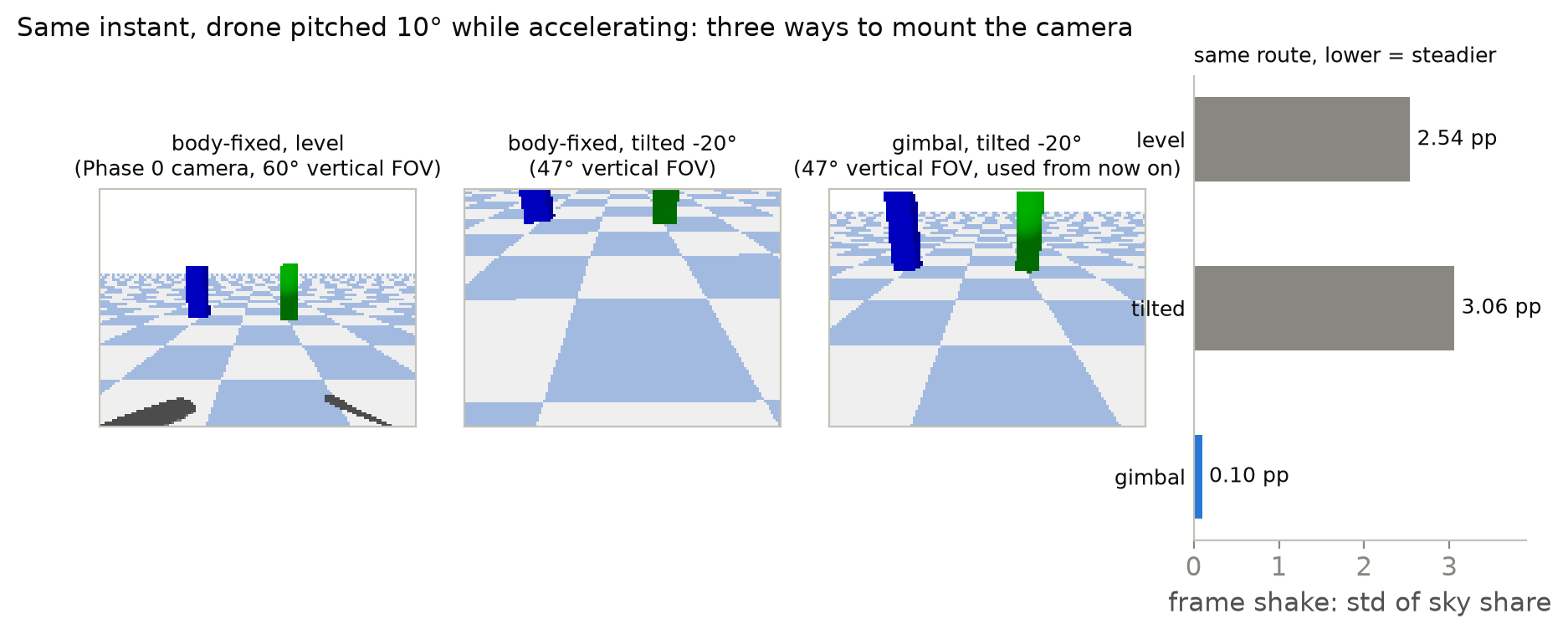
Tilting 20° down also moves the pixels from sky to floor and targets, which fixes Part 1’s “half the frame is sky” finding. The targets became 1.2 m pillars so they stay in view all the way to the stopping point. At the start, each target fills 1.5–4.5% of the frame; at the stopping point, the named one fills 36–43%.
3. Position noise, chosen against the expert
A real drone doesn’t know exactly where it is. Its position estimate drifts slowly. I added a noise process to the position the controller sees. The camera still renders from the true position, because it is physically on the drone. The size, 3 cm horizontally and 1 cm vertically, is a choice. It keeps the Mavic’s 3:1 ratio, scaled down to fit a small room.
The timing of the noise took more work. My first version was jumpy, and the scripted expert (a controller that knows the true positions) began to fail: it couldn’t hold still after stopping, because the controller chased the jumping estimate as if it were real motion.
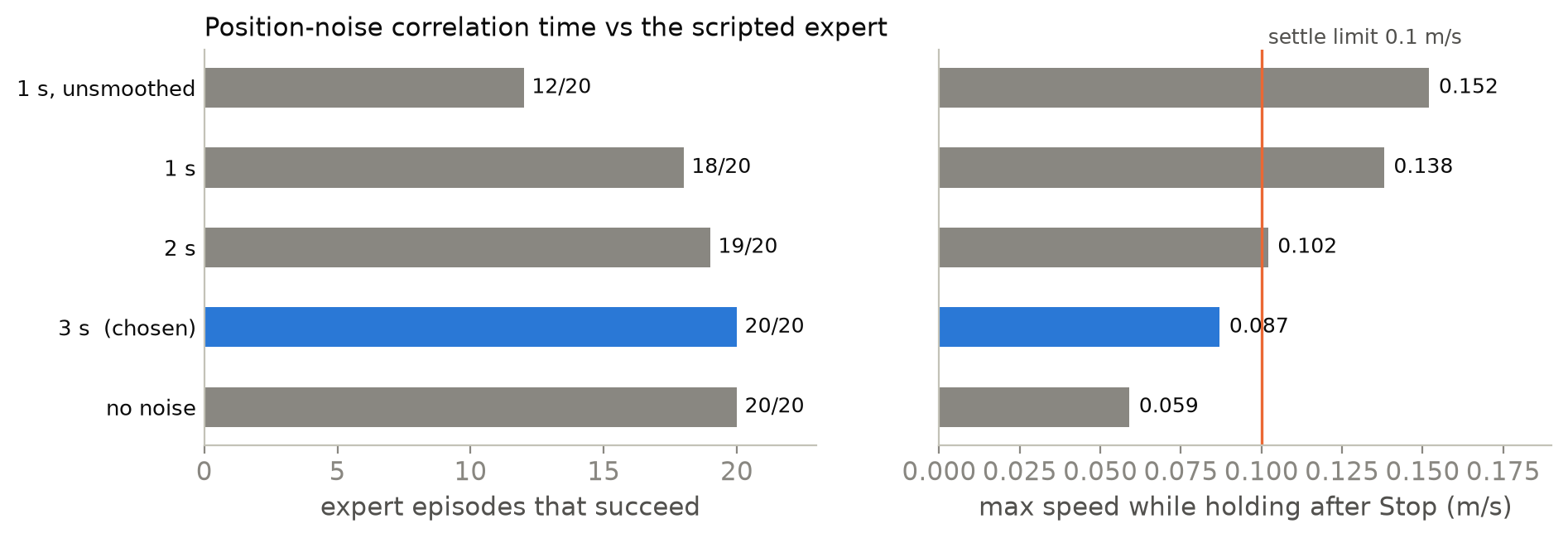
This choice was tuned on one set of seeds, so those 20/20 don’t count as evidence. On 40 held-out episodes that I never looked at while choosing, the expert succeeded in all 40.
Wind and a tilt limit exist as well. The dataset in Part 3 uses noise and the tilt limit but keeps wind off; the details are in the appendix.
4. The contract every policy must satisfy
This is the most important picture in the series. Every policy, from the tiny one in Part 4 to SmolVLA later, has to fit into it.
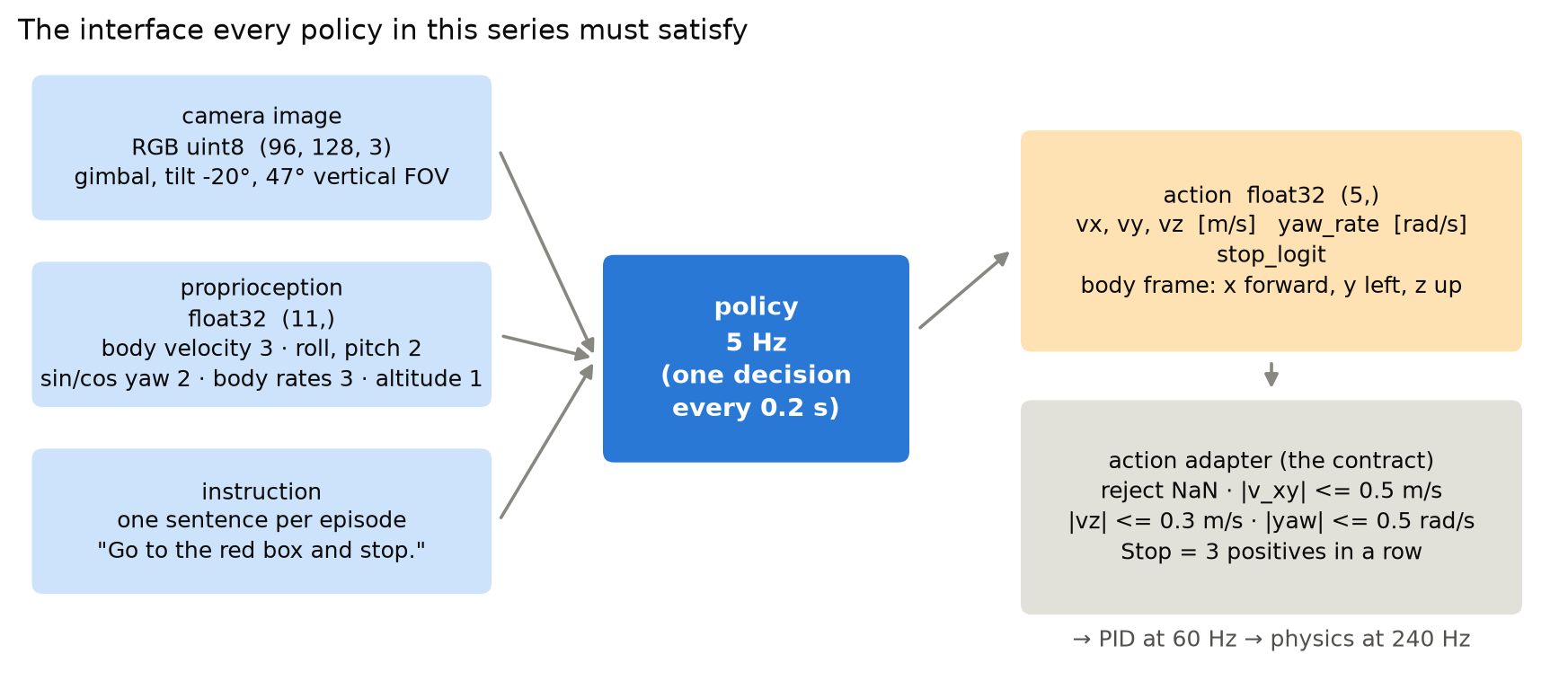
Two details matter:
- The action is a velocity request, not motor speeds. The policy says “go 0.4 m/s forward, 0.1 m/s left”. A PID controller underneath turns that into motor commands 12 times per decision. So the policy only has to learn where to fly.
- One adapter enforces the limits, for everyone. The expert, the learned policies and later the C++ runtime all go through the same function (full code):
def adapt(raw, limits=ActionLimits(), planar=True):
    """Validate and cap one raw policy action. Never raises on bad numbers -- it reports."""
    raw = np.asarray(raw, dtype=np.float64).reshape(-1)
    if raw.shape != (5,):
        return AdaptedAction(..., rejected=f"wrong shape {raw.shape}, expected (5,)")
    if not np.all(np.isfinite(raw)):
        return AdaptedAction(..., rejected="non-finite value in action")

    vx, vy, vz, yaw_rate, stop_logit = raw
    speed = math.hypot(vx, vy)
    if speed > limits.horizontal_mps:            # 0.5 m/s, capped as a vector, not per axis
        vx, vy = vx * limits.horizontal_mps / speed, vy * limits.horizontal_mps / speed
    ...                                          # same for vz (0.3 m/s) and yaw rate (0.5 rad/s)
    return AdaptedAction(applied=np.array([vx, vy, vz, yaw_rate]),
                         stop_positive=bool(stop_logit > 0.0), flags=flags)
The adapter records which limit engaged in flags, so “the policy asked for too much” is always visible in the logs instead of silently corrected.
5. The task, and how a flight is scored
The scene. An 8 x 8 x 3 m room. The drone starts on one side at 1 m altitude. Two pillars with different colours stand on the other side. Each has a hover point 0.75 m in front of it, where the drone should stop.
One episode. The drone gets one sentence, such as “Go to the red box and stop.”, and flies. To stop, the policy must signal Stop three decisions in a row (0.6 s). The drone then holds position for one second while the evaluator watches.
Success means all of these, judged on the true simulator state:
- within 0.4 m of the named hover point,
- slower than 0.1 m/s for the whole second after Stop,
- no collision, and within 30 s.
Everything else is a named failure, because “failed” alone teaches nothing:
| outcome | meaning |
|---|---|
wrong_target | stopped at the other pillar’s hover point |
stop_elsewhere | stopped, but at neither hover point |
stop_not_settled | stopped in the right place but kept drifting |
collision / out_of_bounds | hit something / left the room |
timeout | still flying after 30 s |
invalid_action | output NaN or the wrong shape |
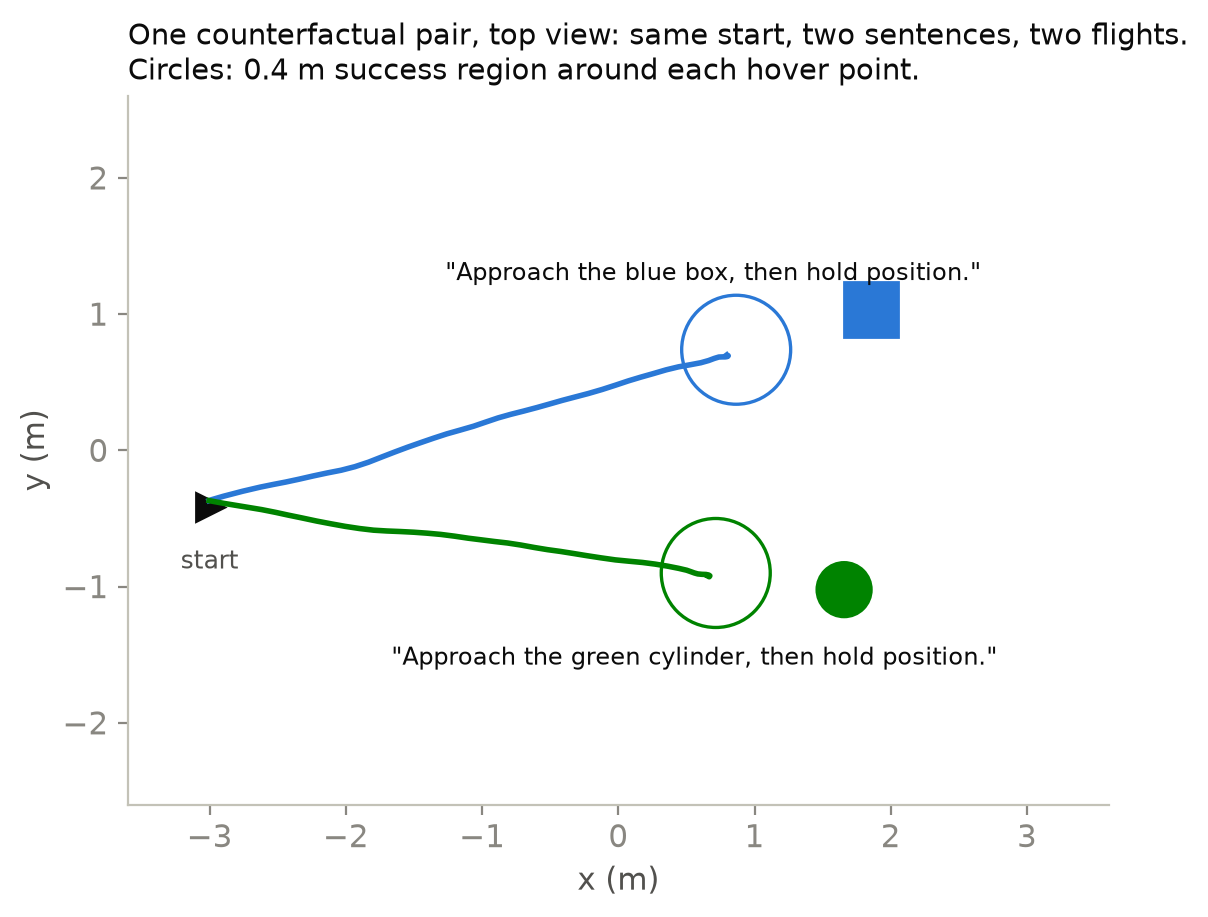
Pair success is the metric the series is built around. Each layout is flown twice from the identical start, once per sentence. A pair counts only if both flights succeed. A policy that ignores the words and always picks one pillar can still score 50% on single episodes, but its pair success is zero.
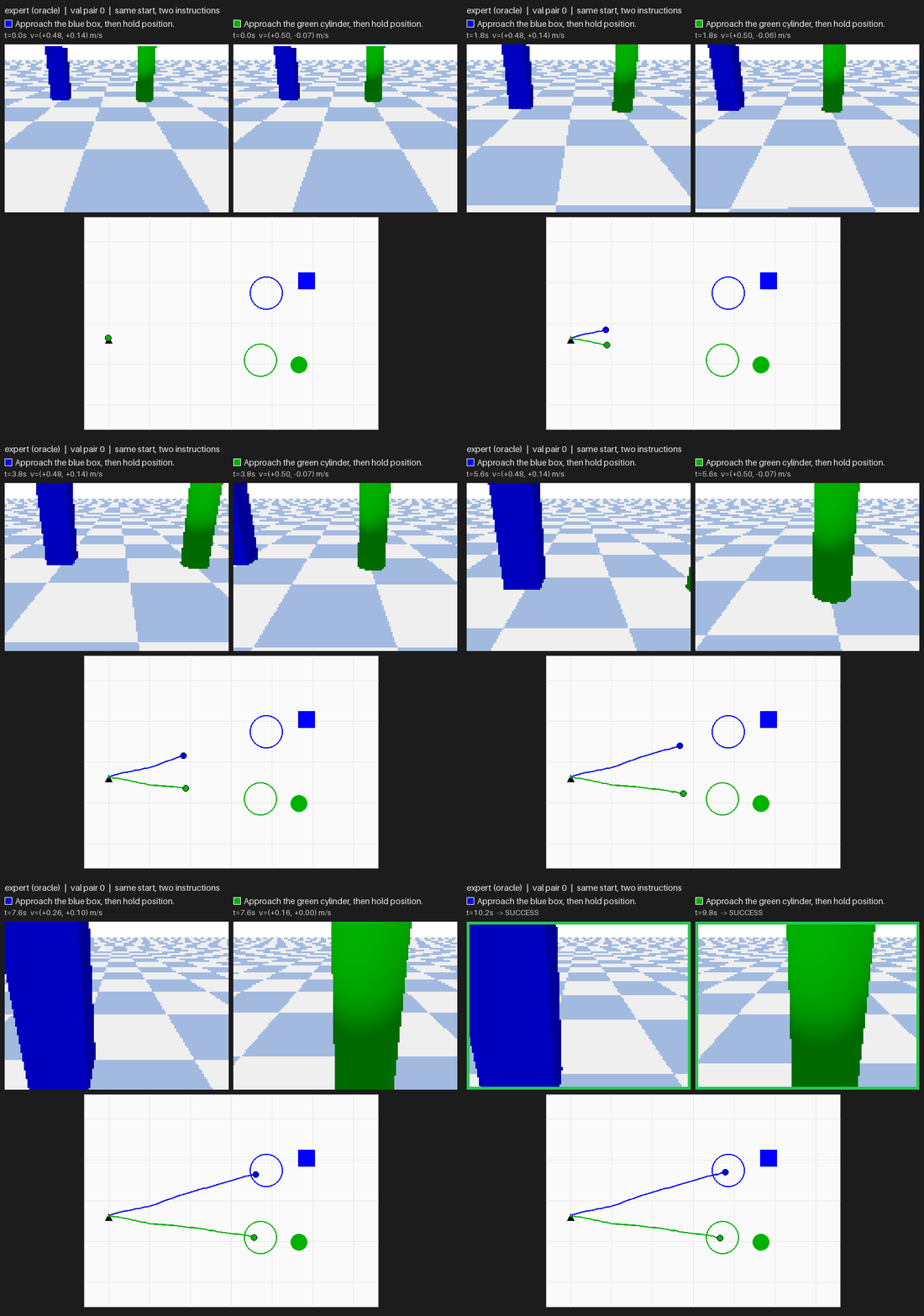
Testing the scorer itself. An evaluator with a bug produces believable wrong numbers. So each outcome has a test that causes it on purpose: fly to the wrong pillar, ram a target, signal Stop while still moving, and so on. The evaluator must name every one correctly. The same test suite (79 tests at the commit below) also covers the action contract, the environment API and pair determinism: both flights of a pair get byte-identical first images.
What this part does not show
- This is not a Mavic. It is a 27 g quadrotor with a Mavic-like camera and noise profile.
- The 3 cm noise size is a choice, not a measurement. The 72° field of view assumes DJI quotes it diagonally, their usual convention.
- Everything is simulation.
Next
The task and scorer are fixed. Part 3 builds the dataset: 120 pairs of flights where the same image comes with two different sentences.
Appendix
A. The tilt limit and the wind model
Tilt limit. The Mavic's maximum pitch is 35°, so the controller's requested tilt is capped at 35°. When flying a route three times faster than the task's speed cap, the drone still reached 39.7°, because the attitude loop overshoots its command by about 5°. The cap limits the request, not the result. At the task's own speeds it never engages.
Wind. The library's drag model uses velocity relative to the ground; mine uses velocity relative to the air, which is what wind changes. With zero wind it reproduces the library's trajectories bit for bit. The drag is linear in airspeed, so strong wind is optimistic here. Results above about 2 m/s understate how hard it would be. The dataset keeps wind off for now.
B. Reproduce
Commit 49a7f1a, set up as in Part 1.
python -m pytest tests -q                    # includes one fixture per outcome
python scripts/try_env.py --headless         # same start, two instructions, two outcomes
python scripts/playground.py --headless      # camera mount, noise, wind: change and re-run
python scripts/figures/blog02_04.py          # every figure in parts 2-4
References: what I took from each
- DJI Mavic 4 Pro specs give the camera, gimbal, tilt and hover-accuracy numbers. → I copied only the items whose meaning doesn’t depend on size.
- Bitcraze Crazyflie 2.1 is the real airframe behind the simulated one. → Its mass and motor model are why the absolute speeds stay small.
- Gymnasium: create a custom environment defines
reset/step, terminated vs truncated. → A timeout is a truncation, not a failure state, which is whytimeoutis scored separately.
Summary (STAR)
SSituation
Part 1 ended with a fast simulator of a 27 g Crazyflie, while the reference drone, a DJI Mavic 4 Pro, weighs about 1 kg: a 40x difference in mass. The camera was bolted to the body, and half of every frame was sky.
TTask
Before training any model, fix three things: which parts of the real drone the simulation copies, what a policy sees and outputs, and how a flight is scored. If any of them moved later, every result would move with it.
AAction
I sorted the spec sheet into three bins and copied only the scale-free items: a 3-axis gimbal tilted 20° down with a 72° field of view, and a 35° tilt limit. Position noise of 3 cm / 1 cm got a 3 s correlation time, the setting at which the scripted expert still held every Stop. Every policy now goes through one contract (image (96,128,3) + state (11,) + one sentence → action (5,)) and one action adapter, and the evaluator has a test that causes each of its 8 outcomes on purpose.
RResult
The gimbal image is 25x steadier than the Phase 0 camera, and the expert succeeded in 40 of 40 held-out episodes with the chosen noise. Pair success counts a layout only if both sentences succeed, so a policy that ignores the words can score 50% on single episodes and still get zero pairs. The suite has 79 tests at commit 49a7f1a.
1편은 빠른 시뮬레이터로 끝났습니다. 그런데 빠른 것과 믿을 만한 것은 다릅니다. 믿을 만한 것과 검증할 수 있는 것도 다릅니다. 그래서 무엇이든 학습하기 전에 세 가지를 먼저 고정하고 싶었습니다. 시뮬레이션이 실제 드론의 어떤 부분을 따라 하는지, 정책이 정확히 무엇을 보고 무엇을 내보내는지, 비행을 어떻게 채점하는지입니다. 이 셋이 나중에 바뀌면 모든 결과가 함께 바뀝니다.
1. 크기로 걸러 낸 스펙 시트
실제 소비자용 드론인 DJI Mavic 4 Pro의 스펙 시트를 놓고 항목을 하나씩 살폈습니다. 시뮬레이션 기체는 Bitcraze Crazyflie 2.x입니다. gym-pybullet-drones에 들어 있는 물리 파라미터(질량, 관성, 추력, 항력)가 이 실제 제품에서 왔습니다.
| Mavic 4 Pro (스펙) | Crazyflie 2.x (시뮬레이션) | |
|---|---|---|
| 이륙 중량 | 약 1,063 g | 27 g |
| 비행 장소 | 실외, km 단위 거리 | 실내, 여기서는 8 m 방 |
| 최고 수평 속도 | 15–25 m/s | 이 과제에서는 0.5 m/s로 제한 |
질량이 40배 차이 나면 “25 m/s” 같은 절댓값은 옮겨 올 수 없습니다. 그래서 스펙 항목을 세 범주로 나눴습니다.
| 범주 | 예시 | 처리 |
|---|---|---|
| 크기와 무관: 그대로 복사 | 카메라 화각, 3축 짐벌, 최대 기울기 35°, 전방 카메라 | 복사함 |
| 실제로 있지만 크기를 줄여야 함 | 호버링 정확도 ±0.1 m / ±0.3 m, 내풍성 | 더 작은 크기로 모델링 |
| 이 노트북으로는 불가능 | 1 kg 기체 동역학, 100 MP 실사 카메라, 배터리, 무선 링크 | 기록만 하고 시도하지 않음 |
2. 카메라: 아래로 기울인 짐벌
1편에서는 카메라가 기체에 고정된 채 정면만 봤습니다. 여기에는 문제가 두 가지 있었습니다. 매 프레임의 절반이 하늘이었습니다. 또 드론이 가속하려고 앞으로 숙이면 화면 전체가 같이 기울었습니다. Mavic은 카메라를 3축 짐벌에 달아 화면을 수평으로 유지합니다. 시뮬레이션 카메라도 이제 같은 방식으로 움직입니다. 아래로 20° 기울어져 있고 화각은 Mavic과 같은 72°(대각선)입니다.
아래로 20° 기울이면 픽셀도 하늘 대신 바닥과 목표물에 쓰입니다. 1편에서 확인한 “프레임 절반이 하늘” 문제가 이것으로 풀립니다. 목표물은 정지 지점까지 계속 화면에 들어오도록 1.2 m 기둥으로 바꿨습니다. 출발 시점에 목표물 하나가 차지하는 면적은 프레임의 1.5–4.5%입니다. 정지 지점에 이르면 지시한 목표물이 36–43%를 채웁니다.
3. 전문가를 기준으로 고른 위치 노이즈
실제 드론은 자기 위치를 정확히 모릅니다. 위치 추정값이 천천히 표류합니다. 그래서 컨트롤러가 보는 위치에 노이즈 과정을 더했습니다. 카메라는 물리적으로 드론에 붙어 있으니 렌더링은 계속 실제 위치에서 합니다. 수평 3 cm, 수직 1 cm라는 크기는 제가 고른 값입니다. Mavic의 3:1 비율을 지키면서 작은 방에 맞게 줄였습니다.
노이즈의 시간 특성을 맞추는 데는 품이 더 들었습니다. 처음 만든 버전은 값이 튀었고 스크립트 전문가(실제 위치를 아는 컨트롤러)가 실패하기 시작했습니다. 컨트롤러가 튀는 추정값을 실제 움직임으로 여기고 쫓아가는 바람에 멈춘 뒤에도 제자리를 지키지 못했습니다.
이 설정은 시드 한 묶음으로 튜닝했기 때문에 그 20/20은 증거로 치지 않습니다. 고르는 동안 한 번도 보지 않은 별도 에피소드 40개(held-out)에서 전문가는 40개 모두 성공했습니다.
바람과 기울기 제한도 있습니다. 3편의 데이터셋은 노이즈와 기울기 제한을 쓰고 바람은 끕니다. 자세한 내용은 부록에 적었습니다.
4. 모든 정책이 지켜야 할 계약
이 연재에서 가장 중요한 그림입니다. 4편의 아주 작은 정책부터 나중에 다룰 SmolVLA까지 모든 정책이 이 틀에 맞아야 합니다.
여기서 짚어 둘 점이 두 가지입니다.
- 행동은 모터 속도가 아니라 속도 요청입니다. 정책은 “앞으로 0.4 m/s, 왼쪽으로 0.1 m/s”처럼 말합니다. 그 아래의 PID 컨트롤러가 결정 한 번마다 이 요청을 모터 명령 12번으로 바꿉니다. 그래서 정책은 어디로 날지만 배우면 됩니다.
- 한계는 어댑터 하나가 모두에게 똑같이 적용합니다. 전문가, 학습된 정책, 나중의 C++ 런타임이 모두 같은 함수를 거칩니다 (전체 코드).
def adapt(raw, limits=ActionLimits(), planar=True):
    """Validate and cap one raw policy action. Never raises on bad numbers -- it reports."""
    raw = np.asarray(raw, dtype=np.float64).reshape(-1)
    if raw.shape != (5,):
        return AdaptedAction(..., rejected=f"wrong shape {raw.shape}, expected (5,)")
    if not np.all(np.isfinite(raw)):
        return AdaptedAction(..., rejected="non-finite value in action")

    vx, vy, vz, yaw_rate, stop_logit = raw
    speed = math.hypot(vx, vy)
    if speed > limits.horizontal_mps:            # 0.5 m/s, capped as a vector, not per axis
        vx, vy = vx * limits.horizontal_mps / speed, vy * limits.horizontal_mps / speed
    ...                                          # same for vz (0.3 m/s) and yaw rate (0.5 rad/s)
    return AdaptedAction(applied=np.array([vx, vy, vz, yaw_rate]),
                         stop_positive=bool(stop_logit > 0.0), flags=flags)
어댑터는 어떤 한계가 걸렸는지 flags에 남깁니다. 따라서 정책이 제한값을 넘는 행동을 요청하면 어댑터가 이를 보정한 사실이 항상 로그에 남습니다.
5. 과제와 비행 채점 방법
장면. 8 x 8 x 3 m 크기의 방입니다. 드론은 한쪽에서 고도 1 m로 출발합니다. 반대편에는 색이 다른 기둥 두 개가 서 있습니다. 기둥마다 앞쪽 0.75 m 지점에 호버 지점이 있고 드론은 거기서 멈춰야 합니다.
에피소드 한 번. 드론은 “Go to the red box and stop.” 같은 문장 하나를 받고 날아갑니다. 멈추려면 정책이 결정 세 번 연속(0.6 s)으로 Stop 신호를 내야 합니다. 그 뒤 드론은 1초 동안 제자리를 지키고 평가기가 이 과정을 지켜봅니다.
성공하려면 아래 조건을 모두 만족해야 합니다. 판정은 시뮬레이터의 실제 상태로 합니다.
- 지시한 호버 지점에서 0.4 m 이내
- Stop 이후 1초 내내 0.1 m/s 미만
- 충돌 없이 30 s 안에 완료
그 밖의 경우는 모두 이름을 붙인 실패로 기록합니다. 그냥 “실패”라고만 적으면 거기서 배울 것이 없습니다.
| 결과 | 의미 |
|---|---|
wrong_target | 다른 기둥의 호버 지점에 멈춤 |
stop_elsewhere | 멈췄지만 어느 호버 지점도 아님 |
stop_not_settled | 맞는 위치에 멈췄지만 계속 표류함 |
collision / out_of_bounds | 무언가에 부딪힘 / 방을 벗어남 |
timeout | 30 s가 지나도 계속 비행 중 |
invalid_action | NaN 또는 잘못된 형태를 출력함 |
쌍 성공(pair success)은 이 연재 전체가 기대는 지표입니다. 레이아웃마다 똑같은 출발 상태에서 문장 하나당 한 번씩, 모두 두 번 비행합니다. 두 비행이 모두 성공해야 그 쌍을 성공으로 칩니다. 말을 무시하고 늘 한쪽 기둥만 고르는 정책은 단일 에피소드로는 50%를 받을 수 있어도 쌍 성공은 0입니다.
채점기 자체 검증. 버그가 있는 평가기는 그럴듯한 틀린 숫자를 내놓습니다. 그래서 결과마다 그 결과를 일부러 일으키는 테스트를 두었습니다. 엉뚱한 기둥으로 날아가기, 목표물에 들이받기, 아직 움직이는 중에 Stop 보내기 같은 식입니다. 평가기는 이 모두를 정확한 이름으로 판정해야 합니다. 같은 테스트 모음(아래 커밋 기준 79개)은 행동 계약과 환경 API, 쌍의 결정성도 검사합니다. 한 쌍의 두 비행은 바이트 단위로 똑같은 첫 이미지를 받아야 합니다.
이 글에서 보여 주지 않는 것
- 이것은 Mavic이 아닙니다. 카메라와 노이즈 특성을 Mavic과 비슷하게 맞춘 27 g 쿼드로터입니다.
- 노이즈 크기 3 cm는 제가 정한 값이며 측정하지 않았습니다. 72° 화각은 DJI의 일반적인 표기 관례에 따라 대각선 기준이라고 가정한 값입니다.
- 모든 내용은 시뮬레이션입니다.
다음 글
과제와 채점기를 고정했습니다. 3편에서는 데이터셋을 만듭니다. 같은 이미지에 서로 다른 두 문장이 붙은 비행 120쌍입니다.
부록
A. 기울기 제한과 바람 모델
기울기 제한. Mavic의 최대 피치가 35°이므로 컨트롤러가 요청하는 기울기를 35°로 제한했습니다. 과제의 속도 제한보다 세 배 빠르게 경로를 날게 하자 드론은 그래도 39.7°까지 기울었습니다. 자세 루프가 명령보다 약 5° 오버슈트하기 때문입니다. 이 제한은 결과가 아닌 요청을 묶습니다. 과제 본래의 속도에서는 제한이 걸리는 일이 없습니다.
바람. 라이브러리의 항력 모델은 지면 기준 속도를 씁니다. 제 모델은 바람이 실제로 바꾸는 값인 공기 기준 속도를 씁니다. 바람이 0이면 라이브러리의 궤적을 비트 단위까지 그대로 재현합니다. 항력이 대기속도에 선형이라서 강한 바람에서는 결과가 낙관적입니다. 약 2 m/s를 넘는 바람의 결과는 실제 난이도를 낮춰 보여 줍니다. 데이터셋은 당분간 바람을 끈 상태로 둡니다.
B. 재현 방법
커밋 49a7f1a 기준이며 환경 설정은 1편과 같습니다.
python -m pytest tests -q                    # includes one fixture per outcome
python scripts/try_env.py --headless         # same start, two instructions, two outcomes
python scripts/playground.py --headless      # camera mount, noise, wind: change and re-run
python scripts/figures/blog02_04.py          # every figure in parts 2-4
참고 자료: 각각에서 가져온 것
- DJI Mavic 4 Pro 스펙에서 카메라, 짐벌, 기울기, 호버링 정확도 수치를 얻었습니다. → 그중 크기가 달라져도 의미가 그대로인 항목만 가져왔습니다.
- Bitcraze Crazyflie 2.1은 시뮬레이션 기체의 바탕이 된 실제 기체입니다. → 이 기체의 질량과 모터 모델 때문에 절대 속도를 작게 잡습니다.
- Gymnasium: create a custom environment는
reset/step과 terminated/truncated 구분을 정의합니다. → 타임아웃은 실패 상태가 아닌 truncation이므로timeout을 따로 채점합니다.
요약 (STAR)
S상황
1편은 27 g Crazyflie를 다루는 빠른 시뮬레이터로 끝났습니다. 기준으로 삼은 DJI Mavic 4 Pro는 약 1 kg이라 질량이 40배 차이 납니다. 카메라는 기체에 고정되어 있었고 매 프레임의 절반이 하늘이었습니다.
T과제
모델을 학습하기 전에 세 가지를 고정해야 했습니다. 시뮬레이션이 실제 드론의 어떤 부분을 따라 하는지, 정책이 무엇을 보고 내보내는지, 비행을 어떻게 채점하는지입니다. 이 중 하나라도 나중에 바뀌면 모든 결과가 함께 바뀝니다.
A행동
스펙 시트를 세 범주로 나누고 크기와 무관한 항목만 가져왔습니다. 아래로 20° 기울인 3축 짐벌과 72° 화각, 35° 기울기 제한이 여기에 해당합니다. 3 cm / 1 cm 위치 노이즈의 상관 시간은 스크립트 전문가가 모든 Stop을 유지한 3 s로 정했습니다. 모든 정책은 같은 계약(이미지 (96,128,3) + 상태 (11,) + 문장 1개 → 행동 (5,))과 같은 액션 어댑터를 거칩니다. 평가기에는 결과 8종을 하나씩 일부러 일으키는 테스트를 두었습니다.
R결과
짐벌 화면은 Phase 0 카메라보다 25배 안정적입니다. 고른 노이즈 설정에서 전문가는 held-out 에피소드 40개를 모두 성공했습니다. 쌍 성공은 두 문장이 모두 성공한 레이아웃만 인정합니다. 그래서 말을 무시하고 늘 같은 기둥을 고르는 정책은 단일 에피소드에서 50%를 받을 수 있지만 쌍 성공은 0입니다. 테스트는 커밋 49a7f1a 기준 79개입니다.