
Part 3 · Same scene, different words: a counterfactual dataset3편 · 같은 장면, 다른 말: counterfactual 데이터셋 만들기第 3 篇 · 同一场景,不同指令:反事实数据集
Published:
Series Building and Evaluating a Drone VLA from Scratch드론 VLA를 처음부터 만들고 평가하기从零构建并评估无人机 VLA Season 1 · Part 3 of 13
One question runs through it: if you change only the words, does the drone fly somewhere else? CPU-first, in simulation. Seasons 1–3 use a small language-conditioned policy trained from scratch; the pretrained VLA (SmolVLA) arrives in Season 4.관통하는 질문은 하나입니다: 말만 바꾸면 드론이 다른 곳으로 날아갈까? CPU 우선, 시뮬레이션에서 진행합니다. 시즌 1–3은 처음부터 학습한 작은 language-conditioned 정책을, 시즌 4에서 사전학습 VLA(SmolVLA)를 다룹니다.贯穿全系列的问题只有一个:只改变指令文字,无人机会飞向别处吗?以 CPU 为先,在仿真中进行。第 1–3 季使用从零训练的小型 language-conditioned 策略,第 4 季引入预训练 VLA(SmolVLA)。 Code
Season 1 · Make the question testable
- Fast frames, missing targets: a drone simulator on a laptop CPU
- From a real drone's spec sheet to a testable task
- Same scene, different words: a counterfactual dataset
- The policy that did not listen
Season 2 · Find out what the result means
- Borrowing from VLAs: action tokens and action chunks
- Separating perception from choice: a world model and a planner
Season 3 · Change the system, keep the behaviour
- One evaluation contract for Python and C++ (coming)
- What changes when the policy runs in ONNX and INT8? (coming)
- A C++ inference runner, measured end to end (coming)
- Turning evaluation into a release gate (coming)
Season 4 · Change the model, close the data loop
- Adapting SmolVLA to a drone (coming)
- Which failures should become the next dataset? (coming)
- Taking the evaluation contract into ROS 2 and PX4 (coming)
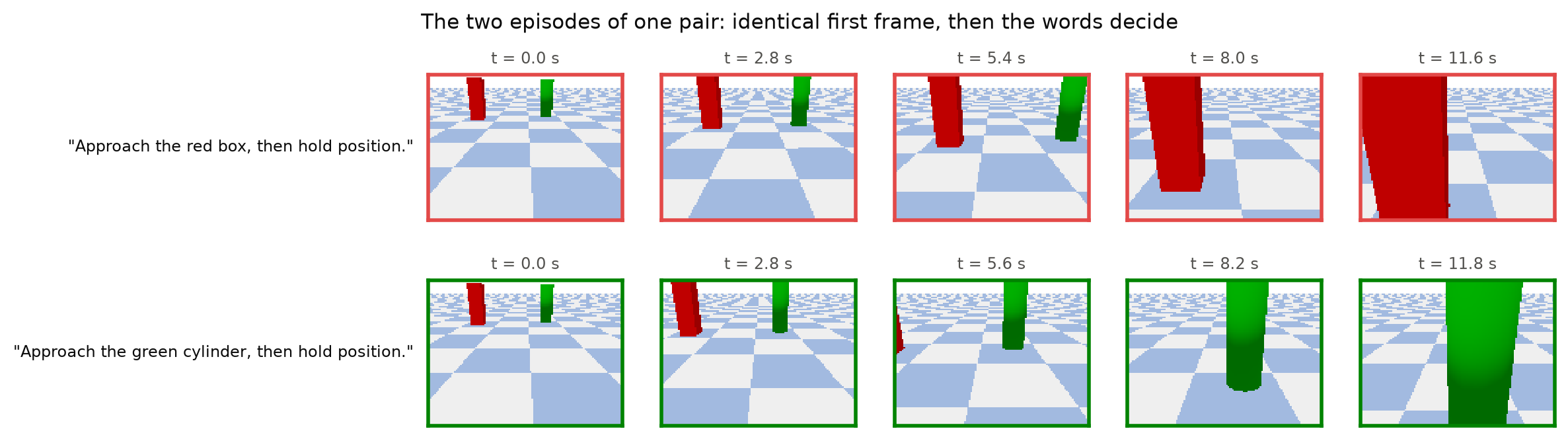
- Every example comes in a pair: the same start and the same first image, flown twice by the scripted expert, once per sentence. So the image alone can never tell which target is meant.
- Dataset v0.2: 240 episodes, 12,198 frames, 19 MB, generated in 9 minutes on the laptop CPU. 100 training pairs; 10 validation and 10 test pairs held out by layout.
- A validator re-reads every file and runs 14 checks. Two bugs were caught only by looking at the output: a visibility check rendered from inside the drone, and a teacher flagged as speeding 37% of the time.
- 모든 예제는 쌍으로 옵니다. 같은 출발점, 같은 첫 이미지에서 스크립트 전문가가 문장마다 한 번씩 두 번 비행합니다. 그래서 이미지만으로는 어느 타깃인지 절대 알 수 없습니다.
- 데이터셋 v0.2: 240 에피소드, 12,198 프레임, 19 MB, 노트북 CPU로 9분 만에 생성. 학습 100쌍, 검증 10쌍, 테스트 10쌍을 레이아웃 단위로 분리했습니다.
- validator가 모든 파일을 다시 읽어 14개 검사를 돌립니다. 버그 두 개는 출력을 직접 봐야만 잡혔습니다: 드론 안쪽에서 렌더링하던 가시성 검사, 그리고 액션의 37%가 속도 초과로 잘못 표시된 전문가.
- 每个样本都是一对:相同起点、相同首帧,由脚本专家飞两次,每句指令一次。因此仅凭图像永远无法判断目标是哪一个。
- 数据集 v0.2:240 个回合、12,198 帧、19 MB,在笔记本 CPU 上 9 分钟生成。100 对训练,10 对验证、10 对测试按布局划分。
- 验证器回读所有文件并运行 14 项检查。有两个 bug 只有亲眼看输出才发现:在无人机内部渲染的可见性检查,以及被标记为 37% 时间超速的专家。
正文为英文,图表与代码与语言无关。
Part 2 fixed the task and the scorer. Now the policy needs examples to learn from. The question of this series sets one hard requirement on the data: listening has to be necessary. If one image could only ever lead to one target, a policy could ignore the words and still match every label. So every example in this dataset comes as a pair.
1. How one pair is made
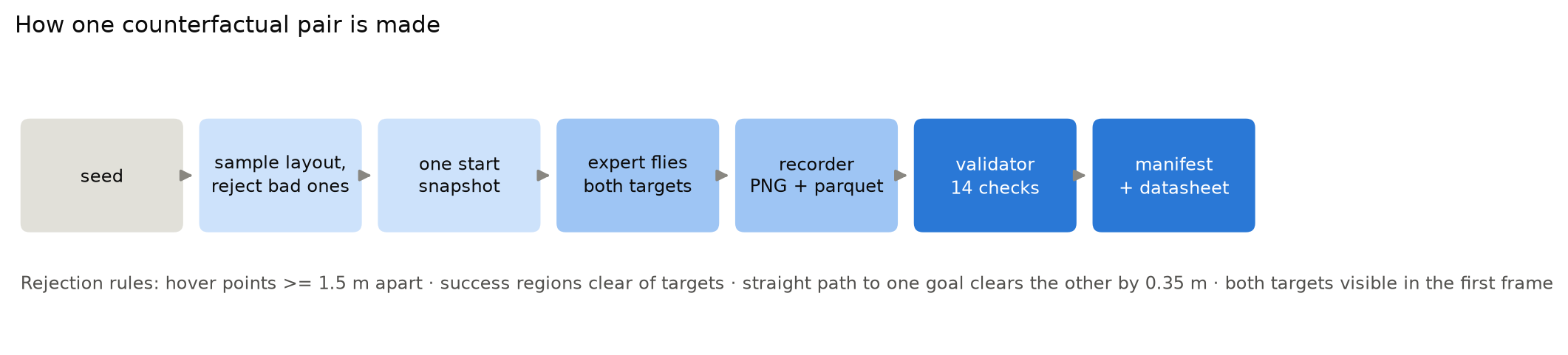
- A seed picks a layout: two pillars of different colours, box or cylinder, somewhere in front of the drone. Layouts that would make a bad test are thrown away and resampled. Examples: hover points closer than 1.5 m, or a straight path to one pillar that brushes the other.
- One start snapshot is shared by both flights. Everything random (the layout, the position-noise stream) comes from the seed, never from which target is named. That’s why the two first frames are byte-identical.
- The scripted expert flies both targets through the same action adapter, controller and physics a policy would use. It is an oracle: it reads true positions, which a policy never gets. That’s fine for a teacher, as long as the dataset says so (it does).
- The recorder writes every 0.2 s: the PNG image, the 11-number state, the action actually applied, the Stop label, and, in separate
priv_*columns that policies never read, the true position for later analysis.
The sentences come from two human-written templates, with no language model involved: “Go to the {colour} {shape} and stop.” and “Approach the {colour} {shape}, then hold position.” Both flights of a pair use the same template, so the only difference between them is the colour and shape words.
2. What is in v0.2
| episodes | 240 (120 pairs), every one flown successfully by the expert |
| frames | 12,198 PNG images, 19.05 MB, about 1.6 KB each |
| episode length | median 51 frames (10.8 simulated seconds), range 38–65 |
| generation time | 553 s on the laptop CPU |

Splits are by layout, not by frame. If frames from one flight landed in both training and validation, a model could memorise the scene and look good for the wrong reason. Here, both flights of a pair and every frame of a flight stay in one split, and no layout appears twice. The validation and test seeds are the same as in the first, smaller version of the dataset, so results stay comparable across versions. One caveat: those test seeds were looked at during an earlier, discarded round of experiments, so final test numbers will come from a fresh test split.
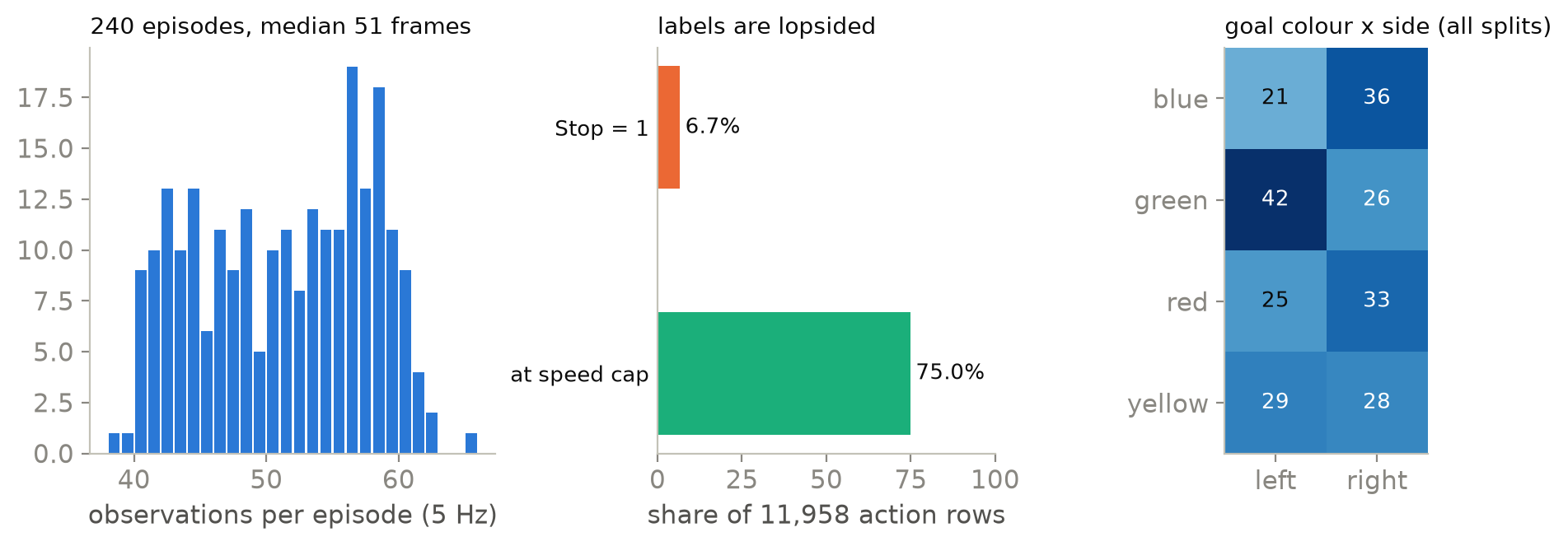
Two label properties shape everything in Part 4:
- Stop is rare. Only 6.7% of action rows say “stop”. The training loss weights those rows up, with the weight computed from training data only.
- Most of the time the expert flies at full speed. 75% of commands are at the 0.5 m/s cap. The interesting part of each label is its direction, and at the very start that direction depends only on the sentence.
The colour-by-side table is reported, not enforced: green goals were on the left 42 times and on the right 26. The splits are small, so a balanced design would have to come from the generator, not from filtering afterwards.
3. Proving the files are what they claim
A dataset that changes silently invalidates every result built on it. So the recorder writes a manifest: the code commit, the simulator commit, the full task configuration and its hash, the camera parameters, a SHA-256 for every non-image file, and one hash over all 12,198 images. Re-running the command on the same machine reproduces the images byte for byte.
Then a validator reads everything back from disk and runs 14 checks: files present and hashes matching, images decoding to 96 x 128 x 3, every pair complete and identical at the start, splits disjoint, every sentence naming its goal, actions aligned with observations. Here is the pair check, slightly simplified (full code):
for pid, eps in by_pair.items():
    a, b = sorted(eps, key=lambda e: e["goal_index"])           # goal 0 and goal 1
    for key in ("split", "layout_id", "snapshot_seed", "first_rgb_sha256", "instruction_family"):
        if a[key] != b[key]:
            pair_problems.append((pid, f"{key} differs"))       # same start, same first image
    if a["instruction"] == b["instruction"]:
        pair_problems.append((pid, "same instruction for both goals"))
    if load_steps(root, a["episode_id"])[0]["proprio"] != load_steps(root, b["episode_id"])[0]["proprio"]:
        pair_problems.append((pid, "first proprio differs"))    # same state, too
check("pairs_complete_and_identical_at_start", not pair_problems, ...)
4. Two bugs that only reading the output caught
Both happened while I was building the first version of the generator. Each is now covered by a test.
A good layout was rejected: the visibility check rendered from inside the drone. One candidate layout was thrown away because “a target covers 0 pixels at the start”. The real first frame showed it clearly, at 346 pixels. Hypothesis: the check and the recording render from different places. Confirmation: the check rendered from the nominal start position. Position noise leaves the hovering drone a few centimetres away from there, so the check’s camera sat inside the real drone’s arm and propeller, which filled the whole view. Fix: render the check from the pose of the actual first observation. The layout is now test pair 5, with both targets clearly visible.
The teacher was “speeding” 37% of the time. The expert commanded exactly 0.5 m/s. Stored as float32, that became 0.5000001 m/s, so the adapter flagged a cap on 37% of the expert’s actions. Numerically harmless, but it would have reported a teacher that never exceeds the limit as clipping more than a third of the time. The expert now commands 0.5 x (1 − 10⁻⁵): zero flags.
What this dataset can’t support
- Two pillars in an empty room, yaw fixed, flat motion. It says nothing about open-vocabulary language or real scenes.
- 10 validation and 10 test layouts are few, so success rates will carry wide intervals.
- The two pillars always differ in colour, so colour alone always decides the target.
Next
Part 4 trains a policy on these 100 pairs, and it does not listen.
Appendix
Reproduce
Commit 49a7f1a, set up as in Part 1. Images and parquet files are not in git; the manifest, datasheet, splits and validation report are.
python -m dronevla.record --out data/v0.2 --pairs 100 10 10 --version 0.2.0    # ~9 min on CPU
python scripts/inspect_episode.py --dataset data/v0.2 --episode val-004-g1      # every frame + action arrow
python scripts/figures/blog02_04.py
References: what I took from each
- Datasheets for Datasets (Gebru et al.) proposes a standard record of a dataset’s purpose, composition and collection. → The recorder writes a datasheet with every v0.2 number in this post computed from the files.
- LeRobotDataset stores episodes as Parquet plus media with metadata. → I kept a simple Parquet + PNG layout now and will convert when SmolVLA needs it.
Summary (STAR)
SSituation
To test whether a drone policy actually listens, I needed training data in which the image alone can never decide the target. Part 2 had already fixed the task and the scorer.
TTask
Build a dataset where every layout is flown twice from the identical start, once per sentence, split by layout rather than by frame. Then prove the files on disk are what they claim to be.
AAction
A seeded generator samples two-pillar layouts, rejects bad ones, and has the scripted expert fly both targets from one shared start snapshot; the sentences come from two human-written templates. The recorder writes a manifest (commits, task-config hash, SHA-256s), and a validator re-reads everything from disk and runs 14 checks.
RResult
Dataset v0.2 has 240 episodes (120 pairs), 12,198 frames and 19.05 MB, generated in 553 s on the laptop CPU and split into 100 / 10 / 10 pairs by layout; on the same machine the images reproduce byte for byte. Reading the output back caught two bugs, a visibility check rendered from inside the drone and an expert flagged as capped on 37% of its actions, and each is now covered by a test.
2편에서 과제와 채점 방식을 정했습니다. 이제 정책이 보고 배울 예제가 필요합니다. 이 연재의 질문을 다루려면 데이터가 꼭 지켜야 할 조건이 하나 있습니다. 정책이 지시문을 들어야만 정답을 맞힐 수 있어야 합니다. 한 이미지에서 갈 수 있는 타깃이 늘 하나뿐이라면 정책은 말을 무시하고도 모든 라벨을 맞힐 수 있습니다. 그래서 이 데이터셋의 예제는 모두 쌍(pair)으로 묶여 있습니다.
1. 쌍 하나를 만드는 과정
- 시드가 레이아웃을 고릅니다. 드론 앞쪽 어딘가에 색이 서로 다른 기둥 두 개를 놓습니다. 모양은 상자 아니면 원기둥입니다. 테스트로 쓰기에 나쁜 레이아웃은 버리고 다시 뽑습니다. 호버 지점끼리 1.5 m보다 가깝거나 한 기둥으로 가는 직선 경로가 다른 기둥을 스치는 경우가 그렇습니다.
- 두 비행은 출발 스냅샷 하나를 같이 씁니다. 무작위 요소(레이아웃, 위치 노이즈 스트림)는 전부 시드에서 나오고 어느 타깃을 지목했는지와는 상관이 없습니다. 그래서 두 비행의 첫 프레임은 바이트 단위까지 같습니다.
- 스크립트 전문가는 정책이 쓰는 것과 똑같은 액션 어댑터, 제어기, 물리 시뮬레이션을 거쳐 두 타깃을 향해 각각 비행합니다. 이 전문가는 오라클(oracle)입니다. 정책은 절대 받지 못하는 실제 위치를 읽습니다. 데이터셋에 그 사실을 적어 두기만 하면 교사로 쓰는 데는 문제가 없습니다(실제로 적어 두었습니다).
- 기록기는 0.2초마다 PNG 이미지, 숫자 11개로 된 상태, 실제로 적용된 액션, Stop 라벨을 저장합니다. 정책이 읽지 않는 별도의
priv_*열에는 나중에 분석할 수 있도록 실제 위치도 남깁니다.
문장은 사람이 직접 쓴 템플릿 두 개로 만들고 언어 모델은 쓰지 않았습니다. 두 템플릿은 “Go to the {colour} {shape} and stop.” 그리고 “Approach the {colour} {shape}, then hold position.” 입니다. 한 쌍의 두 비행은 같은 템플릿을 쓰기 때문에 둘 사이에서 달라지는 것은 색과 모양 단어뿐입니다.
2. v0.2 구성
| 에피소드 | 240개(120쌍), 모두 전문가가 성공적으로 비행 |
| 프레임 | PNG 이미지 12,198장, 19.05 MB, 장당 약 1.6 KB |
| 에피소드 길이 | 중앙값 51프레임(시뮬레이션 시간 10.8초), 범위 38–65 |
| 생성 시간 | 노트북 CPU로 553초 |
분할은 프레임이 아니라 레이아웃 단위입니다. 한 비행의 프레임이 학습과 검증 양쪽에 들어가면 모델이 장면을 외워 엉뚱한 이유로 좋은 점수를 받을 수 있습니다. 여기서는 한 쌍의 두 비행과 한 비행의 모든 프레임이 같은 분할에 들어가며 어떤 레이아웃도 두 번 나오지 않습니다. 검증과 테스트 시드는 더 작았던 첫 번째 버전 데이터셋과 같습니다. 덕분에 버전이 바뀌어도 결과를 비교할 수 있습니다. 단서가 하나 있습니다. 이 테스트 시드는 앞서 버린 실험 라운드에서 이미 들여다본 적이 있어서 최종 테스트 수치는 새 테스트 분할에서 낼 예정입니다.
4편 전체를 좌우하는 라벨 성질이 두 가지 있습니다.
- Stop은 드뭅니다. 액션 행 가운데 “stop”인 행은 6.7%뿐입니다. 학습 손실에서 이 행들에 가중치를 더 주는데 가중치는 학습 데이터로만 계산합니다.
- 전문가는 대부분 최고 속도로 납니다. 명령의 75%가 상한인 0.5 m/s입니다. 라벨에서 볼 만한 부분은 방향입니다. 비행 맨 처음에는 그 방향이 오직 문장으로 정해집니다.
색과 방향 표는 보고만 할 뿐 균형을 강제하지는 않았습니다. 초록 목표는 왼쪽에 42번, 오른쪽에 26번 있었습니다. 분할 크기가 작아서 나중에 걸러 내는 방식으로는 균형을 맞출 수 없고 생성기 단계에서 균형을 설계해야 합니다.
3. 파일 내용이 기록과 같은지 증명하기
데이터셋이 모르는 사이에 바뀌면 그 위에서 낸 결과가 전부 무효가 됩니다. 그래서 기록기는 manifest를 씁니다. 여기에는 코드 커밋, 시뮬레이터 커밋, 전체 과제 설정과 그 해시, 카메라 파라미터, 이미지가 아닌 모든 파일의 SHA-256, 이미지 12,198장 전체에 대한 해시 하나가 들어갑니다. 같은 머신에서 명령을 다시 돌리면 이미지가 바이트 단위까지 똑같이 재현됩니다.
그다음 validator가 모든 것을 디스크에서 다시 읽어 14개 검사를 돌립니다. 파일이 다 있고 해시가 맞는지, 이미지가 96 x 128 x 3으로 디코딩되는지, 모든 쌍이 빠짐없이 갖춰졌고 출발 시점이 똑같은지, 분할끼리 겹치지 않는지, 모든 문장이 자기 목표를 지목하는지, 액션이 관측과 정렬되는지 확인합니다. 아래는 쌍 검사 코드를 조금 단순화한 것입니다 (전체 코드).
for pid, eps in by_pair.items():
    a, b = sorted(eps, key=lambda e: e["goal_index"])           # goal 0 and goal 1
    for key in ("split", "layout_id", "snapshot_seed", "first_rgb_sha256", "instruction_family"):
        if a[key] != b[key]:
            pair_problems.append((pid, f"{key} differs"))       # same start, same first image
    if a["instruction"] == b["instruction"]:
        pair_problems.append((pid, "same instruction for both goals"))
    if load_steps(root, a["episode_id"])[0]["proprio"] != load_steps(root, b["episode_id"])[0]["proprio"]:
        pair_problems.append((pid, "first proprio differs"))    # same state, too
check("pairs_complete_and_identical_at_start", not pair_problems, ...)
4. 출력을 다시 읽고서야 잡힌 버그 두 개
두 버그 모두 생성기 첫 버전을 만들던 중에 나왔습니다. 지금은 각각 테스트로 막아 두었습니다.
가시성 검사가 드론 안쪽에서 렌더링하는 바람에 멀쩡한 레이아웃이 탈락했습니다. 후보 레이아웃 하나가 “출발 시점에 타깃이 차지하는 픽셀이 0개”라는 이유로 버려졌습니다. 그런데 실제 첫 프레임에는 타깃이 346픽셀로 또렷하게 보였습니다. 가설: 검사와 기록이 서로 다른 위치에서 렌더링한다고 봤습니다. 확인: 검사는 명목상의 출발 위치에서 렌더링하고 있었습니다. 위치 노이즈 때문에 호버 중인 드론은 그 위치에서 몇 센티미터 벗어나 있습니다. 그래서 검사용 카메라가 실제 드론의 팔과 프로펠러 안에 들어가 있었고 그 부품이 시야 전체를 가렸습니다. 수정: 첫 관측 당시 드론의 실제 위치와 자세에서 가시성 검사에 쓸 이미지를 렌더링하도록 바꿨습니다. 이 레이아웃은 지금 테스트 쌍 5번이며 두 타깃이 모두 잘 보입니다.
전문가의 액션 중 37%가 속도 초과로 잘못 표시됐습니다. 전문가는 정확히 0.5 m/s를 명령했습니다. 이 값을 float32로 저장하자 0.5000001 m/s가 되었고 어댑터는 전문가 액션의 37%에 상한 플래그를 붙였습니다. 수치상으로는 해가 없습니다. 하지만 그대로 뒀다면 한 번도 제한을 넘지 않는 교사가 3분의 1 넘게 클리핑한다고 보고했을 것입니다. 이제 전문가는 0.5 x (1 − 10⁻⁵)를 명령하고 플래그는 0개입니다.
이 데이터셋으로 할 수 없는 것
- 빈 방에 기둥 두 개, yaw 고정, 평면 운동입니다. 열린 어휘(open-vocabulary) 언어나 실제 장면은 이 데이터로 판단할 수 없습니다.
- 검증 레이아웃 10개와 테스트 레이아웃 10개는 적은 수라서 성공률에 붙는 구간이 넓을 수밖에 없습니다.
- 두 기둥은 항상 색이 달라서 색만 보면 늘 타깃이 정해집니다.
다음 편
4편에서는 이 100쌍으로 정책을 학습합니다. 그리고 그 정책은 말을 듣지 않습니다.
부록
재현하기
사용한 커밋: 49a7f1a. 환경 설정은 1편과 같습니다. 이미지와 parquet 파일은 git에 없습니다. manifest, datasheet, 분할 정보, 검증 보고서는 git에 있습니다.
python -m dronevla.record --out data/v0.2 --pairs 100 10 10 --version 0.2.0    # ~9 min on CPU
python scripts/inspect_episode.py --dataset data/v0.2 --episode val-004-g1      # every frame + action arrow
python scripts/figures/blog02_04.py
참고 문헌과 각각에서 가져온 것
- Datasheets for Datasets (Gebru et al.)는 데이터셋의 목적, 구성, 수집 과정을 기록하는 표준 양식을 제안합니다. → 기록기가 datasheet를 쓰며 이 글에 나온 v0.2 수치는 모두 파일에서 계산해 그 안에 넣었습니다.
- LeRobotDataset은 에피소드를 Parquet와 미디어, 메타데이터로 저장합니다. → 지금은 단순한 Parquet + PNG 구조를 유지하고 SmolVLA에 필요해지면 변환할 계획입니다.
요약 (STAR)
S상황
드론 정책이 지시문을 실제로 듣는지 시험하려면 이미지만으로는 타깃을 정할 수 없는 학습 데이터가 필요했습니다. 과제와 채점 방식은 2편에서 이미 정해 두었습니다.
T과제
모든 레이아웃을 같은 출발점에서 문장마다 한 번씩 두 번 비행하고 프레임이 아닌 레이아웃 단위로 분할한 데이터셋을 만들어야 했습니다. 디스크에 있는 파일이 기록된 내용과 같다는 것도 증명해야 했습니다.
A행동
시드 기반 생성기가 기둥 두 개짜리 레이아웃을 뽑아 불량한 것은 버리고 스크립트 전문가가 출발 스냅샷 하나에서 두 타깃을 향해 각각 비행합니다. 문장은 사람이 쓴 템플릿 두 개로 만들었습니다. 기록기는 커밋, 과제 설정 해시, SHA-256을 담은 manifest를 쓰고 validator는 디스크에서 모든 파일을 다시 읽어 14개 검사를 돌립니다.
R결과
데이터셋 v0.2는 240 에피소드(120쌍), 12,198 프레임, 19.05 MB이며 노트북 CPU로 553초 만에 생성했습니다. 레이아웃 단위로 학습 100쌍, 검증 10쌍, 테스트 10쌍으로 나눴고 같은 머신에서는 이미지가 바이트 단위까지 재현됩니다. 출력을 다시 읽다가 드론 안쪽에서 렌더링하던 가시성 검사와 액션의 37%에 상한 플래그가 붙던 전문가라는 두 버그를 잡았으며 둘 다 지금은 테스트로 막아 두었습니다.